
Ask Weather vs TrafficClaw
Side-by-side comparison to help you choose the right tool.

Ask Weather
Ask Weather delivers clean, ad-free weather updates and instant answers to all your weather questions, anytime.
Last updated: February 28, 2026

TrafficClaw
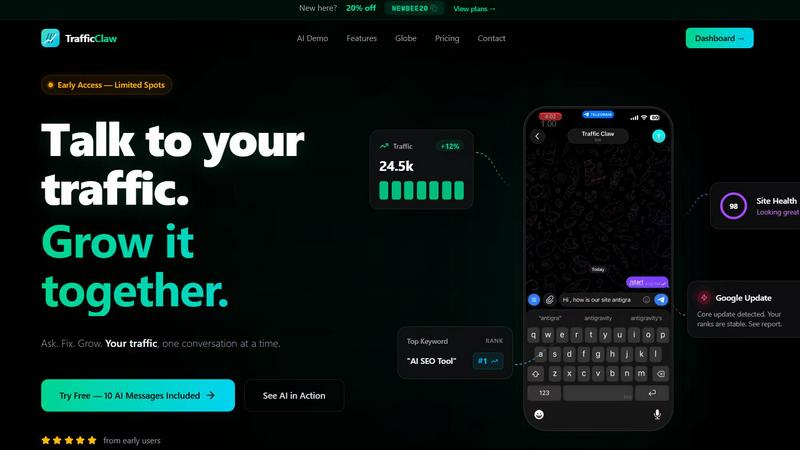
TrafficClaw is your AI analyst that talks to your live SEO data to deliver actionable growth verdicts instantly.
Last updated: April 13, 2026
Visual Comparison
Ask Weather

TrafficClaw
Feature Comparison
Ask Weather
Instant Weather Search
Users can search for weather information effortlessly by entering a location or using their current location for instant updates. The red pin feature allows for a quick check of the weather in real-time, ensuring that users are always informed about their surroundings.
Drive Mode
With Drive Mode activated, users receive live rain radar along their routes. This feature allows for precise location tracking, providing real-time updates on weather conditions that could impact their journey, ensuring safer travel experiences.
Historical Weather Data
Ask Weather gives users access to historical weather data, allowing them to look up past conditions for specific dates. This feature is particularly useful for planning future events or trips based on previous weather patterns.
Hyper-Local Weather Results
The app delivers hyper-local weather results, meaning users can get accurate forecasts for their city, town, specific addresses, or even GPS coordinates. This level of detail enhances the app's utility for users engaging in outdoor activities or travel planning.
TrafficClaw
AI Analyst Chat
This is your core interface for growth. Ask any question about your traffic, rankings, or site performance in natural language. The AI doesn't just summarize data; it analyzes your connected GA4 and Search Console data to diagnose issues, spot trends, and provide specific, actionable verdicts. Get instant answers, supporting charts, and clear next steps, turning complex analytics into a simple conversation.
SEO Intelligence Engine
Go beyond basic rank tracking. This suite proactively monitors your SEO health, alerting you to critical issues like content decay, keyword cannibalization between your own pages, and undiscovered keyword gaps. It also includes an AEO (Answer Engine Optimization) engine, helping you structure content for visibility in AI-powered search experiences from Google's Gemini and others.
Real-Time Analytics & Embeddable Globe
See live visitor activity, traffic sources, and geographic distribution on a beautiful, interactive 3D globe within your dashboard. Uniquely, you can embed this live globe on your own website with a single iframe, showcasing real-time GA4-powered visitor activity without adding any tracking scripts. It's social proof and a data visualization tool in one.
Automated Site Audit & Content Tools
Run deep, page-level technical SEO audits that score performance, Core Web Vitals, and on-page factors, delivering auto-fix suggestions. The integrated content toolkit assists creation with an AI schema generator, blog writer, keyword researcher, and internal linking optimizer, bridging the gap between insight and execution.
Use Cases
Ask Weather
Planning Outdoor Events
Whether it's a weekend barbecue or a picnic in the park, users can leverage Ask Weather to check the forecast for their outdoor gatherings. The app's accurate and timely updates help ensure that plans are not disrupted by unexpected weather changes.
Travel Preparation
When preparing for trips, users can ask, "What should I pack for Paris next week?" This functionality streamlines packing and planning, allowing travelers to feel confident that they are ready for the weather conditions at their destination.
Sports and Event Forecasting
Sports enthusiasts can check weather forecasts for major sporting events, ensuring that they are prepared for any conditions that may affect their experience. This feature is invaluable for tailgating and attending games, enhancing the enjoyment of live events.
Historical Weather Comparisons
Users looking to compare weather conditions between cities can utilize Ask Weather's powerful comparison tool. For instance, they can ask, "Best weather for hiking next weekend: Denver or Boulder?" This capability assists in making informed decisions about travel plans based on historical data.
TrafficClaw
Diagnosing Sudden Traffic Drops
Instead of manually correlating data across tools, you directly ask the AI Analyst "Why did my traffic drop 40% yesterday?" It analyzes your data, detects a recent Google Core Update, confirms your ranks are stable, and identifies a specific referring domain that stopped sending traffic, providing a clear, evidence-based verdict in seconds.
Preventing SEO Cannibalization
The SEO Intelligence engine continuously scans your content to identify pages targeting the same keywords. It alerts you to internal competition, explaining which pages are cannibalizing each other and providing specific recommendations to consolidate or differentiate content, preserving your search rankings.
Generating Actionable Content Briefs
When planning new content, ask the AI to "find keyword gaps in my niche." It analyzes your current rankings versus competitors and surfaces high-opportunity, low-difficulty keywords. Use the integrated content tools to then generate an optimized article outline and structured data markup for the new topic.
Real-Time Website Engagement
Embed the live visitor globe on your site's homepage or status page. This creates an engaging, dynamic element that shows real human activity, builds trust with visitors by demonstrating an active user base, and provides you with a public-facing view of your traffic's geographic reach.
Overview
About Ask Weather
Ask Weather is a groundbreaking, ad-free platform that caters to users seeking quick and reliable weather information without the distractions common on traditional weather websites. Tailored for individuals who require timely weather updates for various activities, such as outdoor events, travel, or daily commutes, Ask Weather emphasizes a user-centric approach. The app discards overwhelming charts and advertisements, offering a tiered experience that prioritizes essential data. Users can effortlessly glance at their daily weather outlook upon opening the app and delve into detailed, high-fidelity data when required. Advanced artificial intelligence capabilities allow users to pose natural language questions like "What’s the best window for a run today?" This combination of speed, accuracy, and intelligence ensures that users remain prepared and informed, making Ask Weather an essential tool for anyone who values clarity and productivity in their weather planning. With features designed to enhance user experience, Ask Weather is poised to redefine how we access and interact with weather information.
About TrafficClaw
Stop guessing why your traffic changes. TrafficClaw is the AI-powered command center that transforms your raw analytics and SEO data into direct, actionable conversations. Built for developers, marketers, and founders, it cuts through the noise of generic dashboards. Simply connect your Google Analytics 4 and Search Console accounts, then ask questions in plain English like "Why did my traffic drop last Tuesday?" or "What's my top keyword opportunity?" The AI Analyst digs into your live data, cross-referencing trends, updates, and page performance to deliver specific verdicts with evidence, not vague advice. It's about moving from passive data observation to active growth collaboration. Beyond the chat, TrafficClaw consolidates everything into one intelligent interface featuring real-time dashboards, automated SEO audits, content tools, and even a live visitor globe you can embed. This is the next evolution of web analytics: a proactive, AI-native partner designed to help you ask, fix, and grow your traffic in real time.
Frequently Asked Questions
Ask Weather FAQ
How does Ask Weather ensure user privacy?
Ask Weather prioritizes user privacy by not tracking history or selling data. The app is designed to provide weather information without invasive practices, allowing users to enjoy a clutter-free experience.
Can I get weather updates for specific times and locations?
Absolutely! Ask Weather allows users to request weather updates for specific times and exact locations. This feature is particularly useful for planning events or activities that depend on precise weather conditions.
Is Ask Weather available on mobile devices?
Yes, Ask Weather can be added to your home screen for instant access, functioning like a native app on both iPhone and Android devices. This ensures that users can easily access weather updates anytime, anywhere.
What types of events does Ask Weather provide forecasts for?
Ask Weather covers a wide range of events, including major sporting events (NFL, NBA, MLB, NHL, Premier League, etc.) and local concerts. This feature helps users plan their attendance based on the weather, enhancing their overall experience.
TrafficClaw FAQ
How does TrafficClaw access and use my data?
TrafficClaw uses secure, read-only Google OAuth to connect to your GA4 and Search Console. This means we can view your analytics and search data but cannot edit, delete, or modify anything in your Google accounts. Your data is processed to generate insights but remains yours, and we do not sell it.
What makes the AI advice better than generic tips?
The AI Analyst is fundamentally different because it is context-aware with your data. Instead of giving broad advice like "improve your Core Web Vitals," it analyzes your specific page performance, identifies your slowest pages, and provides the exact fixes needed for your site, backed by your own metrics.
Is there a setup or configuration required?
Setup takes less than a minute. After signing in with Google, TrafficClaw auto-detects your connected GA4 properties and Search Console sites. Your dashboard and AI chat are populated instantly with real data, requiring zero manual configuration or code implementation to start.
Can I use the embeddable globe on any website?
Yes. The live visitor globe is a standalone iframe widget that can be embedded on any website, CMS (like WordPress), or custom framework. It simply requires pasting one line of code. The globe pulls real-time data from your connected GA4 property without needing to install separate tracking scripts on the embedding site.
Alternatives
Ask Weather Alternatives
Ask Weather is an innovative AI-driven platform that falls under the category of AI Assistants, specifically designed to deliver clean, ad-free weather updates. Users appreciate the app's ability to provide quick and reliable weather information without the distractions often found on traditional websites. As individuals increasingly seek tools that align with their lifestyles, many look for alternatives due to pricing concerns, feature sets, or compatibility with different devices. When choosing an alternative to Ask Weather, it's essential to consider the user experience, privacy policies, and the availability of features that meet your specific weather needs. Look for platforms that combine speed and accuracy, ensuring you can access relevant information with ease while prioritizing your data security.
TrafficClaw Alternatives
TrafficClaw is a conversational AI assistant for SEO and analytics. It sits at the red-hot intersection of generative AI and data analytics, allowing you to simply ask questions about your traffic and get actionable answers pulled directly from your connected data sources like GA4 and Search Console. Users explore alternatives for various reasons. Some need a solution that integrates with a broader martech stack, while others prioritize specific features like automated reporting or competitive intelligence. Budget considerations and the desire for a different user experience also drive the search for other tools in this emerging category. When evaluating other options in this space, focus on core capabilities. Key considerations include the depth of AI interpretation, the range of native data integrations, the specificity and actionability of insights provided, and of course, the overall value relative to the investment. The goal is to move beyond static graphs into a dynamic, conversational analysis of your performance.