
CleanPaste.org vs Hush Touch | Voice-to-Text for MacOS
Side-by-side comparison to help you choose the right tool.
CleanPaste.org
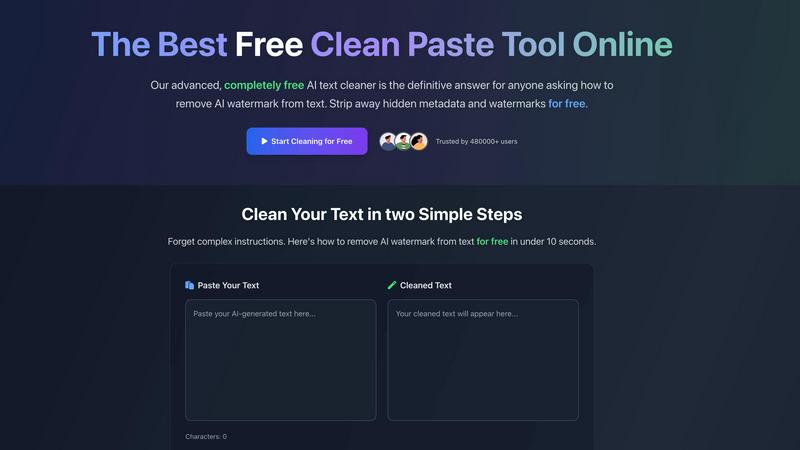
CleanPaste instantly strips invisible characters and AI watermarks from your text for free.
Last updated: February 28, 2026

Hush Touch | Voice-to-Text for MacOS
Hush Touch is offline, on-device AI dictation for Mac that learns your voice for just $20.
Last updated: February 28, 2026
Visual Comparison
CleanPaste.org
Hush Touch | Voice-to-Text for MacOS

Feature Comparison
CleanPaste.org
Advanced AI Watermark Removal
CleanPaste.org employs a sophisticated, real-time algorithm specifically tuned to strip out proprietary AI watermarks embedded by models like GPT, Claude, and Gemini. This goes beyond simple formatting to target the subtle linguistic and structural patterns that detectors look for, ensuring your output passes as human-generated while keeping your original message perfectly intact.
Deep-Scan Invisible Character Stripper
The tool performs a comprehensive deep scan of your text to hunt down and eliminate all non-visible characters. This includes zero-width spaces, hidden metadata tags, formatting artifacts, and other unicode elements that are invisible to the naked eye but can trigger AI detection software or cause display errors in documents and publishing platforms.
Instant, Zero-Friction Processing
True to its promise of simplicity, CleanPaste.org delivers results in under 10 seconds with a two-step workflow: paste and click. There is no account creation, no usage caps, and no paywalls. The processing happens entirely in your browser for speed and privacy, making professional-grade text cleaning accessible to everyone instantly.
Dual-Mode Cleaning Interface
The platform offers versatile control with its dual-action interface. Users can choose to run the comprehensive "Remove AI Watermarks" mode for full sanitization or use the targeted "Clear Invisible Characters" function for specific cleanup tasks. This flexibility allows for precise editing based on your specific needs, from full humanization to quick formatting fixes.
Hush Touch | Voice-to-Text for MacOS
Dual-Engine On-Device Recognition
Hush Touch doesn't rely on a single point of failure. It intelligently blends Apple's DictationTranscriber for natural flow and punctuation with SFSpeechRecognizer to spot your custom vocabulary. This dual-engine approach is then refined by an Apple Intelligence final pass, all executed locally on your Mac. This means superior accuracy for technical terms and everyday speech without the latency or privacy risks of cloud processing. Your voice data never leaves your computer.
Adaptive Custom Vocabulary & Learning
Forget manually adding every industry term. Hush Touch provides a 500-term base and, critically, features auto-learn from corrections. When you fix a transcription, it detects and adds the correct word to your personal vocabulary. This frequency-weighted learning is even boosted per application, meaning it better recognizes your coding jargon in Xcode and your client names in Mail automatically. It learns and evolves with every use.
Smart, Local Text Processing
Experience dictation that thinks ahead. Beyond basic transcription, Hush Touch actively removes filler words ("um," "like"), performs intelligent auto-corrections, and can format numbered lists from your speech. You can also create voice snippets for frequently used phrases. All this smart processing happens in real-time, on your device, ensuring your workflow remains fast and uninterrupted.
Hands-Free Context Modes & Commands
Switch between optimized dictation modes for General writing, Emails, Code, and Notes with ease. Activate dictation completely hands-free by saying "Hey Siri, start touch." The app auto-inserts your text after a pause and can even send messages with voice commands like "okay send message." Double-click your hotkey for Siri-style auto-stop, creating a truly fluid, microphone-like experience.
Use Cases
CleanPaste.org
Academic Integrity for Students
Students using AI for research assistance or drafting can leverage CleanPaste.org to ensure their submitted essays and papers are free of detectable AI fingerprints. It removes the hidden metadata and watermarks from AI-assisted drafts, allowing students to submit work that reflects their own synthesis and effort with confidence, avoiding potential academic integrity flags.
Content Creator & SEO Brand Safety
Bloggers, marketers, and SEO specialists can protect their brand's authentic voice and search rankings. By cleaning AI-generated drafts, they ensure content passes AI detection checks used by some search algorithms and clients, maintaining a natural, human-like tone that engages audiences and upholds brand credibility without any artificial trace.
Professional Communication Polishing
Non-native speakers and professionals using AI to draft important emails, reports, or client communications can use CleanPaste.org to refine the output. The tool removes the robotic patterns and hidden characters, resulting in polished, natural-sounding text that enhances professional image and ensures clear, undetectable communication.
Pre-Publishing Formatting Cleanup
Writers and editors preparing content for publication on websites, e-books, or CMS platforms can use the tool as a final formatting check. It strips out invisible characters and metadata that can cause rendering issues, weird spacing, or broken layouts, ensuring the final published text is clean and displays correctly across all devices and systems.
Hush Touch | Voice-to-Text for MacOS
Technical Documentation & Code Comments
Software engineers and developers can dictate complex commands, variable names, and framework terminology like "Kubernetes" or "kubectl" with confidence. The custom vocabulary learning ensures technical jargon is captured perfectly, making it ideal for writing documentation, adding code comments, or drafting project notes without breaking focus to type.
Medical & Legal Note Dictation
For physicians, therapists, and legal professionals, accuracy with specialized terminology is non-negotiable. Hush Touch learns medical diagnoses, drug names, and legal case references, transforming spoken notes into precise text. The 100% on-device processing guarantees patient and client confidentiality, complying with strict privacy regulations.
Content Creation & Freelance Writing
Writers, bloggers, and journalists can draft articles, emails, and social media content hands-free. The smart filler word removal and punctuation create cleaner first drafts, while the ability to speak in a natural, flowing manner helps overcome writer's block. The one-time cost is a major win over subscription-based tools.
Accessible Computing & Ergonomics
For users with RSI, mobility challenges, or anyone seeking a more ergonomic setup, Hush Touch provides a powerful voice-typing solution. The seamless integration with Siri and system-wide hotkeys allows for complete control of text input across any application on the Mac, reducing physical strain and increasing productivity.
Overview
About CleanPaste.org
In the explosive era of generative AI, a new challenge has emerged: digital fingerprints. Every piece of AI-generated text can carry invisible watermarks, hidden metadata, and zero-width characters that act as a tell-tale sign of its artificial origin. For students, professionals, and creators, this poses a real risk of detection, credibility loss, or even penalties. Enter CleanPaste.org, the definitive, no-cost solution engineered to scrub your text clean of these digital traces. This powerful online tool is specifically designed to ensure your content appears authentically human-written, bypassing AI detection systems with ease. Catering to over 480,000 users, its mission is to restore integrity and originality in a landscape saturated with machine-generated content. With a fiercely simple, instant-process interface that requires zero sign-up, CleanPaste.org empowers you to paste, clean, and present your work with absolute confidence, completely free. It's not just a utility; it's an essential shield for anyone navigating the new norms of AI-assisted creation.
About Hush Touch | Voice-to-Text for MacOS
Stop feeding the cloud. The next wave of AI productivity is happening offline, and Hush Touch is leading the charge for macOS users. This isn't just another dictation app; it's a paradigm shift towards private, intelligent, and perpetually learning voice-to-text software. Engineered exclusively for Mac, Hush Touch leverages the untapped power of your device by fusing two native Apple transcription engines with a final Apple Intelligence polish—all processed 100% on-device. The result? A shockingly lightweight 5.5 MB app that delivers cleaner, more accurate text without ever sending your voice data to a server. It's built for professionals, writers, developers, and anyone who values privacy and precision. For a one-time fee, you get a tool that removes filler words, masters your unique vocabulary, and integrates seamlessly into your workflow with hotkeys and Siri commands. This is the end of subscription lock-in and cloud dependency. Hush Touch represents the future: AI that works for you, learns from you, and protects you.
Frequently Asked Questions
CleanPaste.org FAQ
How does CleanPaste.org actually remove AI watermarks?
CleanPaste.org uses advanced, proprietary algorithms that analyze text for the statistical and syntactic patterns commonly used as watermarks by major AI models. It doesn't just paraphrase; it intelligently restructures and cleanses the text at a fundamental level to eliminate these detectable signatures while meticulously preserving the original meaning, context, and quality of your content in real-time.
Is CleanPaste.org completely free, or is there a hidden premium tier?
Yes, it is 100% completely free with no hidden tiers or future paywalls. The service operates without usage limits, mandatory sign-ups, or premium features. Every tool, including the full AI watermark removal and deep-scan functions, is available at zero cost to all users, forever. The project is committed to accessible, ethical AI text cleaning.
What specific types of invisible characters does the tool detect?
The tool is engineered to detect and remove a wide array of hidden elements. This includes zero-width spaces and joiners, non-printing Unicode characters, hidden formatting metadata from AI platforms, special control characters, and other embedded artifacts that are not visible in standard text editors but can be identified by analysis software.
Will using CleanPaste.org guarantee my content passes all AI detectors?
While CleanPaste.org is highly effective and trusted by hundreds of thousands to significantly reduce detection likelihood, no tool can offer a 100% ironclad guarantee against all detectors, as they constantly evolve. However, users report consistent success across major detection platforms, making it one of the most reliable free solutions available for humanizing AI text.
Hush Touch | Voice-to-Text for MacOS FAQ
How does Hush Touch work offline without the cloud?
Hush Touch is engineered to run entirely on your Mac's hardware. It utilizes two built-in Apple speech recognition engines (DictationTranscriber and SFSpeechRecognizer) and performs its AI-enhanced final pass using Apple's on-device Intelligence framework. No audio data is ever uploaded to external servers, enabling full functionality completely offline.
What makes Hush Touch different from macOS's built-in dictation?
While macOS dictation is a basic tool, Hush Touch supercharges it. It combines two engines for better accuracy, adds smart post-processing like filler word removal, learns your personal vocabulary automatically, and offers context-aware modes. It's a dedicated, premium layer of intelligence built on top of the native system capabilities.
Does the app really learn the words I correct?
Yes, its adaptive learning is a core feature. When you manually correct a transcribed word or phrase in your text, Hush Touch detects that correction and automatically adds the intended word to your personal vocabulary. This frequency-weighted learning makes it smarter and more accurate for your specific needs over time.
Is there a trial available before I buy the license?
Absolutely. You can download a full-featured 7-day free trial directly from the Hush Touch website. No credit card is required for the trial, allowing you to test its on-device accuracy, vocabulary learning, and workflow integration thoroughly before committing to the one-time purchase.
Alternatives
CleanPaste.org Alternatives
CleanPaste.org is a leading free online tool in the AI text processing category, designed to strip AI watermarks, hidden metadata, and invisible characters from text. Its core mission is to help users ensure their content appears human-written and passes AI detection, making it a go-to for students, writers, and professionals navigating the new norms of AI-assisted creation. Users often seek alternatives for various reasons, including the need for different feature sets like integrated grammar checking or more advanced paraphrasing, preferences for downloadable software over web apps, or concerns about data privacy and usage limits that can come with free tiers. The landscape for these tools is rapidly evolving, with new capabilities emerging constantly. When evaluating an alternative, key factors to consider are the tool's effectiveness against the latest AI detectors, its ability to preserve your original writing style and intent, the security of your data, and the overall value—whether it's a robust free plan or a paid subscription with advanced features. The right choice balances powerful cleaning capabilities with a workflow that fits your specific needs.
Hush Touch | Voice-to-Text for MacOS Alternatives
Hush Touch | Voice-to-Text for MacOS is a standout in the AI assistant category, offering a powerful, privacy-first dictation tool. It leverages on-device Apple technology to transcribe speech into text offline, making it a go-to for users who prioritize speed and data security in their daily workflow. Users often seek alternatives for various reasons. Some might need a cross-platform solution that works beyond macOS, while others look for different pricing models like subscriptions or free tiers. Feature sets also drive the search, whether it's demand for advanced editing commands, integration with specific apps, or support for multiple languages. When evaluating other options, key considerations include the processing method—cloud-based for power or on-device for privacy—and the overall accuracy and "intelligence" of the transcription. Also, assess how seamlessly the tool fits into your existing apps and whether its command structure aligns with your natural speaking style.