
conceptviz vs dmaya
Side-by-side comparison to help you choose the right tool.

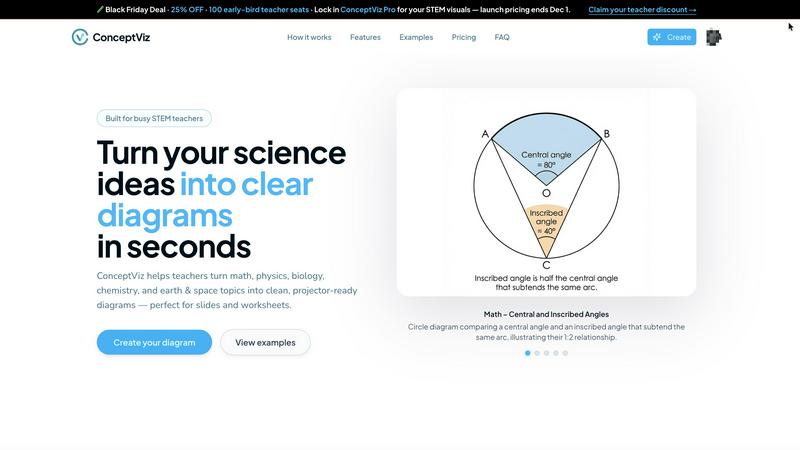
ConceptViz transforms simple text prompts into clear, classroom-ready science and math diagrams for all educational.
Last updated: February 28, 2026

dmaya
dMaya is the AI design platform for agencies that generates client-ready UI and exports to code instantly.
Last updated: April 13, 2026
Visual Comparison
conceptviz
dmaya
Feature Comparison
conceptviz
User-Friendly Diagram Creation
ConceptViz simplifies the diagram creation process through an intuitive three-step method. Users sign in, describe their desired diagram in plain English, and generate a ready-to-use graphic in seconds, streamlining lesson planning and instructional design.
Subject-Specific Presets
The platform offers quick presets tailored for a variety of STEM subjects, including physics, biology, chemistry, earth and space sciences, and mathematics. This feature ensures that educators can select appropriate templates that align with U.S. grade bands, making it easy to find the right visual aid.
High-Quality, Legible Diagrams
ConceptViz prioritizes clarity and readability in its diagrams. With thick, legible lines and minimal background noise, visuals are designed to be easily viewed from anywhere in a classroom, ensuring that all students can engage with the material effectively.
Seamless Integration with Presentation Tools
Once a diagram is generated, it can be effortlessly downloaded and integrated into popular presentation platforms like PowerPoint and Google Slides. This compatibility ensures that educators can enhance their teaching materials without the hassle of formatting changes or design adjustments.
dmaya
Conversational AI Design Generation
Describe any interface concept in natural language and watch dMaya generate complete, production-ready UI designs within seconds. This isn't just a static image; it's a fully structured layout with components, typography, and a logical design system. The AI understands complex requests for multi-screen flows, dashboards, and mobile apps, providing a professional starting point that eliminates blank canvas paralysis and accelerates the initial creative phase dramatically.
Real-Time Iterative Refinement
The design process is a dialogue. Using an integrated chat interface, you instruct the AI to make precise changes: "swap the primary color to a navy blue," "convert this to a dark mode variant," or "add a testimonial section here." Every command is executed instantly and accurately on the canvas. This allows for rapid exploration of visual directions and fine-tuning of details without manual dragging, resizing, or styling, streamlining the revision process to the speed of thought.
Client-Centric Presentation & Feedback Loops
Ditch cumbersome PDFs and static mockups. Generate a secure, shareable preview link for any project. Clients and stakeholders can view interactive designs directly in their browser—no account or login required. They can leave contextual feedback and comments, which funnel directly back into your dMaya workspace. This creates a seamless, professional review cycle that turns what used to be a multi-day email thread into a process that concludes in minutes.
Design-to-Code Export for AI Development
When designs are approved, dMaya doesn't leave you stranded. Export your screens as clean, well-structured HTML, CSS, and JavaScript code. This output is specifically engineered to be consumed by modern AI coding agents and assistants like Cursor, Claude Code, or GitHub Copilot. Hand off the exported code, and your developer or AI agent can efficiently translate the visual design into production-ready components in your framework of choice, bridging the infamous design-development gap.
Use Cases
conceptviz
Enhancing K-12 Education
Teachers can use ConceptViz to create engaging and informative diagrams for their students, transforming complex concepts into clear visuals that enhance understanding and retention in subjects like biology and physics.
Supporting University-Level Research
Researchers can leverage ConceptViz to generate precise scientific visuals for presentations and publications, ensuring their findings are communicated effectively through accurate and professional diagrams.
Curriculum Development
Curriculum developers can utilize ConceptViz to create targeted instructional materials that align with educational standards and best practices, fostering a richer learning experience for both educators and students.
Student Presentations
Students can harness ConceptViz to produce high-quality diagrams for their projects and presentations, enabling them to visually communicate their understanding of complex topics in a professional manner.
dmaya
Agency Pitch & Concept Development
Agencies can revolutionize their client acquisition and discovery phases. During initial meetings, describe the client's vision and generate live design concepts on the fly. Quickly present multiple, polished visual directions to stakeholders within hours instead of weeks. This capability demonstrates immense value early, helps align on aesthetic direction before costly development begins, and significantly increases win rates by showcasing tangible, professional work instantly.
Product Team Ideation & Prototyping
Product managers and designers can use dMaya to explore UI concepts and user flows before committing engineering resources. Rapidly prototype different layouts for a new feature, generate A/B test variants visually, and collaborate with cross-functional teams in a shared workspace. This ensures that everyone—from design to engineering to leadership—is aligned on the visual and experiential goal, reducing rework and miscommunication down the line.
Freelancer Project Scalability
Freelancers and independent designers can dramatically increase their capacity and service offerings. Take on more client projects without extending timelines by leveraging AI for initial drafts and tedious revisions. Deliver high-fidelity concepts faster, impress clients with interactive presentations, and streamline the feedback process. This efficiency allows for higher-value project pricing and the ability to serve more clients while maintaining exceptional quality and a professional workflow.
Design System Exploration & Tokenization
Teams looking to establish or evolve a design system can use dMaya as a powerful exploration tool. Generate multiple component variations (buttons, cards, nav bars) using conversational AI to test different visual languages. The platform's automatic design tokenization maintains consistency across all generated screens, providing a practical sandbox to define color palettes, typography scales, and spacing rules that can later be formalized into a coded system.
Overview
About conceptviz
ConceptViz is a revolutionary AI-powered visual engine designed specifically for STEM educators and researchers, fundamentally changing how instructional materials are created. Unlike generic diagramming tools, ConceptViz is tailored to understand the intricate language of science and mathematics. It enables users to translate straightforward, plain-English descriptions into precise, classroom-ready diagrams with remarkable ease. This innovation eliminates the time-consuming process of searching for subpar stock images or grappling with complex design software. The core value proposition of ConceptViz lies in its immense time savings and pedagogical accuracy, catering to the specific needs of educators. Its diagrams are crafted to be high-contrast, legible from the back of a classroom, and instantly usable in common tools such as PowerPoint, Google Slides, or printed materials. ConceptViz serves a diverse audience, including K-12 teachers, university professors, curriculum developers, and even students creating presentation materials. By leveraging cutting-edge AI technology, ConceptViz democratizes access to high-quality scientific visualization, representing a significant advancement from generic graphic tools to specialized, domain-specific intelligence. Whether generating a simple plant cell diagram for elementary students or a complex free-body diagram for AP Physics, ConceptViz ensures that each visual is not only accurate but also educationally sound and presentation-ready in mere seconds.
About dmaya
dMaya is the AI design platform that's finally built for professionals, not hobbyists. In a landscape flooded with tools that skip straight to code, dMaya reclaims the critical design-first workflow. It's a vibe design platform engineered for agencies, product teams, and freelancers who need to visualize, iterate, and get client approval before a single developer writes a line. You describe your vision—a SaaS dashboard, an e-commerce flow, a mobile app—in plain language, and dMaya's AI agent generates polished, professional UI screens in seconds. The magic happens in conversation: you chat with the AI to change colors, swap layouts, adjust typography, or add new sections, with every change rendered instantly. Design tokens ensure visual consistency automatically across every screen. Then, you share a simple preview link for client review and feedback, collapsing a days-long approval cycle into minutes. Once signed off, export clean HTML, CSS, and JS to hand directly to AI coding agents like Cursor or Claude Code for build-out in React, Next.js, Flutter, or any framework. dMaya is the missing link for teams that prioritize intentional design, early problem-solving, and stakeholder alignment to ship with confidence.
Frequently Asked Questions
conceptviz FAQ
How does ConceptViz work?
ConceptViz operates by allowing users to input a plain-English description of the diagram they need. The AI processes this input and generates a high-quality visual, ready for classroom use in just a few seconds.
Can I use ConceptViz for all grade levels?
Yes, ConceptViz is designed to cater to a wide range of educational levels, from K-12 to university research. It includes subject-specific presets that align with different grade bands.
What kind of diagrams can I create with ConceptViz?
You can create a variety of diagrams across different STEM fields, including biology, physics, chemistry, earth and space sciences, and mathematics. Whether you need simple illustrations or complex diagrams, ConceptViz can accommodate your needs.
Is there a cost associated with using ConceptViz?
Yes, ConceptViz offers a limited-time lifetime deal for $229, with only a few seats left. This pricing provides access to its full suite of features and capabilities for educators and researchers alike.
dmaya FAQ
How is dMaya different from other AI design tools?
dMaya is purpose-built for professional, client-facing workflows where design approval precedes development. Unlike tools that generate only code or target solo builders, dMaya focuses on the visual design and presentation phase. It provides a collaborative canvas, client feedback tools, and a conversational AI tailored for iterative visual refinement, ensuring teams can align stakeholders and catch problems before they become expensive coding issues.
What kind of code does dMaya export?
dMaya exports clean, vanilla HTML, CSS, and JavaScript. This code is not tied to a specific framework, making it an ideal, agnostic handoff artifact. It is structured and commented to be easily interpreted and converted by AI coding assistants (like Cursor or Claude Code) or developers into any modern framework such as React, Next.js, Vue, Svelte, or Flutter, providing maximum flexibility for your development team.
Do clients need an account to review designs?
No. Client and stakeholder review requires zero accounts. You simply generate a shareable link from any project in dMaya and send it to your reviewers. They can view the interactive design presentation in their standard web browser, leave comments, and provide feedback without any sign-up process, friction, or software installation, making the approval process incredibly smooth and accessible.
Can I work on multiple screen sizes at once?
Yes. dMaya features a multi-screen canvas that allows you to work on desktop, tablet, and mobile frames simultaneously on an infinite canvas. You can organize screens for different device breakpoints or user flow steps side-by-side, drag them around, and zoom for detail. The AI can generate and modify designs for specific device contexts, and design tokens ensure consistency across all screen sizes automatically.
Alternatives
conceptviz Alternatives
ConceptViz is an innovative AI-powered visual engine designed specifically for STEM educators and researchers, enabling them to create precise, classroom-ready science and math diagrams from simple text prompts. As a content creation tool, it streamlines the diagram generation process, saving users significant time and effort compared to traditional methods involving stock images or complex design software. Users often seek alternatives to ConceptViz for various reasons, including pricing, feature sets, or specific platform compatibility. When exploring alternatives, it's essential to consider factors such as ease of use, the quality of visuals generated, and how well the tool aligns with the specific needs of educators or researchers in the STEM field. Additionally, assessing the clarity and educational effectiveness of the diagrams produced should be a priority.
dmaya Alternatives
dmaya is an AI-powered vibe design platform that sits at the intersection of visual design and rapid prototyping. It's built for agencies and teams who need to create, iterate, and get client approval on UI designs before a single line of code is written. By chatting with an AI, users generate polished screens from text, making it a standout in the emerging category of conversational design tools. Users often explore alternatives for several key reasons. Budget constraints or specific pricing models can drive the search, as can the need for different feature sets, like more advanced prototyping or integration with existing developer workflows. Platform compatibility is another major factor, with teams needing tools that fit seamlessly into their current tech stack, whether that's Figma, Webflow, or a specific code framework. When evaluating other options, focus on your core workflow needs. Consider the fidelity of the AI-generated output, the smoothness of the client feedback and approval cycle, and the quality and flexibility of the exported code. The best alternative will balance AI-assisted speed with the intentional design control needed to align teams and catch issues early, ensuring you don't sacrifice vision for velocity.