
Decode This Text vs Phishly
Side-by-side comparison to help you choose the right tool.

Decode This Text
Decode confusing texts in seconds with AI-powered, human-like analysis for instant clarity.
Last updated: February 28, 2026

Phishly
Phishly uses AI to instantly detect phishing emails in your Gmail inbox.
Visual Comparison
Decode This Text

Phishly
Feature Comparison
Decode This Text
Instant Screenshot Analysis
Why type it all out? Simply upload a photo of your text chat, and our AI does the heavy lifting. It reads the entire conversation—timestamps, emojis, and all—to provide a complete context-aware analysis. This feature leverages cutting-edge OCR and NLP technology to make decoding as effortless as taking a screenshot, ensuring you never miss a subtle detail buried in a long thread.
Emotional Tone Checker
Go beyond the words and measure the emotional temperature. Our advanced sentiment analysis engine detects whether a message is cold, sarcastic, friendly, or passive-aggressive. This feature quantifies the subtext, giving you a clear percentage-based read on the tone so you can avoid costly misinterpretations and understand the real vibe behind phrases like "We need to talk."
Behavioral Pattern Detection
The AI looks for what you might miss. It identifies critical behavioral patterns, like if someone only texts late at night, consistently avoids direct questions, or if their messages are getting progressively shorter. This trend-spotting feature connects the dots across interactions to reveal underlying habits and intentions, providing a strategic overview of the communication dynamic.
Smart Response Builder
Stuck on what to say next? Get unstuck instantly. Based on the analysis, the tool generates three tailored response options—calm, direct, or firm—so you can choose the approach that best fits the situation. This feature empowers you to reply with confidence, turning analysis into action and helping you navigate tricky replies without second-guessing yourself.
Phishly
One-Click Gmail Integration
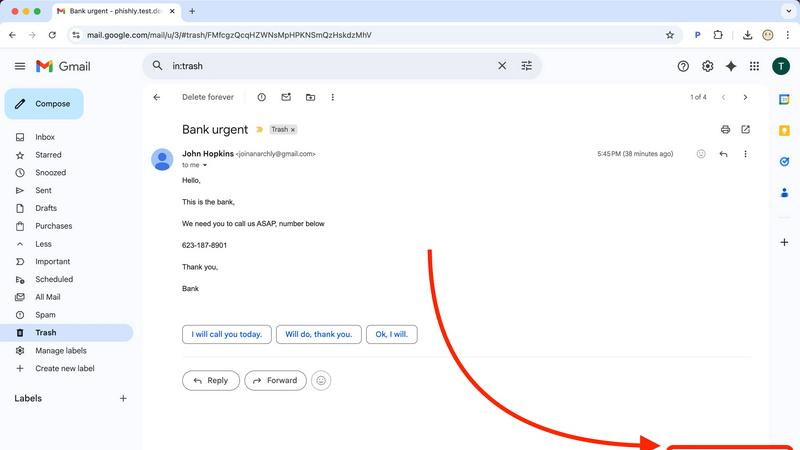
Seamlessly integrate powerful AI security directly into your existing workflow. With the Phishly Chrome extension installed, analyzing any email is as simple as opening it in Gmail and clicking the "Scan with Phishly" button. There's no need to copy, paste, or navigate away from your inbox. This frictionless, instant access ensures you actually use the protection when you need it most, turning a moment of doubt into an actionable security insight in under a second, right where you work.
Advanced AI-Powered Threat Detection
Go beyond basic link checking with an AI engine trained on the latest phishing tactics. It doesn't just look for malware; it understands context. The system analyzes a holistic set of risk factors including suspicious domain registrations, subtle grammatical errors common in AI-generated text, spoofed header information, and the nuanced urgent or threatening language used in modern social engineering scams. This multi-layered analysis catches sophisticated threats that easily slip past standard email filters.
Clear, Actionable Risk Assessments
Phishly cuts through the technical jargon and delivers results you can actually use. Every scan concludes with a straightforward, color-coded verdict: Safe, Medium Risk, or High Risk. More importantly, it provides a detailed, plain-English explanation of the specific red flags it found, such as "The sender's domain was registered very recently" or "This email uses urgent language to pressure immediate action." This educates you while it protects you, building your digital literacy.
Privacy-First, On-Demand Scanning
Your privacy is non-negotiable. Phishly operates on a strict, user-initiated model. The AI only ever analyzes the content of emails you explicitly choose to scan. It does not continuously monitor your inbox, read your emails in the background, or store your personal correspondence. This approach gives you complete control over your data, ensuring you get powerful protection without sacrificing your confidentiality—a critical feature in today's data-conscious world.
Use Cases
Decode This Text
Decoding Dating & Relationship Messages
They said they had fun but then ghosted for days. Are they genuinely busy or losing interest? Decode This Text analyzes the timing, tone, and content of messages to clarify romantic intentions. It helps you understand mixed signals, avoid sending regretful texts, and gain clarity on why someone's communication style has changed, saving you endless cycles of overanalysis.
Interpreting Professional & Workplace Communication
Did your boss's one-word email mean they're angry? What does "we'll keep your resume on file" really mean? This tool deciphers professional nuance, helping you understand critiques, passive-aggressive notes, and vague feedback. It provides the insight needed to craft appropriate, politically savvy responses and maintain your professional standing without misreading the situation.
Navigating Friends & Family Dynamics
Did the group chat go silent after your message? Is a family member being subtly dismissive? Use Decode This Text to parse the complex social cues within your inner circle. It offers an objective take on social tensions, helping you understand if you're being overly sensitive or if there's a genuine issue that needs addressing, improving your closest relationships.
Analyzing Client & Customer Interactions
Is a client's vague message a sign of dissatisfaction or just a busy schedule? Decode unclear client emails, project feedback, and negotiation texts to understand their true stance and priorities. This use case is essential for freelancers and businesses to maintain strong client relationships, manage expectations, and respond strategically to protect your interests.
Phishly
For Remote Workers & Digital Nomads
Working from coffee shops and co-working spaces on various networks increases exposure to phishing. Remote professionals can use Phishly to instantly verify every email request for sensitive data, invoice payments, or credential updates before responding. It acts as a virtual security colleague, providing a crucial second opinion on emails from "HR," "IT support," or "management" that could be sophisticated impersonation attacks targeting a dispersed workforce.
For Small Business Owners & Startups
Small teams often lack dedicated IT security staff, making them prime targets for phishing. A business owner can use Phishly to screen emails related to banking, wire transfers, or vendor communications. By pasting a suspicious invoice or payment request into the web tool, they can get an instant risk analysis, preventing devastating Business Email Compromise (BEC) scams that could cripple a young company's finances overnight.
For Individuals Managing Personal Finances
Consumers are bombarded with phishing emails mimicking banks, PayPal, Amazon, and tax services. Before clicking any link in an email about a "suspended account" or "unusual login attempt," an individual can scan it with Phishly. The clear risk rating and explanation help them confidently identify fraudulent messages, protecting their personal banking details, social media accounts, and sensitive identity information from theft.
For Educational Institutions & Non-Profits
Schools and non-profits handle sensitive data but often have limited cybersecurity budgets. Staff and volunteers can use the free Phishly tool to screen emails claiming to be from parents, donors, or software providers. This helps prevent credential theft that could lead to data breaches, ransomware attacks on school systems, or fraudulent diversion of donations, providing a vital layer of human-centric security.
Overview
About Decode This Text
Stop the guesswork. In a world of cryptic texts, vague emails, and confusing DMs, Decode This Text is the AI-powered clarity engine you need to navigate modern communication. This isn't just another app—it's your personal communication analyst, designed to cut through the noise and reveal the true intentions, emotional tone, and hidden patterns behind any message. Simply paste the conversation, upload a screenshot, or describe the context. In 30 seconds, you'll get a comprehensive, human-feeling analysis that breaks down what's really being said (and not said). Built for anyone tired of overthinking, from decoding a partner's mixed signals to interpreting a boss's terse email, this tool provides the objective "reality check" needed to respond with confidence. It’s 100% anonymous, no human ever reads your texts, and it delivers the wisdom of a savvy older sibling on-demand. In the trending landscape of applied AI, this is the tool that turns communication anxiety into actionable insight.
About Phishly
In the digital trenches of your inbox, a new breed of cyber threat is evolving faster than traditional defenses can keep up. Phishing attacks are no longer clumsy emails from foreign princes; they are hyper-personalized, AI-generated masterpieces of deception designed to bypass human intuition and legacy spam filters. Enter Phishly: your on-demand AI sentinel against these next-generation threats. This isn't another complex enterprise security suite. Phishly is a sleek, powerful Chrome extension and web tool that puts cutting-edge phishing detection directly in your hands, the moment you need it. Simply open any suspicious email in Gmail and click "Scan with Phishly," or paste its contents directly on their website for an instant, deep-dive analysis. Its advanced AI engine meticulously scans for modern phishing indicators—from subtly spoofed sender addresses and lookalike domains to the urgent language and psychological pressure tactics of sophisticated social engineering. It then delivers a crystal-clear, actionable risk assessment: Safe, Medium Risk, or High Risk, complete with a detailed breakdown of why it flagged the content. Built for privacy-conscious individuals, remote workers, and small to medium businesses, Phishly offers enterprise-grade detection without the enterprise-level complexity, setup, or cost. It operates on a strict zero-trust privacy model, only analyzing emails you explicitly choose to scan. In a landscape where one click can cost everything, Phishly is the instant, intelligent second opinion you need to stay secure.
Frequently Asked Questions
Decode This Text FAQ
How does Decode This Text protect my privacy?
Your privacy is our top priority. The process is 100% anonymous. No human ever reads the texts, messages, or screenshots you submit. All analysis is performed by our secure AI systems. We operate under strict data privacy policies, ensuring your personal conversations remain confidential and are not stored or used for any other purpose.
What kind of messages can I analyze?
You can analyze virtually any text-based communication. This includes pasted text messages, email excerpts, social media DMs (via screenshot or paste), and even descriptions of verbal conversations. The AI is trained on a wide array of communication styles, from casual dating chats and friend group texts to formal workplace emails and client correspondence.
How accurate is the analysis?
The AI provides a highly insightful analysis based on linguistic patterns, sentiment, and behavioral cues, offering clarity that often surpasses repeated consultations with friends. It is designed as a powerful "reality check" and decision-support tool. However, it should be used as a guide to inform your judgment, not as an absolute truth, as human communication can be complex.
Can it tell me exactly what to do?
Decode This Text provides clarity and suggests strategic responses, but it does not make decisions for you. It empowers you with information—explaining likely intentions, emotional tone, and patterns—and offers multiple response options. The final choice on how to proceed always remains in your hands, armed with better insight than you had before.
Phishly FAQ
How does Phishly protect my privacy?
Phishly is built on a core principle of user-controlled privacy. Our tool is passive and on-demand. We do not, and cannot, access your email inbox unless you explicitly initiate a scan. When you click "Scan" in Gmail or paste text on our site, only that specific email content is sent for analysis. We do not store your personal emails, track your browsing history, or sell your data. Your security check remains confidential.
Is Phishly really free to use?
Yes, the core functionality of Phishly is completely free to use. You can install the Chrome extension for Gmail and use the web tool to scan suspicious emails at no cost. This allows individuals and small businesses to access powerful AI-driven phishing detection without any financial barrier. We are committed to making basic digital security accessible to everyone.
What makes Phishly different from my email's spam filter?
Traditional spam filters work passively in the background and primarily block bulk, low-effort spam. Phishly is an active tool for analyzing sophisticated, targeted phishing emails that are designed to look legitimate and often bypass standard filters. It provides a deep, contextual analysis and explains its reasoning, helping you understand the why behind a threat, which a typical spam filter notification does not do.
Do I need technical knowledge to use Phishly?
Absolutely not. Phishly is designed for everyone. The one-click scan in Gmail and the simple paste-and-analyze function on the website require zero technical setup or knowledge. The results are presented in clear, simple language with a straightforward risk rating (Safe/Medium/High), making it easy for anyone to understand and take appropriate action immediately.