
Dividend Data vs QuickData.ai
Side-by-side comparison to help you choose the right tool.

Dividend Data
Instantly automate stock analysis in your spreadsheet with AI-powered data and 30+ years of history.
Last updated: March 11, 2026

QuickData.ai
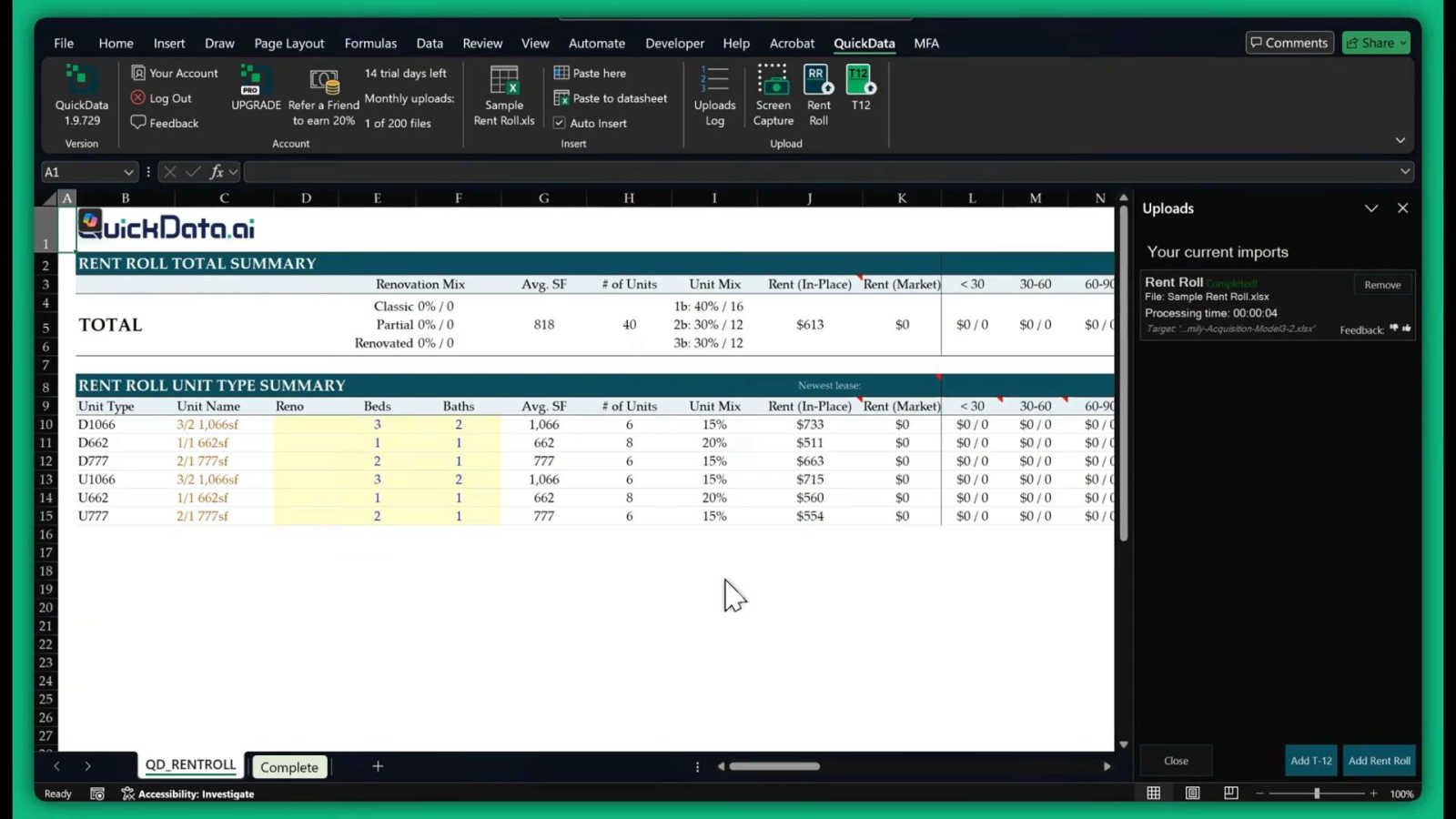
QuickData.ai automates rent roll and T12 data entry, making multifamily underwriting 10x faster and hassle-free.
Last updated: March 1, 2026
Visual Comparison
Dividend Data

QuickData.ai
Feature Comparison
Dividend Data
Live Spreadsheet Integration
This is the core magic. Embed real-time and historical market data directly into your Google Sheets or Excel with simple, custom formulas. No more manual updates, broken API scripts, or flipping between tabs. Your spreadsheet becomes a dynamic, auto-refreshing dashboard. Just input a ticker and a parameter, and data like the current price, next dividend date, or PE ratio appears instantly, keeping your models and trackers perpetually up-to-date with a single click.
Comprehensive Dividend & Fundamental Metrics
Go far beyond basic price quotes. Access a deep library of over 100 metrics specifically curated for fundamental analysis. Pull forward annual dividends, yield, growth rates, and payout ratios for dividend sustainability checks. Dive into full income statements, balance sheets, cash flows, and key ratios like PE, PB, and Debt-to-Equity. This feature provides the complete financial picture needed for rigorous stock evaluation without ever leaving your spreadsheet.
30+ Years of Historical Data
Backtest strategies and analyze long-term trends with confidence. Dividend Data provides an extensive historical database spanning more than three decades for a vast universe of 80,000+ global tickers. Chart dividend growth consistency, examine financial performance through market cycles, and build robust historical models. This depth of historical context is critical for serious investors and is typically locked behind expensive institutional platforms.
AI-Powered Research Assistant (Pro Terminal)
Level up your research with integrated artificial intelligence. The Pro Terminal features an AI Analyst that acts as your personal research assistant. Chat with it to get summaries of company financials, ask complex comparative questions, generate investment theses, and uncover insights from the massive dataset instantly. This turns raw data into actionable intelligence, accelerating the due diligence process dramatically.
QuickData.ai
Multifamily Excel Model
QuickData.ai integrates seamlessly into existing Excel models, allowing users to leverage their current spreadsheets while enhancing them with automated data extraction capabilities. This feature ensures that users can maintain their workflows without learning new software.
AI-Powered Data Entry
This feature utilizes advanced AI algorithms to automate the extraction of data from critical documents such as rent rolls, T12s, and OMs. By reducing the manual entry workload, QuickData.ai allows users to focus on analyzing and interpreting data rather than collecting it.
14-Day Free Trial
QuickData.ai offers a risk-free 14-day trial, allowing users to explore the platform's capabilities without any commitment. This feature encourages potential customers to experience firsthand the efficiency and effectiveness of the tool.
Free 1:1 Onboarding
To ensure a smooth transition, QuickData.ai provides complimentary one-on-one onboarding sessions. This personalized support helps users quickly understand how to utilize the software effectively, maximizing their experience from the get-go.
Use Cases
Dividend Data
Automated Dividend Portfolio Tracking
Manually tracking dividend payments, ex-dates, and yields across a portfolio is a tedious relic of the past. Create a master tracker sheet that uses formulas to automatically pull the next ex-dividend date, declared amount, and yield for every holding. Set up conditional formatting to alert you of upcoming payments, and dynamically calculate your portfolio's total forward income and average yield without ever manually inputting a data point.
Building Dynamic Stock Screening Models
Construct powerful stock screens entirely within your spreadsheet. Use functions to pull criteria like PE ratio under 20, dividend yield over 3%, and payout ratio below 60% for a watchlist of tickers. The live formulas allow you to refresh the entire screen with one recalculation, instantly highlighting stocks that meet your evolving investment criteria. This creates a flexible, personalized screening tool far more adaptable than rigid web-based screeners.
Conducting Deep-Dive Fundamental Analysis
Perform comprehensive company analysis on a single sheet. Create a dedicated tab for a stock where you pull 10 years of revenue, EPS, dividend history, and key financial ratios side-by-side. Calculate growth rates, chart trends, and assess financial health directly in Excel or Sheets, using your own formulas alongside Dividend Data's live feeds to build a complete, customizable research report.
Backtesting Investment Strategies
Validate your investment hypotheses with historical data. Use the historical price and dividend functions to simulate how a strategy like "Dogs of the Dow" or a high-yield, low-payout-ratio approach would have performed over the last 10-20 years. Build a backtesting model that calculates total returns, including dividends, to stress-test your strategy's resilience across different market environments before risking capital.
QuickData.ai
Accelerating Underwriting Processes
Real estate professionals can utilize QuickData.ai to significantly speed up their underwriting processes. By automating data extraction, users can evaluate multiple deals in a fraction of the time, leading to quicker decision-making and increased deal flow.
Enhancing Data Accuracy
With QuickData.ai, users can minimize human error associated with manual data entry. By relying on AI-driven automation, real estate professionals can ensure that the data feeding into their financial models is accurate, leading to more reliable analyses.
Streamlining Financial Reporting
Accounting firms can leverage QuickData.ai to streamline financial reporting for multifamily properties. By automating the extraction of relevant data, firms can create reports more efficiently, freeing up time for strategic planning and client engagement.
Supporting Deal Comparisons
QuickData.ai enables users to easily compare multiple properties by rapidly extracting and organizing key financial metrics. This functionality allows investors and brokers to make informed comparisons between opportunities, facilitating better investment choices.
Overview
About Dividend Data
Forget clunky APIs and endless copy-pasting from financial websites. The game has changed. Dividend Data is the disruptive force democratizing institutional-grade stock market intelligence, bringing it directly into the spreadsheets where investors already live. This isn't just another data feed; it's a seamless integration engineered for the modern, data-driven investor. Built by a dividend investor for dividend investors, it transforms Google Sheets and Microsoft Excel into a powerful, live-terminal experience with zero coding required. Simply type intuitive custom formulas like =DIVIDENDDATA_DIVIDENDS("MSFT") and watch as over 30 years of historical data for 80,000+ tickers populates your cells instantly. Access critical metrics: forward yields, payout ratios, ex-dividend dates, full financial statements, valuation ratios, and comprehensive price history. With a radically generous free tier offering 2,500 monthly credits that never expire, it removes all barriers to entry. This tool is built for fundamental and dividend investors who demand depth, accuracy, and efficiency without the bloated cost of traditional Bloomberg terminals, enabling smarter, faster investment decisions directly within their existing workflow.
About QuickData.ai
QuickData.ai is a groundbreaking Excel Add-In tailored specifically for the multifamily real estate sector, designed to revolutionize how professionals manage and analyze data from essential financial documents. By harnessing cutting-edge AI technology, QuickData.ai simplifies the intricate process of extracting data from rent rolls, T12 statements, and offering memorandums (OMs). This innovative tool is aimed at acquisitions teams, commercial real estate brokers, lenders, and accounting firms, allowing them to automate the cumbersome and time-consuming manual data entry that typically drains resources. With QuickData.ai, users can efficiently extract critical unit-level data directly into their existing Excel underwriting models. The main value proposition of this tool is its ability to save users an impressive average of 15 hours each month, drastically accelerating the underwriting process. This enables real estate professionals to analyze deals in minutes rather than hours, enhancing productivity while significantly reducing the risk of human error. QuickData.ai is essential for anyone involved in the multifamily real estate market, empowering them to make informed decisions faster and more accurately.
Frequently Asked Questions
Dividend Data FAQ
How does the free tier work and what are credits?
The free tier is incredibly robust, offering 2,500 credits per month that never expire. Each data point you pull with a formula (e.g., one cell with =DIVIDENDDATA_QUOTE("AAPL", "price")) typically costs 1 credit. This allows for substantial usage for individual investors tracking a portfolio or analyzing a few companies. There's no trial period; the free tier is permanently available, making it easy to start and scale as needed.
Do I need an API key or coding skills to use it?
Absolutely not. This is the key differentiator. There are no API keys to manage, no scripts to write, and no coding required. You install the add-in from the Google Workspace Marketplace or Microsoft AppSource, and it instantly adds the custom functions to your spreadsheet's formula library. It's designed for investors, not developers.
What data sources does Dividend Data use?
Dividend Data aggregates and cleans data from multiple high-quality, reputable financial data providers to ensure accuracy and comprehensiveness. The specific sources are proprietary, but the focus is on delivering institutional-grade, reliable data for fundamental metrics, dividends, and financial statements, all normalized and ready for analysis in your spreadsheet.
Can I use it in both Google Sheets and Microsoft Excel?
Yes, seamlessly. Dividend Data offers native add-ins for both major spreadsheet platforms. The custom functions and core experience are consistent across Google Sheets and Microsoft Excel. Your workflow remains the same whether you're collaborating online in Sheets or working offline in a desktop Excel file, providing maximum flexibility.
QuickData.ai FAQ
What types of documents can QuickData.ai extract data from?
QuickData.ai can extract data from essential multifamily financial documents such as rent rolls, T12 statements, and offering memorandums (OMs), ensuring comprehensive coverage of critical information.
How long does it take to set up QuickData.ai?
Setting up QuickData.ai is quick and straightforward, typically taking just minutes. The intuitive interface and seamless integration with Excel make it easy for users to get started without extensive training.
Is there customer support available?
Yes, QuickData.ai offers dedicated customer support, including free one-on-one onboarding sessions to help users maximize the software's potential. Ongoing assistance is also available to address any questions or issues that may arise.
Can I cancel my trial or subscription at any time?
Absolutely! QuickData.ai allows users to cancel their trial or subscription at any time, ensuring a risk-free experience. Users can explore the benefits of the platform without any long-term commitment.
Alternatives
Dividend Data Alternatives
Dividend Data is a specialized financial data tool that delivers over 30 years of stock market history directly into spreadsheets. It falls into the category of fundamental investment research platforms, designed specifically for investors who prioritize dividends and long-term value. Users often explore alternatives to find a better fit for their budget, specific feature requirements like different metrics or data sources, or compatibility with other analysis platforms. When evaluating other options, savvy investors should prioritize a few key areas. Look for the depth and reliability of historical data, especially for dividend history. Consider the ease of integration with your existing workflow, whether that's in Excel, Google Sheets, or another tool. Finally, assess the pricing model transparency and whether the tool's core functions align with your specific investment strategy, be it deep fundamental screening or dividend growth tracking. The right tool should feel like a natural extension of your analysis process, removing data friction so you can focus on making informed decisions.
QuickData.ai Alternatives
QuickData.ai is an innovative Excel Add-In tailored for the multifamily real estate sector, designed to automate rent roll and T12 data entry. This technology significantly accelerates the underwriting process, enabling real estate professionals to gather essential data quickly and efficiently. Users often seek alternatives to QuickData.ai for various reasons, including pricing, specific feature sets, or platform compatibility. When choosing an alternative, it is crucial to consider factors such as ease of use, integration capabilities, and the ability to handle specific real estate data requirements effectively. --- [{"question": "What is QuickData.ai?", "answer": "QuickData.ai is an Excel Add-In that automates the extraction of rent roll and T12 data, designed to enhance the multifamily real estate underwriting process."}, {"question": "Who is QuickData.ai for?", "answer": "QuickData.ai is designed for acquisitions teams, commercial real estate brokers, lenders, and accounting firms involved in multifamily real estate."}, {"question": "Is QuickData.ai free?", "answer": "No, QuickData.ai is a paid tool, but it offers significant time savings and efficiency improvements for its users."}, {"question": "What are the main features of QuickData.ai?", "answer": "QuickData.ai features automated rent roll parsing, T12 parsing, seamless Excel integration, and unit-level data extraction."}]