
dmaya vs Prompt Builder
Side-by-side comparison to help you choose the right tool.

dmaya
dMaya is the AI design platform for agencies that generates client-ready UI and exports to code instantly.
Last updated: April 13, 2026

Prompt Builder
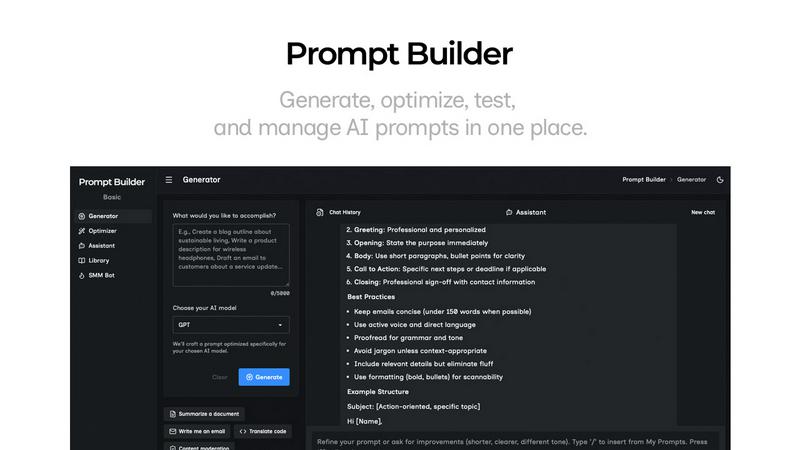
Generate, optimize, test, and manage AI prompts in one place. Turn an idea into a ready-to-use prompt in seconds.
Visual Comparison
dmaya
Prompt Builder
Overview
About dmaya
dMaya is the AI design platform that's finally built for professionals, not hobbyists. In a landscape flooded with tools that skip straight to code, dMaya reclaims the critical design-first workflow. It's a vibe design platform engineered for agencies, product teams, and freelancers who need to visualize, iterate, and get client approval before a single developer writes a line. You describe your vision—a SaaS dashboard, an e-commerce flow, a mobile app—in plain language, and dMaya's AI agent generates polished, professional UI screens in seconds. The magic happens in conversation: you chat with the AI to change colors, swap layouts, adjust typography, or add new sections, with every change rendered instantly. Design tokens ensure visual consistency automatically across every screen. Then, you share a simple preview link for client review and feedback, collapsing a days-long approval cycle into minutes. Once signed off, export clean HTML, CSS, and JS to hand directly to AI coding agents like Cursor or Claude Code for build-out in React, Next.js, Flutter, or any framework. dMaya is the missing link for teams that prioritize intentional design, early problem-solving, and stakeholder alignment to ship with confidence.
About Prompt Builder
Prompt Builder is a prompt engineering workspace for writing, testing, and saving prompts. Describe the task in plain English, and it helps you create a prompt that matches the model you choose. Start with a draft, refine it in chat, save or pin versions, then run them when you are ready. It works with GPT, Claude, Gemini, Llama, Mistral, DeepSeek, Grok, Perplexity, and more. You also get an Optimizer, an assistant for quick tests, and a library of reusable prompts and templates from the community. Turn an idea into a ready-to-use prompt in seconds. Refine it in chat, save it to your Library, and run it anytime.