
documentorium vs Geekflare Connect
Side-by-side comparison to help you choose the right tool.

documentorium
Documentorium instantly creates professional contractor documents and PDFs using AI guided forms.
Last updated: March 26, 2026

Geekflare Connect
Unify your team's AI tools to slash costs and collaborate smarter in one workspace.
Last updated: March 1, 2026
Visual Comparison
documentorium

Geekflare Connect
Feature Comparison
documentorium
Trade-Specific Guided Forms
Forget adapting generic forms. documentorium's library features over 200 templates with fields built specifically for your trade. Whether you're a solar installer detailing panel specs or a plumber listing fixture models, the guided forms ask the right questions in the right order. This eliminates guesswork, ensures you capture all critical job details, and delivers documents that speak your professional language, impressing clients and reducing errors from the very first field.
Instant Professional PDF Generation
The moment you complete a form, documentorium's engine takes over. It instantly compiles your data into a clean, branded, and print-ready PDF document. There is zero manual formatting, no struggling with alignment, and no exporting issues. You get a polished, professional file ready to email to a client or print for the job site in seconds, turning administrative tasks from a chore into a seamless, one-click operation.
Complete Document History & Prefill
Every document you create is automatically saved in your personal history within the platform. This creates a powerful, searchable record of all your jobs. The real magic happens on your next job: the system can intelligently prefill recurring information like your company details, client info, and standard service descriptions. This feature dramatically accelerates document creation for repeat clients or similar service calls, making you exponentially more efficient over time.
All-Access, Simple Subscription
documentorium operates on a straightforward, transparent model. One annual subscription of $99 grants you full, unrestricted access to the entire catalog of over 200 templates across all 26 trade categories. There are no confusing tiers, no per-document fees, and no feature gates. You get everything: quotes, estimates, invoices, contracts, proposals, and more, all for a single, predictable price.
Geekflare Connect
Multi-Model Comparison
Instantly compare responses from cutting-edge models like GPT-5.2, Claude 4.5, and Gemini 3 in a single, side-by-side view. This feature eliminates guesswork, allowing you to pit AI giants against each other to immediately identify the best output for any specific task, from creative writing to complex coding. Make data-driven decisions on which model to use, every single time.
Collaborative Workspaces
Move beyond isolated AI chats. Organize conversations into project-based workspaces, seamlessly add team members, and securely share prompts and chat histories. This fosters alignment across departments, ensures knowledge retention, and creates a centralized hub for all AI-driven initiatives, keeping everyone from product managers to developers on the same page.
Your Private AI Brain
Securely upload your internal documents, PDFs, and data to create a private, contextual knowledge base. The AI models can then reference this proprietary information to generate highly relevant and accurate answers, turning the platform into a custom-trained assistant that understands your business's unique context without exposing sensitive data.
Live Web Access & Prompt Library
Supercharge AI conversations with real-time data. Powered by Parallel, Exa & Firecrawl, this feature gives models live web search capabilities for up-to-the-minute information. Coupled with a curated and shareable prompt library, teams can kickstart any task with proven templates, dramatically accelerating workflow and ensuring high-quality outputs from the start.
Use Cases
documentorium
On-the-Spot Quote Generation
An HVAC technician finishes a diagnostic check at a client's home. Instead of saying "I'll email you a quote later," they pull out their tablet, open documentorium, select the HVAC quote template, and fill in the guided form with the recommended unit, labor costs, and parts. In under two minutes, they generate and hand the client a professional PDF quote on the spot, significantly increasing the likelihood of an immediate approval and booking the job before leaving the property.
Streamlined Inspection Reporting
A home inspector completes a thorough property assessment. Using documentorium's inspection report template, they systematically input findings through trade-specific fields for roofing, electrical, plumbing, and structure. The platform organizes all notes and images into a comprehensive, easy-to-read PDF report. This professional document is instantly delivered to the real estate agent and client, providing clear, actionable data and enhancing the inspector's credibility and efficiency.
Managing Project Changes with Change Orders
A contractor is halfway through a kitchen remodel when the client requests a major appliance upgrade. To formally document the change in scope, cost, and timeline, the contractor uses documentorium's change order template. The guided form ensures all legal and financial details are captured correctly. A professional PDF is generated, signed by both parties, and filed digitally, protecting the business from disputes and ensuring clear communication and proper billing for the added work.
Creating Binding Service Contracts
A roofing company lands a large residential re-roofing project. To protect both parties and outline the project's full scope, payment schedule, and warranties, they use documentorium's contract template for roofers. The guided form includes all necessary clauses and trade-specific terms. The resulting polished, professional contract PDF builds immense trust with the homeowner, sets clear expectations, and provides legal security, allowing the roofer to focus on the work, not the paperwork.
Geekflare Connect
Content Creation & Strategy
Marketing and writing teams can generate drafts using one model, refine tone with another, and fact-check with live web access—all in one workflow. The side-by-side comparison is a game-changer for determining which AI produces the most engaging or brand-aligned content, streamlining the creation of blogs, social posts, and campaign copy.
Technical Development & Support
Developers and SREs can use different models for code generation, debugging, and documentation. Compare a complex code snippet from Claude with one from GPT to find the most efficient solution. Support teams can build a private knowledge base from manuals and tickets to provide instant, accurate technical answers to customer queries.
Enterprise Cost Management & Analytics
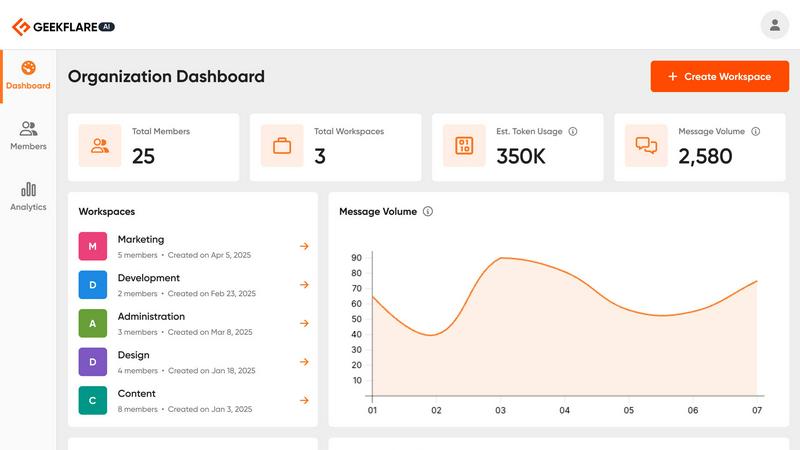
Finance and IT leaders gain a consolidated dashboard to monitor token usage and estimated costs across all connected AI providers (OpenAI, Google, Anthropic, etc.). This visibility is critical for eliminating wasteful spending, forecasting budgets, and demonstrating ROI, enabling large-scale AI adoption without budget overruns.
Cross-Departmental Project Management
Product managers can create a shared workspace for a new feature launch, integrating market research (via live web), drafting PR materials, and generating technical specs with the team. This ensures consistency, secures all AI-generated assets in one place, and provides full audit trails of the AI's role in the project lifecycle.
Overview
About documentorium
Stop wrestling with generic templates and clunky word processors. documentorium is the next-gen document engine engineered exclusively for the trades. This isn't just another form-filler; it's a hyper-specialized toolkit that understands the unique language and workflow of electricians, plumbers, contractors, HVAC techs, roofers, and every service professional in between. The core mission? Obliterate the blank page and the hours wasted on formatting. With a massive library of over 200 guided templates spanning 26 trade categories, documentorium provides the exact professional framework you need. Imagine generating a print-ready, client-worthy PDF for a quote, work order, proposal, or inspection report in literal seconds. Every field is intelligently built for your specific trade, not generic blanks, ensuring accuracy and professionalism from the first click. It's about reclaiming time, elevating your brand, and closing deals faster with a seamless, no-nonsense document workflow that works as hard as you do.
About Geekflare Connect
Stop being locked into a single AI ecosystem. The future of business agility is multi-model, and Geekflare Connect is the BYOK (Bring Your Own Key) platform making it a reality. In an era where AI models are evolving at a breakneck pace, relying on just one provider is a strategic bottleneck. Geekflare Connect shatters that limitation, empowering modern teams to harness the unique strengths of top-tier models from OpenAI, Google, Anthropic, and others—all within one unified, professional workspace. This isn't just another chat interface; it's a centralized command center for your entire organization's AI strategy. Designed for startups to global enterprises, it streamlines collaboration across marketing, sales, development, and support teams. The core value proposition is undeniable: radical flexibility, enhanced productivity, and unprecedented cost control. By consolidating usage and providing deep analytics, businesses can slash their AI spending by up to 65%, turning fragmented AI experiments into a scalable, managed advantage. Geekflare Connect is the essential tool for any team ready to work smarter, compare outputs instantly, and take full control of their AI destiny.
Frequently Asked Questions
documentorium FAQ
Can I cancel my subscription anytime?
Absolutely. You maintain full control and can cancel your subscription directly from your account settings at any time. There are no penalties or lock-in contracts. Your access will remain active until the end of your current billing period, after which you will not be charged again. It's a commitment-free tool designed for your convenience.
What happens to my documents when the free trial ends?
Your data is always safe. When your one-month free trial expires, all the documents you created remain securely stored in your account history. You can view and download them at any time. To create or edit new documents, you would need to activate the paid subscription. No existing work is ever deleted due to a trial ending.
Do I lose access to my old documents if I don't subscribe?
No, you do not lose them. Your document history is preserved. Even without an active subscription, you retain the ability to log in, view, and download all the documents you created during your trial or previous subscription period. Subscribing unlocks the ability to create and edit new documents, but your past work remains accessible.
Does documentorium provide legal advice for contracts?
No. documentorium is a powerful document generation tool that provides professional templates and forms. It is not a substitute for professional legal counsel. The platform is designed to help you create well-structured documents efficiently, but for complex legal matters or to ensure a contract fully complies with local laws, consulting with a qualified attorney is always recommended.
Geekflare Connect FAQ
What is a BYOK (Bring Your Own Key) AI platform?
BYOK means you provide your own API keys from AI providers like OpenAI, Anthropic, or Google. Geekflare Connect does not charge you for AI model usage; instead, it acts as a powerful interface and management layer on top of your existing accounts. You pay the providers directly based on your usage, and Connect helps you optimize and control that spend.
How does Geekflare Connect help reduce AI costs by up to 65%?
The platform reduces costs through consolidation and intelligence. By centralizing all AI activity, it eliminates redundant subscriptions and provides detailed usage analytics. The multi-model comparison feature allows you to choose the most cost-effective model for each task (e.g., using a cheaper model for simple drafts), while the analytics dashboard helps identify and curb inefficient usage patterns across your team.
Is my data safe and private when using Geekflare Connect?
Absolutely. As a BYOK platform, your API keys and conversations are handled with high security standards. When you upload documents for your "Private AI Brain," that data is used to provide context only to your chosen models via your API keys and is not used to train public models. The platform is designed for enterprise-grade security and collaboration.
Can I use it with my entire team?
Yes, Geekflare Connect is built for team collaboration. You can create workspaces, invite team members, and manage their access levels. Features like shared prompt libraries, conversation history, and consolidated cost tracking are specifically designed to enhance team productivity and maintain oversight over group AI usage.
Alternatives
documentorium Alternatives
documentorium is a specialized document engine in the productivity and management category, designed specifically for tradespeople to generate professional PDFs like quotes and invoices from guided templates. Users often explore alternatives for various reasons, including budget constraints, the need for different feature sets like integrated scheduling or CRM, or a preference for a different platform like a mobile-first app or a more comprehensive business suite. When evaluating other options, it's crucial to consider your trade-specific needs. Look for solutions that offer templates and field logic built for your industry, not just generic forms. Also, assess the overall workflow integration, output quality, and whether the tool scales with your business as it grows.
Geekflare Connect Alternatives
Geekflare Connect is a leading BYOK (Bring Your Own Key) AI platform in the productivity and management category. It centralizes access to top AI models like OpenAI and Google, enabling teams to collaborate and manage costs from a single dashboard. Users often explore alternatives for various reasons. Some need a different pricing model or more granular access controls, while others seek integrations with specific project management tools or require advanced features like custom model fine-tuning that may not be available. When evaluating other platforms, focus on core needs. Prioritize solutions that offer true multi-model flexibility, robust collaboration features for your team size, transparent cost analytics, and strong security protocols. The right fit should enhance your workflow without locking you into a single ecosystem.