
Dokta vs Fieldtics
Side-by-side comparison to help you choose the right tool.

Dokta automates document management for SMBs and freelancers, simplifying invoicing, cash flow, and financial tracking in seconds.
Last updated: April 4, 2026

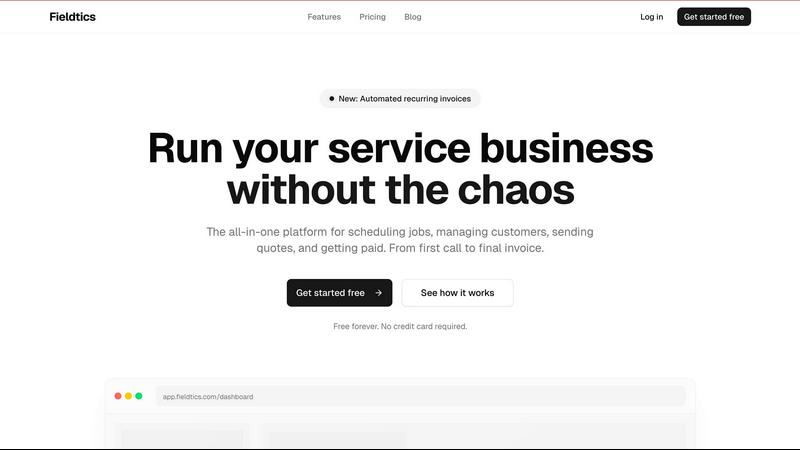
Fieldtics is the AI-powered platform that automates scheduling, invoicing, and operations for modern service businesses.
Last updated: February 28, 2026
Visual Comparison
Dokta

Fieldtics
Feature Comparison
Dokta
Automated Invoice Management
Dokta automates the invoice management process by allowing users to upload any document, such as a photo, scan, or PDF. Within 60 seconds, the AI analyzes the document, extracting vital information like amounts and due dates, which simplifies billing and reduces manual errors.
Real-Time Cash Flow Tracking
Gain insights into your financial status with Dokta's real-time cash flow tracking feature. Users can monitor billed amounts, received payments, outstanding invoices, and VAT, all displayed through a clear and visually appealing 12-month financial chart, making it easier to manage finances effectively.
Client and Supplier Intelligence
Dokta enriches your client and supplier profiles automatically by generating SIRET numbers, scoring payment reliability, and providing a complete transaction history for each entity. This feature helps in assessing relationships and improving payment follow-ups.
Anomaly Detection
Dokta enhances document security with its anomaly detection feature. It identifies potential issues such as modified IBANs, duplicate entries, inconsistent VAT numbers, and missing document numbering, ensuring that your documents remain accurate and compliant.
Fieldtics
Unified Job Scheduling & Dispatch
Fieldtics transforms chaotic scheduling into a visual, intelligent process. Dispatchers can drag-and-drop jobs onto a centralized calendar, instantly assigning them to the right field technician based on location, skill set, and availability. Real-time updates sync across all devices, so the office and field teams are always aligned. Automated reminders and notifications keep everyone on track, reducing missed appointments and optimizing daily routes for maximum productivity and fuel efficiency.
Integrated CRM & Quote Management
Stop losing leads in spreadsheets and emails. Fieldtics features a built-in Customer Relationship Management (CRM) system that acts as a single source of truth for all client interactions. Track every lead, store detailed customer histories, property information, and past service notes. The platform enables you to generate and send professional, branded quotes directly from the system. When a quote is approved, it can be converted into a scheduled job with a single click, creating a seamless pipeline from prospect to paid customer.
Automated Invoicing & Payment Processing
Getting paid faster is critical for cash flow. Fieldtics automates the entire billing cycle. Generate invoices directly from completed job cards and send them to customers instantly via email or SMS. A standout feature is the support for automated recurring invoices for subscription or maintenance contracts, ensuring consistent revenue. Integrated payment processing allows customers to pay online with a click, directly from the invoice, dramatically reducing days sales outstanding (DSO) and administrative chase-up time.
Real-Time Field Mobility & Tracking
Empower your field team with the Fieldtics mobile app, turning any smartphone into a powerful field office. Technicians can access their daily schedule, view job details and customer history, navigate to locations, and log time and materials on-site. They can capture customer signatures, attach photos, and submit completed job reports in real time. This instant data flow provides office managers with live progress tracking, accurate expense logging, and immediate visibility into job completion and profitability.
Use Cases
Dokta
Freelance IT Consultants
For freelance IT consultants, Dokta automates the billing process by generating monthly invoices from time and materials contracts. This allows developers to focus on coding while Dokta handles payment reminders and invoice tracking.
Creative Project Freelancers
Creative professionals can utilize Dokta to manage their projects from the initial quote to final payment. The platform enables them to send quotes with acceptance links, allowing for a seamless transition from estimate to invoice with just one click.
Auto-Entrepreneurs
Auto-entrepreneurs benefit from Dokta's user-friendly features, which ensure that all invoices comply with legal standards. The platform also tracks payments and deadlines, sending alerts for URSSAF due dates, making compliance stress-free.
Small to Medium-Sized Businesses
SMBs can leverage Dokta to streamline their document management processes, from invoicing to contract management. The platform builds an extensive client database and provides real-time insights into cash flow, helping businesses make informed financial decisions.
Fieldtics
Scaling a Residential Cleaning Service
A growing cleaning company uses Fieldtics to manage hundreds of recurring weekly and bi-weekly appointments. The automated recurring invoice feature ensures steady, predictable cash flow. Dispatchers use the smart scheduling board to efficiently assign teams to zones, while cleaners use the mobile app to confirm arrival, log any issues with photos, and collect digital signatures upon completion. This eliminates scheduling conflicts and provides clients with a professional, tech-forward experience.
Managing an Electrical Contractor's Project Pipeline
An electrical contractor juggling multiple large-scale installations and smaller service calls utilizes Fieldtics for end-to-end project management. They create projects for each major job, break them down into tasks with deadlines, and assign them to specific electricians. The CRM holds all client communications and change orders, while the time-tracking feature ensures accurate labor billing. Real-time updates from the field allow the project manager to monitor progress and resource allocation from the office dashboard.
Streamlining a Landscaping Company's Seasonal Operations
A landscaping business faces seasonal peaks with quote requests for spring clean-ups and fall installations. They use Fieldtics to quickly send out branded quotes from templates. Once accepted, jobs are scheduled on a map-based view to optimize crew routing between properties. On-site, crews track material usage (like mulch or plants) against the quote, and managers can approve additional expenses in real time, preventing budget overruns and ensuring accurate client billing.
Centralizing Operations for a Multi-Trade Service Franchise
A franchise owner operating in plumbing, HVAC, and handyman services needs a unified system for all trades. Fieldtics provides a customizable platform where each service line can have tailored job checklists and quote templates. The centralized CRM gives a 360-degree view of each household client, regardless of which service they used last. Integrated reporting provides the owner with a consolidated view of profitability across all trades, enabling data-driven business decisions.
Overview
About Dokta
Dokta is an advanced AI-powered document management platform designed specifically for freelancers, solo entrepreneurs, auto-entrepreneurs, and small to medium-sized businesses (SMBs). It revolutionizes the way users handle their documents by enabling them to drop any document—be it an invoice, quote, or contract—and letting Dokta's sophisticated AI engine read, classify, and extract key data in under 60 seconds. The platform adeptly manages the entire document lifecycle, allowing users to create professional invoices and quotes, track payments, automate reminders for unpaid invoices, and oversee contracts and deadlines seamlessly. With Dokta, users no longer need to worry about lost files or missed deadlines, transforming tedious administrative tasks into a streamlined process. It compiles a comprehensive client database from uploaded documents, offers real-time cash flow tracking, and allows for easy CSV exports for accountants. Whether you are a freelance developer, a consultant, a trades contractor, or a growing SMB, Dokta places your documents at the core of your business operations, all managed efficiently by AI.
About Fieldtics
Fieldtics is the all-in-one operational command center engineered for modern service businesses. It cuts through the daily chaos of managing field teams, customers, and finances by consolidating every essential tool into one intuitive, connected platform. This isn't just another generic project management tool; it's a purpose-built ecosystem for businesses like HVAC, plumbing, electrical, landscaping, and cleaning services. The core value proposition is radical simplicity and synchronization. From the first customer inquiry to the final invoice and payment, Fieldtics streamlines the entire workflow. It empowers business owners and managers with real-time visibility and control, whether they're in the office or on-site, via seamless web and mobile apps. With a strong emphasis on customization and integration, Fieldtics molds itself to your business identity and existing tech stack, automating workflows and centralizing data to eliminate costly errors and delays. In a landscape where operational efficiency is the new currency, Fieldtics provides the clarity and automation needed to scale effectively without the overhead.
Frequently Asked Questions
Dokta FAQ
How does Dokta ensure document security?
Dokta employs AES-256 encryption to safeguard all documents and ensure compliance with GDPR regulations, providing peace of mind that your sensitive data is protected.
What types of documents can I upload to Dokta?
Users can upload a variety of document types, including invoices, quotes, contracts, and receipts in formats such as photos, scans, or PDFs, allowing for versatile document management.
Is there a free trial available for Dokta?
Yes, Dokta offers a free tier that allows users to manage up to 15 documents per month without requiring a credit card, making it easy to try out the platform before committing to a paid plan.
Can I export my data from Dokta?
Absolutely! Dokta allows users to export their client database and financial data in CSV format, making it easy to share with accountants or integrate into other financial tools.
Fieldtics FAQ
Is there a free plan available?
Yes! Fieldtics offers a robust "Starter" plan that is completely free forever with no credit card required to sign up. This plan includes unlimited clients, core job scheduling features, the integrated CRM, and access to both the web and mobile apps. It's designed to allow service businesses to manage essential operations and experience the platform's value before upgrading to a paid tier for more advanced features like invoicing and advanced analytics.
How does Fieldtics handle data integration with other tools?
Fieldtics is built with connectivity in mind. It offers seamless integrations with popular accounting software, payment gateways, and other business tools you likely already use. This allows for automated data syncing, eliminating the need for manual double-entry. For example, invoices created in Fieldtics can sync to your accounting software, and payments processed can automatically update both systems, ensuring your financial data is always centralized and accurate.
Can I customize Fieldtics to match my company's branding?
Absolutely. Fieldtics understands that your software should feel like an extension of your business. The platform allows for deep customization of your client-facing materials. You can upload your company logo, set your brand colors, and customize the layout of invoices, quotes, and email communications. This creates a consistent, professional brand experience for your customers from the first quote to the final receipt.
Is the mobile app available for both iOS and Android?
Yes, the Fieldtics mobile app is available for download on both the Apple App Store (for iOS devices like iPhones and iPads) and Google Play Store (for Android devices). This ensures that all your field technicians, regardless of their preferred mobile operating system, can stay connected, access their schedules, update job statuses, and communicate with the office in real time from anywhere.
Alternatives
Dokta Alternatives
Dokta is an innovative AI-powered document management platform tailored for freelancers, solo entrepreneurs, and small to medium-sized businesses (SMBs). It streamlines the document lifecycle by automating the classification and extraction of key data from various documents like invoices, quotes, and contracts, making it an essential tool for those looking to optimize their administrative tasks. Users often seek alternatives to Dokta for various reasons, including pricing options, specific feature requirements, or the need for different platform integrations that better suit their workflow. When exploring alternatives, it's crucial to consider the features offered, ease of use, scalability, and overall cost-effectiveness. The search for alternatives can often stem from the desire for a solution that aligns more closely with unique business needs. Potential users should evaluate the document automation capabilities, data security measures, and user support that each alternative provides, ensuring that their chosen platform can effectively enhance productivity and streamline document management processes. Finding an alternative that offers robust features at a competitive price while ensuring compliance with data protection regulations is essential for any business.
Fieldtics Alternatives
Fieldtics is a trending all-in-one platform in the service business management category. It consolidates scheduling, CRM, invoicing, and payments into a single, streamlined workflow. Businesses often explore alternatives to find a better fit for their specific budget, required feature depth, or preferred platform ecosystem, especially as new, agile solutions emerge. The search for a different tool is common as operational needs scale and technology evolves. Key drivers include pricing structures, the need for niche integrations, or a desire for a different user experience on mobile versus desktop. The market is constantly shifting with new entrants leveraging AI and automation. When evaluating options, focus on core operational pain points. Prioritize platforms that offer robust mobile capabilities for field teams, transparent and scalable pricing, and strong automation to replace manual tasks. Security and data ownership are also non-negotiable in today's digital landscape.