
Hush Touch | Voice-to-Text for MacOS vs Practical AI (Practical AI for SMB)
Side-by-side comparison to help you choose the right tool.

Hush Touch | Voice-to-Text for MacOS
Hush Touch is offline, on-device AI dictation for Mac that learns your voice for just $20.
Last updated: February 28, 2026

Practical AI (Practical AI for SMB)
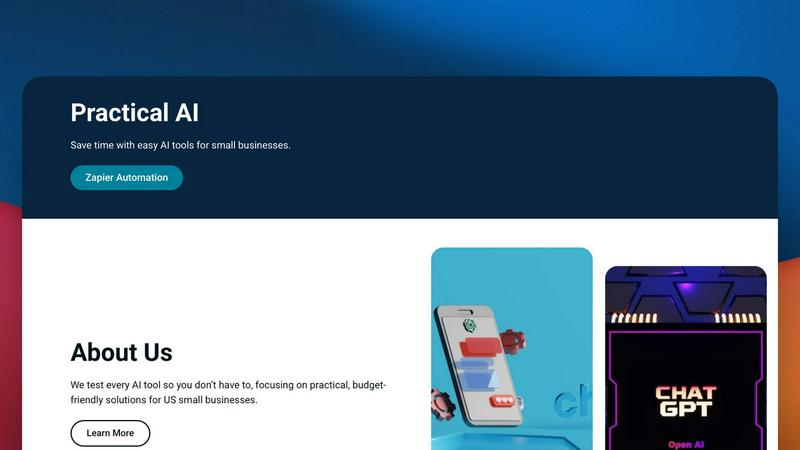
Practical AI delivers tested, budget-friendly automation guides to help small businesses save time and boost efficiency.
Last updated: April 4, 2026
Visual Comparison
Hush Touch | Voice-to-Text for MacOS

Practical AI (Practical AI for SMB)
Feature Comparison
Hush Touch | Voice-to-Text for MacOS
Dual-Engine On-Device Recognition
Hush Touch doesn't rely on a single point of failure. It intelligently blends Apple's DictationTranscriber for natural flow and punctuation with SFSpeechRecognizer to spot your custom vocabulary. This dual-engine approach is then refined by an Apple Intelligence final pass, all executed locally on your Mac. This means superior accuracy for technical terms and everyday speech without the latency or privacy risks of cloud processing. Your voice data never leaves your computer.
Adaptive Custom Vocabulary & Learning
Forget manually adding every industry term. Hush Touch provides a 500-term base and, critically, features auto-learn from corrections. When you fix a transcription, it detects and adds the correct word to your personal vocabulary. This frequency-weighted learning is even boosted per application, meaning it better recognizes your coding jargon in Xcode and your client names in Mail automatically. It learns and evolves with every use.
Smart, Local Text Processing
Experience dictation that thinks ahead. Beyond basic transcription, Hush Touch actively removes filler words ("um," "like"), performs intelligent auto-corrections, and can format numbered lists from your speech. You can also create voice snippets for frequently used phrases. All this smart processing happens in real-time, on your device, ensuring your workflow remains fast and uninterrupted.
Hands-Free Context Modes & Commands
Switch between optimized dictation modes for General writing, Emails, Code, and Notes with ease. Activate dictation completely hands-free by saying "Hey Siri, start touch." The app auto-inserts your text after a pause and can even send messages with voice commands like "okay send message." Double-click your hotkey for Siri-style auto-stop, creating a truly fluid, microphone-like experience.
Practical AI (Practical AI for SMB)
Manually Tested, Real-World Guides
Every automation blueprint, tool review, and step-by-step tutorial is manually tested in live business scenarios before publication. We don't just theorize; we implement the workflows ourselves, ensuring they deliver real results and saving you from costly trial-and-error. This hands-on validation is your guarantee of practical, working solutions.
Industry-Specific Zapier Automation Blueprints
Move beyond generic advice with hyper-targeted automation blueprints designed for specific SMB verticals. Get actionable systems for local couriers, laundromats, landscapers, and more, detailing how to connect apps for dispatch, payment sync, equipment alerts, and customer communications without writing a single line of code.
Hype-Free AI Tool Reviews & Comparisons
We cut through the marketing spin with brutally honest reviews of AI tools and software. Our analysis focuses on practical utility, ease of use, and genuine value for money, helping you make informed decisions without wasting your budget on features your business doesn't actually need.
Ready-to-Deploy Prompts & Workflow Templates
Accelerate your implementation with a library of pre-built, optimized AI prompts and fully mapped workflow templates. These are not just ideas; they are plug-and-play assets you can copy, paste, and customize immediately to start automating tasks like content creation, email responses, and data processing today.
Use Cases
Hush Touch | Voice-to-Text for MacOS
Technical Documentation & Code Comments
Software engineers and developers can dictate complex commands, variable names, and framework terminology like "Kubernetes" or "kubectl" with confidence. The custom vocabulary learning ensures technical jargon is captured perfectly, making it ideal for writing documentation, adding code comments, or drafting project notes without breaking focus to type.
Medical & Legal Note Dictation
For physicians, therapists, and legal professionals, accuracy with specialized terminology is non-negotiable. Hush Touch learns medical diagnoses, drug names, and legal case references, transforming spoken notes into precise text. The 100% on-device processing guarantees patient and client confidentiality, complying with strict privacy regulations.
Content Creation & Freelance Writing
Writers, bloggers, and journalists can draft articles, emails, and social media content hands-free. The smart filler word removal and punctuation create cleaner first drafts, while the ability to speak in a natural, flowing manner helps overcome writer's block. The one-time cost is a major win over subscription-based tools.
Accessible Computing & Ergonomics
For users with RSI, mobility challenges, or anyone seeking a more ergonomic setup, Hush Touch provides a powerful voice-typing solution. The seamless integration with Siri and system-wide hotkeys allows for complete control of text input across any application on the Mac, reducing physical strain and increasing productivity.
Practical AI (Practical AI for SMB)
Automating Local Service Business Operations
Local service businesses like couriers, laundromats, and landscapers use our blueprints to automate critical but repetitive tasks. This includes setting up instant job dispatch from form submissions, syncing remote payments to accounting software, triggering automatic machine repair alerts, and sending proactive customer notifications, all running 24/7.
Scaling Content & Marketing Efforts with AI
Marketing teams and solopreneurs leverage our guides to produce high-quality blog posts, social media content, and SEO-optimized copy at scale using AI tools like ChatGPT. We provide proven prompt frameworks and workflows that maintain brand voice while drastically reducing the time and cost of content creation.
Building a Proactive Customer Service System
Businesses implement our templates to create automated, yet personalized, customer service touchpoints. This includes setting up AI chatbots for initial inquiries, automating follow-up emails based on customer behavior, and syncing support tickets across platforms, ensuring no client falls through the cracks.
Streamlining Internal Admin & Data Workflows
Office managers and founders eliminate manual data entry and administrative drag by following our step-by-step automations. Learn how to automatically compile reports from various sources, manage leads from a central dashboard, and sync calendar appointments across teams, freeing up hours for strategic work.
Pricing Comparison
Hush Touch | Voice-to-Text for MacOS
Hush Touch is available for a single, one-time payment of $20. This purchases a lifetime license for the software with all current and future features, with no subscriptions or recurring fees. The price includes free updates. A fully functional 7-day free trial is available for download to test the app before purchasing.
Practical AI (Practical AI for SMB)
The core educational content, including detailed blog posts, step-by-step guides, automation blueprints, and tool reviews featured on the Practical AI for SMB website, is provided free of charge. This aligns with the mission to make practical AI knowledge accessible to all SMBs without a financial barrier to entry. Users can access this wealth of information at no cost to learn and implement strategies independently.
Overview
About Hush Touch | Voice-to-Text for MacOS
Stop feeding the cloud. The next wave of AI productivity is happening offline, and Hush Touch is leading the charge for macOS users. This isn't just another dictation app; it's a paradigm shift towards private, intelligent, and perpetually learning voice-to-text software. Engineered exclusively for Mac, Hush Touch leverages the untapped power of your device by fusing two native Apple transcription engines with a final Apple Intelligence polish—all processed 100% on-device. The result? A shockingly lightweight 5.5 MB app that delivers cleaner, more accurate text without ever sending your voice data to a server. It's built for professionals, writers, developers, and anyone who values privacy and precision. For a one-time fee, you get a tool that removes filler words, masters your unique vocabulary, and integrates seamlessly into your workflow with hotkeys and Siri commands. This is the end of subscription lock-in and cloud dependency. Hush Touch represents the future: AI that works for you, learns from you, and protects you.
About Practical AI (Practical AI for SMB)
Practical AI for SMB is the definitive, hype-free command center for US small and medium-sized businesses ready to harness automation and artificial intelligence. In a landscape flooded with complex tech jargon and untested promises, this platform cuts straight to what works. It provides meticulously tested, step-by-step guides and blueprints that translate powerful tools like ChatGPT, Claude, and no-code platforms like Zapier into tangible business results. The mission is clear: empower SMB owners, managers, and operators to automate repetitive tasks, streamline core operations, supercharge marketing efforts, and unlock new efficiencies without requiring a technical background or a massive budget. Founded by lead automation specialist Aapt Dubey, who brings firsthand experience from building over 800 real-world workflows, every piece of advice is battle-tested in actual business scenarios. This isn't theoretical; it's a practical toolkit focused on immediate ROI, covering industry-specific automations for local service businesses, AI-driven content creation, customer service bots, and honest reviews that separate the market leaders from the noise. For any SMB feeling left behind by the AI revolution, Practical AI is the essential, trusted co-pilot for sustainable growth.
Frequently Asked Questions
Hush Touch | Voice-to-Text for MacOS FAQ
How does Hush Touch work offline without the cloud?
Hush Touch is engineered to run entirely on your Mac's hardware. It utilizes two built-in Apple speech recognition engines (DictationTranscriber and SFSpeechRecognizer) and performs its AI-enhanced final pass using Apple's on-device Intelligence framework. No audio data is ever uploaded to external servers, enabling full functionality completely offline.
What makes Hush Touch different from macOS's built-in dictation?
While macOS dictation is a basic tool, Hush Touch supercharges it. It combines two engines for better accuracy, adds smart post-processing like filler word removal, learns your personal vocabulary automatically, and offers context-aware modes. It's a dedicated, premium layer of intelligence built on top of the native system capabilities.
Does the app really learn the words I correct?
Yes, its adaptive learning is a core feature. When you manually correct a transcribed word or phrase in your text, Hush Touch detects that correction and automatically adds the intended word to your personal vocabulary. This frequency-weighted learning makes it smarter and more accurate for your specific needs over time.
Is there a trial available before I buy the license?
Absolutely. You can download a full-featured 7-day free trial directly from the Hush Touch website. No credit card is required for the trial, allowing you to test its on-device accuracy, vocabulary learning, and workflow integration thoroughly before committing to the one-time purchase.
Practical AI (Practical AI for SMB) FAQ
Is Practical AI for SMB suitable for someone with zero tech experience?
Absolutely. Our core mission is to democratize AI and automation for non-technical business owners. Every guide is built with a strict, step-by-step methodology, using visual platforms like Zapier that require no coding. We explain concepts in plain language, focusing on the "what to click" and "how to set it up" to ensure anyone can follow along and succeed.
How are your guides and tool reviews different from other tech blogs?
Unlike many blogs that simply aggregate press releases or surface-level opinions, our content is rooted in hands-on, manual testing by an expert with over 800 built workflows. We pressure-test every automation in a real business context and provide honest, budget-conscious assessments. You get battle-tested blueprints, not just theoretical advice.
Do I need a large budget to implement your recommended automations?
No. We specifically prioritize practical, budget-friendly solutions. Many of our core strategies utilize freemium tiers of tools like Zapier, ChatGPT, and other platforms. Our guides show you how to achieve maximum impact with minimal investment, ensuring automation is accessible for bootstrapped and growing SMBs.
What kind of ongoing support or community do you offer?
While we primarily provide comprehensive, self-service guides and resources, our platform is built to be your ongoing reference library. As tools update and new opportunities emerge, we continuously test and publish the latest, most effective strategies. You gain a permanent, up-to-date resource for adapting your automations as your business and technology evolve.
Alternatives
Hush Touch | Voice-to-Text for MacOS Alternatives
Hush Touch | Voice-to-Text for MacOS is a standout in the AI assistant category, offering a powerful, privacy-first dictation tool. It leverages on-device Apple technology to transcribe speech into text offline, making it a go-to for users who prioritize speed and data security in their daily workflow. Users often seek alternatives for various reasons. Some might need a cross-platform solution that works beyond macOS, while others look for different pricing models like subscriptions or free tiers. Feature sets also drive the search, whether it's demand for advanced editing commands, integration with specific apps, or support for multiple languages. When evaluating other options, key considerations include the processing method—cloud-based for power or on-device for privacy—and the overall accuracy and "intelligence" of the transcription. Also, assess how seamlessly the tool fits into your existing apps and whether its command structure aligns with your natural speaking style.
Practical AI (Practical AI for SMB) Alternatives
Practical AI (Practical AI for SMB) is a specialized resource hub in the AI assistants and automation category, designed exclusively for US small and medium-sized businesses. It delivers manually tested, step-by-step guides and workflows that leverage tools like ChatGPT and Zapier to automate operations, marketing, and customer service without technical complexity. Users often explore alternatives for several key reasons. Budget constraints lead some to seek free or lower-cost resources, while others may need content tailored to a specific industry not covered. The desire for different formats, like video tutorials over written guides, or a need for more advanced, technical deep-dives can also prompt a search for other solutions. When evaluating an alternative, focus on practical value over hype. Look for resources that offer real-world, tested applications rather than just theory. Ensure the content matches your specific business type and tech stack, and verify that the guidance is current, as the AI tool landscape evolves rapidly. The goal is to find actionable intelligence that delivers immediate time savings.