
Hush Touch | Voice-to-Text for MacOS vs QuickImg
Side-by-side comparison to help you choose the right tool.

Hush Touch | Voice-to-Text for MacOS
Hush Touch is offline, on-device AI dictation for Mac that learns your voice for just $20.
Last updated: February 28, 2026

QuickImg
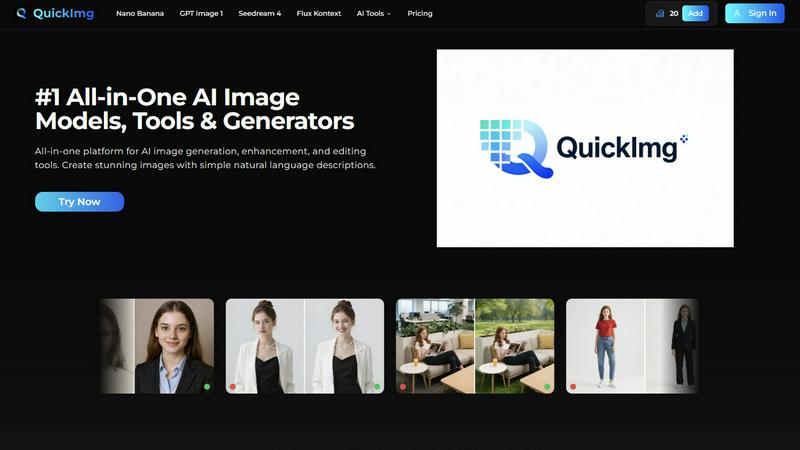
Unleash your creativity with the all-in-one AI platform for generating, enhancing, and editing stunning images.
Last updated: February 28, 2026
Visual Comparison
Hush Touch | Voice-to-Text for MacOS

QuickImg
Feature Comparison
Hush Touch | Voice-to-Text for MacOS
Dual-Engine On-Device Recognition
Hush Touch doesn't rely on a single point of failure. It intelligently blends Apple's DictationTranscriber for natural flow and punctuation with SFSpeechRecognizer to spot your custom vocabulary. This dual-engine approach is then refined by an Apple Intelligence final pass, all executed locally on your Mac. This means superior accuracy for technical terms and everyday speech without the latency or privacy risks of cloud processing. Your voice data never leaves your computer.
Adaptive Custom Vocabulary & Learning
Forget manually adding every industry term. Hush Touch provides a 500-term base and, critically, features auto-learn from corrections. When you fix a transcription, it detects and adds the correct word to your personal vocabulary. This frequency-weighted learning is even boosted per application, meaning it better recognizes your coding jargon in Xcode and your client names in Mail automatically. It learns and evolves with every use.
Smart, Local Text Processing
Experience dictation that thinks ahead. Beyond basic transcription, Hush Touch actively removes filler words ("um," "like"), performs intelligent auto-corrections, and can format numbered lists from your speech. You can also create voice snippets for frequently used phrases. All this smart processing happens in real-time, on your device, ensuring your workflow remains fast and uninterrupted.
Hands-Free Context Modes & Commands
Switch between optimized dictation modes for General writing, Emails, Code, and Notes with ease. Activate dictation completely hands-free by saying "Hey Siri, start touch." The app auto-inserts your text after a pause and can even send messages with voice commands like "okay send message." Double-click your hotkey for Siri-style auto-stop, creating a truly fluid, microphone-like experience.
QuickImg
Multi-Model AI Engine
Access a powerhouse of cutting-edge AI models in one unified dashboard. Choose from trending options like Google's Nano Banana Pro for advanced text rendering, OpenAI's GPT Image 1 for superior multimodal understanding, or ByteDance's Seedream 4 for ultra-fast 4K generation. This feature eliminates the need to juggle multiple subscriptions, letting you select the perfect model for your specific creative task and compare outputs instantly for optimal results.
Natural Language Image Crafting
Generate and edit images using simple, everyday language. This groundbreaking feature removes the barrier of engineering complex prompts. Just describe the scene, style, or edit you envision—like "a cyberpunk cat wearing neon sunglasses" or "make the background a sunset beach"—and QuickImg's AI interprets your command, handling all the technical complexities to bring your vision to life with stunning accuracy and detail.
One-Click Professional Editing Tools
Streamline complex editing workflows with a suite of automated, one-click tools. Instantly remove backgrounds, change clothing with AI fashion editing, erase unwanted text and watermarks, convert images to transparent PNGs, or apply a green screen effect. These tools leverage advanced AI to perform tasks that traditionally required hours in professional software, delivering precision edits in seconds and supercharging your productivity.
Ready-to-Use Template Library
Jumpstart your projects with a vast collection of professionally designed templates for common scenarios. Need a product mockup, a social media banner, or a marketing ad? Browse the template library, select a design that fits, and customize it with your own text and imagery using the platform's intuitive tools. This feature is perfect for maintaining brand consistency and achieving polished results rapidly, even with no prior design experience.
Use Cases
Hush Touch | Voice-to-Text for MacOS
Technical Documentation & Code Comments
Software engineers and developers can dictate complex commands, variable names, and framework terminology like "Kubernetes" or "kubectl" with confidence. The custom vocabulary learning ensures technical jargon is captured perfectly, making it ideal for writing documentation, adding code comments, or drafting project notes without breaking focus to type.
Medical & Legal Note Dictation
For physicians, therapists, and legal professionals, accuracy with specialized terminology is non-negotiable. Hush Touch learns medical diagnoses, drug names, and legal case references, transforming spoken notes into precise text. The 100% on-device processing guarantees patient and client confidentiality, complying with strict privacy regulations.
Content Creation & Freelance Writing
Writers, bloggers, and journalists can draft articles, emails, and social media content hands-free. The smart filler word removal and punctuation create cleaner first drafts, while the ability to speak in a natural, flowing manner helps overcome writer's block. The one-time cost is a major win over subscription-based tools.
Accessible Computing & Ergonomics
For users with RSI, mobility challenges, or anyone seeking a more ergonomic setup, Hush Touch provides a powerful voice-typing solution. The seamless integration with Siri and system-wide hotkeys allows for complete control of text input across any application on the Mac, reducing physical strain and increasing productivity.
QuickImg
Social Media Content Creation
QuickImg is a game-changer for influencers, marketers, and small businesses needing a constant stream of fresh, eye-catching visuals. Generate unique branded graphics, create engaging anime-style avatars, produce stunning promotional art, and design cohesive posts for Instagram, TikTok, and Facebook—all without a design team. The template library and fast generation tools make it possible to keep your feed trending and visually dynamic every single day.
E-commerce & Product Photography
Revolutionize your online store by generating high-quality product images, removing distracting backgrounds with one click, and creating lifestyle scenes for your items. Use the AI to change clothing on models for fashion retailers or upscale product photos to 4K resolution for crystal-clear detail pages. This use case saves thousands on professional photoshoots and allows for rapid A/B testing of different visual styles.
Creative Concepting & Storyboarding
Artists, writers, and game developers can use QuickImg to rapidly visualize concepts and iterate on ideas. Generate characters, environments, and key art scenes from descriptive text to flesh out stories and game worlds. The AI Character Generator and tools like "Pet to Human" provide endless inspiration, while the ability to edit with natural language allows for quick adjustments during the creative brainstorming phase.
Personal Photo Enhancement & Fun
Transform personal photos into extraordinary keepsakes. Turn a family portrait into an anime artwork, remove photobombers or text from a cherished image, replace a dull sky with a dramatic sunset, or create a hilarious version of your pet as a human character. QuickImg makes advanced photo manipulation accessible for personal projects, allowing anyone to create magical, share-worthy memories with ease.
Pricing Comparison
Hush Touch | Voice-to-Text for MacOS
Hush Touch is available for a single, one-time payment of $20. This purchases a lifetime license for the software with all current and future features, with no subscriptions or recurring fees. The price includes free updates. A fully functional 7-day free trial is available for download to test the app before purchasing.
QuickImg
🎉 Limited Time Offer: Get 50% OFF on your first purchase! Use code QI50 at checkout to activate this exclusive discount. Visit the QuickImg website and click "View Offer" for detailed plan information and to start creating with this special promotion.
Overview
About Hush Touch | Voice-to-Text for MacOS
Stop feeding the cloud. The next wave of AI productivity is happening offline, and Hush Touch is leading the charge for macOS users. This isn't just another dictation app; it's a paradigm shift towards private, intelligent, and perpetually learning voice-to-text software. Engineered exclusively for Mac, Hush Touch leverages the untapped power of your device by fusing two native Apple transcription engines with a final Apple Intelligence polish—all processed 100% on-device. The result? A shockingly lightweight 5.5 MB app that delivers cleaner, more accurate text without ever sending your voice data to a server. It's built for professionals, writers, developers, and anyone who values privacy and precision. For a one-time fee, you get a tool that removes filler words, masters your unique vocabulary, and integrates seamlessly into your workflow with hotkeys and Siri commands. This is the end of subscription lock-in and cloud dependency. Hush Touch represents the future: AI that works for you, learns from you, and protects you.
About QuickImg
QuickImg is the definitive, all-in-one platform revolutionizing AI-powered visual creation. It consolidates the entire image workflow—from generation and enhancement to professional editing—into a single, intuitive interface. The core mission is to democratize cutting-edge AI, making it accessible to everyone from creative hobbyists and social media managers to professional designers and marketing teams. Forget complex software and cryptic prompts; QuickImg empowers you to create stunning, high-resolution visuals using simple natural language descriptions or by uploading an image. The platform's powerhouse lies in its curated selection of top-tier AI models, including the hot Nano Banana, the text-savvy GPT Image 1, and the ultra-fast Seedream 4. This multi-model approach ensures you have the right tool for any task, whether it's generating a brand-new concept, upscaling to 4K, removing a watermark, or transforming a photo into anime art. With partnerships with over 50 global tech leaders, QuickImg stands at the forefront of innovation, delivering professional-grade results without the steep learning curve. It's not just a tool; it's your entire creative studio, powered by AI.
Frequently Asked Questions
Hush Touch | Voice-to-Text for MacOS FAQ
How does Hush Touch work offline without the cloud?
Hush Touch is engineered to run entirely on your Mac's hardware. It utilizes two built-in Apple speech recognition engines (DictationTranscriber and SFSpeechRecognizer) and performs its AI-enhanced final pass using Apple's on-device Intelligence framework. No audio data is ever uploaded to external servers, enabling full functionality completely offline.
What makes Hush Touch different from macOS's built-in dictation?
While macOS dictation is a basic tool, Hush Touch supercharges it. It combines two engines for better accuracy, adds smart post-processing like filler word removal, learns your personal vocabulary automatically, and offers context-aware modes. It's a dedicated, premium layer of intelligence built on top of the native system capabilities.
Does the app really learn the words I correct?
Yes, its adaptive learning is a core feature. When you manually correct a transcribed word or phrase in your text, Hush Touch detects that correction and automatically adds the intended word to your personal vocabulary. This frequency-weighted learning makes it smarter and more accurate for your specific needs over time.
Is there a trial available before I buy the license?
Absolutely. You can download a full-featured 7-day free trial directly from the Hush Touch website. No credit card is required for the trial, allowing you to test its on-device accuracy, vocabulary learning, and workflow integration thoroughly before committing to the one-time purchase.
QuickImg FAQ
What AI models are available on QuickImg?
QuickImg provides access to a curated selection of the world's leading AI image models in one platform. This includes hot models like Nano Banana and Nano Banana Pro from Google, GPT Image 1 from OpenAI, Seedream 4 from ByteDance, and Flux Kontext for precise editing. This multi-model approach ensures you always have the best and most suitable technology for any generation or editing task.
Do I need to know how to write AI prompts?
Absolutely not. QuickImg is designed with a natural language interface, meaning you can simply describe what you want in plain English (or other supported languages). Instead of technical prompt engineering, just type your creative idea, like "a minimalist logo of a mountain for a coffee shop," and the AI will interpret and generate the image accordingly. It's built for creativity, not complexity.
Can I edit my existing images with QuickImg?
Yes, image editing is a core strength of QuickImg. You can upload any image and use natural language to instruct edits (e.g., "change the shirt color to blue") or utilize the one-click tools for instant transformations. These tools include background removal/changing, watermark removal, AI upscaling, clothes changing, and converting photos to anime style, among many others.
What is the quality of the generated images?
QuickImg is engineered for professional-quality output. Supported by models like Seedream 4 and Nano Banana Pro, you can generate and upscale images up to 4K resolution with exceptional detail and clarity. The platform is trusted by global partners and is built to deliver results suitable for marketing materials, high-resolution prints, and professional digital content.
Alternatives
Hush Touch | Voice-to-Text for MacOS Alternatives
Hush Touch | Voice-to-Text for MacOS is a standout in the AI assistant category, offering a powerful, privacy-first dictation tool. It leverages on-device Apple technology to transcribe speech into text offline, making it a go-to for users who prioritize speed and data security in their daily workflow. Users often seek alternatives for various reasons. Some might need a cross-platform solution that works beyond macOS, while others look for different pricing models like subscriptions or free tiers. Feature sets also drive the search, whether it's demand for advanced editing commands, integration with specific apps, or support for multiple languages. When evaluating other options, key considerations include the processing method—cloud-based for power or on-device for privacy—and the overall accuracy and "intelligence" of the transcription. Also, assess how seamlessly the tool fits into your existing apps and whether its command structure aligns with your natural speaking style.
QuickImg Alternatives
QuickImg is a leading AI assistant platform focused on image generation, enhancement, and editing. It simplifies creating professional visuals using natural language and a suite of powerful AI models like Nano Banana and GPT Image 1. This places it squarely in the competitive and rapidly evolving category of AI-powered creative tools. Users often explore alternatives for various reasons, including specific budget constraints, the need for different feature sets, or compatibility with other platforms in their workflow. Some may seek tools with a stronger focus on a particular niche, like vector graphics or advanced photo realism, that better match their project requirements. When evaluating other options, key factors to consider are the core AI capabilities, output quality and resolution, ease of use, and integration potential. It's also crucial to assess the pricing model transparency and whether the tool's strengths align with your primary use cases, be it social media content, marketing materials, or personal art projects.