
ImaginePro vs Img Editor
Side-by-side comparison to help you choose the right tool.

ImaginePro
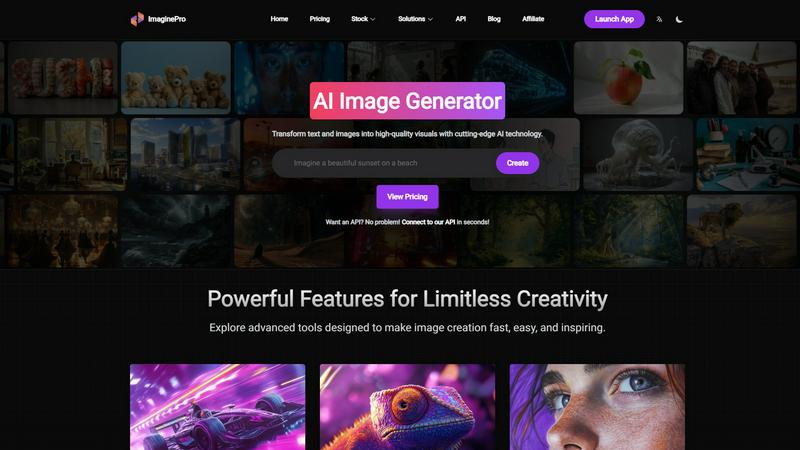
ImaginePro transforms your text and ideas into stunning high-resolution images in seconds with advanced AI technology.
Last updated: March 1, 2026

Img Editor
Transform your text prompts into stunning AI-generated images in seconds with Img Editor's advanced technology.
Last updated: February 28, 2026
Visual Comparison
ImaginePro
Img Editor

Feature Comparison
ImaginePro
Instant Masterpieces
Create professional-quality images in seconds using top-tier AI models. Whether for social media posts, marketing materials, or personal projects, this feature guarantees stunning results that captivate audiences.
Creative Control
With precise style references, color adjustments, and special effects, users can fine-tune their images to match their vision. This level of control ensures that every detail is tailored to perfection, enhancing the overall impact of the visuals.
High-Quality Images
ImaginePro specializes in generating lifelike, high-resolution images that stand out in any context. Ideal for commercial use or polished personal projects, these images are ready for immediate deployment without further editing.
Background Removal
Effortlessly eliminate backgrounds from your images with this powerful feature. It is perfect for creating product images for e-commerce, professional headshots, and compelling social media content, allowing for clean and focused visuals.
Img Editor
Text-to-Image Generation
Img Editor's core feature allows users to input text descriptions and instantly generate stunning images. This feature leverages advanced AI algorithms to interpret user prompts, resulting in high-quality visuals that reflect the user's imagination and creativity.
Image Editing Capabilities
Beyond just generating images, Img Editor provides robust editing tools that allow users to refine and customize their creations. Users can adjust various aspects of their images, including colors, textures, and effects, ensuring that every detail aligns with their artistic vision.
Prompt Generator
The integrated prompt generator helps users craft effective and inspiring descriptions for their desired images. By suggesting keywords and phrases, this feature enhances the creative process, making it easier for users to convey their ideas clearly and effectively.
High-Quality Output Options
Img Editor offers multiple resolution settings, including 1K, 2K, and 4K ultra-quality options. This flexibility allows users to choose the best quality for their projects, catering to professionals who require high-resolution images for print and digital media.
Use Cases
ImaginePro
Social Media Content Creation
ImaginePro enables marketers and influencers to generate eye-catching visuals tailored for social media platforms. With the ability to create unique images quickly, users can maintain a consistent and engaging online presence.
E-commerce Product Images
Retailers can produce high-quality product images that highlight their offerings without the hassle of complex editing. This feature enhances online shopping experiences by providing clear, appealing visuals for potential customers.
Graphic Design Projects
Designers can leverage ImaginePro to create stunning graphics for various projects, from posters to brochures. The intuitive interface allows for seamless integration of unique elements, elevating the overall design quality.
Digital Art and Photo Manipulation
Artists and photographers can explore new creative avenues by utilizing ImaginePro to manipulate photos and generate digital art. The advanced AI capabilities offer endless possibilities for artistic expression.
Img Editor
Artistic Creation
Artists can utilize Img Editor to create original artworks from simple text prompts, enabling them to explore new styles and concepts without the limitations of traditional tools. This feature fosters creativity and experimentation, making it an ideal resource for digital artists.
Marketing and Advertising
Marketers can generate eye-catching visuals for campaigns and social media posts quickly. With Img Editor, they can create tailored graphics that resonate with their audience, all while saving time and resources typically spent on conventional design processes.
Content Creation
Content creators can enhance their blogs or videos with unique visuals generated through Img Editor. By transforming ideas into images, they can make their content more engaging and visually appealing, helping to attract and retain the attention of their audience.
Education and Training
Educators can leverage Img Editor to create illustrative materials for their lessons. Whether it's designing infographics or visual aids, the platform provides an efficient way to produce educational content that enhances learning and comprehension.
Overview
About ImaginePro
ImaginePro is a revolutionary AI image generator that empowers users to convert their ideas into breathtaking visuals in mere seconds. Designed with cutting-edge artificial intelligence technology, this tool caters to a diverse range of professionals including designers, marketers, and creative enthusiasts. ImaginePro facilitates the creation of high-resolution images while offering features such as background removal and text placement behind subjects, making it an all-in-one solution for visual content creation. The user-friendly interface simplifies the design process, allowing even beginners to produce professional-quality images effortlessly. With applications in social media, e-commerce, and various design projects, ImaginePro serves as an essential asset for anyone aiming to enhance their visual storytelling. The flexible pricing plans—including Free, Standard, and Premium—enable users to select an option that best meets their needs, ensuring access to professional-quality images ready for commercial use without the burden of extensive editing.
About Img Editor
Img Editor is an innovative AI image generator that is revolutionizing the world of digital art creation. This free platform empowers users by transforming text descriptions and existing images into high-quality, professional-grade visuals. Whether you are an artist, designer, marketer, or content creator, Img Editor caters to your creative needs without the traditional financial barriers associated with AI art tools. The platform offers a unique value proposition: unlimited creative potential without subscription fees. Users can enjoy 10 free image generations daily, with additional opportunities to earn bonus credits. By integrating intuitive text-to-image generation with powerful image-editing features, Img Editor serves as a comprehensive toolkit for anyone looking to bring their visual concepts to life, from photorealistic landscapes to abstract designs.
Frequently Asked Questions
ImaginePro FAQ
What types of images can I create with ImaginePro?
ImaginePro allows users to create a wide array of images, including social media graphics, product photos, digital art, and marketing materials. Its versatility caters to various creative needs.
Is ImaginePro suitable for beginners?
Yes, ImaginePro is designed with a user-friendly interface that simplifies the image creation process. Beginners can easily navigate the platform and produce high-quality visuals without prior experience.
Can I remove backgrounds from images using ImaginePro?
Absolutely! ImaginePro includes a background removal feature that allows users to effortlessly eliminate backgrounds from their images, making it ideal for product photography and other applications.
Are there different pricing plans available for ImaginePro?
Yes, ImaginePro offers flexible pricing plans—Free, Standard, and Premium—to accommodate different user needs. Each plan provides access to powerful features, ensuring users can choose the best fit for their requirements.
Img Editor FAQ
How many images can I generate for free each day?
Users can generate up to 10 images for free every day. This allows ample opportunity to explore Img Editor's capabilities without any financial commitment.
Can I edit the images generated by Img Editor?
Yes, Img Editor includes robust image editing tools that allow users to customize their creations. Users can adjust colors, add effects, and refine details to achieve their desired look.
Is there a limit to the quality of images I can generate?
Img Editor offers various output quality settings, including 1K, 2K, and 4K. Users can choose the resolution that best fits their project needs, ensuring flexibility for both digital and print uses.
How can I earn additional generations beyond the daily limit?
Users have opportunities to earn unlimited bonus credits through various activities, including submitting images to the gallery for review. This allows for more creative exploration without hitting a daily cap.
Alternatives
ImaginePro Alternatives
ImaginePro is a state-of-the-art AI image generator that excels in transforming your ideas into stunning, high-resolution visuals in just seconds. As a leader in the image and photo category, it harnesses advanced artificial intelligence to cater to designers, marketers, and creative professionals alike. Users often seek alternatives to ImaginePro for reasons such as pricing structures, specific feature sets, or compatibility with their unique platform needs. When searching for an alternative, it’s essential to consider factors like image quality, user interface, customization options, and the range of use cases supported. An ideal alternative should not only meet your specific creative requirements but also offer a balance between functionality and cost that aligns with your project demands.
Img Editor Alternatives
Img Editor is an innovative AI image generator that falls under the category of image and photo editing tools. This platform allows users to create stunning visuals from text prompts or modify existing images, making it a powerful resource for artists, designers, marketers, and anyone interested in visual content. Users commonly seek alternatives to Img Editor for various reasons, such as pricing models, feature sets, and compatibility with specific platforms or devices. When evaluating alternatives, it’s essential to consider the range of creative tools offered, user-friendly interfaces, and any unique functionalities that may enhance the overall experience. With the growing popularity of AI-driven creative tools, individuals often look for options that provide similar capabilities to Img Editor without the constraints of subscription fees or limited access. It’s crucial to assess the quality of output, the flexibility of editing features, and the community and support available for users. Exploring these factors can help users find an alternative that best suits their artistic needs and enhances their creative journey.