
Marauder Bot vs Prompt Builder
Side-by-side comparison to help you choose the right tool.

Marauder Bot
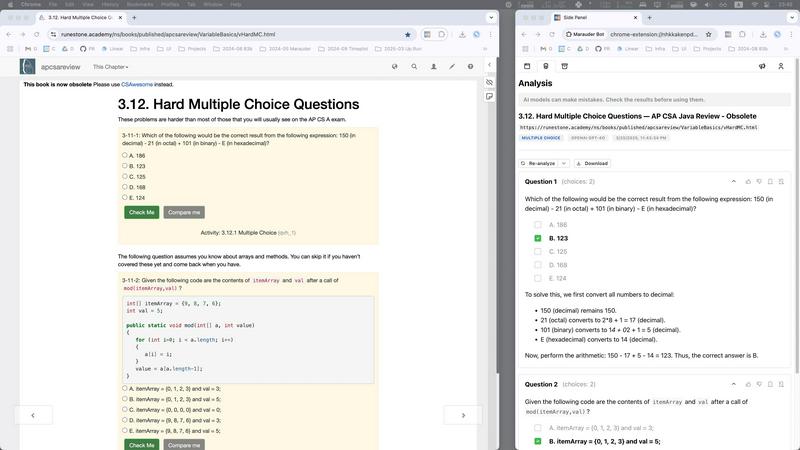
Marauder Bot is a stealth Chrome extension that instantly solves technical questions, enhancing your interview prep.
Last updated: March 1, 2026

Prompt Builder
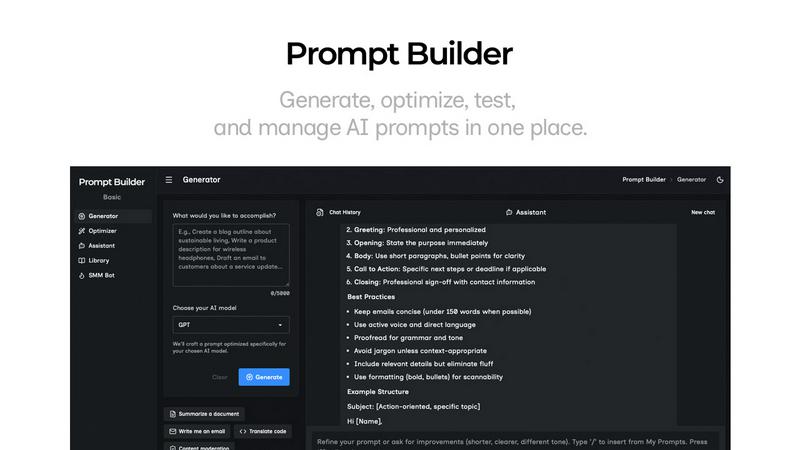
Generate, optimize, test, and manage AI prompts in one place. Turn an idea into a ready-to-use prompt in seconds.
Visual Comparison
Marauder Bot
Prompt Builder
Overview
About Marauder Bot
Marauder Bot is a cutting-edge AI-powered Chrome extension designed to revolutionize the approach to tackling technical questions encountered online. Targeted specifically at software developers, engineers, and tech enthusiasts, this innovative tool serves as a highly intelligent assistant that operates within a side panel, enhancing your browsing experience. By automatically identifying and displaying all open web pages, Marauder Bot allows users to swiftly select any page for in-depth technical analysis. Whether you're faced with multiple-choice questions or complex algorithmic challenges, this tool leverages advanced AI models to parse content, pinpoint relevant queries, and deliver detailed solutions complete with step-by-step explanations. The primary value proposition of Marauder Bot lies in its capability to significantly reduce the time spent during interview preparation, empowering users to concentrate on refining their skills instead of becoming mired in problem-solving complexities.
About Prompt Builder
Prompt Builder is a prompt engineering workspace for writing, testing, and saving prompts. Describe the task in plain English, and it helps you create a prompt that matches the model you choose. Start with a draft, refine it in chat, save or pin versions, then run them when you are ready. It works with GPT, Claude, Gemini, Llama, Mistral, DeepSeek, Grok, Perplexity, and more. You also get an Optimizer, an assistant for quick tests, and a library of reusable prompts and templates from the community. Turn an idea into a ready-to-use prompt in seconds. Refine it in chat, save it to your Library, and run it anytime.