
Mod vs Skene
Side-by-side comparison to help you choose the right tool.
Mod accelerates your SaaS app development with a robust CSS framework and a library of ready-to-use UI components.

Skene automates your product's growth by optimizing onboarding and retention with seamless code integration.
Last updated: February 28, 2026
Visual Comparison
Mod
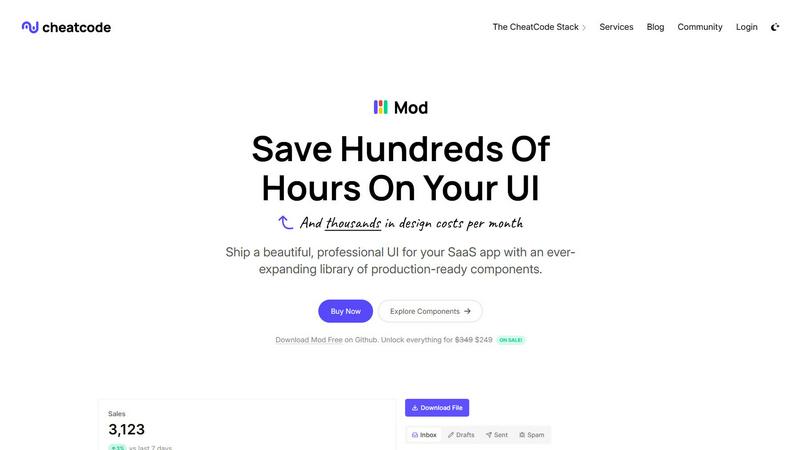
Skene

Feature Comparison
Mod
Extensive Component Library
Mod boasts a comprehensive library with over 88 components ready to be utilized. This allows developers to rapidly assemble user interfaces without reinventing the wheel, ensuring consistency and quality across their applications.
Customizable Styles
With 168 unique styles, Mod provides extensive customization options to fit any brand or application aesthetic. Developers can easily tweak these styles to maintain brand identity while saving valuable time on design.
Dark Mode Support
In today's digital landscape, dark mode is a must-have feature for applications. Mod's built-in dark mode support allows users to toggle between light and dark themes seamlessly, enhancing user experience and accessibility.
Framework-Agnostic Functionality
One of Mod's greatest strengths is its framework-agnostic nature. Whether you're building with React, Vue, or even traditional frameworks like Rails and Django, Mod integrates smoothly, allowing developers to focus on coding rather than compatibility issues.
Skene
Automated User Behavior Analysis
Skene leverages advanced algorithms to analyze user interactions within your product, identifying pain points and opportunities for improvement. This feature allows for continuous optimization of the user journey, ensuring that every interaction is geared towards maximizing activation and retention.
Codebase Integration
Unlike traditional tools, Skene seamlessly integrates with your existing codebase. By requiring only read-only access, it automatically generates onboarding flows and analytics, ensuring that updates occur in real-time with every code push, eliminating the need for manual maintenance.
Outcome-Based Pricing
Skene's pricing model is designed to align with your success. You only pay when customers successfully complete their onboarding journey, making it a risk-free investment for startups. The free tier allows for 5 completed onboardings per month, offering an accessible entry point.
Real-Time Analytics Dashboard
With Skene, you gain access to a comprehensive analytics dashboard that provides real-time insights into user progress and engagement metrics. This feature allows you to track completion rates and identify bottlenecks in the onboarding process, enabling data-driven optimizations.
Use Cases
Mod
Rapid SaaS Development
For startups and individual developers, Mod accelerates the process of building SaaS applications. Its pre-built components and styles allow teams to focus on functionality rather than design, speeding up time-to-market.
Custom Dashboards
With Mod's extensive component library, developers can create customizable dashboards tailored to specific user needs. This flexibility empowers teams to provide unique insights and analytics to their clients.
E-Commerce Platforms
Mod can be utilized to design e-commerce platforms that are responsive and visually appealing. The ability to integrate dark mode and customize styles ensures that online stores can cater to diverse customer preferences.
Portfolio Websites
Freelancers and agencies can leverage Mod to build stunning portfolio websites. The rich library of components and icons enables them to showcase their work in a polished and professional manner, attracting more clients.
Skene
Streamlining Onboarding Processes
Skene helps startups streamline their onboarding by automatically generating tailored user flows that guide new users through crucial features. This reduces the time it takes for users to realize the value of the product, enhancing initial engagement.
Enhancing Customer Retention
By continuously analyzing user behavior, Skene identifies patterns that lead to churn and provides actionable insights to retain customers. This proactive approach allows businesses to implement strategies that keep users engaged and satisfied over time.
Optimizing Activation Rates
Skene’s automated user behavior analysis detects activation drop-offs, enabling developers to refine user flows. This optimization is crucial for increasing the percentage of users who achieve meaningful outcomes within the product, driving overall growth.
Supporting Indie Developers
For indie developers with limited resources, Skene acts as a growth partner, automating the complexities of user engagement. This empowers them to focus on product development while Skene takes care of the growth strategies, ensuring they can compete effectively in the market.
Overview
About Mod
Mod is a cutting-edge CSS framework tailored for SaaS user interfaces, designed to optimize the development process for both solo developers and teams. With a robust suite of over 88 components and 168 styles at your fingertips, Mod empowers you to create visually stunning applications without the hassle of tedious design work. It seamlessly integrates with a myriad of frameworks including Next.js, Nuxt, Vite, Svelte, Rails, and Django, making it a versatile choice for modern web development. The standout features include dark mode support, responsive and mobile-first design, and an extensive library of 1,500+ icons. Mod not only simplifies the design phase but also accelerates deployment, enabling developers to ship polished SaaS applications faster while significantly reducing design costs. With straightforward pricing and yearly updates, Mod is the perfect ally for anyone looking to elevate their SaaS projects.
About Skene
Skene is a groundbreaking, fully automated Product-Led Growth (PLG) iteration engine tailored for indie developers and early-stage startups aiming for scalability without the overhead of a dedicated growth team. By tapping into an innovative methodology of user behavior analysis, Skene continuously refines onboarding, activation, and retention strategies, deriving insights directly from customer interactions with your product. The platform autonomously identifies friction points and activation drop-offs, enabling it to create and test optimized user flows. This self-optimizing mechanism not only enhances the onboarding experience but also streamlines activation and augments retention loops over time. As a self-learning growth engine, Skene allows developers to delegate the tedious aspects of growth while offering startups an all-in-one "growth team in a box." This makes Skene an indispensable tool for PLG companies seeking to enhance activation and extend customer lifetime value without necessitating additional personnel.
Frequently Asked Questions
Mod FAQ
What is Mod and who can use it?
Mod is a CSS framework designed specifically for SaaS user interfaces. It is ideal for solo developers, startups, and teams looking to streamline their design processes and create high-quality, responsive applications.
How does Mod support dark mode?
Mod includes built-in features that allow users to easily switch between light and dark themes. This capability enhances user experience and accessibility, catering to different preferences in visual design.
Can Mod be used with any framework?
Yes, Mod is framework-agnostic, meaning it can be integrated with various modern frameworks such as Next.js, Nuxt, Vite, Svelte, Rails, and Django, among others. This makes it a versatile choice for any development team.
What are the benefits of using Mod for SaaS applications?
Using Mod helps developers save time and reduce design costs by providing a rich library of components and styles. This means faster deployment of polished applications, which is crucial for staying competitive in the SaaS market.
Skene FAQ
What is PLG software?
PLG (Product-Led Growth) software is designed to facilitate user discovery of value within a product without relying on manual efforts from sales or customer success teams. It automates the user journey, enhancing activation, feature adoption, and retention directly through the product experience.
How is Skene different from traditional customer experience software?
Traditional customer experience tools often require manual setups and maintenance, relying on fragile UI overlays. In contrast, Skene automates the creation of onboarding and lifecycle processes by analyzing your codebase, ensuring that everything updates seamlessly with new deployments.
How long does it take to set up?
Setting up Skene is incredibly quick, taking less than 60 seconds. Simply connect your GitHub or GitLab repository in read-only mode, and Skene will analyze your codebase to generate effective PLG flows without any need for code alterations.
Is my code secure?
Yes, Skene prioritizes security by requiring only read-only access to your code repository. The analysis occurs in a secure and isolated environment, ensuring that your code remains protected throughout the process.