
Kling 5 vs Nano Photo
Side-by-side comparison to help you choose the right tool.

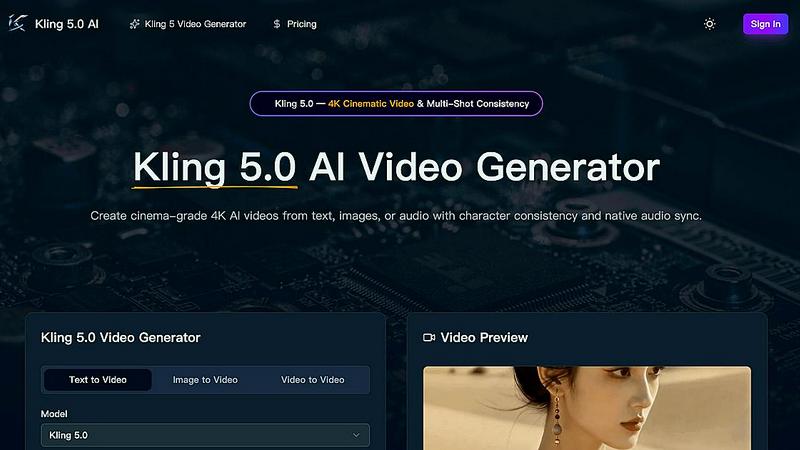
Kling 5.0 is the AI video generator creating cinematic 4K clips with consistent characters and native audio sync from text or images.
Last updated: April 13, 2026

Unleash your creativity with simple AI photo and video editing tools at half price.
Last updated: March 1, 2026
Visual Comparison
Kling 5
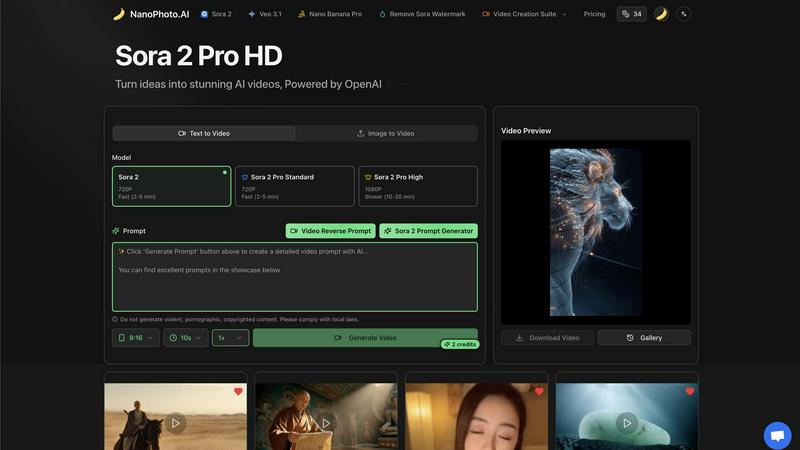
Nano Photo
Feature Comparison
Kling 5
4K Cinematic Video Generation
Kling 5.0's core engine generates videos up to 15 seconds long in breathtaking 4K resolution directly from text descriptions. It doesn't just create moving images; it renders scenes with a professional cinematic look, complete with realistic lighting, atmospheric effects, and nuanced textures that make every output broadcast-ready. This feature ensures your content stands out with maximum visual impact on any platform, from YouTube to digital billboards.
Omni Subject Library for Multi-Shot Consistency
This is a game-changer for serialized content. The Omni Subject Library allows you to "lock" a character's facial features, proportions, and style across an unlimited number of shots and camera angles. Whether you're producing an episodic series, a product campaign, or a storyboard, your subjects remain perfectly consistent, eliminating the uncanny variability that plagues other AI generators and enabling true narrative continuity.
Native Audio Generation & Phoneme-Level Lip-Sync
Kling 5.0 goes beyond silent clips by generating synchronized audio natively. It produces dialogue, ambient sound, and Foley effects in one pass. Most impressively, it features advanced lip-sync technology that matches mouth movements at the phoneme level across five languages: English, Chinese, Japanese, Korean, and Spanish. This creates remarkably natural-looking speaking characters with emotion-matched expressions.
Advanced Physics & Motion Control
Powered by a sophisticated physics engine, Kling 5.0 simulates natural movement for complex elements like flowing water, billowing fabric, flickering fire, and human anatomy. Furthermore, you can control cinematic camera movements—such as precise zooms, pans, tilts, and orbital shots—directly through text prompts, giving you directorial control over the dynamic flow of every generated scene.
Nano Photo
Sora 2 Pro HD Video Generation
🔥 TRENDING NOW: Direct access to OpenAI's groundbreaking Sora 2 technology. This feature allows you to turn simple text descriptions or an initial image into high-definition, coherent video sequences. Choose from different tiers like Sora 2 Pro Standard for speed or Sora 2 Pro High for stunning 1080P detail. It's the power of next-gen AI video synthesis, simplified into a single click, putting Hollywood-grade simulation in the hands of every user.
AI-Powered Prompt Engineering Suite
💡 THE PROMPT IS THE NEW CODE: Mastering AI requires mastering the prompt. Nano Photo's integrated suite includes a Sora 2 Prompt Generator for crafting perfect video descriptions and a Video Reverse Prompt tool to analyze existing content. This feature is essential for iterating quickly, understanding what works, and consistently generating the precise visual style and action you envision, maximizing the output of the AI models.
Nano Banana Pro & Watermark Removal
⚡ GO PRO, GO CLEAN: This feature set includes access to the advanced "Nano Banana Pro" model and a crucial tool to Remove Sora Watermark from your generated content. It's about owning your final product and achieving a polished, professional look suitable for public distribution and commercial use, ensuring your AI-generated videos are clean, branded, and ready for any platform.
All-in-One Video Creation Suite
🎬 CONSOLIDATE YOUR WORKFLOW: Why switch between ten different apps? Nano Photo consolidates the entire creative process. From initial idea generation with prompt tools, to rendering with top AI models, to final tweaks like watermark removal, it's all in a single, cohesive dashboard. This unified approach drastically cuts down production time, reduces costs from multiple subscriptions, and streamlines project management.
Use Cases
Kling 5
Prototyping for Film & Animation
Filmmakers and animators can rapidly visualize scenes, test concepts, and create dynamic storyboards without costly production setups. Generate multiple 4K shots with consistent characters and realistic physics to pitch ideas, plan sequences, or create compelling pre-visualization assets that capture the full cinematic vision for stakeholders and teams.
Viral Social Media & Marketing Content
Marketing teams and content creators can produce a high volume of stunning, platform-optimized videos for campaigns. Quickly generate eye-catching ads, product showcases, or brand story snippets with native audio and perfect lip-sync for international markets. The ability to maintain character consistency is perfect for serialized ad campaigns or influencer avatars.
Game Development & Interactive Media
Game developers can use Kling 5.0 to create realistic cutscenes, animate character portraits, or simulate in-game environments. The physics-driven nature scenes and fluid motion are ideal for prototyping game mechanics or creating promotional trailers, providing high-quality assets that enhance storytelling and player immersion without a full render farm.
Educational & Explainer Video Production
Educators and corporate trainers can transform scripts or story outlines into engaging animated explainer videos. The image-to-video feature can bring diagrams and illustrations to life, while the clear, lip-synced audio generation in multiple languages makes it a powerful tool for creating accessible learning materials and training modules for a global audience.
Nano Photo
Viral Social Media Content Creation
📈 For influencers and social media managers, speed and trend-jacking are everything. Use Nano Photo to rapidly generate eye-catching, unique video clips for TikTok, Instagram Reels, and YouTube Shorts based on trending topics or sounds. Transform a simple concept into a engaging visual story in minutes, not days, to stay ahead of the algorithm and captivate your audience.
Agile Marketing & Advertising
🎯 Marketing teams can prototype ad concepts, create product demo videos, and generate branded visual assets without needing a full production crew or lengthy shoot schedules. Test multiple creative directions for a campaign with minimal resource expenditure, allowing for data-driven creative decisions and incredibly fast go-to-market strategies for digital ads.
Concept Visualization & Storyboarding
🎨 Filmmakers, game developers, and writers can use Nano Photo to breathe life into their ideas. Generate visual concepts for characters, scenes, or environments directly from a script description. Create dynamic storyboards and mood videos to pitch ideas, secure funding, or align creative teams, making abstract concepts tangible and compelling.
Educational & Explainer Content
🧠 Educators, course creators, and corporate trainers can produce complex explanatory videos easily. Visualize historical events, scientific processes, or software tutorials by describing them in plain language. This makes learning materials more engaging and accessible, helping to explain difficult topics through high-quality, custom-generated visuals.
Overview
About Kling 5
Kling 5.0 isn't just another AI video tool—it's a seismic shift in digital content creation, shattering the barriers between imagination and cinematic reality. This next-generation AI video generator is engineered to transform simple text prompts, images, or audio into stunning, broadcast-ready 4K video clips in seconds. Forget wrestling with complex editing suites or managing multi-software pipelines; Kling 5.0 delivers a professional-grade production studio accessible through your browser. It's built for a new wave of creators: visionary filmmakers prototyping scenes, savvy marketers crafting viral ads, social media influencers demanding consistent character content, and indie developers generating dynamic game cutscenes. Its core value proposition is unprecedented creative control paired with radical simplicity. By mastering advanced physics simulation, multi-shot character consistency, and native multilingual audio sync, Kling 5.0 empowers anyone to produce videos with a level of polish, realism, and narrative coherence that was previously exclusive to high-budget studios. This is the tool that democratizes cinematic storytelling.
About Nano Photo
🚨 BREAKING THE CREATIVE BARRIER: Nano Photo (NanoPhoto.AI) is the all-in-one AI creative suite that's democratizing high-end visual production. This isn't just another editing tool—it's a full-stack generative platform powered by the latest frontier models like Sora 2 and Veo 3.1. Designed for the fast-paced creator economy, it instantly transforms text prompts and images into stunning, professional-grade videos and graphics. Whether you're a solo content creator, a marketing team on a deadline, or a business building its brand, Nano Photo eliminates the technical friction and exorbitant costs traditionally associated with premium visual content. Its core value proposition is crystal clear: unprecedented accessibility to cutting-edge AI video and image generation, wrapped in a user-friendly interface that delivers rapid results. This is about unleashing potential without the steep learning curve or budget.
Frequently Asked Questions
Kling 5 FAQ
What is the maximum video length Kling 5.0 can generate?
Kling 5.0 AI can generate video clips up to 15 seconds in duration per generation. This length is ideal for crafting concise, impactful scenes for social media, advertisements, or as building blocks for longer sequences using the multi-shot consistency feature to maintain narrative flow.
How does the character consistency feature work?
The feature utilizes the Omni Subject Library. You define a subject (like a character or object) in one prompt, and Kling 5.0 creates a unique reference model. In subsequent prompts, you reference this model to generate new shots from different angles or scenes, and the AI will keep the subject's core appearance identical, ensuring visual continuity.
Which languages are supported for lip-sync?
Kling 5.0 currently supports native audio generation and phoneme-accurate lip-synchronization for five major languages: English, Chinese, Japanese, Korean, and Spanish. This allows for the creation of realistic talking characters and narrators that are perfectly synced for audiences in these linguistic markets.
Can I use an image as a starting point for a video?
Absolutely. Kling 5.0 includes a powerful image-to-video conversion feature. You can upload a photograph, digital art, or concept sketch, and the AI will animate it with natural, physics-aware motion while meticulously preserving the original image's composition, style, and fine details, bringing static visuals to life.
Nano Photo FAQ
What AI models does Nano Photo use?
Nano Photo is at the forefront, integrating the most advanced models available. The platform is powered primarily by OpenAI's Sora 2 for state-of-the-art text-to-video generation and Google's Veo 3.1 for enhanced video creation capabilities. It also features proprietary tools like the Nano Banana Pro model, offering users a versatile and powerful suite of generative options.
How long does it take to generate a video?
Generation time depends on the model and quality tier you select. The "Fast" options (like Sora 2 Pro Standard) can deliver a 720P video in approximately 2-5 minutes. For the highest quality 1080P output (Sora 2 Pro High), the process is more computationally intensive and may take between 10-20 minutes. This is significantly faster than traditional video production.
Can I use the generated videos commercially?
Yes, but attention to detail is key. Videos generated using models like Sora 2 may initially include a watermark. To use your content for commercial purposes (ads, branded content, etc.), you must utilize the platform's built-in "Remove Sora Watermark" feature. Always ensure your final, downloaded asset is clean and review the platform's Terms of Service for specific commercial usage rights.
Is there a free trial or any special offers?
Alert! The platform frequently runs promotional campaigns to boost accessibility. Currently, there is a highlighted Annual Payment Special Offer providing a half-price discount. This is a major opportunity to unlock premium AI video generation at a fraction of the cost. Check the official NanoPhoto.AI website's Pricing page for the most current offers and plan details.
Alternatives
Kling 5 Alternatives
Kling 5.0 is a leading AI video generator that has made waves by allowing users to create professional-looking videos from simple text prompts. It falls squarely into the booming category of generative AI video tools, which are rapidly changing how content is produced for marketing, social media, and entertainment. Users often explore alternatives to Kling 5 for several key reasons. Budget constraints are a major factor, as pricing models can vary widely. Some creators need specific features Kling 5 might lack, like advanced character animation, longer video outputs, or different art styles. Platform compatibility is also crucial, with users checking for web-based access, mobile apps, or integration with other software in their workflow. When evaluating other options, focus on your core needs. Consider the quality and style of the AI-generated video, the flexibility of the input methods (text, image, audio), and the level of post-generation editing control. Also, scrutinize the pricing tiers, usage limits, and the tool's roadmap to ensure it aligns with your future projects.
Nano Photo Alternatives
Nano Photo is an AI-powered creative platform focused on video generation, offering tools like text-to-video and ad production. It's designed to help creators and businesses produce visual content quickly without deep technical expertise. Users often explore alternatives for various reasons. Some may need a different pricing model or subscription tier, while others seek specific features like more advanced editing controls, integration with other software, or platforms that cater to different content types like still images or social media formats. When evaluating other options, consider your primary use case. Look for the core AI models powering the tool, the quality and consistency of outputs, and the overall workflow efficiency. Also, assess the learning curve and whether the platform's strengths align with your most frequent projects, be it short ads, social clips, or longer narrative content.