
NB2 Hub vs RemoveTexts
Side-by-side comparison to help you choose the right tool.

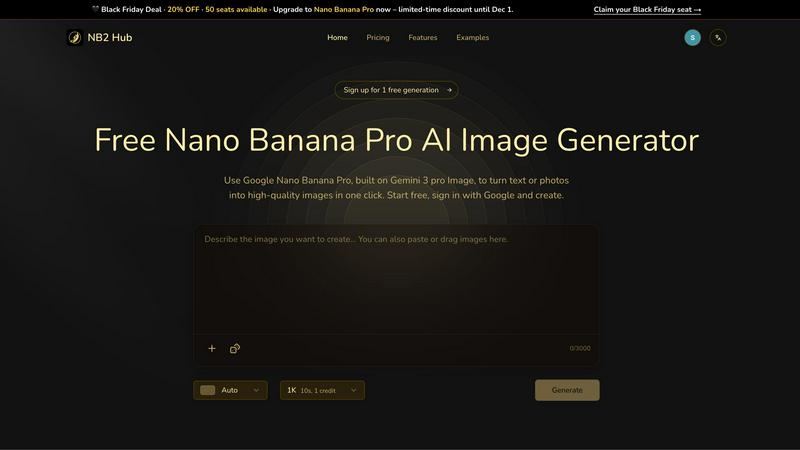
NB2 Hub's AI instantly creates perfect 4K images with flawless text and layout from your prompts.
Last updated: March 1, 2026

RemoveTexts
Effortlessly erase text and unwanted elements from images in seconds with RemoveTexts, the AI tool that requires no design skills.
Last updated: March 11, 2026
Visual Comparison
NB2 Hub
RemoveTexts

Feature Comparison
NB2 Hub
Faithful Text + Image Remix
Upload a reference image and a short prompt, and Nano Banana Pro intelligently preserves the original composition, layout, and lighting while upgrading details, textures, and overall quality. This is perfect for iterating on UI designs, refreshing product photography, or evolving comic panels without losing the foundational structure, making it a powerhouse for professional revision and ideation.
Crisp Text Inside Images
Generate images with clean, legible, and artistically integrated text—from headlines to full paragraphs. The model excels at multilingual typography without the common AI pitfalls of blurry or haloed letters. This feature is a game-changer for creating posters, advertisement creatives, social media covers, and any visual requiring precise, readable on-image copy.
Multi-Reference Fusion & Identity Consistency
Seamlessly fuse elements from multiple reference images into a single, coherent output while maintaining strict consistency for characters, products, or brand elements. This allows for the creation of consistent storyboards, multi-angle product sets, and surreal composite images, ensuring your visual narrative remains unified and professional across all generated assets.
Pro-Level Lighting & Camera Control
Exercise fine-tuned creative control over the cinematic qualities of your images. Adjust lens type, framing, depth of field, and color grading. Perform local edits and dramatic mood shifts like day-to-night transitions. This gives creators directorial command to achieve specific dramatic effects and professional, studio-quality lighting on demand.
RemoveTexts
Paint to Remove
This feature allows users to brush over specific areas of text for precise removal. You have full control over what gets erased, enabling more detailed edits without affecting the surrounding image.
Auto Remove All
For those in a hurry, the AI's Auto Remove All feature detects and removes every text element automatically. This one-click solution is perfect for quickly cleaning up images that have multiple text elements, saving you time and effort.
Edit & Replace Text
Not only can you remove text, but you can also replace existing text with new content while matching the original style. This feature is particularly useful for updating promotional materials or personalizing images for social media.
Remove Objects
Beyond just text, RemoveTexts offers the ability to erase unwanted objects, logos, and other visual elements from your images. This enhances your design flexibility, allowing you to create polished visuals that fit your needs.
Use Cases
NB2 Hub
Rapid Advertising & Social Media Campaigns
Marketing teams can generate a high volume of varied, on-brand visual content for ads, social posts, and email campaigns in minutes. The ability to create crisp text overlays and maintain brand consistency across multiple images accelerates content velocity and A/B testing, keeping campaigns fresh and engaging.
Product Design & Mockup Generation
Designers and entrepreneurs can quickly visualize product concepts by applying logos, patterns, and textures to 3D objects. Create realistic product shots, branded scene mockups, and packaging variations without expensive photoshoots or 3D rendering software, streamlining the prototyping and presentation phase.
Consistent Character & Storyboard Creation
Authors, game developers, and comic creators can generate multiple scenes featuring the same character from different angles and in various actions. Using multi-reference fusion, they ensure the character's appearance remains perfectly consistent, enabling efficient storyboarding and visual storytelling for pitches and production.
Educational & Infographic Content
Educators and content creators can leverage the model's grounding in real-world facts to generate accurate, visually compelling infographics, diagrams, and educational materials. Transform complex data or concepts into beautiful, easy-to-understand visuals that are both informative and aesthetically engaging.
RemoveTexts
E-commerce Product Photos
E-commerce sellers often need to remove logos or watermarks from product images to create a clean presentation for their listings. RemoveTexts provides a quick and effective solution to enhance product visuals, making them more appealing to customers.
Marketing Materials
Marketers can utilize RemoveTexts to clean up promotional graphics by removing unwanted text or overlays. This results in more professional-looking materials that can capture audience attention and elevate brand perception.
Legal Document Redaction
Legal professionals can use the tool to redact sensitive information from documents by removing text without leaving any trace behind. This ensures compliance with privacy regulations while maintaining the document's overall integrity.
Social Media Content Creation
Content creators can leverage RemoveTexts to enhance their social media posts by removing distracting text elements from images. This allows for a more cohesive and visually appealing aesthetic, helping to engage audiences effectively.
Overview
About NB2 Hub
NB2 Hub is the trending, essential portal that democratizes access to Google's most advanced image generation model, Nano Banana Pro. Built on the groundbreaking Gemini 3 Pro Image architecture, this platform delivers state-of-the-art AI image generation directly in your browser, completely free to start. It's engineered to shatter the barriers between complex enterprise AI tools and real-world creative needs. NB2 Hub empowers creators, marketers, designers, and businesses to generate production-ready, 4K-quality visuals from simple text prompts or existing images with one-click simplicity. The core mission is clear: provide unprecedented fidelity and creative control without the steep learning curve or prohibitive cost. Start with 2 free 4K generations just by signing in with Google. This tool unlocks capabilities once reserved for high-end studios: impeccable layout preservation, generation of crisp, legible text within images, and multi-reference fusion for unwavering character and brand consistency. In an era where visual content velocity defines success, NB2 Hub emerges as the go-to solution for rapid ad campaigns, product mockups, social media content, and more, putting pro-grade generative AI power at your fingertips for real projects.
About RemoveTexts
RemoveTexts is an innovative, AI-powered online image editing tool designed to remove unwanted text from images effortlessly and swiftly. Whether you're dealing with watermarks, captions, subtitles, date stamps, or branded overlays, RemoveTexts allows you to upload your image and erase text with just a few clicks, delivering clean results in seconds. The platform is perfect for a wide range of users including designers, marketers, e-commerce sellers, and legal professionals who need to maintain the integrity of their visuals. By leveraging advanced deep learning techniques, RemoveTexts reconstructs the background seamlessly where the text used to be, ensuring professional quality without any visible traces. With over 100,000 images processed and a user-friendly interface, RemoveTexts empowers creators to enhance their visuals without requiring any design skills.
Frequently Asked Questions
NB2 Hub FAQ
How do I start using NB2 Hub for free?
Getting started is incredibly simple. Just visit the NB2 Hub website and sign in using your Google account. Upon signing in, you will immediately receive credits for 2 free generations at 4K quality. This allows you to test the full power of Nano Banana Pro without any initial payment or commitment.
What makes Nano Banana Pro different from other AI image generators?
Nano Banana Pro, accessed via NB2 Hub, is built on Google's cutting-edge Gemini 3 Pro Image architecture. It sets itself apart with exceptional strengths in layout preservation, generating readable text within images, and maintaining strong consistency across multiple generations. These are critical, production-ready features often lacking in other consumer-grade AI tools.
Can I use NB2 Hub for commercial projects?
Yes, absolutely. NB2 Hub is engineered for real-world production work, making it ideal for commercial use by creators, marketers, and businesses. The images you generate can be used in advertising, product mockups, social media, and other commercial applications, helping you create professional assets quickly and cost-effectively.
What is the "Holiday Sale" offer mentioned?
For a limited time, NB2 Hub is offering a 20% discount on upgrades to enhanced Nano Banana Pro access or credit packs. You can use the promo code HOLIDAY20 at checkout to avail of this offer. This is a trending opportunity to gain more generation credits and advanced features at a reduced price.
RemoveTexts FAQ
How does RemoveTexts work?
RemoveTexts employs advanced AI and deep learning inpainting technology to analyze surrounding pixels, allowing it to intelligently reconstruct the background after removing text. This ensures that the final image looks seamless and professional.
What image formats does RemoveTexts support?
RemoveTexts supports various image formats including JPG, PNG, and WebP, accommodating a wide range of user needs while allowing uploads of images up to 10 MB in size.
Is there a limit to how many images I can process?
Currently, there are no specific limits mentioned on the number of images users can process. Many users take advantage of the tool for batch editing, making it a convenient option for high-volume projects.
Do I need any design skills to use RemoveTexts?
Absolutely not! RemoveTexts is designed for users of all skill levels. Its intuitive interface allows anyone to upload an image, remove text, and download results without requiring prior design experience or software proficiency.
Alternatives
NB2 Hub Alternatives
NB2 Hub is a trending, browser-based portal to Google's Nano Banana Pro AI, a cutting-edge image generation model. It instantly creates production-ready 4K visuals with perfect text and layout from simple prompts, making pro-grade AI accessible for free. This places it squarely in the hot category of AI image generators, a space exploding with innovation. Users often explore alternatives for various reasons, from hitting usage limits on free tiers to needing specific features like advanced editing suites, different artistic styles, or API access for integration. Platform preference—whether desktop software, a mobile app, or a different web service—also drives the search for other options. When evaluating alternatives, key considerations include output quality and consistency, the model's ability with text and layout, pricing transparency, and the overall workflow fit. The goal is to find a tool that matches your specific creative velocity and project demands without compromising on the fidelity that modern AI now delivers.
RemoveTexts Alternatives
RemoveTexts is an innovative AI-powered tool designed to remove unwanted text from images in mere seconds, eliminating the need for complex software like Photoshop. This tool falls into the image and photo editing category, providing users with a seamless experience to clean up screenshots, erase watermarks, or eliminate distracting overlays. As users seek efficiency and simplicity, they often look for alternatives that may offer different pricing structures, feature sets, or platform compatibilities, ensuring they find a solution that best meets their specific needs. When choosing an alternative to RemoveTexts, consider factors such as ease of use, the ability to handle various languages, and the quality of output. Users should also evaluate whether the alternative provides a similar level of precision and control, such as the capability to paint over specific text areas or auto-detect text elements. Ultimately, the right alternative should align with individual requirements, whether for personal use, marketing demands, or professional design projects.