
OGimagen vs RemoveTexts
Side-by-side comparison to help you choose the right tool.

OGImagen instantly creates perfect, AI-generated Open Graph images and meta tags for every social platform.
Last updated: March 11, 2026

RemoveTexts
Effortlessly erase text and unwanted elements from images in seconds with RemoveTexts, the AI tool that requires no design skills.
Last updated: March 11, 2026
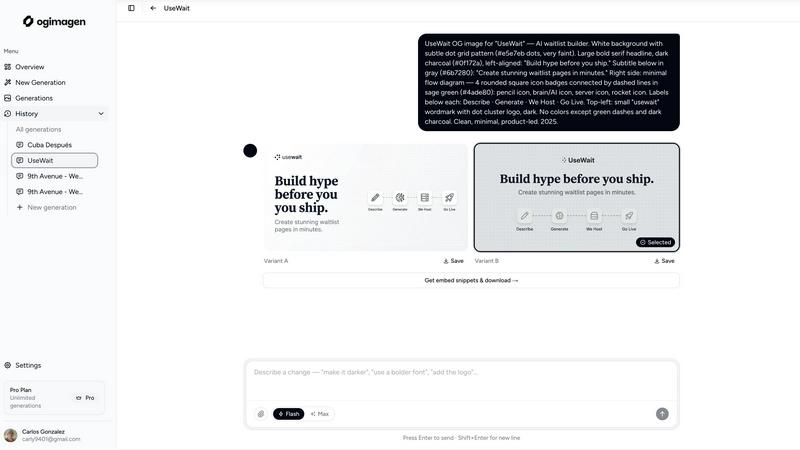
Visual Comparison
OGimagen
RemoveTexts

Feature Comparison
OGimagen
AI-Powered, Multi-Format Generation
OGimagen's core intelligence lies in its ability to generate two distinct, beautiful image variants from a simple title and description. It doesn't just create one image; it automatically produces three perfectly optimized versions for different platforms: a 1200x630px OG image for Facebook and Discord, a 1200x600px Twitter Card, and a 1200x627px LinkedIn Card. This ensures pixel-perfect presentation everywhere your link is shared, eliminating guesswork and manual resizing.
Framework-Specific Meta Tag Snippets
The tool doesn't leave you hanging with just a JPG file. Immediately after generation, it provides ready-to-paste code snippets tailored to your tech stack. Free users get standard HTML, while Pro users unlock native snippets for all major frameworks including Next.js (App and Pages Router), Astro, SvelteKit, and Remix. This feature bridges the gap between design and development, shipping the complete Open Graph implementation instantly.
MCP (Model Context Protocol) Integration
This is where OGimagen truly connects to the modern AI-powered developer workflow. With its MCP integration, you can generate images, list your past generations, and fetch embed code snippets directly from within compatible editors and agents like Claude Code, Cursor, and Windsurf. It brings powerful OG image creation into your coding environment, eliminating context switching and supercharging your content workflow.
Global CDN Hosting & Management
Every image generated is instantly hosted on a fast, global Cloudflare CDN, ensuring quick load times anywhere in the world. Pro plans offer permanent hosting, while one-time packs include hosting for 45 or 90 days. This managed infrastructure means you don't have to worry about image storage, optimization, or delivery; OGimagen handles it all, providing you with stable, reliable URLs for your meta tags.
RemoveTexts
Paint to Remove
This feature allows users to brush over specific areas of text for precise removal. You have full control over what gets erased, enabling more detailed edits without affecting the surrounding image.
Auto Remove All
For those in a hurry, the AI's Auto Remove All feature detects and removes every text element automatically. This one-click solution is perfect for quickly cleaning up images that have multiple text elements, saving you time and effort.
Edit & Replace Text
Not only can you remove text, but you can also replace existing text with new content while matching the original style. This feature is particularly useful for updating promotional materials or personalizing images for social media.
Remove Objects
Beyond just text, RemoveTexts offers the ability to erase unwanted objects, logos, and other visual elements from your images. This enhances your design flexibility, allowing you to create polished visuals that fit your needs.
Use Cases
OGimagen
Rapid Blog & Content Marketing
Content teams and solo bloggers can generate eye-catching social previews for every new article or post in under a minute. Simply input the blog title and excerpt, let AI create a relevant visual, and paste the provided meta tags into the CMS head section. This drastically improves the shareability of content across social platforms, leading to better engagement and traffic from links shared by readers.
SaaS Product Launch & Updates
When launching a new feature or product, developers and marketers need polished social cards for announcement posts, documentation, and changelog entries. OGimagen allows for quick iteration, enabling the creation of on-brand images that reflect the product's aesthetic without needing a designer on standby, ensuring every update makes a professional splash on social media.
Developer Workflow Integration
Developers building with Next.js, Astro, or similar frameworks can use OGimagen, especially via MCP, to generate and implement OG images during the development process. Instead of mocking up placeholder images or designing them separately, they can create final, deploy-ready assets and code directly from their IDE, streamlining the path from development to deployment.
Agency & Client Project Delivery
Digital agencies managing multiple client websites can use OGimagen to consistently produce high-quality social previews at scale. The ability to save brand colors and potentially attach logos (as indicated in MCP features) allows for quick, brand-compliant image generation for various client pages, from service listings to case studies, ensuring a polished presentation for every shared link.
RemoveTexts
E-commerce Product Photos
E-commerce sellers often need to remove logos or watermarks from product images to create a clean presentation for their listings. RemoveTexts provides a quick and effective solution to enhance product visuals, making them more appealing to customers.
Marketing Materials
Marketers can utilize RemoveTexts to clean up promotional graphics by removing unwanted text or overlays. This results in more professional-looking materials that can capture audience attention and elevate brand perception.
Legal Document Redaction
Legal professionals can use the tool to redact sensitive information from documents by removing text without leaving any trace behind. This ensures compliance with privacy regulations while maintaining the document's overall integrity.
Social Media Content Creation
Content creators can leverage RemoveTexts to enhance their social media posts by removing distracting text elements from images. This allows for a more cohesive and visually appealing aesthetic, helping to engage audiences effectively.
Overview
About OGimagen
In the hyper-competitive landscape of social media and digital sharing, your link's preview image is your first and most critical impression. OGimagen is the AI-powered engine that automates and perfects this process. It's built for developers, content creators, and marketing teams who need to generate stunning, platform-optimized Open Graph, Twitter, and LinkedIn card images in seconds, directly from text. Forget wrestling with design tools or settling for bland templates. OGimagen uses artificial intelligence to interpret your title and description, creating two unique, visually compelling variants that capture attention. Beyond just image generation, it delivers the complete package: production-ready images hosted on a global Cloudflare CDN and the exact meta tag snippets you need for your framework (Next.js, Astro, SvelteKit, etc.), ready to copy-paste into your code. Its cutting-edge MCP (Model Context Protocol) integration lets you generate and manage images without leaving your AI-powered editor like Cursor or Claude Code. OGimagen transforms a tedious, multi-step design and dev task into a seamless, three-click workflow, ensuring every shared link looks professional and drives higher click-through rates with zero design skills required.
About RemoveTexts
RemoveTexts is an innovative, AI-powered online image editing tool designed to remove unwanted text from images effortlessly and swiftly. Whether you're dealing with watermarks, captions, subtitles, date stamps, or branded overlays, RemoveTexts allows you to upload your image and erase text with just a few clicks, delivering clean results in seconds. The platform is perfect for a wide range of users including designers, marketers, e-commerce sellers, and legal professionals who need to maintain the integrity of their visuals. By leveraging advanced deep learning techniques, RemoveTexts reconstructs the background seamlessly where the text used to be, ensuring professional quality without any visible traces. With over 100,000 images processed and a user-friendly interface, RemoveTexts empowers creators to enhance their visuals without requiring any design skills.
Frequently Asked Questions
OGimagen FAQ
What is the difference between Starter, Growth, and Pro?
Starter and Growth are one-time purchase packs (10 and 25 generations, respectively) with temporary CDN hosting (45 or 90 days). They include all image variants and framework snippets. The Pro plan is a monthly subscription offering 50 generations per month, permanent CDN hosting, and the key differentiator: MCP integration for direct editor workflow access, making it ideal for developers and power users.
What happens when my CDN hosting expires?
For images generated under one-time packs (Starter, Growth), the hosted image files on the CDN will become unavailable after the hosting period expires (45 or 90 days). This will cause broken image previews on social platforms. To prevent this, you must download the images and host them on your own infrastructure before the period ends, or upgrade to the Pro plan for permanent hosting.
What is MCP integration and why is it a game-changer?
MCP (Model Context Protocol) is an emerging standard that allows tools to connect directly to AI-assisted code editors and agents. OGimagen's MCP integration means you can command an AI within Cursor or Claude to generate an OG image, list your past creations, or get an embed code without ever opening a browser. It deeply integrates a critical marketing asset creation tool into the modern developer's native environment.
Which frameworks are supported for meta tag snippets?
OGimagen provides tailored code snippets for all major modern web frameworks. This includes Next.js (for both the App Router and Pages Router architectures), Astro, SvelteKit, and Remix. A plain HTML fallback snippet is always included for universal compatibility, ensuring you can implement the generated images on any website or platform.
RemoveTexts FAQ
How does RemoveTexts work?
RemoveTexts employs advanced AI and deep learning inpainting technology to analyze surrounding pixels, allowing it to intelligently reconstruct the background after removing text. This ensures that the final image looks seamless and professional.
What image formats does RemoveTexts support?
RemoveTexts supports various image formats including JPG, PNG, and WebP, accommodating a wide range of user needs while allowing uploads of images up to 10 MB in size.
Is there a limit to how many images I can process?
Currently, there are no specific limits mentioned on the number of images users can process. Many users take advantage of the tool for batch editing, making it a convenient option for high-volume projects.
Do I need any design skills to use RemoveTexts?
Absolutely not! RemoveTexts is designed for users of all skill levels. Its intuitive interface allows anyone to upload an image, remove text, and download results without requiring prior design experience or software proficiency.
Alternatives
OGimagen Alternatives
OGimagen is a trending AI-powered dev tool that automates the creation of professional Open Graph images. It streamlines the process of generating social media preview cards, helping developers and content creators boost engagement with minimal effort. As a specialized tool in a fast-moving space, it's a go-to for ensuring links look polished when shared across platforms. Users often explore alternatives for various reasons. Some need a different pricing model or a free tier for smaller projects, while others seek more advanced design controls, specific integrations, or a platform that better fits their existing tech stack. The search for the right tool is constant as new features and competitors emerge. When evaluating other options, key considerations include the quality and speed of AI generation, customization depth, ease of embedding into your workflow, and overall value. The ideal alternative should not only match core functionality but also align with your specific development environment and growth trajectory.
RemoveTexts Alternatives
RemoveTexts is an innovative AI-powered tool designed to remove unwanted text from images in mere seconds, eliminating the need for complex software like Photoshop. This tool falls into the image and photo editing category, providing users with a seamless experience to clean up screenshots, erase watermarks, or eliminate distracting overlays. As users seek efficiency and simplicity, they often look for alternatives that may offer different pricing structures, feature sets, or platform compatibilities, ensuring they find a solution that best meets their specific needs. When choosing an alternative to RemoveTexts, consider factors such as ease of use, the ability to handle various languages, and the quality of output. Users should also evaluate whether the alternative provides a similar level of precision and control, such as the capability to paint over specific text areas or auto-detect text elements. Ultimately, the right alternative should align with individual requirements, whether for personal use, marketing demands, or professional design projects.