
Outbid vs SupaSidebar
Side-by-side comparison to help you choose the right tool.

OutBid instantly alerts freelancers of new Upwork jobs and provides AI-generated proposals via Telegram to help them apply faster and win more.
Last updated: March 19, 2026

SupaSidebar
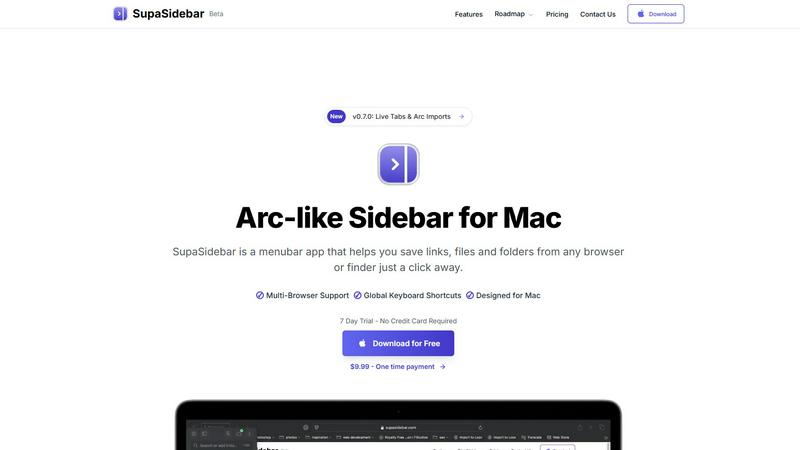
SupaSidebar is your AI command center for Mac, instantly surfacing any link, file, or app.
Last updated: February 28, 2026
Visual Comparison
Outbid

SupaSidebar
Feature Comparison
Outbid
Instant Alerts
With OutBid's instant alert feature, freelancers receive notifications within seconds of a job being posted on Upwork. This rapid response capability means users can apply long before most competitors even see the listing, giving them a crucial edge in the job application process.
AI Proposals
OutBid generates tailor-made proposal drafts for each job posting, powered by advanced AI. These personalized proposals are crafted to reflect the user's skills and the specific requirements of the job, making it easy to copy, tweak, and submit with just one tap.
Smart Filtering
The smart filtering system allows users to view only the job postings that align with their specific criteria. Freelancers can filter job alerts based on skills, budget, experience level, and even their preferred quiet hours, ensuring they only receive relevant opportunities.
War Room Strategy Mode
In competitive job markets, standing out is vital. OutBid's War Room Strategy Mode provides users with the ability to add custom instructions, regenerate proposals, and refine their approach for high-competition listings, ensuring their applications are compelling and strategic.
SupaSidebar
Universal Browser & Finder Integration
SupaSidebar seamlessly connects with your entire workflow, pulling data directly from any major browser like Safari, Chrome, Arc, and Firefox, as well as macOS Finder. This deep integration allows you to save the current website link or copy a file's path with a single, consistent keyboard shortcut, breaking down the barriers between apps and creating a truly unified workspace. Your saved items are instantly accessible from one central hub, regardless of their origin.
Global Keyboard Shortcuts & Fast Search
Command your Mac at the speed of thought. SupaSidebar is built for keyboard-centric productivity, featuring customizable global shortcuts. Press CMD CTRL S to instantly save a link or CMD CTRL C to copy the current URL. Unleash the powerful CMD CTRL K command to open a lightning-fast search overlay, letting you find and launch any saved website, file, folder, or application instantly, without ever touching your mouse.
Arc-Inspired Sidebar & Spaces Organization
Experience the sleek, focused design philosophy of modern browsers in a system-wide tool. SupaSidebar presents a beautiful, distraction-free sidebar that blends perfectly with macOS aesthetics. Organize your digital life into customizable "Spaces"—the free plan includes 3, perfect for daily use, while Pro unlocks unlimited spaces to categorize work, personal projects, and research meticulously, keeping everything neatly sorted and one click away.
Privacy-First & On-Device Data
In an era of cloud surveillance, SupaSidebar takes a firm stand for privacy. All your data—every saved link, file reference, and organizational structure—stays securely on your Mac. Nothing is sent to external servers. This commitment ensures your workflow remains fast, private, and entirely under your control, giving you peace of mind while you work with sensitive documents or personal projects.
Use Cases
Outbid
Busy Professionals
OutBid is perfect for busy freelancers who cannot dedicate hours to job hunting. With instant alerts, they can quickly respond to job postings while managing their other commitments, maximizing productivity and opportunity.
New Freelancers
For newcomers to the freelance world, writing proposals can be daunting. OutBid simplifies this process by providing AI-generated proposal drafts that can be easily customized, helping them gain confidence and make a strong impression on potential clients.
Experienced Freelancers
Seasoned freelancers looking to save time and enhance their application strategy will find OutBid invaluable. The tool allows them to apply quickly to multiple job postings, ensuring they remain competitive while focusing on their core work.
Strategic Job Seekers
Freelancers who recognize the importance of being first to apply will benefit greatly from OutBid's features. By leveraging instant alerts and smart filtering, they can identify and seize high-potential opportunities before they are flooded with applications from others.
SupaSidebar
The Developer in Deep Work
A developer context-switching between API documentation, GitHub repositories, local code files, and terminal windows can save precious seconds with every lookup. SupaSidebar keeps all crucial references pinned and searchable instantly with CMD CTRL K, eliminating disruptive tab hunting and maintaining flow state, allowing for more code written and fewer distractions endured.
The Academic Researcher
Juggling dozens of academic papers, data sets, and reference tabs across multiple browsers is a standard research nightmare. SupaSidebar's "Recents" feature automatically tracks every website visited in the last 48 hours, and the ability to pin important sources to the top creates a personal, searchable library that survives browser crashes and session changes, making literature reviews efficient.
The Creative Content Creator
For creators gathering inspiration, managing assets, and switching between design tools, writing apps, and social media, organization is key. SupaSidebar allows them to save mood board links, font folders, brand asset files, and frequently used apps into dedicated spaces (e.g., "Design," "Writing," "Social"), creating a visual and instantaneous launchpad for any creative project phase.
The Multi-Tasking Project Manager
Project managers coordinating across communication platforms (Slack, email), cloud docs, task boards, and spreadsheets need rapid access. SupaSidebar becomes their mission control, holding quick links to all active project hubs, important briefing documents, and shared folders. Global shortcuts let them share updates or reference materials in meetings without fumbling through Finder or browser history.
Overview
About Outbid
OutBid is a revolutionary tool tailored specifically for freelancers aiming to excel in the competitive landscape of Upwork. This innovative platform operates around the clock, tirelessly monitoring job postings on Upwork and delivering real-time alerts directly to users via Telegram. By empowering freelancers to respond to new job postings within a mere 60 seconds, OutBid significantly enhances their chances of catching the attention of potential clients. Each alert comes equipped with a personalized, AI-generated proposal draft, meticulously crafted to align with both the job description and the user's unique skill set. This streamlining of the application process is particularly beneficial for busy professionals who cannot afford to constantly check job listings, as well as newcomers who may struggle with proposal writing. OutBid stands as an essential resource for freelancers of all experience levels, providing them with the tools needed to win more jobs and maximize their earning potential in a fast-paced freelance environment.
About SupaSidebar
Stop the digital scavenger hunt. The future of desktop productivity isn't about more windows or complex apps—it's about seamless, instant access. SupaSidebar is the groundbreaking, Arc-inspired sidebar application for macOS that's shattering traditional workflow barriers. This isn't just another menubar utility; it's a unified command center engineered for the modern power user, living elegantly on the edge of your screen. It acts as the central nervous system for your Mac, designed to eliminate context-switching friction and lock you into a state of deep, uninterrupted focus. By integrating natively with your entire digital ecosystem—including Safari, Chrome, Arc, Firefox, Brave, and Finder—it grants you keyboard-driven mastery over every link, file, folder, and open tab. Imagine a lightweight, beautiful extension of macOS that sits patiently in the background, ready to be summoned with a shortcut to deliver anything you need. Built for developers juggling code and documentation, researchers managing vast seas of browser tabs, and creators organizing assets and inspiration, SupaSidebar makes the promise of a streamlined digital life a reality. Your data stays private and on-device, and with its current beta pricing offering 30% off, there's never been a better time to transcend chaotic window management and step into a fluid, accelerated, and organized computing environment.
Frequently Asked Questions
Outbid FAQ
How fast are the alerts?
OutBid's alerts are incredibly fast, notifying users within seconds of a job being posted on Upwork. This rapid notification system ensures that freelancers can apply ahead of the competition.
Do I need to be tech-savvy?
No, OutBid is designed to be user-friendly and accessible to freelancers of all technical backgrounds. The setup process is straightforward, taking less than two minutes to complete through Telegram.
Can I customize the proposals?
Absolutely! While OutBid provides AI-generated proposal drafts, users have the flexibility to customize these proposals to reflect their personal voice and approach, ensuring authenticity in their applications.
Is this affiliated with Upwork?
OutBid operates independently and is not officially affiliated with Upwork. However, it is designed specifically to enhance the job application experience on the Upwork platform.
SupaSidebar FAQ
Is SupaSidebar a browser extension?
No, SupaSidebar is not a browser extension. It is a standalone macOS menubar application that integrates directly with your system and browsers at a deep level. This native approach allows it to work uniformly across Safari, Chrome, Arc, Firefox, Brave, and other Chromium-based browsers without requiring individual extensions, ensuring broader compatibility and system-wide performance.
Which browsers does SupaSidebar work with?
SupaSidebar is compatible with all major browsers on macOS, including Safari, Google Chrome, Arc Browser, Mozilla Firefox, and Brave. Its integration is built to support the underlying frameworks these browsers use, allowing it to capture the active tab URL and interact with your browsing session seamlessly from its centralized sidebar interface.
What macOS version do I need?
You need macOS 13 (Ventura) or a newer version to run SupaSidebar. The application leverages modern macOS APIs and frameworks to provide its deep system integration, smooth performance, and native-looking sidebar experience, ensuring optimal stability and feature availability on supported operating systems.
Where is my data stored?
All your data is stored locally and privately on your Mac. SupaSidebar operates on a strict privacy-first principle; none of your saved links, file paths, or organizational spaces are ever uploaded to external servers. Everything remains on your device, giving you complete control and ensuring your workflow information stays secure and fast.
Alternatives
Outbid Alternatives
OutBid is a cutting-edge tool designed specifically for freelancers navigating the Upwork marketplace. It falls under the Productivity & Management category, offering features that enhance job application efficiency. Users often seek alternatives to OutBid for various reasons, including pricing concerns, specific feature requests, or the need for compatibility with different platforms. When considering an alternative, it is essential to evaluate factors such as ease of use, the ability to generate tailored proposals, and real-time job alert capabilities to ensure that you can maintain a competitive edge in your freelance career.
SupaSidebar Alternatives
SupaSidebar is an AI-native command center for Mac, a powerful productivity tool designed to streamline your digital workflow. It acts as a universal search hub, instantly surfacing links, files, and apps from a sleek, keyboard-driven sidebar to eliminate digital chaos and maintain focus. Users often explore alternatives for various reasons. Some may seek different pricing models, require specific integrations not offered, or need cross-platform support beyond macOS. Others might look for a different balance between simplicity and advanced feature sets, or simply prefer an alternative user interface philosophy. When evaluating an alternative, consider your core needs. Look for robust search capabilities across your apps and files, efficient tab and window management features, and a smooth, non-intrusive user experience. Security and privacy practices are also crucial, as these tools often require broad system access. The right choice should feel like a natural extension of your workflow, not a new obstacle.