
Perkoon vs Phishly
Side-by-side comparison to help you choose the right tool.

Perkoon offers free unlimited P2P file transfers with no signup and no data scanning.
Last updated: March 4, 2026

Phishly
Phishly uses AI to instantly detect phishing emails in your Gmail inbox.
Visual Comparison
Perkoon

Phishly
Feature Comparison
Perkoon
Unlimited Free P2P Transfers
This is the game-changer. Perkoon's core technology uses WebRTC to establish a direct, encrypted peer-to-peer connection between two browsers. Files stream from sender to recipient without ever passing through Perkoon's servers. This means there are absolutely no file size limits, no mandatory accounts, and complete privacy. The service is free because the infrastructure cost is virtually zero. It's file transfer in its purest, most efficient form, available to anyone with a modern browser.
Honest Encrypted Cloud Storage
For when your recipient is offline, Perkoon provides a straightforward cloud holding service. Files are encrypted on their servers before storage. This is the paid part of the service, and Perkoon is transparent about it: you pay for the real cost of server space and bandwidth. No hidden fees, no freemium tricks. It's an honest solution for asynchronous transfers, clearly separated from the free, real-time P2P system.
Native AI & Automation API
Perkoon is built for the future. Instead of forcing AI agents to clumsily scrape a website, Perkoon exposes a direct JavaScript API (window.__perkoon). This allows automation scripts, bots, and AI assistants to programmatically initiate and manage file transfers directly within the browser environment. It's a foundational feature that treats automation as a first-class citizen, not an afterthought.
Privacy-First Architecture
Your data is not the product. P2P transfers are inherently private as data is never intercepted. For cloud storage, files are encrypted. Perkoon does not scan, analyze, or sell your data. The entire service is built on the principle of minimal data handling, with clear explanations of what happens to your files in each transfer mode, putting user privacy and control front and center.
Phishly
One-Click Gmail Integration
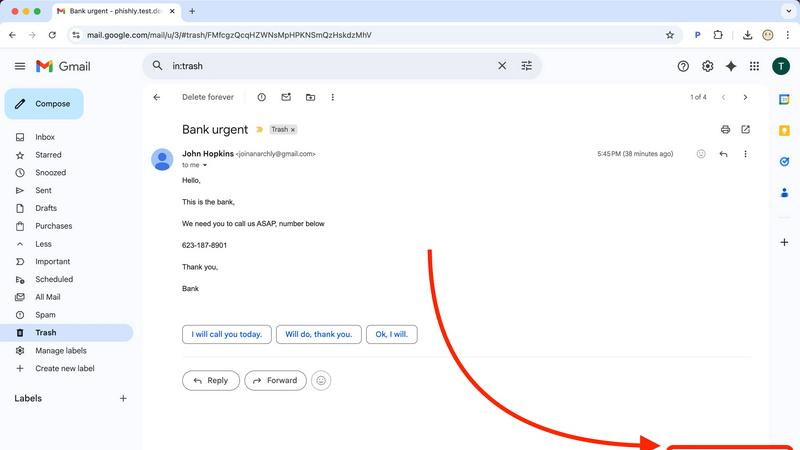
Seamlessly integrate powerful AI security directly into your existing workflow. With the Phishly Chrome extension installed, analyzing any email is as simple as opening it in Gmail and clicking the "Scan with Phishly" button. There's no need to copy, paste, or navigate away from your inbox. This frictionless, instant access ensures you actually use the protection when you need it most, turning a moment of doubt into an actionable security insight in under a second, right where you work.
Advanced AI-Powered Threat Detection
Go beyond basic link checking with an AI engine trained on the latest phishing tactics. It doesn't just look for malware; it understands context. The system analyzes a holistic set of risk factors including suspicious domain registrations, subtle grammatical errors common in AI-generated text, spoofed header information, and the nuanced urgent or threatening language used in modern social engineering scams. This multi-layered analysis catches sophisticated threats that easily slip past standard email filters.
Clear, Actionable Risk Assessments
Phishly cuts through the technical jargon and delivers results you can actually use. Every scan concludes with a straightforward, color-coded verdict: Safe, Medium Risk, or High Risk. More importantly, it provides a detailed, plain-English explanation of the specific red flags it found, such as "The sender's domain was registered very recently" or "This email uses urgent language to pressure immediate action." This educates you while it protects you, building your digital literacy.
Privacy-First, On-Demand Scanning
Your privacy is non-negotiable. Phishly operates on a strict, user-initiated model. The AI only ever analyzes the content of emails you explicitly choose to scan. It does not continuously monitor your inbox, read your emails in the background, or store your personal correspondence. This approach gives you complete control over your data, ensuring you get powerful protection without sacrificing your confidentiality—a critical feature in today's data-conscious world.
Use Cases
Perkoon
Sending Massive Creative Files
Video editors, 3D artists, and photographers can finally breathe easy. Need to send a raw 80GB project file to a client or collaborator? With Perkoon's P2P transfer, you can do it instantly and for free. No more splitting archives, battling upload limits, or paying for expensive "pro" tiers just to do your job. It's unlimited transfer for unlimited creativity.
Secure Document Exchange for Professionals
Lawyers, journalists, and consultants handling sensitive documents require confidentiality. Perkoon's direct P2P channel ensures documents move from point A to point B without being stored on or scanned by an intermediary server. For offline delivery, the encrypted cloud storage provides a secure holding pen, all without the data-harvesting practices of mainstream cloud services.
Automated Workflow & AI Agent Integration
Developers and power users can integrate Perkoon directly into their automated pipelines. An AI agent that generates weekly reports can use the native API to send them directly to a team. Backup scripts can offload large logs via the CLI tool. Perkoon acts as a programmable transfer layer, seamlessly connecting automated processes with human recipients.
Referral-Powered Storage Growth
Users who need more cloud storage can earn it organically through Perkoon's transparent affiliate program. By sharing a unique referral link, you and your contacts both receive bonus storage, with potential for chain rewards. It's a community-driven model that rewards active users instead of just charging them more, aligning platform growth with user benefit.
Phishly
For Remote Workers & Digital Nomads
Working from coffee shops and co-working spaces on various networks increases exposure to phishing. Remote professionals can use Phishly to instantly verify every email request for sensitive data, invoice payments, or credential updates before responding. It acts as a virtual security colleague, providing a crucial second opinion on emails from "HR," "IT support," or "management" that could be sophisticated impersonation attacks targeting a dispersed workforce.
For Small Business Owners & Startups
Small teams often lack dedicated IT security staff, making them prime targets for phishing. A business owner can use Phishly to screen emails related to banking, wire transfers, or vendor communications. By pasting a suspicious invoice or payment request into the web tool, they can get an instant risk analysis, preventing devastating Business Email Compromise (BEC) scams that could cripple a young company's finances overnight.
For Individuals Managing Personal Finances
Consumers are bombarded with phishing emails mimicking banks, PayPal, Amazon, and tax services. Before clicking any link in an email about a "suspended account" or "unusual login attempt," an individual can scan it with Phishly. The clear risk rating and explanation help them confidently identify fraudulent messages, protecting their personal banking details, social media accounts, and sensitive identity information from theft.
For Educational Institutions & Non-Profits
Schools and non-profits handle sensitive data but often have limited cybersecurity budgets. Staff and volunteers can use the free Phishly tool to screen emails claiming to be from parents, donors, or software providers. This helps prevent credential theft that could lead to data breaches, ransomware attacks on school systems, or fraudulent diversion of donations, providing a vital layer of human-centric security.
Overview
About Perkoon
Forget everything you know about file transfer. In an era of surveillance capitalism, artificial limits, and mandatory sign-ups, Perkoon is the radical return to sanity. This isn't just another WeTransfer clone; it's a foundational protocol built for the next generation of users and machines. Perkoon cuts through the corporate nonsense with a brutally honest, two-pronged approach. Its flagship service is unlimited, free, peer-to-peer (P2P) transfer that beams files directly between browsers. No accounts, no size caps, and because the data never touches a central server, it's private and costs Perkoon nothing—so it's free for you, forever. For sending to offline recipients, Perkoon offers transparently priced, encrypted cloud storage. But the real alert? Perkoon is natively designed for the age of AI, with built-in APIs so your agents can interact directly, no screen-scraping required. It's the privacy-focused, automation-ready file transfer solution for real people, developers, and the intelligent agents that work for them.
About Phishly
In the digital trenches of your inbox, a new breed of cyber threat is evolving faster than traditional defenses can keep up. Phishing attacks are no longer clumsy emails from foreign princes; they are hyper-personalized, AI-generated masterpieces of deception designed to bypass human intuition and legacy spam filters. Enter Phishly: your on-demand AI sentinel against these next-generation threats. This isn't another complex enterprise security suite. Phishly is a sleek, powerful Chrome extension and web tool that puts cutting-edge phishing detection directly in your hands, the moment you need it. Simply open any suspicious email in Gmail and click "Scan with Phishly," or paste its contents directly on their website for an instant, deep-dive analysis. Its advanced AI engine meticulously scans for modern phishing indicators—from subtly spoofed sender addresses and lookalike domains to the urgent language and psychological pressure tactics of sophisticated social engineering. It then delivers a crystal-clear, actionable risk assessment: Safe, Medium Risk, or High Risk, complete with a detailed breakdown of why it flagged the content. Built for privacy-conscious individuals, remote workers, and small to medium businesses, Phishly offers enterprise-grade detection without the enterprise-level complexity, setup, or cost. It operates on a strict zero-trust privacy model, only analyzing emails you explicitly choose to scan. In a landscape where one click can cost everything, Phishly is the instant, intelligent second opinion you need to stay secure.
Frequently Asked Questions
Perkoon FAQ
Is the free P2P transfer really unlimited and free forever?
Yes. The P2P technology streams data directly between browsers (like a video call for files). Since Perkoon's servers are not involved in the data transfer, they incur no bandwidth or storage costs. Therefore, they can offer this specific service as unlimited and free indefinitely. It's free as in beer, because it costs them nothing to provide.
What happens if the person I'm sending to is offline?
If the recipient is not online to accept the direct P2P connection, Perkoon offers encrypted cloud storage as a fallback. This is a paid feature because it involves Perkoon's servers storing your file until the recipient is ready to download it. You can initiate a cloud transfer instead, or the recipient can be notified to come online for a free P2P transfer.
How does Perkoon work with AI agents and automation?
Perkoon is built with automation in mind. It provides a native JavaScript API (window.__perkoon) accessible in the browser. This allows AI agents and scripts to control the transfer process programmatically without needing to simulate human clicks or scrape the website's HTML, making it a reliable and official integration point for machines.
Which web browsers are supported?
For the full, unlimited P2P experience, Chromium-based browsers like Chrome, Edge, and Brave are recommended. Firefox and Safari have inherent browser restrictions that can limit certain aspects of P2P functionality or file sizes. It's always best to use a modern, updated browser for optimal performance.
Phishly FAQ
How does Phishly protect my privacy?
Phishly is built on a core principle of user-controlled privacy. Our tool is passive and on-demand. We do not, and cannot, access your email inbox unless you explicitly initiate a scan. When you click "Scan" in Gmail or paste text on our site, only that specific email content is sent for analysis. We do not store your personal emails, track your browsing history, or sell your data. Your security check remains confidential.
Is Phishly really free to use?
Yes, the core functionality of Phishly is completely free to use. You can install the Chrome extension for Gmail and use the web tool to scan suspicious emails at no cost. This allows individuals and small businesses to access powerful AI-driven phishing detection without any financial barrier. We are committed to making basic digital security accessible to everyone.
What makes Phishly different from my email's spam filter?
Traditional spam filters work passively in the background and primarily block bulk, low-effort spam. Phishly is an active tool for analyzing sophisticated, targeted phishing emails that are designed to look legitimate and often bypass standard filters. It provides a deep, contextual analysis and explains its reasoning, helping you understand the why behind a threat, which a typical spam filter notification does not do.
Do I need technical knowledge to use Phishly?
Absolutely not. Phishly is designed for everyone. The one-click scan in Gmail and the simple paste-and-analyze function on the website require zero technical setup or knowledge. The results are presented in clear, simple language with a straightforward risk rating (Safe/Medium/High), making it easy for anyone to understand and take appropriate action immediately.