
MyImageUpscaler vs poseup
Side-by-side comparison to help you choose the right tool.

MyImageUpscaler
MyImageUpscaler uses AI to quickly enhance and upscale photos, ensuring sharp text preservation for stunning images.
Last updated: February 28, 2026

poseup
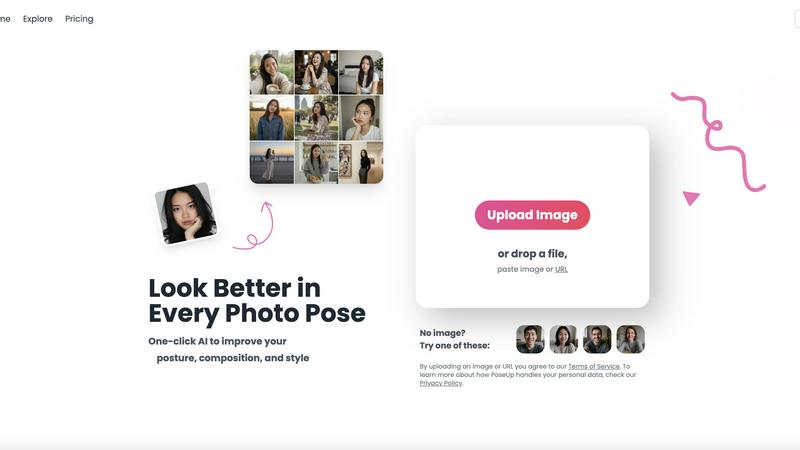
PoseUp enhances your photo poses with one-click AI, transforming ordinary images into professional-quality masterpieces.
Last updated: March 1, 2026
Visual Comparison
MyImageUpscaler

poseup
Feature Comparison
MyImageUpscaler
Advanced Detail Preservation
MyImageUpscaler utilizes state-of-the-art algorithms to ensure that every image retains its sharpness and fine details, even after significant upscaling. This feature is essential for maintaining the quality of product images and marketing materials, allowing businesses to present their offerings in the best light.
Rapid Processing Speed
With the ability to process images in under 10 seconds, MyImageUpscaler maximizes efficiency for users. This is particularly beneficial for busy professionals and content creators who need to manage large volumes of images swiftly without sacrificing quality.
Flexible Upscaling Options
Users can choose between 2x and 4x upscaling options, giving them the flexibility to select the ideal enhancement level for their specific needs. This versatility ensures that whether you need a slight boost in resolution or a major enhancement, MyImageUpscaler has you covered.
Batch Processing Capability
MyImageUpscaler allows batch processing for up to 500 images at once, making it a perfect tool for users who regularly manage large quantities of visual content. This feature significantly reduces time spent on individual image enhancements, streamlining workflows for e-commerce sellers and photographers alike.
poseup
AI-Powered Photo Enhancement
PoseUp leverages advanced AI algorithms to automatically analyze your uploaded photos, correcting posture and optimizing composition. This feature eliminates the need for professional photography skills, making it accessible to everyone.
Dynamic Pose Suggestions
The platform provides smart recommendations for more flattering and dynamic poses based on the analysis of your photo. This ensures that you present your best self, whether in selfies, family gatherings, or professional settings.
Quick and Efficient Processing
With just a single click, PoseUp transforms your images, saving time and effort. Users can upload JPG, PNG, WEBP, and HEIC files up to 5MB, making it convenient for various photography needs.
Versatile Use Cases
PoseUp caters to a wide range of users, from casual photographers to social media influencers and professionals. Its versatile application means you can enhance lifestyle shots, fitness photos, and even headshots effortlessly.
Use Cases
MyImageUpscaler
E-commerce Sellers
For e-commerce sellers, high-quality product images are crucial for attracting customers. MyImageUpscaler enhances product images to make them more appealing, which can lead to higher conversion rates and increased sales.
Social Media Content Creators
Content creators on platforms like Instagram and TikTok can use MyImageUpscaler to ensure their images are eye-catching and of high quality. The platform's presets for various social media platforms make it easy to optimize images perfectly for each channel.
Real Estate Agents
Real estate agents preparing MLS listings can benefit from MyImageUpscaler's ability to enhance property photos. Upscaled images help present properties more attractively, which can be critical in a competitive market.
Photographers
Professional photographers processing large batches of images can use MyImageUpscaler to save time while ensuring their final products maintain the highest quality. The batch processing feature allows photographers to enhance multiple images simultaneously, streamlining their workflow.
poseup
Social Media Creators
For social media influencers and content creators, PoseUp serves as an invaluable tool to enhance their images. With its AI-driven enhancements, users can achieve eye-catching results that attract more engagement on their platforms.
Family Portraits
Families often struggle with getting everyone in the perfect pose for group photos. PoseUp helps by suggesting optimal arrangements and correcting posture, ensuring everyone looks their best in memorable snapshots.
Professional Headshots
In today's digital landscape, a professional image is critical. PoseUp allows users to create polished headshots that convey confidence and professionalism, making it an essential asset for job seekers and professionals alike.
Fitness and Wellness Shots
For fitness enthusiasts and trainers, capturing the right pose can make a significant impact. PoseUp offers tailored enhancements that improve posture and composition, resulting in more motivating and inspiring fitness photos.
Overview
About MyImageUpscaler
MyImageUpscaler is a cutting-edge AI-driven platform that revolutionizes the way businesses and content creators enhance and upscale their images. Designed with efficiency and quality in mind, this tool enables users to upscale images by 2x to 4x while preserving sharpness and enhancing fine details. Whether you are an e-commerce seller looking to make your product images pop, a photographer needing to process large batches, or a content creator resizing images for social media, MyImageUpscaler provides the perfect solution. The platform is user-friendly, boasting advanced technology that processes images in under 10 seconds. With no watermarks on the free tier and a robust set of features, it is an indispensable asset for anyone seeking to improve their visual content.
About poseup
PoseUp is the groundbreaking AI-powered photo enhancement platform that transforms your ordinary snapshots into stunning professional portraits with just a click. Utilizing cutting-edge artificial intelligence, PoseUp analyzes and optimizes human poses, posture, and overall composition to elevate your photography game. Whether you are a social media influencer, a casual user taking family pictures, or a professional photographer, this tool is designed for everyone who wishes to enhance their visual storytelling. PoseUp’s primary value proposition is its simplicity: upload any photo containing people, and the AI immediately generates an optimized version that corrects posture, recommends flattering poses, and enhances visual appeal. Gone are the days of awkward photos, tedious editing, and costly software. With PoseUp, you can achieve top-notch results in seconds, making it an essential tool for the digital age where first impressions matter.
Frequently Asked Questions
MyImageUpscaler FAQ
How does MyImageUpscaler enhance images?
MyImageUpscaler uses advanced AI algorithms to analyze and enhance images, increasing resolution while preserving sharpness and fine details. This ensures that the final output looks professional and visually appealing.
Is there a limit to the number of images I can process?
Yes, users can batch process up to 500 images at one time. This feature is designed to accommodate professionals and businesses that handle large volumes of visual content regularly.
What formats does MyImageUpscaler support?
MyImageUpscaler supports a variety of image formats, allowing users to upload and enhance JPEG, PNG, and more. This versatility makes it accessible for various use cases and industries.
What is included in the free tier?
The free tier of MyImageUpscaler includes 10 credits with no credit card required. Users can try the platform and experience its features without any financial commitment, making it a great starting point for those interested in image enhancement.
poseup FAQ
How does PoseUp enhance my photos?
PoseUp employs advanced AI technology to analyze your photos and automatically improve posture, composition, and overall visual appeal, all in one click.
What types of images can I upload?
You can upload images in JPG, PNG, WEBP, and HEIC formats, with a maximum file size of 5MB. This versatility ensures that you can enhance a wide range of images.
Is professional photography experience required to use PoseUp?
No, PoseUp is designed for everyone, regardless of photography experience. Its AI-driven capabilities simplify the process, enabling users to achieve professional results effortlessly.
Can I use PoseUp for group photos?
Absolutely! PoseUp is perfect for group photos, as it analyzes the composition and suggests optimal arrangements to ensure everyone looks great together.
Alternatives
MyImageUpscaler Alternatives
MyImageUpscaler is an AI-powered image enhancement and upscaling platform designed to cater to the needs of businesses and content creators. This cutting-edge tool allows users to upscale images by 2x to 4x while preserving important details and sharpness, making it a valuable resource in the productivity and management category. However, many users seek alternatives due to varying needs such as budget constraints, specific feature sets, or compatibility with different platforms. When searching for an alternative to MyImageUpscaler, it's crucial to consider factors like pricing options, ease of use, batch processing capabilities, and the quality of the final output. Additionally, users should evaluate whether the alternative supports their specific use cases, such as e-commerce or social media, to ensure they find the best fit for their requirements.
poseup Alternatives
PoseUp is a groundbreaking AI-powered platform designed to enhance your photo poses and compositions with just one click. By automatically analyzing human posture and alignment, it transforms ordinary images into stunning portraits, making it an essential tool for photographers and casual users alike. However, users often seek alternatives to PoseUp for various reasons, including pricing considerations, specific feature requirements, or compatibility with different platforms. When exploring alternatives, it's crucial to assess the quality of AI enhancements, ease of use, and additional features that may better suit your individual photography needs.