
Seedream 4.0 vs SparkPix
Side-by-side comparison to help you choose the right tool.

Seedream 4.0
Seedream 4.0 transforms image creation with AI-powered generation, editing, and stunning 4K visuals in one seamless.
Last updated: March 1, 2026

SparkPix
Transform your photos effortlessly with SparkPix, the AI-powered online editor that enhances, restores, and stylizes images by simply typing.
Last updated: March 11, 2026
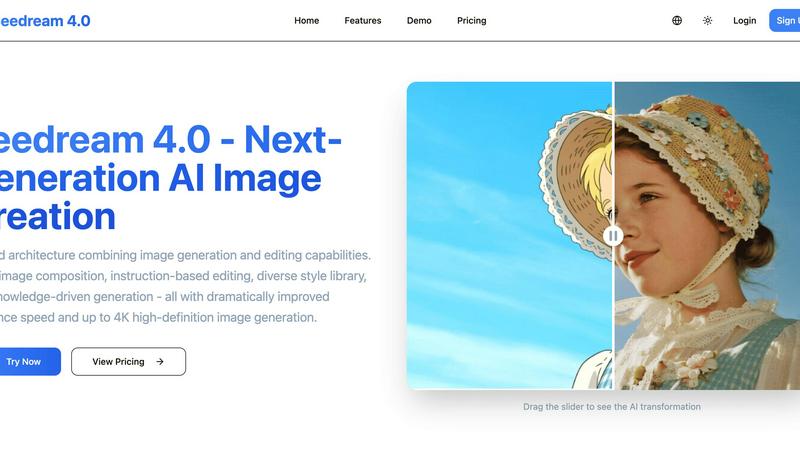
Visual Comparison
Seedream 4.0
SparkPix

Feature Comparison
Seedream 4.0
Multi-Image Composition
This feature allows users to input multiple images and achieve intricate compositions using just a single sentence. It’s perfect for visual storytelling and creating brand assets, making the creative process more efficient and streamlined.
Instruction-Based Editing
Experience the power of “what you say is what you get.” With this feature, users can generate high-quality images and perform precise edits simply by entering descriptive instructions, making image manipulation intuitive and user-friendly.
Diverse Style Library
Seedream 4.0 offers a vast library of professional artistic styles at your fingertips. Users can easily generate stylized images or apply unique styles to their own photos, ranging from watercolor to cyberpunk, thus enhancing their visual language.
Knowledge-Driven Generation
This feature harnesses rich knowledge and reasoning capabilities to produce beautiful and accurate educational illustrations, charts, and professional images. It allows for content creation with enhanced understanding and precision, especially useful in educational and professional contexts.
SparkPix
AI Photo Editor
The AI Photo Editor feature allows users to type specific instructions such as "remove background" or "enhance colors," and within seconds, the AI applies the desired edits. This feature is perfect for users who want quick results without the need for extensive editing knowledge.
Background Remover
With just one click, the Background Remover can eliminate backgrounds from portraits, product images, or even complex scenes. This functionality is ideal for creating transparent backgrounds for use in marketing materials, social media posts, or e-commerce listings.
Unblur Image
The Unblur Image feature uses advanced AI algorithms to fix motion blur, out-of-focus shots, and compression artifacts. This tool is invaluable for those who want to salvage blurry images and transform them into clear, sharp photos suitable for sharing or printing.
Style Transfer
SparkPix offers a unique Style Transfer feature that allows users to convert their photos into various artistic styles, including anime, oil painting, watercolor, and pencil sketch. With over 15 styles available, users can unleash their creativity and produce stunning, original artwork from their images.
Use Cases
Seedream 4.0
Marketing Campaigns
Seedream 4.0 can be utilized to create eye-catching visuals for marketing campaigns. Whether it’s social media graphics or promotional materials, the AI can generate images tailored to specific themes and messages, making campaigns more engaging.
Content Creation for Blogs
Bloggers and content creators can leverage Seedream 4.0 to produce stunning images that complement their written content. With its instruction-based editing, users can quickly generate images that align perfectly with their blog topics.
Social Media Posts
For social media managers, the multi-image composition feature allows for the rapid creation of visually appealing posts. Users can combine various images into a single post, enhancing the overall aesthetic and engagement of their social media feeds.
Educational Illustrations
Educators and trainers can benefit from the knowledge-driven generation feature to create informative and visually appealing educational materials. This capability enables the creation of charts, diagrams, and illustrations that enhance learning experiences.
SparkPix
Personal Photo Enhancement
Individuals can use SparkPix to enhance their personal photos, like vacation snapshots or family portraits, by applying filters, improving colors, and removing unwanted elements, making every memory look its best.
Professional Product Photography
E-commerce businesses can leverage SparkPix to create high-quality product images without the need for expensive photography sessions. The Background Remover and AI Image Generator features can produce professional-looking product shots that attract customers.
Historical Photo Restoration
Families looking to preserve their heritage can utilize SparkPix's Photo Restoration capabilities to repair and enhance old, damaged photos. This is a perfect solution for maintaining family archives and reviving cherished memories.
Creative Artistic Projects
Artists and designers can transform their images into unique artworks using the Style Transfer feature. Whether for personal projects or professional portfolios, this capability allows for endless creative possibilities.
Overview
About Seedream 4.0
Seedream 4.0 is an innovative AI image generator and editor that transforms the landscape of visual content creation. Catering to a diverse audience including creators, designers, marketers, and anyone seeking high-quality visuals, Seedream 4.0 merges powerful image generation with advanced editing capabilities. Its unified architecture allows users to produce stunning images and execute precise edits based on simple textual commands, revolutionizing the creative process. With features such as multi-image composition, an extensive library of artistic styles, and knowledge-driven generation, Seedream 4.0 empowers users to swiftly translate their ideas into captivating visuals. The platform promises up to 4K high-definition image outputs and significantly enhanced inference speed, fulfilling the demands of contemporary digital creativity. Ideal for both professionals and amateurs, Seedream 4.0 streamlines the creative workflow, enabling users to bring their visual concepts to life efficiently and effortlessly.
About SparkPix
SparkPix is an innovative AI-powered photo editing tool that revolutionizes how users edit images by simply typing what they want. Designed for everyone from casual users to professional photographers, SparkPix eliminates the need for complex software skills like those required in Photoshop, making photo editing accessible to all. Users can enhance their photos, restore old images, remove backgrounds, and apply artistic styles with just a few clicks or typed commands. The platform is web-based, ensuring that anyone with an internet connection can access powerful editing tools from their desktop or mobile devices without the hassle of downloads. SparkPix offers a free entry-level option with credits to get started, making it an attractive choice for those looking to improve their photo editing capabilities quickly and efficiently.
Frequently Asked Questions
Seedream 4.0 FAQ
Can I try it for free?
Yes, Seedream 4.0 typically offers a free trial period, allowing users to explore its features and capabilities before committing to a subscription plan.
How does Seedream 4.0 work?
Seedream 4.0 uses advanced AI algorithms to generate and edit images based on textual descriptions provided by the user, making the process intuitive and efficient.
What makes Seedream 4.0 different?
The unified architecture of Seedream 4.0 sets it apart, as it seamlessly combines image generation and editing in one platform, offering a versatile tool for various creative needs.
What image formats are supported?
Seedream 4.0 supports multiple image formats including JPG, PNG, and WebP, catering to a wide range of user requirements for image downloads.
SparkPix FAQ
What types of photos can I edit with SparkPix?
You can edit a wide variety of photos, including portraits, landscapes, product images, and historical photos. The AI tools are designed to accommodate different editing needs and styles.
Do I need any special software to use SparkPix?
No, SparkPix is a web-based platform, which means you can access it directly from your browser on any device, including desktops and mobile phones, without the need for any downloads.
Is there a free trial available?
Yes, SparkPix offers a free plan that gives you 5 credits to start editing without requiring a credit card. This allows you to explore the features and functionality of the platform risk-free.
How does the credit system work?
SparkPix operates on a credit system where each edit or generated image costs a certain number of credits. You can purchase additional credits through various plans starting at $9.99 for 350 credits, giving you flexibility based on your editing needs.
Alternatives
Seedream 4.0 Alternatives
Seedream 4.0 is an innovative AI image generator and editor that fits within the image and photo category, designed to transform the way users create and edit visuals. Its advanced capabilities make it a popular choice among creators, marketers, and designers seeking high-quality images. However, many users often explore alternatives due to factors like pricing, specific feature requirements, or platform compatibility that may not align perfectly with their needs. When searching for an alternative to Seedream 4.0, it's essential to consider key factors such as the range of editing capabilities, the quality of image output, ease of use, and any unique features that may enhance your creative process. Additionally, understanding your specific requirements and how each option aligns with your workflow will help you make an informed decision that best supports your artistic vision.
SparkPix Alternatives
SparkPix is an innovative AI photo editor that allows users to edit images effortlessly through simple text commands. With its powerful features like background removal, photo restoration, and artistic style conversion, it fits seamlessly into the growing category of online image editing tools. Users often seek alternatives to SparkPix due to various reasons, including pricing structures, feature sets, user interface preferences, or specific platform compatibilities. When searching for a suitable alternative, it’s essential to consider factors such as ease of use, the range of editing capabilities, and the accessibility of the platform on different devices. Additionally, evaluate the pricing plans to ensure they align with your budget while still meeting your editing needs.