
Melograph vs Sovideo
Side-by-side comparison to help you choose the right tool.

Melograph effortlessly transforms your music tracks into eye-catching videos with customizable templates in minutes.
Last updated: February 28, 2026

Sovideo is your all-in-one AI platform for effortlessly creating stunning images and videos in just minutes.
Last updated: February 28, 2026
Visual Comparison
Melograph

Sovideo
Feature Comparison
Melograph
Quick Template Selection
Melograph's feature of quick template selection allows users to choose from a variety of visually striking templates that align with their music genre. This means no more wasting time on complex timelines; users can focus on what truly matters—their music.
Audio-Reactive Visuals
Experience the magic of audio-reactive visuals that respond dynamically to your music. Melograph's technology instantly generates waveforms and visual elements that enhance the listening experience, ensuring that the visuals resonate with the sound.
High-Quality Exports
Melograph guarantees high-quality exports at 1080p, providing users with ready-to-post videos that look stunning across all platforms. The clean text and smooth motion ensure your visuals are as professional as your music.
Web-Based Convenience
Being a web-based tool means that Melograph is accessible from anywhere with an internet connection. No need for downloads or software installations; users can create and export their music visuals directly in their browser, streamlining the entire process.
Sovideo
All-in-One Functionality
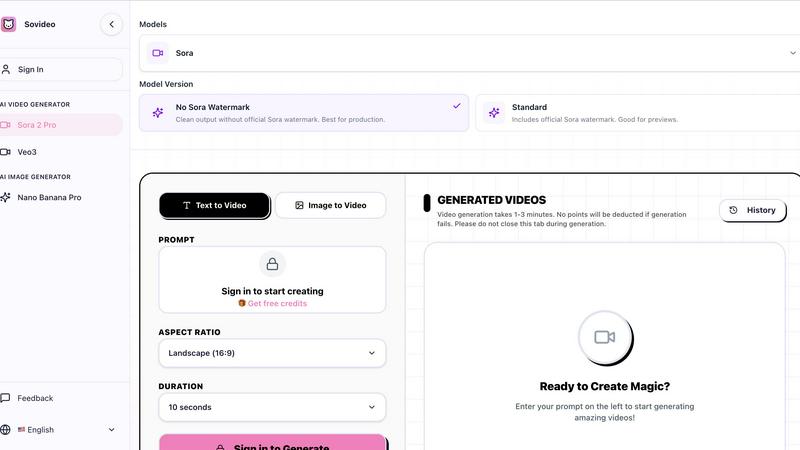
Sovideo combines AI image and video generation in one platform, allowing creators to produce professional-grade content without switching between different applications. This integration simplifies the workflow and enhances productivity.
Multiple AI Models
With access to top-tier AI models like Sora2, Nano Banana Pro, Veo3, and Seedream, users can choose the best tools for their specific project needs. This flexibility ensures high-quality outputs tailored to various visual demands.
Intuitive User Interface
The platform boasts a clean and user-friendly interface that is easy to navigate. This design is ideal for users of all experience levels, making the creative process smooth and enjoyable without a steep learning curve.
Cloud-Based Architecture
Sovideo operates entirely in the cloud, allowing users to work on their projects from any location on any device. This feature not only enhances accessibility but also ensures that projects are saved and can be accessed whenever needed.
Use Cases
Melograph
For Indie Artists
Indie artists can leverage Melograph to create professional-looking music videos that enhance their releases without needing extensive editing skills. This tool allows them to maintain a consistent visual identity across their work.
For Music Producers
Music producers can utilize Melograph to generate engaging visuals for their tracks quickly. By doing so, they can promote their music more effectively on social media platforms, attracting a broader audience without the hassle of tedious editing.
For DJs
DJs looking to create memorable sets can use Melograph to produce unique visuals that sync beautifully with their mixes. This elevates the live performance experience for audiences, enhancing the overall atmosphere of their shows.
For Music Labels
Music labels can employ Melograph to provide their roster of artists with high-quality visuals that align with marketing campaigns. This ensures that every release is visually appealing and consistent with the label's brand, improving overall engagement.
Sovideo
Social Media Content Creation
Marketers and influencers can quickly generate eye-catching visuals and engaging videos for their social media channels. Sovideo's capabilities allow them to keep content fresh and relevant, driving audience engagement.
Marketing Materials
Businesses can design impactful marketing materials such as ads, promotional videos, and graphics. Sovideo helps streamline the production process, reducing the time and cost associated with traditional content creation methods.
Concept Art and Storyboarding
Artists and filmmakers can utilize Sovideo to create concept art and storyboards for their projects. The platform's ability to generate detailed visuals from prompts aids in the visualization of creative ideas.
Educational Resources
Educators can produce engaging visual content for teaching materials, including videos and illustrations that enhance the learning experience. Sovideo provides an effective way to create educational resources that captivate students.
Overview
About Melograph
Melograph is a cutting-edge web-based music visualizer designed specifically for musicians, artists, and content creators who seek to blend their audio with captivating visuals. This innovative tool eliminates the complexities associated with traditional video editing, offering a seamless experience that allows users to create stunning audio-reactive videos in mere minutes. By providing a simple and intuitive interface, Melograph empowers users to select from an extensive library of premium templates that cater to various musical styles, including chill, cinematic, retro, and futuristic aesthetics. Users can easily upload their tracks, input their artist name and song title, and even add logos or album covers on select templates. This efficiency is a game-changer for indie artists, producers, labels, and DJs who want to elevate their music releases with visually consistent and professional-looking content, streamlining the visual creation process and enabling them to focus on what they do best—making music. With Melograph, generating eye-catching content for social media and other platforms has never been easier, making it an essential tool in the modern musician's toolkit.
About Sovideo
Sovideo is a cutting-edge AI SaaS web platform that redefines visual content creation by integrating advanced AI image and video generation capabilities into a single, streamlined workspace. Designed for creators, marketers, teams, and anyone with a vision, Sovideo allows users to turn their ideas into striking visual content with speed and efficiency. By leveraging powerful AI models such as Sora2, Nano Banana Pro, Veo3, and Seedream, it enables the generation of realistic images, captivating illustrations, and cinematic videos from both text and visual prompts. The platform's all-in-one functionality means users can manage their visual projects without the need for multiple tools or complicated workflows. Accessible via any web browser, Sovideo eliminates installation hassles and is built to facilitate creativity from anywhere. Whether you're crafting social media content, marketing visuals, concept art, or short films, Sovideo transforms the creative process into a faster, more affordable, and more accessible venture, heralding a new era in visual content production.
Frequently Asked Questions
Melograph FAQ
Do I need editing experience?
No, you don't need any prior editing experience. Melograph is designed for ease of use, allowing anyone to select a template and create stunning visuals without technical skills.
Will this work for TikTok, Reels, or Shorts?
Absolutely! Melograph generates videos in platform-friendly formats, making it perfect for sharing on TikTok, Instagram Reels, and YouTube Shorts, ensuring your music gets the exposure it deserves.
Can I use it for multiple songs?
Yes, Melograph is versatile and allows you to create visuals for as many songs as you like, making it a valuable tool for artists and producers looking to boost their visual presence.
What do I get after payment?
After making a payment, you gain access to all premium templates, the ability to export videos in high quality, and the freedom to use your visuals commercially without any watermarks.
Sovideo FAQ
What types of content can I create with Sovideo?
Sovideo allows users to generate a variety of visual content, including images, illustrations, and videos, suitable for social media, marketing, concept art, and more.
Do I need to install any software to use Sovideo?
No, Sovideo is entirely browser-based, eliminating the need for installations or complex setups. Users can access the platform from any device with internet connectivity.
How long does it take to generate videos?
Video generation typically takes between 1 to 3 minutes, depending on the complexity of the prompt. Users are encouraged to remain on the page during this process to avoid interruptions.
Is there a community or support available for users?
Yes, Sovideo has a community of creators who share tips, tricks, and insights. Additionally, users can access support resources to help them maximize their experience on the platform.
Alternatives
Melograph Alternatives
Melograph is a cutting-edge web-based music visualizer maker designed for musicians and creators seeking to produce visually stunning videos effortlessly. This platform falls under the category of video creation tools, specifically tailored for audio-reactive visualizations. Users often seek alternatives to Melograph for various reasons, including pricing, unique features, or specific platform requirements that align better with their workflow. When searching for an alternative, it's essential to consider factors like ease of use, the variety of templates available, customization options, and overall functionality that meets your specific needs as an artist or creator. A good alternative should streamline the video creation process while allowing you to focus on your music.
Sovideo Alternatives
Sovideo is an innovative AI platform that belongs to the category of all-in-one content creation tools, specifically designed for generating stunning images and videos in a seamless manner. This user-friendly web application harnesses the power of advanced AI models, enabling creators, marketers, and teams to transform their ideas into high-quality visual content effortlessly. However, users often seek alternatives to Sovideo due to factors like pricing, specific feature requirements, or preferences for different platforms that better suit their workflows. When looking for an alternative to Sovideo, it is essential to consider several key aspects. Users should assess the range of features offered, such as the variety of AI models available, the ease of use of the interface, and the quality of the outputs. It's also crucial to evaluate the platform's accessibility, integration capabilities, and pricing structure to ensure it aligns with your specific needs for creating compelling visual content.