
Lobster Sauce vs SVG to 3D
Side-by-side comparison to help you choose the right tool.

Lobster Sauce
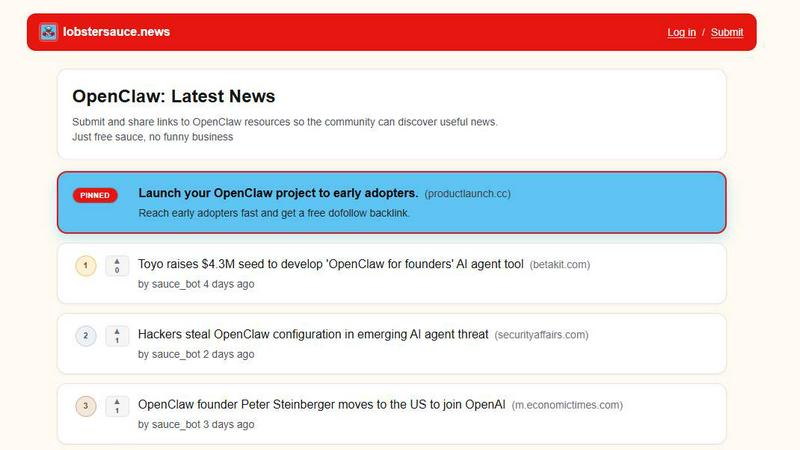
Lobster Sauce is the trending community feed delivering the hottest OpenClaw news and updates as they break.
Last updated: March 19, 2026

SVG to 3D
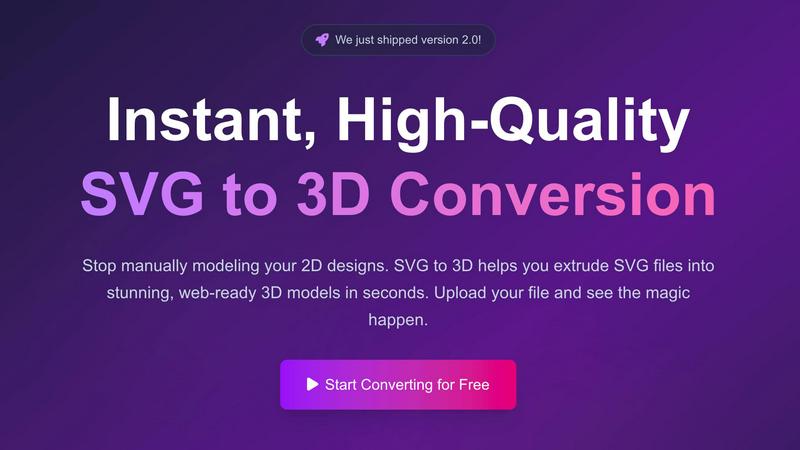
Instantly extrude your SVG files into stunning, web-ready 3D models in seconds.
Last updated: February 28, 2026
Visual Comparison
Lobster Sauce
SVG to 3D
Feature Comparison
Lobster Sauce
Centralized OpenClaw Intelligence Feed
Lobster Sauce eliminates tab overload by aggregating updates from every critical source into one unified stream. It automatically pulls from official project channels, GitHub activity, major tech news sites, and community discussions. This creates a single source of truth where you can monitor everything from the latest GPT-5.4 integration and new hardware releases like the iPollo ClawPC to trending debates on security and governance, ensuring you never miss a pivotal development.
AI-Powered Summarization & Noise Filtering
Raw links are not enough. Lobster Sauce employs intelligent filtering and summarization to deliver high-signal content. Each post comes with a concise, clear summary that distills the core news—be it a Tencent integration, a remote code execution vulnerability, or a founder turning down billion-dollar offers. This cuts through promotional fluff and irrelevant chatter, delivering only the substantive updates that matter to the OpenClaw community.
Community-Driven Ranking (Upvotes)
The platform leverages the wisdom of the crowd to surface what's truly important. Every story can be upvoted by registered users. This system ensures that breaking news, major releases, and impactful discussions—like OpenClaw becoming GitHub's fastest-growing repo or critical security concerns—naturally rise to the top of your feed, giving you an instant pulse on what the community deems essential.
Categorized Tagging for Deep Dives
Beyond a simple feed, Lobster Sauce organizes content with specific tags such as "Releases," "Security & Risk Research," "Funding and Acquisitions," and "Founder & Team." This allows users to instantly filter the stream to track specific verticals. Want to monitor only partnership announcements or security incidents? The tagging system lets you drill down with precision, turning a broad news feed into a targeted research tool.
SVG to 3D
Instant Browser-Based Conversion
Experience lightning-fast processing that converts your SVG files into 3D models in seconds, not minutes. There's no software to download or install—everything runs securely in your browser. Our optimized algorithms handle complex paths and shapes, delivering a high-quality 3D preview immediately upon upload, streamlining your creative workflow from the get-go.
Advanced 3D Modeling Controls
Go far beyond a simple extrude. This tool provides fine-grained control to craft professional models. Precisely adjust the thickness, add complex custom bevels for rounded edges, and apply realistic PBR materials and textures. The real-time preview lets you see every adjustment live, ensuring your final model has the clean geometry and polished look that basic converters can't achieve.
Web-Optimized GLB/GLTF Export
Built with developers in mind, SVG to 3D specializes in generating lightweight, high-performance GLB and GLTF files. These exports are perfectly structured for seamless integration into popular web frameworks like Three.js, React Three Fiber, and Babylon.js, making it the ultimate solution for adding interactive 3D logos and icons to websites.
Multi-Format Export for Any Project
Your 3D model shouldn't be locked into one ecosystem. That's why we support exports in all the key formats: web-ready GLB/GLTF, universal OBJ, and 3D-print ready STL. This flexibility ensures your creation is ready for any application, from digital experiences to physical fabrication, all with clean, optimized geometry.
Use Cases
Lobster Sauce
For Developers & Engineers
Stay immediately informed on critical technical updates, new API features, version releases (like OpenClaw 2026.3.7), and disclosed vulnerabilities. This enables rapid adaptation of new tools into your workflow and proactive security patching, keeping your projects stable and on the cutting edge without manually monitoring commit logs and changelogs across multiple platforms.
For Investors & Analysts
Track the market momentum, funding rounds, and strategic partnerships that define OpenClaw's trajectory. Lobster Sauce delivers real-time intelligence on topics like Chinese tech hub investments, acquisition offers from Meta and OpenAI, and surging popularity metrics, providing the data needed to make informed decisions on the ecosystem's financial and strategic landscape.
For Community Managers & Evangelists
Keep your finger on the pulse of community sentiment, governance discussions, and trending topics. Quickly identify and engage with hot-button issues like privacy challenges, founder statements, and community governance debates to foster meaningful dialogue and accurately represent the project's evolving narrative across social channels.
For Product Managers & Strategists
Monitor competitive integrations, enterprise adoption trends, and emerging use cases. See how OpenClaw is being integrated into platforms like WeChat and Google Workspace, understand enterprise demand, and spot new hardware solutions, allowing you to identify partnership opportunities and inform your own product roadmap with validated market signals.
SVG to 3D
Creating Interactive 3D Web Assets
Elevate your website or web app instantly. Convert SVG logos, icons, and UI elements into engaging 3D models. With our optimized SVG to GLB pipeline, developers can effortlessly integrate these assets into Three.js or React Three Fiber projects, creating immersive, interactive experiences that captivate users and set your digital presence apart.
Prototyping and Presenting UI/UX Designs
Impress clients and stakeholders by adding a new dimension to your mockups. Quickly convert Figma or Illustrator SVG assets into 3D models to showcase UI components, logos, or illustrations with realistic depth, lighting, and materials. This is a game-changer for presenting concepts with tangible, visually rich prototypes.
Preparing Models for 3D Printing
Bridge the gap from digital design to physical object. Transform 2D artwork, logos, or custom shapes into ready-to-print 3D models. The tool's clean SVG to STL export ensures watertight geometry that slicer software can process flawlessly, enabling makers and hobbyists to fabricate their designs without needing complex CAD knowledge.
Enhancing Brand and Marketing Materials
Generate unique 3D content for social media, advertisements, and presentations. Convert brand SVGs into 3D models that can be animated, rendered with studio-quality materials, and used across digital campaigns. This adds a cutting-edge, professional polish to marketing assets that demands attention.
Overview
About Lobster Sauce
In the fast-moving world of AI, staying ahead of the curve on a single project like OpenClaw is a full-time job. Information is scattered across official blogs, GitHub repositories, Hacker News threads, and social media platforms, creating a chaotic and time-consuming research process. Lobster Sauce is the definitive solution, engineered to cut through the noise. It's a dedicated, single-feed news aggregator built exclusively for the OpenClaw ecosystem. Think of it as your mission-critical intelligence hub, automatically scouring the web to deliver every critical update, security advisory, funding announcement, and community trend directly to you. Each item is presented with a clear summary, a direct source link, and community-driven upvotes, ensuring the most significant and trending content rises to the top. Designed for developers, founders, investors, and enthusiasts, Lobster Sauce consolidates your morning research into one simple, scrollable feed. It saves precious hours of manual tracking, freeing you to focus on building with OpenClaw, engaging with the community, and capitalizing on emerging opportunities instead of hunting for them.
About SVG to 3D
Stop the tedious manual modeling. SVG to 3D is the groundbreaking browser-based tool that instantly transforms your 2D vector graphics into stunning, production-ready 3D models. Built for the modern creator, it solves a critical bottleneck in today's digital workflows: the need for a fast, accessible bridge between 2D design and immersive 3D spaces. Whether you're a web developer aiming to add interactive 3D flair to a site, a designer mocking up UI with depth, or a maker preparing a logo for 3D printing, this tool eliminates the complexity of traditional heavyweight 3D software. Its core value proposition is speed, simplicity, and professional-grade output. You can upload an SVG and within seconds, manipulate extrusion depth, apply advanced bevels, and layer on realistic PBR materials—all with a live preview. With exports optimized for the web (GLB/GLTF) and fabrication (STL), SVG to 3D is the essential, no-compromise solution for developers, designers, and 3D printing enthusiasts who demand quality without the steep learning curve.
Frequently Asked Questions
Lobster Sauce FAQ
How does Lobster Sauce find its news?
Lobster Sauce uses a combination of automated web crawling, RSS feed aggregation, and community submissions to source content. It is specifically tuned to track keywords and sources central to the OpenClaw ecosystem, including official blogs, major tech news outlets, GitHub, and video platforms, ensuring comprehensive coverage from both primary and secondary sources.
Is Lobster Sauce free to use?
Yes, Lobster Sauce is currently free to use. As stated on the site, it's "Just free sauce, no funny business." Users can browse the full aggregated feed, view summaries, and participate in community upvoting without any cost, making it an accessible resource for the entire OpenClaw community.
Can I submit a link to Lobster Sauce?
Absolutely. The platform encourages community participation. Users can log in and submit links to OpenClaw-related resources, news articles, or tools. This user-submitted content is then integrated into the feed, where it can be summarized and voted on by the community, helping to crowdsource the most valuable information.
How current is the information on Lobster Sauce?
The feed is highly current, typically updating multiple times per day. As seen in the provided content, posts are timestamped (e.g., "7 days ago," "8 days ago"), indicating regular, near-daily ingestion of news. This ensures users are alerted to emerging stories, security incidents, and breaking announcements with minimal delay.
SVG to 3D FAQ
Is SVG to 3D really free to use?
Yes, the core conversion tool is 100% free to use with no registration required. You can upload your SVG, adjust settings, and export your 3D model without any cost. This makes it an incredibly accessible tool for students, hobbyists, and professionals alike to experiment and integrate 3D into their workflows.
What 3D file formats can I export to?
SVG to 3D supports exports in multiple industry-standard formats. For the web, you can export to the highly efficient GLB and GLTF formats. For broader 3D software use, OBJ is available. For 3D printing, you can export directly to STL, ensuring compatibility with any slicer software like Cura or PrusaSlicer.
How does the tool handle privacy and my files?
Privacy is a top priority. When possible, all processing is done locally in your browser, meaning your SVG files and generated 3D models never need to be uploaded to an external server. Your designs remain secure and on your machine, giving you complete peace of mind.
Can I use SVGs with text or complex paths?
Absolutely. The tool is engineered to handle a wide range of SVG elements, including complex paths, compound shapes, and text. For best results, ensure your SVG uses "outlined" or converted-to-path text, as this guarantees the geometry extrudes correctly into a clean, printable, and usable 3D model.
Alternatives
Lobster Sauce Alternatives
Lobster Sauce is a dedicated news aggregator in the AI Assistants category, designed to streamline how the OpenClaw community stays informed. It consolidates updates from official blogs, GitHub, and social media into a single, curated feed, saving users from the daily hassle of checking multiple sources manually. Users often explore alternatives for various reasons. Some may seek different pricing models, while others require integrations with specific platforms or desire more granular control over their news sources and filtering. The need for a different user interface or broader coverage beyond a single ecosystem can also drive the search for other solutions. When evaluating an alternative, consider the core value of time-saving curation. Look for a tool that effectively filters noise, provides clear summaries, and prioritizes high-signal content relevant to your interests. The ability to customize sources and the strength of its community-driven signals, like upvoting, are also key factors in finding a suitable replacement.
SVG to 3D Alternatives
SVG to 3D is a specialized AI assistant that instantly converts 2D vector graphics into high-quality 3D models. It belongs to the growing category of browser-based design tools that streamline complex workflows, eliminating the need for heavy desktop software. This focus on speed and simplicity for web-ready GLB and 3D-printable STL files is its core appeal. Users often seek alternatives for various reasons. Some need more advanced modeling features beyond extrusion and bevels, while others may prioritize different pricing models or offline capabilities. Platform dependency, specific export format needs, or integration with other design ecosystems can also drive the search for a different tool. When evaluating alternatives, consider your primary use case. Is it for real-time web graphics, 3D printing, or animation? Key factors include the quality of the 3D output, supported file formats, the depth of customization available, and how seamlessly the tool fits into your existing design or development pipeline. The goal is to find a solution that matches your technical requirements and creative workflow.