
Pullsy vs URL to Any
Side-by-side comparison to help you choose the right tool.

Pullsy organizes your inbox and drafts tailored replies, keeping your day efficient and stress-free.
Last updated: February 28, 2026

URL to Any
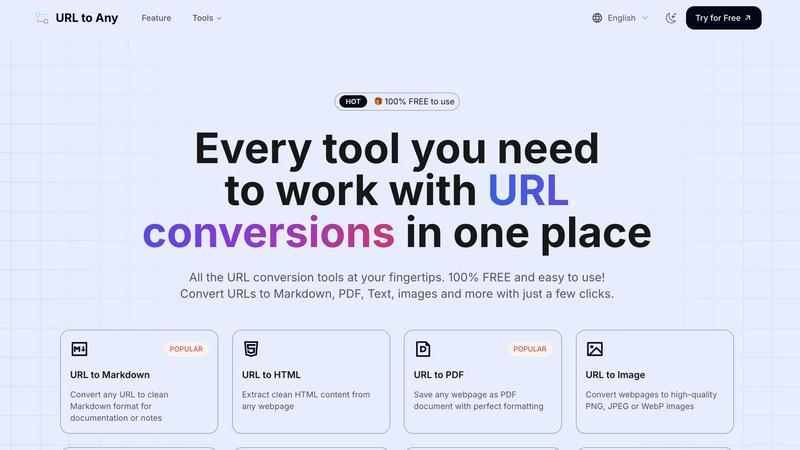
URL to Any instantly converts any webpage into Markdown, PDF, images, and more with one click.
Last updated: February 28, 2026
Visual Comparison
Pullsy

URL to Any
Feature Comparison
Pullsy
Smart Inbox Management
Pullsy’s Smart Inbox organizes your messages by relevance and importance, ensuring that you see what matters most first. It filters out irrelevant information, allowing you to focus on urgent communications without the clutter.
Context-Aware Reply Drafting
Pullsy drafts replies tailored to the context of the conversation and your personal tone. It identifies key action items, such as questions needing answers or tasks to confirm, making your responses more effective and timely.
Adaptive Writing Style Learning
The AI learns your writing style over time, adapting to your tone and preferences. With options for Professional, Friendly, or Quick responses, you can send personalized replies that reflect your voice with just one click.
Intelligent Insights with “Ask Pullsy”
The “Ask Pullsy” feature allows users to extract key insights and summaries from long email threads and documents. This functionality helps streamline communication and ensures that important information is always at your fingertips.
URL to Any
🚀 Lightning-Fast, Multi-Format Conversion Engine
At the core of URL to Any is an optimized processing engine that delivers instant results. Go beyond basic text extraction. Convert any webpage into over 10 different formats with a single click, including Markdown for docs, PDF for archiving, PNG/JPEG for visuals, and structured data like JSON and XML for developers. This eliminates the need for multiple disparate tools, centralizing your entire conversion workflow into one blazing-fast, efficient platform.
🔒 Secure, Private & Cloud-Based Processing
Your data's security is paramount. All conversion magic happens securely in the cloud, requiring no risky software downloads or extensions that compromise your system. Most importantly, URL to Any operates on a strict privacy principle: your data and the URLs you process are never stored on their servers. This ensures complete confidentiality for sensitive research, internal documents, or any web content you handle, giving you peace of mind with every conversion.
🛠️ Advanced Extraction & AI-Powered Tools
URL to Any is packed with pro-level utilities that go simple conversion. Instantly extract all links from a site with the URL Extractor, analyze SEO meta tags and headings, or resolve URLs to IP addresses. The integrated AI Summarizer leverages cutting-edge AI technology to digest lengthy articles and provide concise summaries instantly, a must-have for researchers and content curators staying ahead of information overload.
🎯 User-Friendly Interface & Global Accessibility
Designed for effortless use, the intuitive interface ensures anyone can master it in moments—just paste, select, and convert. Access the entire toolkit from any device, anywhere in the world. With features like batch URL opening and one-click copying/downloading, it seamlessly integrates into any workflow. The platform is constantly evolving, adding NEW tools like meta tag analyzers to keep you at the forefront of web utility trends.
Use Cases
Pullsy
Efficient Email Management for Entrepreneurs
Entrepreneurs can leverage Pullsy to manage high volumes of emails without sacrificing quality or attention to detail. By automatically organizing messages and drafting replies, they can focus on growing their businesses.
Streamlined Communication for Small Teams
Small teams can benefit from Pullsy’s ability to keep everyone on the same page. By summarizing threads and highlighting important messages, team members can collaborate more effectively and avoid miscommunication.
Task Prioritization for Busy Professionals
Professionals juggling multiple projects can use Pullsy to prioritize their emails and tasks. The tool identifies urgent communications, allowing users to address critical issues first and manage their workflow efficiently.
Enhanced Meeting Preparation
Before meetings, Pullsy provides users with a personalized summary of upcoming calls and relevant emails. This ensures that users are fully prepared and organized, giving them the confidence to engage effectively in discussions.
URL to Any
📚 Academic Research & Documentation
Students and researchers can effortlessly capture online sources in a clean, citable format. Convert crucial articles or studies into PDFs for offline annotation or transform reference webpages into organized Markdown notes for literature reviews. The AI Summarizer is a game-changer for quickly digesting multiple papers, while extracting pure text helps in compiling bibliographies without ads or webpage clutter.
💻 Developer Workflow & Data Structuring
Developers can supercharge their workflows by converting API documentation or blog tutorials into Markdown for local knowledge bases. The URL to JSON and URL to XML features are invaluable for web scraping prototypes, quickly turning webpage content into structured data for apps. The URL Encode/Decode toolset supports 8+ formats, making it a handy Swiss Army knife for debugging and data processing tasks.
🎨 Content Creation & Digital Marketing
Content creators and marketers can capture visual inspiration or competitor layouts by converting websites to high-quality images (PNG, JPEG, WebP). Generate QR codes from campaign URLs for print materials in seconds. Use the Meta Tags Extractor to audit and analyze the SEO and social media previews (Open Graph, Twitter Cards) of any webpage, streamlining competitive research and on-page optimization.
🗄️ Professional Archiving & Knowledge Management
Professionals across industries can reliably archive important webpages, legal notices, or project briefs as perfectly formatted PDFs, ensuring layout fidelity for future reference. Convert internal wiki pages or announcements into text or Markdown for centralized knowledge management systems. The ability to process content securely and privately makes it ideal for handling sensitive business information found online.
Overview
About Pullsy
Pullsy is an innovative AI-powered inbox assistant designed specifically for busy professionals, entrepreneurs, and small teams who want to take control of their email experience. By seamlessly integrating with popular email platforms such as Gmail and Outlook, Pullsy enhances productivity and efficiency, allowing users to manage their inboxes without the overwhelming burden of constant email interruptions. It intelligently organizes incoming messages, highlights what truly matters, and drafts context-aware replies in the user's unique voice. With features like instant thread summarization, PDF review, and the “Ask Pullsy” functionality, users can save valuable time—navigating their inboxes up to three times faster. Pullsy’s intuitive setup and clean interface, combined with a free 14-day trial, transform email from a daily chore into a streamlined workflow, making professional communication simpler and more effective.
About URL to Any
🚀 HOT ALERT: In the fast-paced digital world, content is king, but format is its kingdom. URL to Any is the revolutionary, all-in-one web content conversion suite that's changing how creators, developers, and professionals interact with online information. This isn't just another simple converter; it's a comprehensive, cloud-powered toolkit designed to dismantle the barriers between a webpage and its potential. Simply paste any URL, and within seconds, transform it into a versatile array of formats including clean Markdown, perfectly formatted PDFs, high-quality images, structured JSON/XML, and even shareable QR codes. Built with a laser focus on user experience, it requires no registration, no software installation, and is 100% FREE, making powerful conversion accessible to everyone. Whether you're archiving research, documenting code, preparing content for publication, or extracting data for analysis, URL to Any streamlines your workflow, eliminates manual hassle, and supercharges productivity. It's the essential bridge between the dynamic web and your projects.
Frequently Asked Questions
Pullsy FAQ
What is Pullsy and how does it work?
Pullsy is an AI-powered inbox management tool that connects with Gmail and Outlook. It organizes your messages, highlights important emails, and suggests replies to help you manage your inbox more efficiently and with less stress.
Is Pullsy safe to use?
Yes, Pullsy prioritizes data security and is Google OAuth Verified. It also complies with GDPR standards, ensuring your personal information and email data are kept secure and protected.
Do I need a credit card to start the free trial?
No, you do not need a credit card to start the free 14-day trial of Pullsy. You can explore all features risk-free without any financial commitment.
Can Pullsy help with meeting reminders?
Absolutely! Pullsy tracks your calendar events and upcoming meetings, providing reminders and summaries to ensure you are always prepared and organized for your important calls.
URL to Any FAQ
Is URL to Any really free to use?
YES, 100% FREE! URL to Any is completely free to use with no hidden costs, tiered plans, or required registrations. Every tool, from URL to PDF and Markdown conversion to the AI Summarizer and advanced extractors, is available at no charge. This commitment to accessibility ensures everyone from students to enterprise users can benefit from its powerful features without any financial barrier.
How does URL to Any ensure my privacy and data security?
Privacy is a foundational principle. When you convert a URL, the content is processed transiently in the cloud to generate your output. Immediately after the conversion is complete and delivered to you, the data is purged. URL to Any does not store the webpages you convert, your IP address, or any personal information on its servers, guaranteeing a secure and private conversion experience.
What formats can I convert a URL into?
The platform supports a wide and growing range of formats. Key outputs include Markdown, PDF, HTML, Text, and high-quality Images (PNG, JPEG, WebP). For developers and data work, you can convert to JSON and XML. It also creates QR Codes, MP3 audio (for text-to-speech), and offers advanced utilities like encoding/decoding in 8+ formats and bulk URL extraction.
Do I need to install software or a browser extension?
No installation is necessary! URL to Any is a fully cloud-based web application. You can access and use all its tools directly from any modern web browser on your desktop, tablet, or phone. While an optional browser extension is available for added convenience, the core website provides the complete, powerful functionality without any downloads, making it instantly accessible and safe to use.
Alternatives
Pullsy Alternatives
Pullsy is an AI-powered inbox assistant designed to help busy professionals, entrepreneurs, and small teams reclaim control over their email communication. By integrating seamlessly with popular email platforms like Gmail and Outlook, Pullsy automates the tedious tasks of organizing, responding, and searching through emails, allowing users to navigate their inbox more efficiently. As the demand for streamlined communication grows, users often seek alternatives to Pullsy for various reasons, including pricing, feature sets, and compatibility with preferred platforms. When looking for an alternative, consider factors such as ease of integration with your current email system, the specific features that cater to your workflow, and the overall cost-effectiveness of the solution. It's essential to identify tools that not only enhance productivity but also align with your unique communication style and organizational needs. By focusing on these criteria, you can find an email management solution that transforms your inbox into a powerful productivity hub.
URL to Any Alternatives
URL to Any is a leading AI-powered web content conversion tool, part of the dynamic AI Assistants category. It instantly transforms any webpage link into versatile formats like Markdown, PDF, and QR codes, streamlining digital workflows for creators and developers alike. Users often explore alternatives for various reasons. Some may require advanced features like batch processing or API access, while others might need integrations with specific platforms like Notion or Google Docs. Budget constraints or a preference for open-source solutions can also drive the search for different tools. When evaluating an alternative, prioritize core needs. Consider the range of output formats, processing speed, and ease of use. Security and data privacy are paramount, especially for sensitive content. Finally, assess the overall value—whether a freemium model or a one-time purchase aligns best with your long-term usage and workflow requirements.