
AI Formatter
Transform raw text into polished documents instantly with 1000+ professional templates using AI Formatter.
About AI Formatter
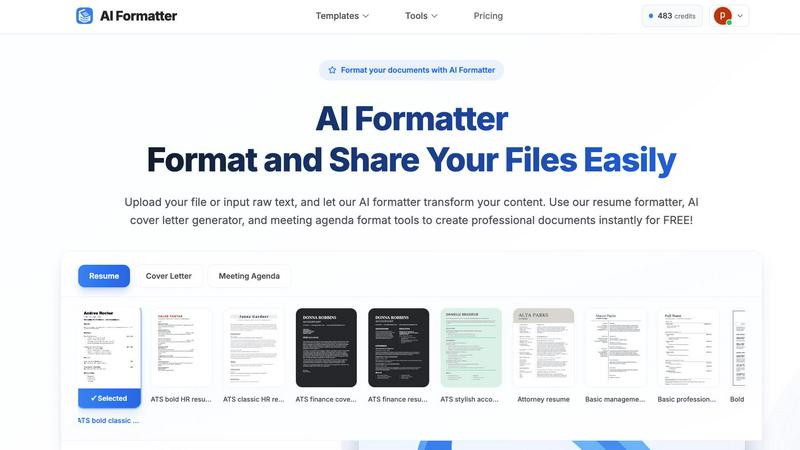
AI Formatter is a revolutionary cloud-based SaaS platform designed to streamline the process of document creation and formatting through intelligent automation. It caters to a wide array of users, including job seekers, business professionals, and students, by transforming raw text and uploaded files into polished, ATS-optimized documents in mere seconds. The platform is not just another template tool; it offers a comprehensive suite of document intelligence capabilities. With an impressive 95%+ ATS pass rate for resumes and a time-saving average of over two hours per document, AI Formatter is poised to elevate your professional presentation with minimal effort. It supports various input formats—Word, PDF, TXT—and features over 100 professional templates, ensuring users achieve consistent, visually appealing results. The combination of AI technology and a real-time online editor empowers users to customize their documents fully, export in multiple formats, and share securely. Starting with a free tier, AI Formatter is the essential productivity hack for anyone involved in document creation, making tedious tasks a one-click operation.
Features of AI Formatter
Advanced AI Formatting
AI Formatter utilizes advanced artificial intelligence to analyze and structure your content automatically. This ensures that your documents not only look professional but also adhere to industry standards and ATS compatibility.
Extensive Template Library
With over 162 professional templates at your disposal, AI Formatter enables you to choose the perfect layout for your documents. Each template is designed to be ATS-optimized, ensuring that your resumes and cover letters pass automated screening systems with ease.
Multi-Format Support
The platform supports a variety of input formats, including PDF, DOC, DOCX, and TXT, allowing users to upload existing documents or input raw text directly. This flexibility ensures that users can work with any type of content they have on hand.
Real-Time Editing and Customization
Once your document is formatted, AI Formatter offers an intuitive online editor where you can make adjustments, customize content, and finalize your document. This feature allows for personal touches while maintaining the professional look of your formatted document.
Use Cases of AI Formatter
Job Seekers
Job seekers can leverage AI Formatter to create ATS-optimized resumes and cover letters that stand out to recruiters. The platform's templates and AI capabilities ensure that their documents meet industry standards and increase their chances of landing interviews.
Business Professionals
Business leaders and professionals can use AI Formatter to create standardized reports, presentations, and meeting agendas quickly. The automation reduces the time spent on formatting, allowing them to focus on the content and strategy of their documents.
Students
Students can utilize AI Formatter to format their theses, essays, and other academic papers with ease. The platform ensures adherence to specific formatting guidelines, saving them time and minimizing formatting errors.
Freelancers and Entrepreneurs
Freelancers and entrepreneurs can benefit from AI Formatter by generating professional invoices and receipts. The AI-driven tools allow for quick document creation, enabling them to maintain a professional image while managing their business operations efficiently.
Frequently Asked Questions
How does AI Formatter ensure ATS compatibility?
AI Formatter uses advanced AI algorithms to analyze and structure your documents according to the latest ATS requirements, ensuring that your resumes and cover letters are optimized for automated screening systems.
What formats can I upload to AI Formatter?
You can upload documents in various formats, including PDF, DOC, DOCX, and TXT. This flexibility allows you to work with existing files or simply input raw text for formatting.
Is there a free version of AI Formatter?
Yes, AI Formatter offers a generous free tier that allows users to access many of its features without any cost. This makes it accessible for those looking to improve their document formatting skills.
Can I customize my documents after formatting?
Absolutely! AI Formatter includes a real-time online editor that allows you to customize and edit your formatted documents before downloading them. You can make adjustments to content, layout, and design as needed.
Explore more in this category:
Best Productivity & Management tools
Similar to AI Formatter


PerPageFax
PerPageFax lets you send a fax online from any browser for a flat $0.50 per page — no account, no subscription, no fax machine.

OctoWatch DLP
Track staff & time. Free trial. Cloud/on-prem.

Fill PDF from Sheet
Fill PDF from Sheet automates the process of populating PDF forms from data in Excel, CSV, or Google Sheets.

linkwise.link
AI finds your lost links. Summarizes & tags URLs.

Glanced
Follow news, blogs, newsletters, and podcasts in a free RSS reader, with AI summaries, top stories, full-text search, saved searches, and a catalog.
