

Caesura
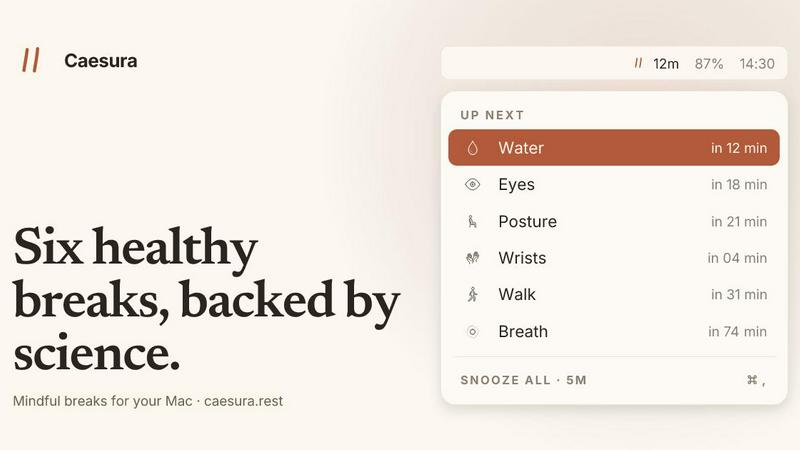
Caesura is a macOS menu-bar app that uses science-backed break intervals for water, walking, wrists, eyes, posture, and breath, pausing automatically.
About Caesura
Caesura is a calm, intelligent macOS menu-bar break manager designed for knowledge workers, developers, designers, and anyone who spends long, uninterrupted hours at a desk. In an era where deep focus is currency, the biggest threat to productivity isn't distraction—it's the slow, silent erosion of physical health from sitting still, staring at screens, and forgetting to hydrate. Caesura solves this by delivering six science-backed micro-breaks—water, walking, wrists, eyes, posture, and breathing—each on its own independent, research-validated interval, not a generic round number. What sets Caesura apart in the emerging landscape of digital wellness tools is its radical respect for your flow state. It intelligently coalesces overlapping reminders into a single gentle prompt, so you're never interrupted twice in a row. It automatically pauses every timer when it detects you're on a video call, screen sharing, in a fullscreen app, or during a calendar event, then picks up exactly where it left off. There are no accounts, no telemetry, no subscriptions—just a one-time purchase of $15 that gives you a lifetime license. For the modern professional who values both peak cognitive performance and long-term physical health, Caesura is the quiet, evidence-based co-pilot your body needs, running silently in your menu bar, waiting for the right moment to nudge.
Features of Caesura
Six Science-Backed Breaks on Independent Schedules
Caesura doesn't rely on generic 50-minute intervals. Each of the six habits—water (every 45 min), walk (every 60 min), wrists (every 30 min), eyes (every 20 min), posture (every 30 min), and breathing (every 90 min)—is calibrated to the specific cadence supported by peer-reviewed research. You can turn any break off, retune its interval, or change how it appears. This precision means you're not just following a trend; you're adopting a system built on actual physiological data, from hydration studies to ergonomic research.
Coalescing Engine: One Break, Not Two
This is Caesura's breakthrough feature. When two or more reminders fall due within a minute of each other—say, your wrist stretch and posture check align—Caesura intelligently merges them into a single, consolidated break prompt. You get one gentle nudge instead of two disruptive interruptions. In a world where every notification fragments your attention, this coalescing logic is a quiet revolution, ensuring your focus is protected even while your health is prioritized.
Automatic Flow Detection and Pause
Caesura is hyper-aware of your digital context. It watches your camera, screen sharing status, calendar events, fullscreen apps, Do Not Disturb mode, and which app has focus. The moment you join a video call, share your screen, or enter a fullscreen game, every timer freezes instantly. When the call ends, it picks up precisely where it left off—if you had 12 minutes until your water break, you still have 12 minutes. This contextual intelligence means the app is invisible when you're busy and present when you're not.
Customizable Break Styles: Overlay, Banner, or Notification
Not all breaks require the same level of urgency. Caesura gives you three distinct prompt styles, assignable per break. The Overlay takes over your full screen until you press Return—perfect for water or wrist stretches you might otherwise ignore. The Banner slides in from under the menu bar and auto-dismisses in 30 seconds, ideal for eye breaks. The Notification is a standard macOS alert, the lightest possible touch for breathing exercises. This flexibility lets you design your own interruption hierarchy.
Use Cases of Caesura
The Deep-Focus Developer or Writer
For professionals who enter hours-long coding or writing sessions, the biggest risk is losing the flow state to a clunky reminder. Caesura's coalescing engine and automatic pause during fullscreen or focus modes mean you only get a break when your brain is naturally ready. The cursor countdown for eye breaks is a subtle, non-intrusive way to enforce the 20-20-20 rule without leaving your IDE or text editor. Your flow stays intact, and your eyes get the rest they need.
The Remote Worker on Back-to-Back Video Calls
Modern remote work is a gauntlet of Zoom, Teams, and Google Meet. Caesura detects when your camera is active or you're screen sharing and pauses all timers. When your 90-minute breathing break was due mid-call, it simply waits. After the call, it resumes the countdown from exactly where it stopped. This prevents the awkwardness of a break prompt appearing while you're presenting, while still ensuring you get your movement and hydration between meetings.
The Freelancer or Solopreneur Managing Their Own Schedule
Without a corporate wellness program, independent workers often neglect their physical health entirely. Caesura becomes your silent, non-judgmental wellness co-pilot. The one-time purchase model means no recurring fees, no data collection, and no account creation. You set it and forget it. The breathing guide with the expanding orb and progress bar is particularly useful for solo workers who need a structured, 90-minute reset to manage stress and maintain cognitive clarity throughout a long day.
The Ergonomic and Preventative Health Advocate
For individuals recovering from repetitive strain injuries (RSI), carpal tunnel, or chronic back pain, Caesura's wrist and posture breaks are literal therapy. The wrist stretch overlay shows four illustrated, optional moves with a 40-second timer. The posture reminder encourages a "shift, don't sit up straight" philosophy—the best posture is the next one. Combined with the evidence links for each break, this turns Caesura from a simple timer into a preventative health tool grounded in real science.
Frequently Asked Questions
How does Caesura handle breaks during video calls or screen sharing?
Caesura automatically detects when your camera is active, when you are sharing your screen, or when a fullscreen app is in focus. When any of these conditions are met, all six timers freeze instantly. They resume exactly where they left off once the call or sharing session ends. This is handled locally on your machine with no telemetry or cloud processing.
Can I customize which breaks I receive and how often?
Absolutely. Every break is independently configurable. You can turn any of the six breaks on or off, adjust its interval to your personal preference, and choose from three distinct prompt styles (Overlay, Banner, or Notification) per break. This means you can have a full-screen overlay for water, a gentle banner for eyes, and a silent notification for breathing, all running on your own schedules.
Is this a subscription? Do I need to create an account?
No and no. Caesura is a one-time purchase of $15. There are no subscriptions, no recurring fees, no accounts, and no credit card required for the 14-day free trial. The app runs entirely locally on your Mac with no telemetry or data collection. It is a privacy-first, buy-it-once product designed for macOS 14 and later.
What happens if two breaks are due at the same time?
This is Caesura's signature feature: coalescing. When two or more reminders fall due within one minute of each other, they are merged into a single, consolidated break prompt. Instead of being interrupted twice in a row, you get one gentle nudge that covers all the breaks due. This prevents notification fatigue and respects your focus above all else.
Pricing of Caesura
Caesura is available as a one-time purchase for $15. This is a lifetime license with no subscriptions, no recurring fees, and no account required. You can try the app free for 14 days with no credit card on file. The purchase is a single transaction, and the app runs entirely locally with no telemetry or data collection. Compatible with macOS 14 and later.
Explore more in this category:
Best Lifestyle & Entertainment tools
Best Personal Development tools
Similar to Caesura

Forms Plugin
The #1 Native Form Builder Plugin for Framer - No Code, No Embeds, No External Platforms.

AIdorable
Adopt a virtual baby who grows, learns, and remembers you.


PerPageFax
PerPageFax lets you send a fax online from any browser for a flat $0.50 per page — no account, no subscription, no fax machine.