

CIOOffice: the CIO-Software
CIOOffice is a unified cloud platform empowering CIOs to streamline IT strategy, budgeting, projects, and vendor.
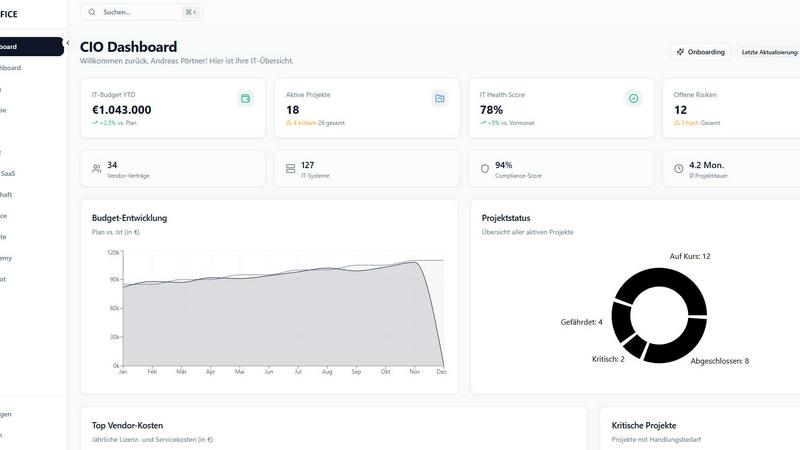
About CIOOffice: the CIO-Software
CIOOffice is a cutting-edge, cloud-based platform specifically designed for Chief Information Officers (CIOs), IT managers, and digital leaders in enterprises and mid-sized companies. This comprehensive IT management solution integrates essential functions like IT strategy management, project portfolio oversight, budget control, vendor management, and performance analytics into a single, intuitive interface. By employing CIOOffice, organizations can enhance transparency in their IT operations and streamline processes, enabling informed decision-making through real-time insights. The platform also plays a crucial role in supporting digital transformation initiatives by standardizing governance practices and promoting synergy between IT and business teams. With strict adherence to security standards and GDPR compliance, CIOOffice is an indispensable tool for modernizing IT management, driving efficiency, and ultimately fueling business growth.
Features of CIOOffice: the CIO-Software
IT Strategy Management
CIOOffice allows users to define strategic goals, plan initiatives, and monitor progress transparently. This feature ensures that all IT activities align with the organization’s objectives, facilitating better strategic alignment and execution.
IT Budgeting
Manage OPEX, CAPEX, and forecasts with ease using the IT budgeting feature. Automated alerts notify users of budget deviations, enabling proactive financial management and ensuring that spending aligns with strategic priorities.
Project Portfolio Management
This feature enables users to categorize and prioritize projects while maintaining an overview of the entire portfolio. By visualizing project statuses and dependencies, CIOOffice ensures that resources are allocated effectively and projects are aligned with strategic goals.
Governance and Risk Management
CIOOffice provides tools to identify IT risks, ensure compliance, and prepare for audits. This feature streamlines governance processes, allowing organizations to maintain compliance with industry regulations and mitigate potential risks effectively.
Use Cases of CIOOffice: the CIO-Software
Streamlining IT Operations
CIOOffice can be utilized by IT leaders to streamline operations across multiple departments. By providing a centralized platform for managing IT strategy, budgeting, and project oversight, organizations can significantly reduce operational inefficiencies.
Enhancing Decision-Making
With real-time insights and comprehensive analytics, CIOOffice empowers decision-makers to make informed choices swiftly. This capability is crucial for navigating the complexities of IT management and aligning resources with business priorities.
Supporting Digital Transformation
Organizations can leverage CIOOffice to support their digital transformation initiatives. By standardizing governance practices and fostering collaboration between IT and business teams, CIOs can ensure a cohesive approach to technology adoption.
Improving Vendor Management
CIOOffice provides a centralized view of vendor contracts and SaaS costs, enabling organizations to optimize vendor relationships and reduce unnecessary expenses. This feature is particularly valuable for managing a diverse range of technology suppliers.
Frequently Asked Questions
What types of organizations can benefit from CIOOffice?
CIOOffice is tailored for enterprises and mid-sized companies looking to enhance their IT management capabilities. It addresses the unique challenges faced by CIOs and IT managers in these organizations.
How does CIOOffice ensure data security and compliance?
CIOOffice adheres to stringent security standards and is fully GDPR compliant. This commitment ensures that organizations can manage their IT operations securely while meeting legal obligations.
Can CIOOffice integrate with existing systems?
Yes, CIOOffice offers API access, allowing for seamless integration with existing IT systems and tools. This flexibility enables organizations to leverage their current infrastructure while benefiting from CIOOffice's capabilities.
What kind of support does CIOOffice provide to users?
CIOOffice offers various support options depending on the pricing plan chosen. Users can access email support, priority support, and dedicated assistance, ensuring they have the help they need to maximize the platform's benefits.
Explore more in this category:
Similar to CIOOffice: the CIO-Software


PerPageFax
PerPageFax lets you send a fax online from any browser for a flat $0.50 per page — no account, no subscription, no fax machine.

OctoWatch DLP
Track staff & time. Free trial. Cloud/on-prem.

Fill PDF from Sheet
Fill PDF from Sheet automates the process of populating PDF forms from data in Excel, CSV, or Google Sheets.

linkwise.link
AI finds your lost links. Summarizes & tags URLs.

Glanced
Follow news, blogs, newsletters, and podcasts in a free RSS reader, with AI summaries, top stories, full-text search, saved searches, and a catalog.
