

Dot & Dash
Learn Morse code on a machine you can press. Write and send messages, turn Morse into text and back, and key Morse in any app on your Mac.
About Dot & Dash
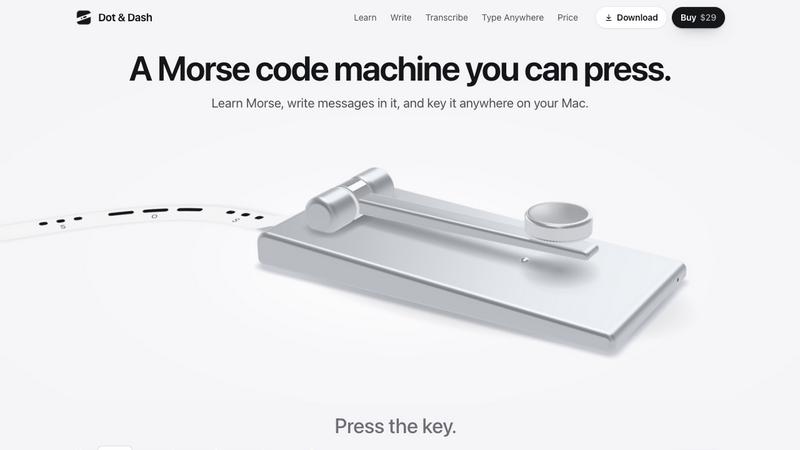
Dot & Dash is a Morse code machine for the Mac. Hold Space or press the knob: a tap is a dit, a hold is a dah, and the tape prints as you key.
Twenty short chapters take you from E and T to the whole alphabet, the figures, punctuation and the common prosigns, two or three characters a chapter. A five-minute daily review brings back what needs it most.
Type a message and the machine sends it, or key it yourself and watch it decode. Paste dots and dashes to get text, or text to get Morse. Type Anywhere keys Morse into any app from the menu bar. Share a message as a tape image, audio or video.
Free for 24 hours, then $29 once for up to 3 Macs. Seven finishes, works offline, no account. macOS 14 or later, Apple silicon and Intel.
Similar to Dot & Dash

Bloom
An adaptive AI tutor that turns topics or your materials into courses, lessons, and answers tailored to how you learn.

LiveGameShow
A game show board for the TV, with real buzzers on every player's phone

LivePartyGames
Most likely to, would you rather and more: the TV shows it, every phone votes

LivePoll
Create a free live poll, share a QR code, and watch the votes come in live.

PracticeNetworking
Master networking with interactive, hands-on practice directly in your browser. Solve real terminal challenges, debug routes, and build core IT skills

PythonExercise.com
An interactive coding platform featuring bite-sized Python exercises designed to build real coding skills through hands-on practice.

PracticeSIEM
PracticeSIEM.com is an interactive, browser-based hands-on cybersecurity learning platform designed for Security Operations Center (SOC) analysts.

SQLCrab
SQLCrab (sqlcrab.com) is an interactive, browser-based SQL learning platform that lets you practice database queries directly in your browser.