

Easymotion - AI Motion Graphic Generator
Easymotion turns static images, spreadsheets, and ideas into professional motion graphics and map animations in minutes by simply chatting with AI.
About Easymotion - AI Motion Graphic Generator
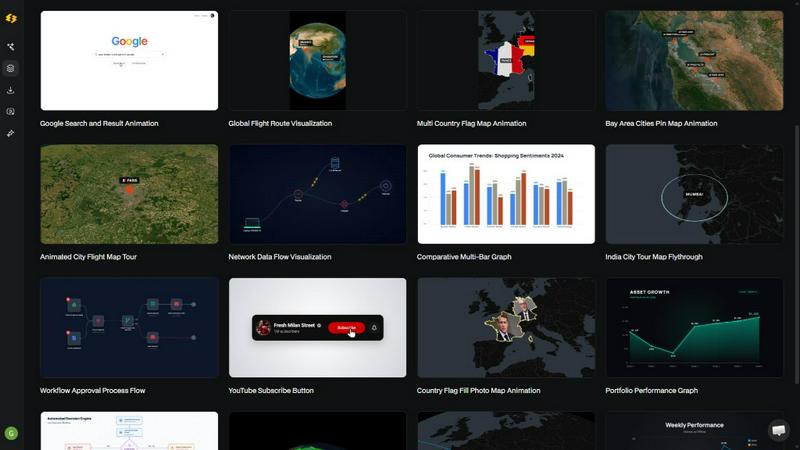
Easymotion is an AI motion graphics generator and map animation platform designed for content creators, video editors, founders, marketers, and data storytellers. It allows users to turn ideas, files, and static visuals into polished animated videos without needing complex timeline editing software like Adobe After Effects. The platform leverages conversational AI, enabling users to describe their desired animation in plain English and receive a professional-grade video in minutes. Easymotion supports a wide range of motion graphics, including SaaS product promos, flowcharts, animated charts, UI explainers, quizzes, and other visual storytelling formats. It also functions as a powerful map animation maker for flight routes, location pins, flag fill highlights, and geographic storytelling visuals. Users can start from a simple text prompt or convert images, spreadsheets (CSV/XLSX), and PDFs into animation-ready scenes. After generating an animation, users can edit every aspect by chatting with the AI to adjust colors, pacing, labels, layout, and visual style. The platform includes a premium template library with proven layouts for maps, charts, social media, and interfaces that can be customized for brand, campaign, or client content. Export options include MP4 and MOV, with support for transparent backgrounds (alpha channel) for seamless integration into editing workflows. Aspect ratios cover 16:9 for YouTube, 9:16 for TikTok and Instagram Reels, 1:1 for square social posts, and 4:5 for feed-friendly vertical formats. Easymotion is built for anyone who needs a faster way to create motion graphics, map animations, and reusable video assets directly in the browser, with creators reporting under 5 minutes per video and 3x more projects completed.
Features of Easymotion - AI Motion Graphic Generator
AI-Powered Motion Graphics from Text Prompts
Easymotion uses conversational AI to generate professional motion graphics from simple text descriptions. Instead of manually keyframing animations in After Effects, users type what they want, such as "Design a social media promo video for my coffee shop," and the AI creates a fully animated video. This feature eliminates the steep learning curve of traditional animation software, making motion design accessible to anyone. Users can iterate rapidly by chatting with the AI to refine colors, pacing, labels, layout, and visual style without touching a timeline.
Static Image to Dynamic Animation
Upload a static image, and Easymotion's AI brings it to life with stunning motion. This capability is ideal for transforming product screenshots, logos, infographics, or any static visual into an engaging animated video. The AI analyzes the image content and applies intelligent motion effects, such as zooms, pans, transitions, and object animations, creating a polished result in minutes. This feature saves hours of manual work and enables creators to repurpose existing visual assets into high-impact video content for social media, presentations, or client deliverables.
Data and Spreadsheet to Animated Visualizations
Easymotion can turn boring spreadsheets into captivating animated charts and graphs. Users upload a CSV or XLSX file, and the AI automatically creates beautiful, motion-driven data visualizations like bar charts, line graphs, and pie charts. This feature is a game-changer for data storytellers, analysts, and marketers who want to present insights in a format that stops the scroll. Animated data visualizations get up to 5x more engagement than static images, making this a powerful tool for social media, reports, and presentations.
Map Animation Made Effortless
Easymotion specializes in creating map animations faster than ever before. Users can generate flight route animations, location pin drops, flag fill highlights, and geographic storytelling visuals with simple prompts or by uploading location data. The platform supports globe fly-throughs, travel route maps, and global flight visualizations. This feature is perfect for travel content creators, logistics companies, news organizations, and marketers looking to create engaging geographic narratives. The AI handles all the complex map rendering and animation curves automatically.
Use Cases of Easymotion - AI Motion Graphic Generator
Social Media Video Creation for Creators and Marketers
Content creators and marketers use Easymotion to produce high-volume, platform-optimized social media videos in minutes. Whether it is a 9:16 Instagram Reel for a coffee shop promo, a 16:9 YouTube explainer, or a 1:1 square post for LinkedIn, the AI generates motion graphics tailored to the platform. Creators report being able to create more content, post more frequently, and grow their audience faster. The ability to iterate on videos without waiting for designers enables same-day campaign launches and keeps content fresh and trending.
Animated Data Storytelling for Reports and Presentations
Data analysts, researchers, and business professionals use Easymotion to turn static charts and spreadsheets into animated data stories. By uploading a CSV file, they can instantly generate animated bar charts, line graphs, and flowcharts that explain trends and insights dynamically. These animated visuals are highly effective for boardroom presentations, YouTube educational content, and social media posts where engagement is critical. The platform helps data storytellers stop the scroll and communicate complex information in an accessible, visually appealing way.
Map-Based Geographic Content for Travel and Logistics
Travel bloggers, tourism boards, logistics companies, and news outlets use Easymotion to create compelling map animations. They can visualize flight routes, travel itineraries, delivery networks, or historical geographic events with animated pins, routes, and flag highlights. A travel creator can build a multi-stop travel map animation step by step without any After Effects skills. Logistics teams can animate global supply chain routes for client presentations. This use case transforms static maps into engaging visual narratives that capture audience attention.
Product Demos and UI Explainers for SaaS and Startups
SaaS companies and startup founders use Easymotion to create professional product demos, UI explainers, and feature highlight videos. By uploading screenshots or describing the product in a prompt, the AI generates polished animations that showcase workflows, user interfaces, and key benefits. This eliminates the need to hire expensive freelancers or learn complex editing software. Startups are using these videos to grow their social presence, increase engagement by 5x, and ship professional-looking content the same day without design bottlenecks.
Frequently Asked Questions
What is Easymotion?
Easymotion is an AI-powered motion graphics generator that lets you create professional videos simply by chatting. You can instantly generate map animations, animate static images, turn spreadsheets into data visualizations, and create social media videos without needing complex software like After Effects. It is designed for creators, marketers, editors, and founders who need fast, high-quality video content directly in the browser.
How does AI motion graphics generation work?
It works in three simple steps. First, describe the animation you want in plain English, such as "Create a flight route map animation from New York to London." Second, refine the result using chat commands to adjust colors, timing, map styles, or assets. Finally, export your completed video as an MP4 or with a transparent background. The AI handles all the keyframes, animation curves, and rendering automatically.
What types of videos can I create?
You can create a wide variety of motion graphics, including SaaS product promos, animated flowcharts, data visualizations (bar charts, line graphs), UI explainers, quizzes, social media videos, and map animations like flight routes, location pins, and globe fly-throughs. The platform also supports converting static images, PDFs, and spreadsheets into animation-ready scenes.
What export formats and aspect ratios are supported?
Easymotion exports videos as MP4 or MOV files, including videos with transparent backgrounds (alpha channel) for editing workflows. Supported aspect ratios include 16:9 for YouTube and landscape content, 9:16 for TikTok and Instagram Reels, 1:1 for square social posts, and 4:5 for feed-friendly vertical formats. This ensures your videos are ready to post everywhere without additional editing.
Explore more in this category:
Similar to Easymotion - AI Motion Graphic Generator

ImageAgent
Create and edit AI images through conversation, using text or reference images and refining results in chat.

CloneWebsite
Clone any webpage pixel-perfect, export HTML/CSS/ZIP or React/Vue components.

GenX
All-in-one AI workspace to generate images, videos, and audio with multiple leading AI models.

Bloom
An adaptive AI tutor that turns topics or your materials into courses, lessons, and answers tailored to how you learn.

AppIconGenerator
Generate iOS and Android app icons from any image and export all platform sizes for free.

Agent Pets
Your Claude Code & Codex sessions as pets in Chrome. Approve, deny and reply to your coding agents from any tab.

Budgetpixel AI
Create AI images, videos, music, and designs in one workspace with multiple models, powerful editing tools, and API access.

Nano AI
Create and edit AI images, generate videos, and compare models in one creative workbench.