

Image3D AI
Instantly transform any 2D image into a high-quality 3D model for printing or games with AI.
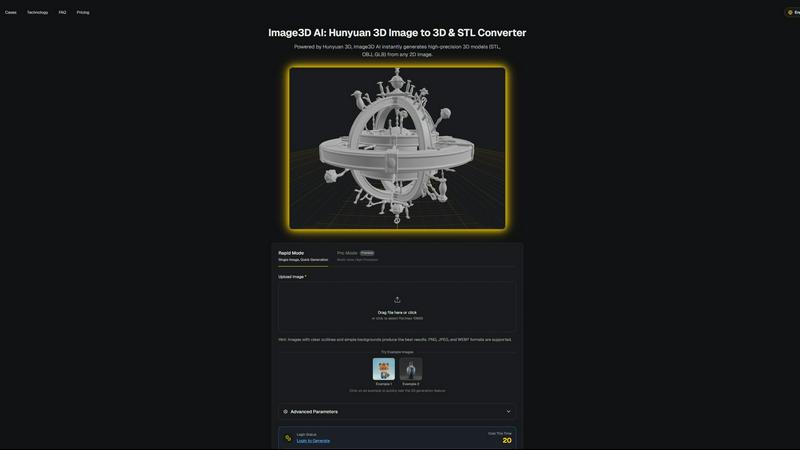
About Image3D AI
The 3D creation landscape is undergoing a seismic shift, and Image3D AI is at the epicenter. This isn't just another tool; it's a professional-grade platform powered by Tencent's cutting-edge Hunyuan 3D engine, designed to demolish the most significant barrier in digital creation: 3D modeling. Imagine transforming a simple 2D image—a logo, a sketch, a product photo—into a fully realized, production-ready 3D model in mere seconds. That's the reality Image3D AI delivers. It's democratizing high-fidelity 3D asset generation, making it accessible to everyone from indie game developers and 3D printing hobbyists to e-commerce giants and architectural visualizers. The core proposition is undeniable: massive time and cost savings. It eliminates the need for expensive, complex software like Blender and years of specialized modeling skill. Whether you need a watertight STL file for your 3D printer, a textured OBJ for further refinement in your favorite software, or a lightweight GLB for immersive WebAR experiences, Image3D AI provides a streamlined, AI-powered pipeline. It turns fleeting inspiration into a tangible, usable 3D asset in minutes, not days, propelling your projects forward at the speed of thought.
Features of Image3D AI
Powered by Hunyuan 3D Engine
At its core, Image3D AI leverages Tencent's advanced Hunyuan 3D technology, a powerhouse AI engine specifically trained for spatial understanding and reconstruction. This isn't a simple extrusion tool; it performs intelligent inference to generate geometrically accurate and textured 3D models from flat images, setting a new benchmark for quality and reliability in AI-driven 3D generation.
Dual Generation Modes
Cater to any project's needs with two distinct operational modes. Rapid Mode is perfect for quick iterations, generating a 3D model from a single image in under a minute. For ultimate precision, Pro Mode utilizes multi-view images (front, side, back) to perform a physically accurate reconstruction, delivering studio-quality models ideal for professional applications and 3D printing.
Multi-Format Export Flexibility
Image3D AI seamlessly integrates into any professional pipeline by exporting in the industry's most crucial formats. Get print-ready, watertight .STL files for 3D printing. Download textured .OBJ files for further editing in software like Maya or Blender. Or, generate efficient .GLB files that are perfect for real-time applications, web display, and augmented reality experiences.
Intelligent Optimization & Guidance
The platform is built for success, not guesswork. It provides clear best-practice guides, recommending high-contrast images with simple backgrounds for optimal results. The interface includes free example images to test the technology instantly without login, and advanced parameters allow users with specific needs to fine-tune their generation for polygon count or geometric focus.
Use Cases of Image3D AI
Rapid 3D Printing Prototyping
Revolutionize your maker workflow. Instantly convert a sketch, diagram, or logo into a precise, watertight STL file ready for your 3D printer. This slashes the time from concept to physical prototype from days to minutes, enabling rapid iteration for product designers, engineers, and hobbyists, accelerating innovation at an unprecedented pace.
Game Development Asset Creation
Indie and professional game developers, take note. Generate game-ready 3D models directly from character concept art, prop sketches, or environment paintings. With support for PBR-ready textures and low-poly optimization, these assets can be imported directly into engines like Unity or Unreal Engine, dramatically speeding up pre-production and asset pipeline bottlenecks.
E-commerce & AR Product Visualization
Transform static online shopping. Upload product photos and generate interactive 3D models and AR-ready GLB files in seconds. Embed these models on product pages to allow customers to view items from every angle, scale them in their own space via WebAR, and reduce return rates by setting accurate expectations, creating the future of digital retail today.
Architectural Concept Modeling
Architects and interior designers can quickly breathe life into their initial sketches. Generate basic 3D massing models or detailed scene elements from hand-drawn concepts or mood board images. This provides a powerful visual tool for early-stage client presentations and spatial studies, saving countless hours of manual modeling from scratch.
Frequently Asked Questions
What image formats and quality work best?
For optimal image to 3D conversion, use clear, high-contrast images in PNG, JPEG, or WEBP format (max 10MB). Images with a well-defined subject, sharp outlines, and a simple, uncluttered background yield the best results. Avoid blurry, poorly lit, or overly complex images where the subject isn't distinct.
What's the difference between Rapid Mode and Pro Mode?
Rapid Mode uses AI inference to generate a 3D model from a single image quickly, ideal for logos, sketches, or fast concepts. Pro Mode is for high-precision needs; it requires multiple images (e.g., front, side, top views) of an object to perform a detailed, physically accurate 3D reconstruction, perfect for real-world objects and 3D printing.
Which 3D file format should I download?
The format depends on your use case. Choose .STL for 3D printing (it contains only the mesh geometry). Select .OBJ if you plan to edit the model further in software like Blender (it includes mesh and texture data). Use .GLB for web, real-time applications, or AR/VR, as it's a compact, single-file format with everything included.
Do I need any 3D modeling experience to use this?
Absolutely not. This is the core promise of Image3D AI. It is designed specifically to democratize 3D creation. You only need a 2D image to get started. The AI handles the complex task of spatial reasoning and model generation, making professional-grade 3D asset creation accessible to anyone, regardless of their technical background in 3D software.
Similar to Image3D AI

Ideogram Studio
Create text-perfect logos, posters, ads, packaging, and ecommerce visuals with Ideogram 4 AI workflows.

Presentation Intelligence
AI-native presentation and visual content platform that turns prompts, documents, images, videos, and data into polished, shareable decks.

Lockimate - AI Live Wallpapers
Turn any photo into a real Apple Live Photo that animates when you wake your iPhone. Restyle it and choose the motion — customizable.

Magic Eraser
AI-powered photo editor for removing objects, erasing backgrounds, enhancing images, and creating visuals.

GPT Image 2 API
Generate and edit production-ready images with GPT Image 2 API, clear text rendering, reference images, and developer-friendly workflows.


PNG to SVG
Free, private image conversion tools that run entirely in your browser.
