

JustPDF
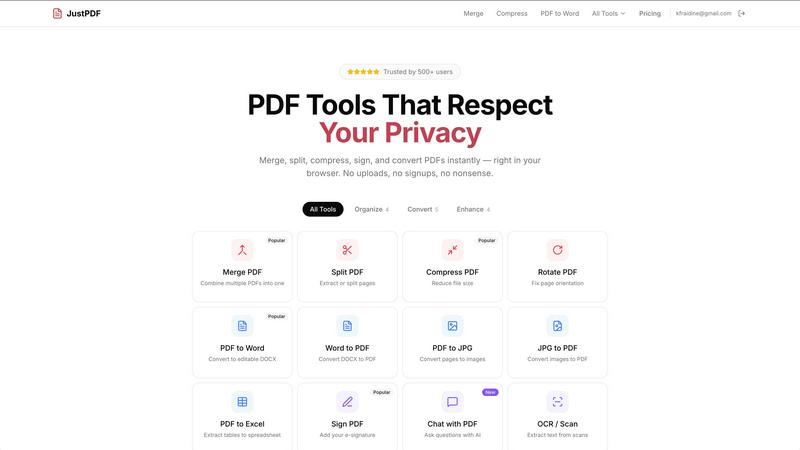
JustPDF is a privacy-first, browser-based toolkit offering 17 free tools to effortlessly manage your PDF files without any uploads.
About JustPDF
JustPDF is a cutting-edge online suite of PDF tools designed for users seeking efficiency, privacy, and ease of use. With a robust offering of 17 professional-grade tools, JustPDF operates entirely within the user’s browser, ensuring that all file processing occurs locally on the device. Unlike other online PDF services such as Smallpdf or iLovePDF, which require file uploads to remote servers, JustPDF leverages JavaScript and WebAssembly technologies to keep your files secure and private. This is particularly valuable for those concerned about data privacy, such as educators and students, as JustPDF is FERPA-compliant. The platform is user-friendly, requiring no account for free tier access, allowing users to perform up to three operations daily at no cost. With a pro plan starting at just $4 per month for unlimited access, JustPDF is not only affordable but also an essential tool for anyone looking to manage PDF documents effectively.
Features of JustPDF
Merge PDF
The Merge PDF feature allows users to combine multiple PDF documents into a single file effortlessly. This is particularly useful for those needing to consolidate reports, presentations, or other related documents into one cohesive unit. Simply drag and drop your files, and JustPDF takes care of the rest, providing a quick and seamless merging experience.
Compress PDF
JustPDF's Compress PDF tool enables users to reduce the file size of their PDFs in seconds without compromising quality. This feature is ideal for sending documents via email or uploading them to platforms with size restrictions. Users can achieve significant size reductions while maintaining the integrity of the original file, making it a must-have for anyone handling large PDF documents.
PDF to Word
Transforming PDFs into editable Word documents is made easy with the PDF to Word tool. This feature is particularly beneficial for professionals who need to extract text or images from PDFs for editing or repurposing. Users can quickly convert their PDF files into DOCX format, allowing for straightforward modifications and enhancements.
Chat with PDF (AI)
The innovative Chat with PDF feature utilizes AI technology to allow users to interact with their PDF documents in a conversational manner. This unique tool enables users to ask questions about the content of their PDFs, making it easier to extract information or clarify details without manually searching through the document. It enhances productivity and streamlines workflows, especially for students and researchers.
Use Cases of JustPDF
Academic Research
Students and researchers can utilize JustPDF to manage their academic papers efficiently. Whether merging multiple research articles into one document, converting PDFs to Word for notes, or compressing files for easier submission, JustPDF provides the tools needed to streamline their workflow while ensuring data privacy.
Business Document Management
For professionals handling numerous reports, contracts, and presentations, JustPDF simplifies document management. Users can merge several PDFs into one, sign documents electronically, or convert PDFs to Excel for data analysis. This enhances productivity and collaboration in a business environment.
Creative Projects
Graphic designers and content creators often need to work with a variety of file formats. JustPDF allows them to convert JPG images to PDF for presentations or flatten PDFs for client reviews, ensuring that their creative work maintains its intended format and quality.
Personal Use
Individuals can benefit from JustPDF by managing personal documents like resumes, tax forms, or travel itineraries. Whether unlocking a secured PDF, rotating pages for better readability, or compressing files for easy sharing, JustPDF offers a comprehensive suite for personal document management.
Frequently Asked Questions
How does JustPDF ensure the privacy of my files?
JustPDF processes all files locally in your browser using JavaScript and WebAssembly, meaning your files never leave your device. This guarantees that your documents remain private and secure throughout the editing process.
Is there a limit to the number of operations I can perform for free?
Yes, JustPDF allows users to perform up to three operations per day for free. This provides an excellent opportunity to test the platform before considering a pro subscription for unlimited access.
What types of files can I convert using JustPDF?
JustPDF supports a variety of conversions, including PDF to Word, Word to PDF, PDF to Excel, PDF to JPG, JPG to PDF, WebP to PDF, and HEIC to PDF, among others, catering to diverse user needs.
Do I need to create an account to use JustPDF?
No, JustPDF does not require users to create an account for the free tier. You can immediately start using the tools without any signup process, making it accessible and convenient for everyone.
Similar to JustPDF

Egmatic
No-code 2D game editor: visual node logic, drag-and-drop scenes, live preview. Exports to Windows, macOS, Linux, Android, iOS, Web.

Product Launch Checklist
A free launch checklist for SaaS, apps, AI tools and more. Every step says why it matters and when you can skip it.

Kody Tools
Free collection of online developer utilities, code formatters, and digital converters designed to streamline your daily workflow.

Forms Plugin
The #1 Native Form Builder Plugin for Framer - No Code, No Embeds, No External Platforms.


PerPageFax
PerPageFax lets you send a fax online from any browser for a flat $0.50 per page — no account, no subscription, no fax machine.