

Opal
Opal is your all-in-one visual workspace that instantly organizes projects and notes, so you never lose track of your ideas again.
About Opal
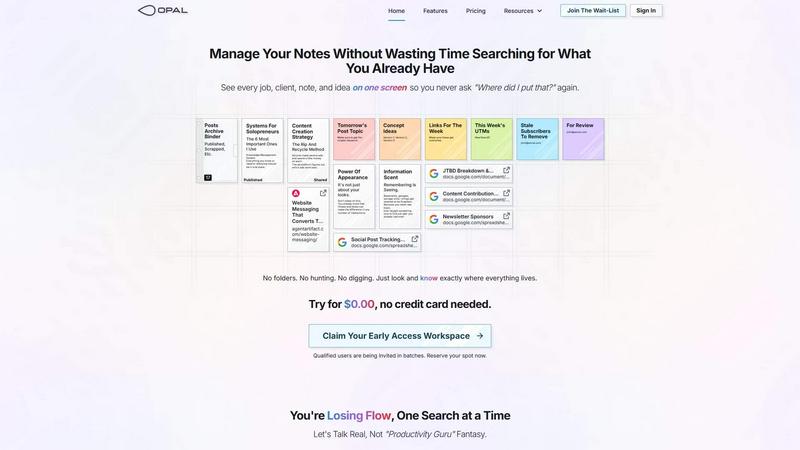
Opal is a cutting-edge visual knowledge and project management workspace crafted for individuals who thrive in spatial thinking. Recognizing the frustrations of conventional tools that bury valuable information within nested folders, Opal provides an infinite digital canvas that mirrors the organization of a physical desk. Users can effortlessly drag and drop notes, documents, files, and links, arranging them visually to enhance recall and streamline workflow. This innovative approach encourages users to remember not just the names of their files but also their locations, enabling instant retrieval of crucial information. Ideal for solopreneurs, consultants, agency owners, and writers, Opal ensures that every aspect of your active projects, client details, and creative ideas remains visible and easily accessible, allowing you to focus on what truly matters: delivering exceptional work without interruption.
Features of Opal
Infinite Digital Canvas
Opal offers a limitless workspace where users can visually organize projects, notes, and ideas. This feature allows for the flexibility of dragging and dropping items, creating a personalized and intuitive layout that enhances productivity.
Visual Organization
Forget about traditional filing systems. With Opal, everything is arranged spatially, making it easier to remember where items are located. This spatial memory approach ensures quick access to information without the frustration of searching through nested folders.
Seamless Drag-and-Drop Functionality
Opal's drag-and-drop capabilities enable users to move notes, documents, and links effortlessly. This functionality allows for dynamic organization, helping users to adapt their workspace according to ongoing projects and priorities.
Client and Project Visibility
With Opal, every job, client, and task is displayed on one screen, eliminating the need for endless searches. This feature allows users to maintain a clear view of their work, ensuring that nothing slips through the cracks.
Use Cases of Opal
Project Management for Solopreneurs
Opal is perfect for solopreneurs managing multiple projects simultaneously. Its visual workspace allows for easy organization of tasks and ideas, ensuring that everything needed for successful project execution is at the user's fingertips.
Creative Idea Development
Writers and creatives can utilize Opal to brainstorm and develop ideas in a visually stimulating environment. The infinite canvas encourages free-form thinking, allowing thoughts to flow without the constraints of traditional tools.
Client Relationship Management
Consultants and agency owners can manage client details and ongoing projects effectively with Opal. The visual organization of information ensures that critical details are always accessible, enhancing communication and service delivery.
Content Planning and Strategy
Marketers and content creators can plan their content strategies using Opal's spatial layout. By visualizing their campaigns, they can track various concepts, keywords, and deadlines all in one cohesive space, optimizing their workflow.
Frequently Asked Questions
How does Opal improve productivity?
Opal enhances productivity by providing a visual workspace that eliminates the time wasted searching for information. Users can see everything they need in one place, allowing them to focus on their work without interruption.
Is Opal suitable for team collaboration?
Absolutely! Opal's flexible workspace can be adapted for team use, allowing multiple users to collaborate on projects and share information in real-time, making collective problem-solving more efficient.
Can I access Opal on different devices?
Yes, Opal is designed to be accessible across various devices. Whether you are on a desktop, tablet, or smartphone, you can access your workspace and stay organized wherever you are.
What makes Opal different from other project management tools?
Unlike traditional project management tools that rely on hierarchical structures, Opal allows users to organize information spatially. This unique approach caters to users who think visually and prefer a more intuitive way to manage their projects and ideas.
Similar to Opal

Egmatic
No-code 2D game editor: visual node logic, drag-and-drop scenes, live preview. Exports to Windows, macOS, Linux, Android, iOS, Web.

Product Launch Checklist
A free launch checklist for SaaS, apps, AI tools and more. Every step says why it matters and when you can skip it.

Kody Tools
Free collection of online developer utilities, code formatters, and digital converters designed to streamline your daily workflow.

Forms Plugin
The #1 Native Form Builder Plugin for Framer - No Code, No Embeds, No External Platforms.


PerPageFax
PerPageFax lets you send a fax online from any browser for a flat $0.50 per page — no account, no subscription, no fax machine.