

Picture Enhancer
Picture Enhancer uses AI to deblur, upscale, and restore photos instantly in your browser with no software install and 3 free guest tries.
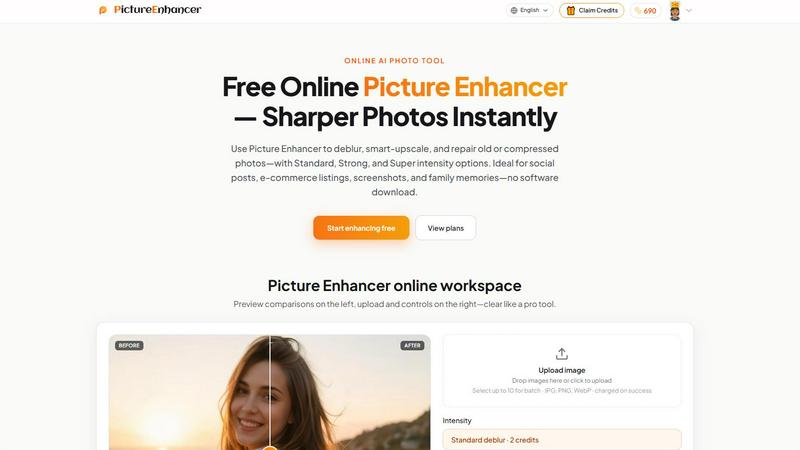
About Picture Enhancer
Picture Enhancer is a cutting edge AI powered online photo enhancement tool designed for creators, sellers, and everyday users who demand sharper, cleaner images instantly. This free online platform leverages advanced artificial intelligence to deblur, smart upscale, and restore photos with unprecedented precision. The tool supports JPG, PNG, and WebP formats and offers three distinct enhancement modes: Deblur, Upscale, and Restore. Each mode comes with three intensity tiers called Standard, Strong, and Super, allowing users to dial in exactly the level of processing needed for their specific image quality issues. What sets Picture Enhancer apart in the emerging AI image tool landscape is its zero friction approach to access. Guests receive three free lifetime tries per IP address with absolutely no signup required. For users who need more capability, signing in unlocks a credit based system where new accounts receive starter credits automatically. Credits are only charged on successful enhancements, meaning no waste on failed attempts. The platform processes images privately and delivers results in seconds without watermarks. For power users, paid subscriptions and permanent credit packs unlock the Super intensity tiers and batch processing of up to 10 images simultaneously. This makes Picture Enhancer a hot tool for anyone working with visual content in the fast paced world of social media, e-commerce, and digital preservation.
Features of Picture Enhancer
AI Deblur Technology
Picture Enhancer uses state of the art artificial intelligence to rebuild edges and texture lost from camera shake, soft focus, and mild motion blur. The AI analyzes the entire image to understand what details should look like, then reconstructs them with remarkable accuracy. Users can choose between Standard, Strong, or Super deblur intensity depending on how much correction is needed. This feature is particularly effective for making faces and text read clearly again, even from photos that seemed hopelessly blurry. The algorithm handles everything from slight focus issues to significant motion artifacts.
Smart Upscale Capabilities
The smart upscale feature enables 2x and 4x enlargement of images while adding genuine detail rather than simply stretching pixels. This is a game changer for creators who need to use small source files for large format applications like social media covers, product hero shots, or print previews. The AI intelligently fills in missing information based on context, creating smooth edges and natural looking textures that maintain image integrity. This feature works across all supported formats and intensity levels, with the Super tier providing the most dramatic enlargement quality.
Old Photo and Damage Restoration
Picture Enhancer includes a dedicated restore mode that reduces scratches, fade, and compression artifacts from aging or damaged photographs. The AI identifies imperfections like dust spots, creases, and color shifts and intelligently repairs them while preserving the original character of the photo. Strong and Super restore settings handle heavier damage on scanned family prints, making this feature invaluable for preserving memories. The restoration process works in seconds and produces watermark free results that are ready to share or print.
Credit Based Billing with Success Guarantee
The platform uses an innovative credit system where users are only charged when an enhancement succeeds. Standard enhancements cost 2 credits, Strong costs 4 credits, and Super costs 6 credits. Paid users unlock the Super tiers and batch enhancement capabilities, allowing up to 10 images to be processed simultaneously. Monthly subscription plans grant fresh credits each billing cycle, while permanent credit packs never expire. This flexible approach means users only pay for what works, eliminating the frustration of wasted attempts.
Use Cases of Picture Enhancer
Portraits and Everyday Photos
Picture Enhancer is ideal for improving personal photos and portraits by reducing mild blur so faces and clothing look cleaner for social media feeds or professional portfolios. The AI deblur and restore modes work together to enhance image quality without making subjects look artificial. Whether you are fixing a slightly out of focus selfie or cleaning up a group photo from a family gathering, the tool delivers natural looking results. The before and after comparison slider gives users confidence that the enhancement improves the image without over processing.
E-commerce and Product Shots
Online sellers and e-commerce professionals can use Picture Enhancer to upscale product detail and tame compression noise so listings stand out in crowded marketplaces. The smart upscale feature is particularly valuable for creating high resolution product hero shots from smaller source images. Strong and Super intensity tiers handle even heavily compressed product photos, restoring sharp edges and clear text on packaging. This directly impacts conversion rates by presenting products in the best possible light.
Screenshots and UI Captures
Tech professionals, content creators, and documentation writers can sharpen text edges in screenshots for tutorials, support threads, or software documentation archives. The deblur mode excels at cleaning up UI captures that often suffer from compression artifacts or slight blur from scaling. This ensures that instructional content remains readable and professional looking across all platforms. The ability to upscale screenshots without losing text clarity is a major advantage for technical documentation.
Old Photo Memories
Family historians and memory keepers can repair fade and scratches on scanned vintage photographs so they are ready to share digitally or print for preservation. The restore mode intelligently identifies and fixes common issues like yellowing, dust spots, and creases without destroying the authentic character of old photos. Strong and Super restore settings handle heavily damaged images, making it possible to bring treasured family memories back to life. The watermark free output ensures these precious images remain pristine.
Frequently Asked Questions
What is Picture Enhancer?
Picture Enhancer is a free online AI powered photo enhancement tool that uses artificial intelligence to deblur, smart upscale, and restore images. It supports JPG, PNG, and WebP formats and offers three intensity levels for each enhancement mode. The platform is designed for creators, sellers, and everyday users who need sharper images quickly without downloading software. Guests can try it three times for free without signing up, and signed in users access a credit based system where charges only apply on successful enhancements.
Can I try Picture Enhancer without signing in?
Yes, guests get three free lifetime tries per IP address with no signup required. This allows users to test the platform and see the quality of enhancements before committing to an account. After those three tries, users must sign in to use credits for additional enhancements. New accounts receive starter credits automatically, so there is no upfront cost to begin using the tool regularly.
How does billing work after sign in?
After signing in, users receive starter credits and can purchase additional credits through monthly subscriptions or permanent credit packs. Credits are charged only when an enhancement succeeds, meaning failed attempts do not consume credits. Standard enhancements cost 2 credits, Strong costs 4 credits, and Super costs 6 credits. Monthly plans grant fresh credits each billing cycle, while permanent packs never expire and can be used at any time.
Which modes does Picture Enhancer support?
Picture Enhancer supports three enhancement modes: Deblur, Upscale, and Restore. Deblur rebuilds edges and texture from camera shake and soft focus. Upscale provides 2x and 4x enlargement with intelligent detail addition. Restore reduces scratches, fade, and compression artifacts from damaged photos. Each mode offers Standard, Strong, and Super intensity tiers, with Super tiers being exclusive to paid users.
Will downloads include a watermark?
No, all successful enhancements are delivered without watermarks. Users can download the original quality before and after results for any purpose, including commercial use. The watermark free policy applies to both guest users and signed in accounts, making the tool suitable for professional and personal projects alike.
What is the difference between subscription and permanent credit packs?
Monthly subscription plans grant credits each billing cycle, providing a recurring supply for regular users. Permanent credit packs never expire and are ideal for users who need enhancements occasionally or want to buy credits in bulk without ongoing commitment. Both options unlock Super tiers and batch enhancement capabilities, allowing up to 10 images to be processed simultaneously.
Are my photos safe?
Yes, Picture Enhancer processes all images privately. Uploaded photos are used only to complete the enhancement request and are not stored or shared after processing. The platform uses secure connections and follows industry standard privacy practices to protect user data. This makes the tool safe for sensitive or personal images.
Where do I check balance and history?
Signed in users can check their credit balance and enhancement history in the My Assets section of the platform. This area shows remaining credits, past enhancements, and allows users to revisit and download previous results. The dashboard provides full transparency on credit usage and processing history.
Similar to Picture Enhancer

EditTextPhoto
AI-powered image text editor to edit, replace, fix, or translate text in images while preserving the original font, color, size, and style.

ImageGenerator
Create and edit AI images online with multiple models, text-to-image, image-to-image, background removal, and upscaling.

AIPetGen
AIPetGen turns a photo of your dog, cat, or other pet, or a written description, into a new picture or a short animation.

Image to Layers AI
Turn any image into editable transparent PNG/PSD layers with AI

nanobanana 21
A fast, simple AI image studio powered by Nano Banana 2.1 - precise edits, readable text, consistent characters, up to 14 reference images.

Raindance AI
Turn a single portrait into a cinematic five-second seaside video, ready for TikTok, Reels and Shorts.

AI Album Cover Maker
Create release-ready album covers from a prompt or photo. Generate, refine, and export art for singles, EPs, mixtapes, and playlists.

Ideogram Studio
Create text-perfect logos, posters, ads, packaging, and ecommerce visuals with Ideogram 4 AI workflows.