
Sketch To
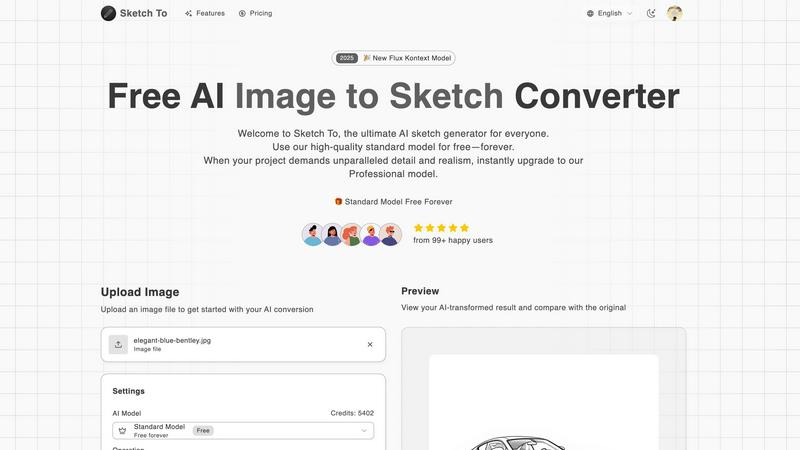
Sketch To instantly transforms your images into stunning AI sketches or sketches into images.
About Sketch To
Sketch To is the definitive AI-powered creative suite that is revolutionizing digital artistry by seamlessly bridging the gap between photography and illustration. This isn't just another filter app; it's a sophisticated platform built on advanced generative AI models that intelligently interpret and transform visual data. It empowers a massive user base of over 500,000 creators by offering two distinct pathways: converting real-world photos into stunning, nuanced artistic sketches (like pencil, charcoal, ink, and watercolor styles) and performing the reverse magic of turning simple line drawings into photorealistic images. The core value proposition is its unparalleled accessibility paired with professional-grade power. Anyone can dive in and start creating immediately with the high-quality Standard Model, supported by free trial credits for new users. For projects demanding commercial-ready, hyper-realistic detail, the Professional Model delivers world-class results. Designed for social media enthusiasts, hobbyists, students, designers, and professional artists, Sketch To's instant, cloud-based processing makes cutting-edge AI artistry available to everyone, breaking down the barriers between imagination and visual reality.
Features of Sketch To
Bidirectional AI Conversion Engine
At the heart of Sketch To is its dual-direction AI technology. It doesn't just apply a simple overlay; it deeply understands image composition to transform photos into authentic, style-specific sketches. Conversely, its sketch-to-image feature analyzes line work and shading to generate rich, detailed, and realistic images from basic drawings. This two-way capability unlocks truly endless creative workflows, from conceptualizing ideas to finalizing professional artwork.
Tiered AI Model Access (Standard & Pro)
Sketch To democratizes AI art with its intelligent two-tier system. The Standard Model is a powerful, free-to-start tool perfect for learning, social media content, and personal projects, offering fantastic results across numerous sketch styles. For mission-critical work, the Professional Model is a game-changer, providing unparalleled detail, texture accuracy, and realism necessary for commercial design, professional portfolios, and high-resolution print applications.
Instant High-Resolution Processing
Leveraging a robust cloud-based infrastructure, Sketch To delivers rapid results without sacrificing quality. Users can upload an image and receive their transformed creation in seconds, ready for download in high resolution. This instant processing power is crucial for maintaining creative flow and meeting tight deadlines, ensuring that both hobbyists and professionals can work efficiently and effectively.
Extensive Artistic Style Library
Move beyond basic filters. Sketch To offers a curated and expanding library of artistic styles, including Pencil Sketch, Charcoal, Ink, Colored Pencil, Comic, Concept Art, Figure Sketch, and Watercolor effects. This allows creators to match the output to a specific aesthetic or project need, providing the versatility to create everything from classic portrait sketches to dynamic digital concept art with a single tool.
Use Cases of Sketch To
Social Media Content Creation
Creators and influencers can instantly generate unique, eye-catching artwork from their photos to stand out on platforms like Instagram, TikTok, and Pinterest. Transforming a portrait into a pencil sketch or a travel photo into a watercolor painting creates highly engaging, personalized content that boosts audience interaction and feed aesthetics without requiring manual drawing skills.
Professional Design & Concept Art
Designers, architects, and concept artists can use the sketch-to-image function to rapidly visualize ideas. A quick hand-drawn sketch can be converted into a realistic product mock-up, architectural rendering, or character concept, accelerating the ideation and client presentation phases. The Pro model's detail is ideal for creating compelling, near-final visuals early in the creative process.
Educational & Hobbyist Projects
Students and hobbyists can use the Standard Model to enhance school presentations, personal art projects, or DIY crafts. It's a perfect tool for learning about artistic styles, creating custom illustrations for stories or journals, or simply adding a creative touch to personal photos and memorabilia in a fun and accessible way.
Professional Portrait & Artistic Services
Photographers and digital artists can offer new services by converting client photos into custom digital sketches or paintings. This opens revenue streams for creating personalized gifts, custom avatar illustrations, or stylized profile pictures, leveraging AI to produce high-volume, high-quality artwork that would be time-prohibitive to draw manually.
Frequently Asked Questions
How do I get started with Sketch To for free?
New users can sign up on the Sketch To platform to receive free trial credits for the Standard Model. This allows you to explore the core image-to-sketch and sketch-to-image conversion features without any initial cost. Simply upload your file, choose a style, and use your trial credits to generate your first AI creations.
What is the difference between the Standard and Professional models?
The Standard Model is designed for high-quality personal use, hobbies, and social media, delivering excellent artistic conversions. The Professional Model utilizes more advanced AI algorithms to produce superior detail, accuracy, texture, and photorealism, making it the required choice for commercial projects, professional artwork, and any application where the highest fidelity is critical.
What file formats and sizes does Sketch To support?
Sketch To supports common image file formats for upload. The interface indicates a maximum file size of 5MB for uploads to ensure swift processing. Output images are delivered in high resolution, suitable for both digital use and print, allowing you to download your creations for various applications.
Can I use Sketch To for commercial purposes?
Yes, but the appropriate model must be used. Outputs generated with the free Standard Model are typically for personal use. For commercial projects - such as client work, merchandise, advertising, or resale - you must use the Professional Model to ensure you have the rights to use the generated images commercially and to access the necessary quality and detail.
Similar to Sketch To

AIEnhancer
Enhance photos, create AI images, and generate videos with flexible workflows, creative effects, and a shared asset library.

Lockimate - AI Live Wallpapers
Turn any photo into a real Apple Live Photo that animates when you wake your iPhone. Restyle it and choose the motion — customizable.

Magic Eraser
AI-powered photo editor for removing objects, erasing backgrounds, enhancing images, and creating visuals.

IsThisAIImage
Free AI image checker: upload a photo for AI-generated and deepfake scores, a clear verdict, and optional generator hints.


ClipUtils
Free browser video & image tools: trim, compress, convert, resize & remove backgrounds. 100% on-device — your files never leave your browser.

Blur & Unblur AI
Free online face blur and unblur tool with local browser processing.

Best Face Swap
Best Face Swap delivers hot new AI workflows for frame-consistent video and photo face replacement with reserved API access.