

TaleHug AI Story Generator for Kids
TaleHug turns a child’s voice, drawing, or idea into a safe, illustrated AI storybook for co-reading in minutes.
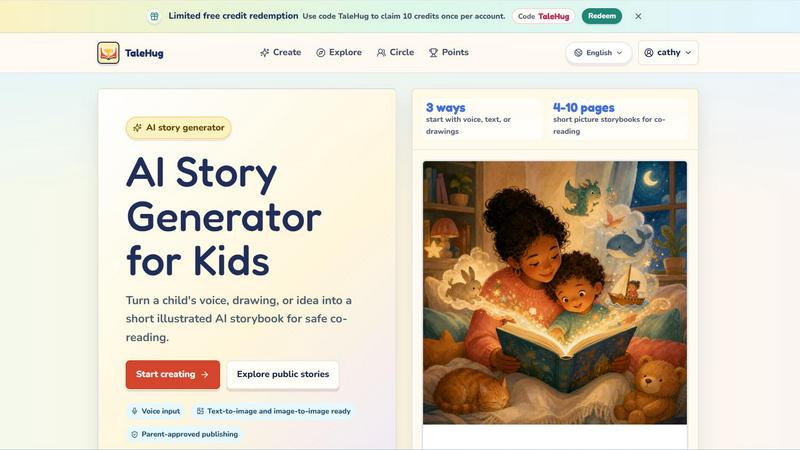
About TaleHug AI Story Generator for Kids
TaleHug is an emerging AI-powered storytelling platform that is reshaping how children create, imagine, and engage with stories. This is not just another writing tool; it is a kid-first creative ecosystem where a child's voice, a simple drawing, or a spontaneous idea can be transformed into a fully illustrated, multi-page storybook in seconds. The platform is designed specifically for preschool and kindergarten-aged children, typically between the ages of 3 and 6, making it one of the most accessible AI story generators on the market today. What sets TaleHug apart is its triple-input method: children can start a story by speaking into the microphone, uploading a hand-drawn picture, or typing a text prompt. The AI then generates 4 to 10 pages of picture storybooks that are perfect for co-reading with parents or teachers. Safety is the core architecture here, not an afterthought. Every story starts as a private draft, and any public or circle sharing requires explicit adult approval. There are no public comments in the current version, no collection of school names or addresses, and all display names are safe and anonymized. This makes TaleHug a hot contender for parents and educators who have been waiting for a generative AI tool that is both imaginative and responsibly designed. The platform also features a public gallery showcasing approved examples, a points and credits system, and a growing library of story ideas ranging from moon rabbit bedtimes to classroom social stories about sharing. TaleHug is currently operated by Vava AI Labs LLC and offers limited free credits with the code TaleHug for new users to explore its capabilities.
Features of TaleHug AI Story Generator for Kids
Voice, Text, and Drawing Input
TaleHug breaks the mold of traditional story generators by offering three distinct ways for a child to begin their creative journey. A child can simply speak their idea into the microphone, and the AI will capture and expand it into a narrative. Alternatively, they can upload a drawing they have made on paper or digitally, and the AI will interpret the image to generate a story around it. For children who are already comfortable with typing, a text prompt works just as well. This multi-modal input is a game-changer for early childhood education because it removes the barrier of literacy as a prerequisite for storytelling. A child who cannot yet write can still create rich, illustrated stories using their voice or artwork, fostering confidence and a love for narrative creation from the very beginning.
AI-Powered Illustrated Storybook Generation
Once an idea is submitted, TaleHug’s AI engine works to produce a complete picture storybook ranging from 4 to 10 pages. Each page is generated with a strong, colorful illustration that matches the child’s input, accompanied by a single, short sentence that is easy for young readers to follow. The platform uses both text-to-image and image-to-image AI models, meaning it can create illustrations from scratch based on text, or it can transform a child’s uploaded drawing into a polished, storybook-style image. Every page also stores a hidden prompt, allowing for regeneration if the child or parent wants to tweak the visual style or narrative direction. This feature makes TaleHug an incredibly dynamic tool for iterative creativity, where a story can evolve and improve with each attempt.
Parent-Approved Publishing and Safety Controls
TaleHug is built from the ground up with a safety-first architecture that is rare in the AI space. All stories are created as private drafts by default. If a child wants to share their story with a wider audience, the platform requires adult approval before any story can be published to a "Circle" of trusted friends or to the public gallery. The platform has zero public comments in its MVP, eliminating the risk of negative feedback or cyberbullying. Display names are safe and do not use full child names, and the system never asks for school names, addresses, or any contact details of the child. The public gallery only contains approved examples, ensuring that what is visible is always age-appropriate and curated. This feature is a massive relief for parents who are wary of the unmoderated chaos found on many other generative AI platforms.
Visibility Modes: Private, Circle, and Public
TaleHug offers three distinct visibility modes that give families granular control over who sees their creations. The "Private" mode keeps the storybook completely hidden, visible only to the child and the parent account. The "Circle" mode allows sharing with a curated group of trusted family members or friends, similar to a private social network for stories. The "Public" mode makes the storybook visible in the TaleHug gallery, but only after an adult has explicitly approved it for public viewing. This tiered system is incredibly smart for the target age group of 3 to 6 years old. It teaches children about digital privacy and consent in a practical, hands-on way, while giving parents the final say on what leaves the family’s private digital space. It is a model that other children’s apps should be watching closely.
Use Cases of TaleHug AI Story Generator for Kids
Bedtime Story Creation for Parents and Children
One of the most natural use cases for TaleHug is the nightly bedtime routine. Instead of reading the same store-bought book for the hundredth time, a parent and child can collaborate to create a brand new story every night. The child can suggest a character, like a moon rabbit or a friendly dragon, and the parent can help guide the AI to generate a gentle, winding-down narrative. The 4 to 10 page length is perfect for a short bedtime session, and the colorful illustrations keep the child engaged without overstimulating them. Over time, families can build a personal digital library of bedtime stories that are unique to their child’s imagination, making each night a new adventure. This turns screen time into a bonding activity rather than a passive consumption experience.
Classroom Social-Emotional Learning Activities
Teachers in kindergarten and preschool settings can use TaleHug to create social stories that address specific classroom challenges. For example, a teacher can generate a story about sharing a red truck or about the bravery of a first school morning. These stories can be customized with characters that look like the students in the class, making the lessons more relatable. The platform’s safety features are ideal for schools, as there is no risk of public exposure without teacher approval. Teachers can use the "Circle" mode to share stories only with their specific classroom group. This is a hot trend in early childhood education: using AI to create personalized, just-in-time learning materials that address the exact emotional or social needs of the children in the room.
Art-to-Story Projects for Young Creators
For children who love to draw but struggle with writing, TaleHug is a revolutionary tool. A child can spend time creating a detailed drawing of a monster, a princess, or a spaceship, then upload that drawing into TaleHug. The AI will analyze the image and generate a story around it, effectively turning the child’s artwork into a published storybook. This validates the child’s artistic effort and shows them that their ideas have narrative value. It is a powerful way to bridge the gap between visual arts and literacy. Parents and educators can use this feature to create portfolios of a child’s work over time, showing how their drawing skills and storytelling abilities evolve together.
Multilingual Storytelling for Diverse Families
TaleHug supports multiple languages, as evidenced by the public gallery containing stories in both English and Chinese. This makes it an excellent tool for bilingual families or for children learning a second language. A family can create a story in one language, then use the AI to generate a version in another language, helping children see the same narrative structure in different linguistic forms. For immigrant families or expat communities, this feature helps maintain a connection to a heritage language while also practicing the local language. The visual illustrations remain consistent across languages, providing a stable anchor for comprehension. This is a growing need in global households, and TaleHug is positioned well to meet it.
Frequently Asked Questions
How does TaleHug ensure the safety of my child while using the AI story generator?
TaleHug has implemented multiple layers of safety that are specifically designed for children aged 3 to 6. All stories are created as private drafts by default and cannot be viewed by anyone else without adult approval. The platform requires parent verification before any story can be published to a Circle of trusted friends or to the public gallery. There are no public comments in the current MVP, which eliminates the risk of inappropriate interactions. The system uses safe display names instead of real child names, and it never asks for school names, addresses, or any contact details of the child. The public gallery only contains pre-approved examples, ensuring that all visible content is age-appropriate.
Can my child start a story using only their voice or a drawing?
Yes, absolutely. TaleHug is designed to be accessible even for children who have not yet learned to read or write. The platform offers three distinct input methods: voice input, where a child speaks their idea into the microphone; drawing input, where a child uploads a picture they have drawn; and text input for children who can type. The AI is trained to interpret all three input types and generate a complete illustrated storybook from them. This multi-modal approach is one of the key features that makes TaleHug stand out from other AI story generators that rely solely on text prompts.
How many pages are in a typical TaleHug storybook, and what is the reading level?
TaleHug generates picture storybooks that are between 4 and 10 pages in length. This range is specifically chosen to be appropriate for co-reading sessions with preschool and kindergarten-aged children, typically 3 to 6 years old. Each page contains a strong, colorful illustration paired with a single short sentence. The language is kept simple and engaging, making it easy for young readers to follow along or for parents to read aloud. The length is designed to hold a child’s attention without becoming overwhelming, making it ideal for bedtime routines or classroom story time.
Is TaleHug free to use, and how do I get started with credits?
TaleHug offers a limited free credit redemption system for new users. You can use the code TaleHug to claim 10 credits once per account. These credits allow you to generate a certain number of storybooks without any initial payment. To get started, visit the TaleHug website, log in or create an account, and enter the code TaleHug in the credit redemption section. After using your initial credits, you can explore the platform’s points system or any available plans to continue creating stories. The platform is operated by Vava AI Labs LLC and is designed to be accessible for families exploring AI storytelling for the first time.
Explore more in this category:
Similar to TaleHug AI Story Generator for Kids

PracticeNetworking
Master networking with interactive, hands-on practice directly in your browser. Solve real terminal challenges, debug routes, and build core IT skills

Voice Keyboard Pro
Hold a key, say what you mean, let go. Clean, punctuated text lands at the cursor in any app on your Mac or iPhone.

Inkling
Catch a thought without leaving what you are doing. Notes, checklists and a little companion in your Mac's notch. $12 once.

FreeVideoGenerator
Generate AI videos from text prompts and photos with Sora 2, Veo 3.1, Wan and more. Get free starter credits and watermark-free downloads.

HearBuyers
AI social listening agent: finds people on Reddit and X describing the problem you solve, scores buying intent and drafts a reply your team approves.


Leadeon
AI growth tool for X and LinkedIn: write posts in your voice, schedule at your best times, find leads on X and see what works.

Riff
Riff writes replies, DMs and posts with Gemini Nano inside Chrome. Runs on your computer, no account or API key, and never posts for you.