

TextSharp | Text Image Enhance
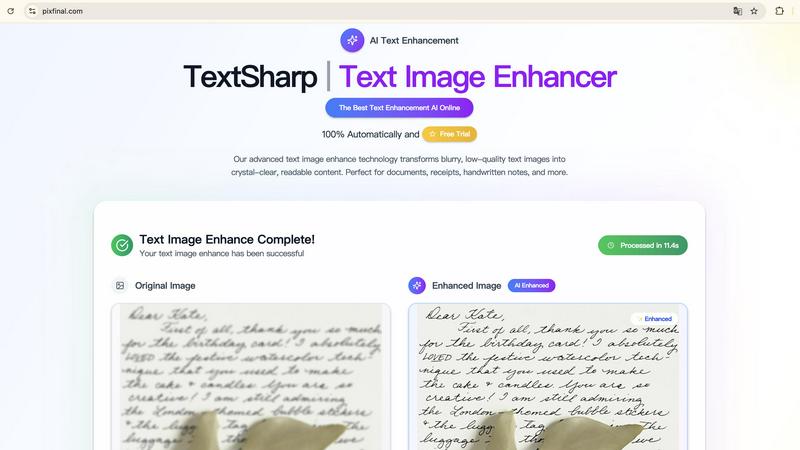
Transform blurry text images into clear, readable content instantly with TextSharp's advanced AI enhancement tool.
About TextSharp | Text Image Enhance
TextSharp | Text Image Enhance is a cutting-edge AI tool designed to transform blurry and low-quality text images into crystal-clear, readable content. Whether you're dealing with screenshots, scanned documents, receipts, or handwritten notes, this innovative solution delivers exceptional clarity and accuracy. The main value proposition of TextSharp lies in its proprietary AI algorithms that intelligently detect and sharpen text, preserving the original formatting and context. This is crucial for professionals, students, or anyone needing reliable text clarity in their work. Unlike generic tools that often produce inconsistent results, TextSharp guarantees a high level of precision, ensuring that users can seamlessly convert unclear text into usable content within seconds. With a focus on speed, security, and quality, TextSharp offers an instant online experience that is both user-friendly and effective, making it the top choice for anyone looking to enhance text images.
Features of TextSharp | Text Image Enhance
Advanced AI Algorithms
TextSharp employs proprietary AI algorithms that enhance text clarity by intelligently sharpening letters and reducing background noise. This technology ensures that the restored text is not only readable but also accurate to the original content.
Instant Processing
Users can enjoy real-time text enhancement with TextSharp’s instant processing capabilities. Simply upload your image, and witness the transformation in seconds, allowing for efficient workflows without unnecessary delays.
Privacy-Focused
With TextSharp, users can rest easy knowing their data is secure. The tool processes images without storing them, ensuring that all personal and sensitive information remains private and confidential.
High-Quality Output
TextSharp is dedicated to providing professional-grade results every time. The tool enhances various types of text images—from receipts to handwritten notes—ensuring that clarity and quality are prioritized in every enhancement.
Use Cases of TextSharp | Text Image Enhance
Enhanced Document Clarity
Professionals can utilize TextSharp to restore clarity in important documents, ensuring that contracts and multi-page scans maintain their formatting and readability for accurate referencing.
Receipt Restoration
Businesses and individuals can fix faded or unclear receipts using TextSharp, enhancing the text for accurate OCR export and record-keeping, which is essential for expense tracking and financial documentation.
Screenshot Improvement
TextSharp can be used to polish screenshots from chat logs or tutorials, making them visually clear and easy to read. This is ideal for creating instructional content or sharing important information online.
Handwritten Note Clarity
Students and professionals alike can benefit from enhancing handwritten notes, whiteboards, and other text-heavy images. TextSharp clarifies these images, making archiving and studying easier and more effective.
Frequently Asked Questions
What is an image text enhancer and how does it work?
An image text enhancer is an advanced tool designed to transform blurry or low-quality text images into clear, readable content. TextSharp uses edge-aware algorithms to enhance clarity, reduce noise, and improve OCR accuracy across various image types.
Which image formats work best with the text image enhancer?
TextSharp supports multiple formats including JPG, PNG, JPEG, and WEBP, allowing for text-heavy images to be enhanced easily. These formats are optimal for screenshots, document scans, and any photos with text that require clarity improvements.
Is my image data stored or kept private with the text image enhancer?
User privacy is a top priority with TextSharp. All images processed are temporary, and they are automatically deleted after enhancement, ensuring that no personal data is stored or shared.
How fast can I expect results from the text image enhancer?
TextSharp delivers rapid results, with an average processing time of under five seconds per image. This speed allows users to quickly enhance their text images without disrupting their workflow.
Explore more in this category:
Similar to TextSharp | Text Image Enhance

Remove Text
Remove Text is an AI tool that erases text from photos while keeping the background clean, removing watermarks and captions.

Crazy Frog AI
Turn 1–2 photos into the viral Crazy Frog invisible-moped chase video in seconds.

RemoveObjectFromPhoto
Remove unwanted objects, people, and text from photos with AI for clean, natural-looking results in seconds.

ImageAgent
Create and edit AI images through conversation, using text or reference images and refining results in chat.

AppIconGenerator
Generate iOS and Android app icons from any image and export all platform sizes for free.

FreeCreate
Create AI images from text or reference photos and turn prompts or still images into short videos with FreeCreate. Start free—no account needed.

Nano AI
Create and edit AI images, generate videos, and compare models in one creative workbench.

Screen Issues
Free Online Screen Test Tool - Instantly diagnose dead pixels, lines, color issues, and flickering. Multiple test modes, no download needed.