

TinyFast
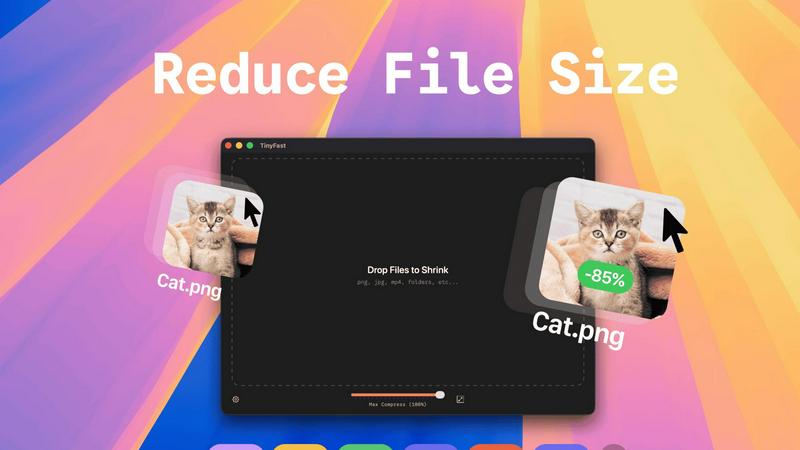
Effortlessly compress images, videos, and PDFs on your Mac with TinyFast's fast and private drag-and-drop solution.
About TinyFast
TinyFast is a cutting-edge macOS application that transforms the way users compress their files, making it an indispensable tool for developers, designers, and content creators. Whether you're working with images, videos, documents, or audio files, TinyFast supports a wide range of formats, including PNG, JPEG, MP4, MOV, PDF, SVG, WebP, MP3, and GIF. Its intuitive drag-and-drop interface allows users to compress files directly on their Mac, ensuring that sensitive data remains secure and private. By eliminating the need for uploading files to unknown servers, TinyFast prioritizes speed and confidentiality, providing a seamless user experience. With TinyFast, you can maintain high-quality assets while significantly reducing file sizes, enabling efficient workflows without compromising security. Say goodbye to tedious online compression tools and embrace the simplicity and effectiveness of TinyFast, designed for anyone who values both efficiency and data protection.
Features of TinyFast
Batch & Drag-Drop Shrink
With TinyFast, you can easily drag entire folders into the application for bulk compression. This feature allows you to optimize multiple files at once, saving you precious time while ensuring that your assets are quickly and efficiently reduced in size.
Blazing-Fast Compression
TinyFast utilizes optimized native engines to shrink large files in seconds. This enables users to bypass the frustrating waits associated with online compression tools, allowing for rapid processing without the hassle of uploads and downloads.
Resize Resolution
This feature allows users to automatically resize their images and videos to fit specific needs. Whether you require smaller resolutions for web uploads or different formats for social media, TinyFast streamlines the process, ensuring high-quality outputs every time.
100% Local & Private
TinyFast operates entirely on your device, meaning your files never leave your Mac. This design ensures total privacy, making it ideal for users concerned about data security. No uploads or cloud servers mean your sensitive information remains confidential.
Use Cases of TinyFast
Streamlined Workflow for Designers
Designers can use TinyFast to efficiently compress large images and graphics without sacrificing quality. This expedites their workflow, allowing them to focus on creativity instead of waiting for files to upload or download.
Content Creation Simplified
For content creators, TinyFast provides a quick solution for compressing videos and images intended for social media or websites. By optimizing file sizes, creators can ensure faster loading times and better user experiences for their audiences.
Secure File Management for Developers
Developers often handle sensitive files and assets. TinyFast offers a secure way to compress and manage these files locally, reducing the risk of data breaches associated with online compression services.
Efficient Document Handling for Businesses
Businesses can benefit from using TinyFast to compress PDF and document files efficiently. This allows teams to share large files quickly while maintaining the integrity and quality of the documents, enhancing collaboration and productivity.
Frequently Asked Questions
How does TinyFast ensure my files remain private?
TinyFast operates entirely on your local device, meaning files never get uploaded to any servers. This guarantees that your data remains confidential and secure.
What file types can I compress using TinyFast?
TinyFast supports a wide range of file types, including images (PNG, JPEG, GIF), videos (MP4, MOV), documents (PDF, DOCX), and audio files (MP3), making it a versatile tool for various needs.
Is TinyFast easy to use for non-technical users?
Absolutely! TinyFast features a user-friendly drag-and-drop interface, making it accessible for everyone, regardless of technical expertise. Simply drag your files into the app and watch them get compressed instantly.
What kind of compression speeds can I expect from TinyFast?
TinyFast is designed to offer blazing-fast compression speeds, allowing you to shrink large files in seconds. This efficiency eliminates the long wait times typically associated with online compression tools.
Explore more in this category:
Similar to TinyFast

Kody Tools
Free collection of online developer utilities, code formatters, and digital converters designed to streamline your daily workflow.

Forms Plugin
The #1 Native Form Builder Plugin for Framer - No Code, No Embeds, No External Platforms.

Qwen Image Edit
Edit and generate visuals with Qwen Image Edit using prompts for background changes, text edits, posters, outpainting, and style exploration.


AIEnhancer
Enhance photos, create AI images, and generate videos with flexible workflows, creative effects, and a shared asset library.


PerPageFax
PerPageFax lets you send a fax online from any browser for a flat $0.50 per page — no account, no subscription, no fax machine.