
Alternatives to Cece AI
Explore the best alternatives and competitors to Cece AI.
Explore 20 alternatives to Cece AI. Compare features, pricing, and find the best fit for your needs.


GigUp
GigUp helps freelancers discover relevant Upwork jobs through AI matching, automated monitoring, and instant alerts.

Safe Outreach
AI-powered platform that evaluates the safety of LinkedIn automation tools and helps reduce the risk of account restrictions.

How Long How Many Tool
Timers and hourly checks to figure how out long until a certain time or how many days away.


ButterShare
Realtime peer-to-peer file transfer in the browser. Send files directly between devices, no account and no upload to a server.

Emailyy
Free email tools for signatures, subject lines, HTML previews, word counts, and email headers. Browser-based, simple to use, and no signup required.
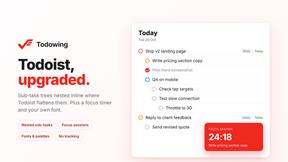
Todowing
Chrome extension that nests Todoist sub-tasks inline in Today, Upcoming, filter, label and board views. Free tier, $19.99 lifetime unlock.
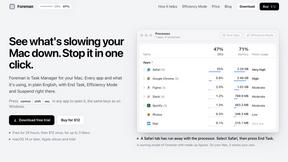
Foreman
See every app and what it's using in plain English, and end or slow down the one that's hogging your Mac.
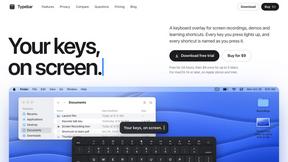
Typebar
Every key you press lights up on an on-screen keyboard, and each shortcut is named as you press it.

Uniclip
Clip pages, take full-page screenshots and batch-capture list data to Notion, Feishu, Obsidian, Markdown, CSV or JSON.

TroveKey
Search tabs, Chrome bookmarks and history, run browser commands, and save webpages and social posts locally—no account.

Notchpals
Little characters peek out of your Mac's notch to remind you to drink water, eat, sit up and get to bed. Quiet during calls. $4.99 once.

LightScreen
Free light screen tool online. Turn any display into a flashlight, ambient light, or solid-color screen. No download or sign-up.
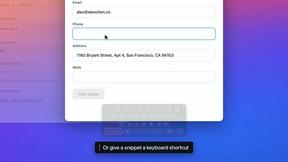


Agent Pets
Your Claude Code & Codex sessions as pets in Chrome. Approve, deny and reply to your coding agents from any tab.
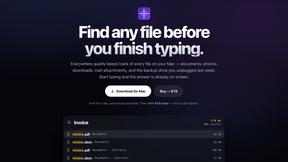
Everywhere
Fast file search for the Mac. Results as you type, files inside Mail and Photos, works with Wi-Fi off. $19 once.

Basalt
Eighteen PDF tools in one native Mac window: merge, split, compress, OCR, Bates numbering, forms, signing and redaction. Offline. $29 once.

Voice Keyboard Pro
Hold a key, say what you mean, let go. Clean, punctuated text lands at the cursor in any app on your Mac or iPhone.
About Cece AI Alternatives
The AI executive assistant space is heating up fast, and Cece AI has carved out a niche as a practical, email-native tool for small business owners drowning in admin. It sits squarely in the Productivity & Management category, acting as a virtual assistant that lives inside your inbox to handle scheduling, quotes, invoices, and follow-ups. But as more players enter this market, users are increasingly looking for alternatives—often driven by pricing constraints, a need for deeper integrations with specific CRMs or accounting software, or a desire for a more proactive, mobile-first experience rather than a purely email-driven workflow. The trend is moving toward hyper-specialized AI that adapts to industry-specific jargon or offers omnichannel support across text, voice, and chat. When evaluating an alternative to a tool like Cece AI, the key is to look beyond surface features. You should prioritize how the AI handles context switching—can it manage tasks across multiple inboxes or platforms without breaking a sweat? Also, consider the learning curve: some solutions require heavy dashboard setup, while others learn passively from your email patterns. Finally, check for transparent pricing models that scale with your business size, and ensure the tool offers robust data security, particularly if you’re handling sensitive client or financial information. The hot trend right now is AI that doesn’t just execute tasks but also proactively suggests optimizations for your workflow, so look for that emerging capability.
FAQs about Cece AI Alternatives
What is Cece AI?
Cece AI is an AI executive assistant designed to operate directly within your email inbox, helping business owners automate admin tasks like scheduling, customer responses, quoting, invoicing, and follow-ups. It works by you simply CCing Cece on an email, turning messy threads into completed tasks without needing to manage a separate chatbot or hire additional staff. The system requires an initial setup of your calendar, business profile, price book, and preferences via a dashboard, after which it executes daily workflow tasks through email.
Who is Cece AI for?
Cece AI is specifically built for small business owners and entrepreneurs who are overwhelmed by email overload, administrative work, and incomplete follow-ups. It targets users who want to reduce the need for a full-time administrative hire by leveraging AI to handle routine tasks like scheduling and invoicing. The tool is ideal for those who prefer to work where business already happens—inside the inbox—rather than adopting a separate project management platform.
Is Cece AI free?
Based on the provided product content, there is no mention of Cece AI being free or offering a free tier. The service is positioned as a practical alternative to hiring a full-time employee, which suggests it operates on a paid subscription model. Users should check the official Cece AI website for current pricing details, as costs typically scale with the volume of tasks or the number of users.
What are the main features of Cece AI?
Cece AI offers a suite of email-based automation features including meeting scheduling, customer response drafting, quote creation, invoice generation, follow-up tracking, and reminder management. It integrates with your calendar and business profile to ensure tasks are executed based on your specific pricing and preferences. The tool is designed to keep work moving without additional software babysitting, turning email threads into completed administrative actions.