
AI Formatter vs CleanPaste.org
Side-by-side comparison to help you choose the right tool.
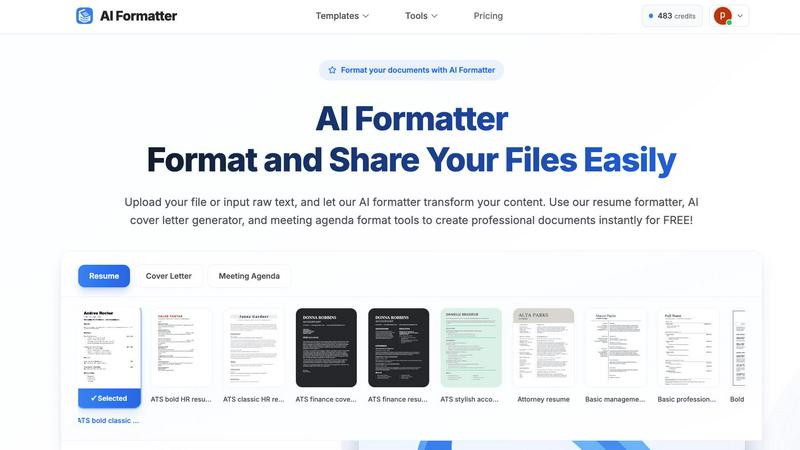
Transform raw text into polished documents instantly with 1000+ professional templates using AI Formatter.
Last updated: March 1, 2026

CleanPaste.org
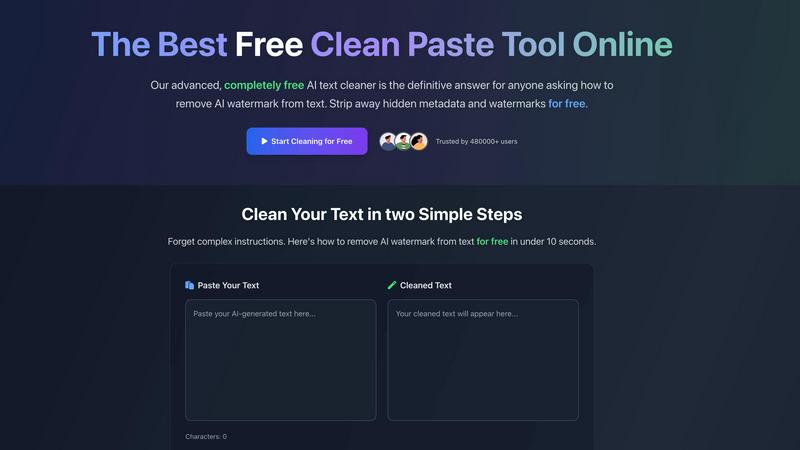
CleanPaste instantly strips invisible characters and AI watermarks from your text for free.
Last updated: February 28, 2026
Visual Comparison
AI Formatter
CleanPaste.org
Feature Comparison
AI Formatter
Advanced AI Formatting
AI Formatter utilizes advanced artificial intelligence to analyze and structure your content automatically. This ensures that your documents not only look professional but also adhere to industry standards and ATS compatibility.
Extensive Template Library
With over 162 professional templates at your disposal, AI Formatter enables you to choose the perfect layout for your documents. Each template is designed to be ATS-optimized, ensuring that your resumes and cover letters pass automated screening systems with ease.
Multi-Format Support
The platform supports a variety of input formats, including PDF, DOC, DOCX, and TXT, allowing users to upload existing documents or input raw text directly. This flexibility ensures that users can work with any type of content they have on hand.
Real-Time Editing and Customization
Once your document is formatted, AI Formatter offers an intuitive online editor where you can make adjustments, customize content, and finalize your document. This feature allows for personal touches while maintaining the professional look of your formatted document.
CleanPaste.org
Advanced AI Watermark Removal
CleanPaste.org employs a sophisticated, real-time algorithm specifically tuned to strip out proprietary AI watermarks embedded by models like GPT, Claude, and Gemini. This goes beyond simple formatting to target the subtle linguistic and structural patterns that detectors look for, ensuring your output passes as human-generated while keeping your original message perfectly intact.
Deep-Scan Invisible Character Stripper
The tool performs a comprehensive deep scan of your text to hunt down and eliminate all non-visible characters. This includes zero-width spaces, hidden metadata tags, formatting artifacts, and other unicode elements that are invisible to the naked eye but can trigger AI detection software or cause display errors in documents and publishing platforms.
Instant, Zero-Friction Processing
True to its promise of simplicity, CleanPaste.org delivers results in under 10 seconds with a two-step workflow: paste and click. There is no account creation, no usage caps, and no paywalls. The processing happens entirely in your browser for speed and privacy, making professional-grade text cleaning accessible to everyone instantly.
Dual-Mode Cleaning Interface
The platform offers versatile control with its dual-action interface. Users can choose to run the comprehensive "Remove AI Watermarks" mode for full sanitization or use the targeted "Clear Invisible Characters" function for specific cleanup tasks. This flexibility allows for precise editing based on your specific needs, from full humanization to quick formatting fixes.
Use Cases
AI Formatter
Job Seekers
Job seekers can leverage AI Formatter to create ATS-optimized resumes and cover letters that stand out to recruiters. The platform's templates and AI capabilities ensure that their documents meet industry standards and increase their chances of landing interviews.
Business Professionals
Business leaders and professionals can use AI Formatter to create standardized reports, presentations, and meeting agendas quickly. The automation reduces the time spent on formatting, allowing them to focus on the content and strategy of their documents.
Students
Students can utilize AI Formatter to format their theses, essays, and other academic papers with ease. The platform ensures adherence to specific formatting guidelines, saving them time and minimizing formatting errors.
Freelancers and Entrepreneurs
Freelancers and entrepreneurs can benefit from AI Formatter by generating professional invoices and receipts. The AI-driven tools allow for quick document creation, enabling them to maintain a professional image while managing their business operations efficiently.
CleanPaste.org
Academic Integrity for Students
Students using AI for research assistance or drafting can leverage CleanPaste.org to ensure their submitted essays and papers are free of detectable AI fingerprints. It removes the hidden metadata and watermarks from AI-assisted drafts, allowing students to submit work that reflects their own synthesis and effort with confidence, avoiding potential academic integrity flags.
Content Creator & SEO Brand Safety
Bloggers, marketers, and SEO specialists can protect their brand's authentic voice and search rankings. By cleaning AI-generated drafts, they ensure content passes AI detection checks used by some search algorithms and clients, maintaining a natural, human-like tone that engages audiences and upholds brand credibility without any artificial trace.
Professional Communication Polishing
Non-native speakers and professionals using AI to draft important emails, reports, or client communications can use CleanPaste.org to refine the output. The tool removes the robotic patterns and hidden characters, resulting in polished, natural-sounding text that enhances professional image and ensures clear, undetectable communication.
Pre-Publishing Formatting Cleanup
Writers and editors preparing content for publication on websites, e-books, or CMS platforms can use the tool as a final formatting check. It strips out invisible characters and metadata that can cause rendering issues, weird spacing, or broken layouts, ensuring the final published text is clean and displays correctly across all devices and systems.
Overview
About AI Formatter
AI Formatter is a revolutionary cloud-based SaaS platform designed to streamline the process of document creation and formatting through intelligent automation. It caters to a wide array of users, including job seekers, business professionals, and students, by transforming raw text and uploaded files into polished, ATS-optimized documents in mere seconds. The platform is not just another template tool; it offers a comprehensive suite of document intelligence capabilities. With an impressive 95%+ ATS pass rate for resumes and a time-saving average of over two hours per document, AI Formatter is poised to elevate your professional presentation with minimal effort. It supports various input formats—Word, PDF, TXT—and features over 100 professional templates, ensuring users achieve consistent, visually appealing results. The combination of AI technology and a real-time online editor empowers users to customize their documents fully, export in multiple formats, and share securely. Starting with a free tier, AI Formatter is the essential productivity hack for anyone involved in document creation, making tedious tasks a one-click operation.
About CleanPaste.org
In the explosive era of generative AI, a new challenge has emerged: digital fingerprints. Every piece of AI-generated text can carry invisible watermarks, hidden metadata, and zero-width characters that act as a tell-tale sign of its artificial origin. For students, professionals, and creators, this poses a real risk of detection, credibility loss, or even penalties. Enter CleanPaste.org, the definitive, no-cost solution engineered to scrub your text clean of these digital traces. This powerful online tool is specifically designed to ensure your content appears authentically human-written, bypassing AI detection systems with ease. Catering to over 480,000 users, its mission is to restore integrity and originality in a landscape saturated with machine-generated content. With a fiercely simple, instant-process interface that requires zero sign-up, CleanPaste.org empowers you to paste, clean, and present your work with absolute confidence, completely free. It's not just a utility; it's an essential shield for anyone navigating the new norms of AI-assisted creation.
Frequently Asked Questions
AI Formatter FAQ
How does AI Formatter ensure ATS compatibility?
AI Formatter uses advanced AI algorithms to analyze and structure your documents according to the latest ATS requirements, ensuring that your resumes and cover letters are optimized for automated screening systems.
What formats can I upload to AI Formatter?
You can upload documents in various formats, including PDF, DOC, DOCX, and TXT. This flexibility allows you to work with existing files or simply input raw text for formatting.
Is there a free version of AI Formatter?
Yes, AI Formatter offers a generous free tier that allows users to access many of its features without any cost. This makes it accessible for those looking to improve their document formatting skills.
Can I customize my documents after formatting?
Absolutely! AI Formatter includes a real-time online editor that allows you to customize and edit your formatted documents before downloading them. You can make adjustments to content, layout, and design as needed.
CleanPaste.org FAQ
How does CleanPaste.org actually remove AI watermarks?
CleanPaste.org uses advanced, proprietary algorithms that analyze text for the statistical and syntactic patterns commonly used as watermarks by major AI models. It doesn't just paraphrase; it intelligently restructures and cleanses the text at a fundamental level to eliminate these detectable signatures while meticulously preserving the original meaning, context, and quality of your content in real-time.
Is CleanPaste.org completely free, or is there a hidden premium tier?
Yes, it is 100% completely free with no hidden tiers or future paywalls. The service operates without usage limits, mandatory sign-ups, or premium features. Every tool, including the full AI watermark removal and deep-scan functions, is available at zero cost to all users, forever. The project is committed to accessible, ethical AI text cleaning.
What specific types of invisible characters does the tool detect?
The tool is engineered to detect and remove a wide array of hidden elements. This includes zero-width spaces and joiners, non-printing Unicode characters, hidden formatting metadata from AI platforms, special control characters, and other embedded artifacts that are not visible in standard text editors but can be identified by analysis software.
Will using CleanPaste.org guarantee my content passes all AI detectors?
While CleanPaste.org is highly effective and trusted by hundreds of thousands to significantly reduce detection likelihood, no tool can offer a 100% ironclad guarantee against all detectors, as they constantly evolve. However, users report consistent success across major detection platforms, making it one of the most reliable free solutions available for humanizing AI text.
Alternatives
AI Formatter Alternatives
AI Formatter is a state-of-the-art cloud-based SaaS platform that revolutionizes document creation by transforming raw text into polished, professional documents using artificial intelligence. It belongs to the productivity and management category, focusing on enhancing the efficiency of document formatting tasks for various users, including job seekers, business leaders, and students. Users often seek alternatives to AI Formatter for a variety of reasons, such as pricing, specific feature sets, or platform compatibility. When searching for an alternative, it's essential to consider factors like the range of templates offered, the efficiency of the formatting engine, user interface ease, and the overall value provided for your unique document creation needs.
CleanPaste.org Alternatives
CleanPaste.org is a leading free online tool in the AI text processing category, designed to strip AI watermarks, hidden metadata, and invisible characters from text. Its core mission is to help users ensure their content appears human-written and passes AI detection, making it a go-to for students, writers, and professionals navigating the new norms of AI-assisted creation. Users often seek alternatives for various reasons, including the need for different feature sets like integrated grammar checking or more advanced paraphrasing, preferences for downloadable software over web apps, or concerns about data privacy and usage limits that can come with free tiers. The landscape for these tools is rapidly evolving, with new capabilities emerging constantly. When evaluating an alternative, key factors to consider are the tool's effectiveness against the latest AI detectors, its ability to preserve your original writing style and intent, the security of your data, and the overall value—whether it's a robust free plan or a paid subscription with advanced features. The right choice balances powerful cleaning capabilities with a workflow that fits your specific needs.