
Cosy vs documentorium
Side-by-side comparison to help you choose the right tool.

Effortlessly onboard and connect your Slack community with automated DMs, saving you hours each week.
Last updated: February 28, 2026

documentorium
Documentorium instantly creates professional contractor documents and PDFs using AI guided forms.
Last updated: March 26, 2026
Visual Comparison
Cosy
documentorium

Feature Comparison
Cosy
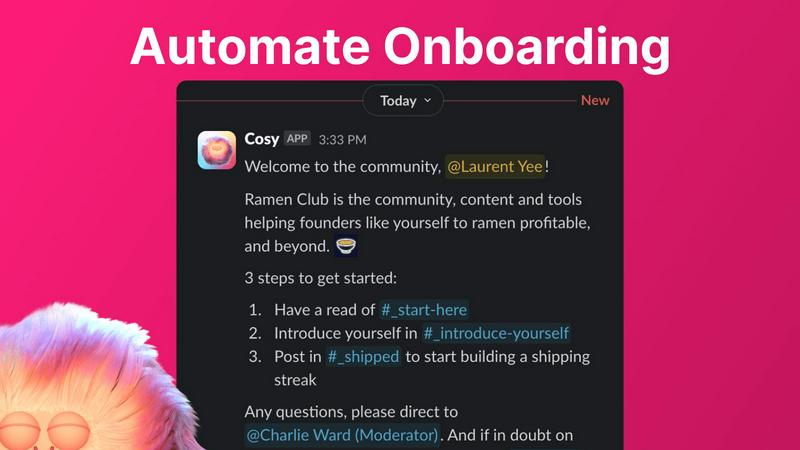
Automate Onboarding
Cosy allows you to create and automate up to 10 distinct onboarding welcome DM sequences. When a new member joins your Slack workspace, they receive tailored onboarding messages either immediately or after a specified delay. This feature is customizable, enabling you to include member names, links, and emojis, making each welcome feel personal. You can rest assured that every new member is greeted, even during odd hours, freeing up your time and ensuring no one is left out.
Connect Your Members
Enhance community engagement by automatically introducing members to each other via DMs. You can customize the frequency and timing of these introductions, making it easy for members to connect and interact. Opted-in members are randomly selected for introductions, promoting serendipitous conversations while avoiding repeated matches. This feature ensures that your community remains vibrant and connected, even when you are not actively managing it.
Member Directory
Create a simple and searchable member directory directly within Slack. Members can easily fill out their profiles with customized fields that you set up, allowing others to search for keywords and filter profiles. This feature encourages members to learn more about each other and facilitates meaningful connections. Members can access their profiles through the Cosy app or by using a quick slash command, making it effortless to engage with one another.
Content Highlights
Cosy instantly surfaces the top 10 most engaging posts in your community, along with a list of public messages that have gone unanswered. By using simple slash commands, community managers can quickly view the most engaging content or identify posts that require attention. This feature keeps the community active and ensures that important discussions are not overlooked, fostering ongoing engagement.
documentorium
Trade-Specific Guided Forms
Forget adapting generic forms. documentorium's library features over 200 templates with fields built specifically for your trade. Whether you're a solar installer detailing panel specs or a plumber listing fixture models, the guided forms ask the right questions in the right order. This eliminates guesswork, ensures you capture all critical job details, and delivers documents that speak your professional language, impressing clients and reducing errors from the very first field.
Instant Professional PDF Generation
The moment you complete a form, documentorium's engine takes over. It instantly compiles your data into a clean, branded, and print-ready PDF document. There is zero manual formatting, no struggling with alignment, and no exporting issues. You get a polished, professional file ready to email to a client or print for the job site in seconds, turning administrative tasks from a chore into a seamless, one-click operation.
Complete Document History & Prefill
Every document you create is automatically saved in your personal history within the platform. This creates a powerful, searchable record of all your jobs. The real magic happens on your next job: the system can intelligently prefill recurring information like your company details, client info, and standard service descriptions. This feature dramatically accelerates document creation for repeat clients or similar service calls, making you exponentially more efficient over time.
All-Access, Simple Subscription
documentorium operates on a straightforward, transparent model. One annual subscription of $99 grants you full, unrestricted access to the entire catalog of over 200 templates across all 26 trade categories. There are no confusing tiers, no per-document fees, and no feature gates. You get everything: quotes, estimates, invoices, contracts, proposals, and more, all for a single, predictable price.
Use Cases
Cosy
Enhance New Member Experience
With Cosy, newly joined members receive immediate, personalized onboarding messages. This ensures they feel welcomed and informed about community norms and resources. The automated nature of this feature means community managers can focus on other priorities while new members receive the attention they need to integrate smoothly.
Facilitate Networking Opportunities
Cosy’s automatic member introductions create networking opportunities within the community. By connecting members based on their interests or roles, you foster collaboration and encourage meaningful conversations. This leads to stronger relationships and a more cohesive community.
Simplify Member Management
Community managers can utilize Cosy’s member directory to simplify the process of managing member information. With customizable fields and easy search functionality, members can find others with shared interests or skills, enhancing the overall community experience without extensive manual effort.
Keep Content Engaging
By leveraging Cosy’s content highlights feature, community managers can ensure that the most engaging discussions are brought to the forefront. This encourages participation and helps keep conversations lively, allowing members to stay informed and involved without missing out on important interactions.
documentorium
On-the-Spot Quote Generation
An HVAC technician finishes a diagnostic check at a client's home. Instead of saying "I'll email you a quote later," they pull out their tablet, open documentorium, select the HVAC quote template, and fill in the guided form with the recommended unit, labor costs, and parts. In under two minutes, they generate and hand the client a professional PDF quote on the spot, significantly increasing the likelihood of an immediate approval and booking the job before leaving the property.
Streamlined Inspection Reporting
A home inspector completes a thorough property assessment. Using documentorium's inspection report template, they systematically input findings through trade-specific fields for roofing, electrical, plumbing, and structure. The platform organizes all notes and images into a comprehensive, easy-to-read PDF report. This professional document is instantly delivered to the real estate agent and client, providing clear, actionable data and enhancing the inspector's credibility and efficiency.
Managing Project Changes with Change Orders
A contractor is halfway through a kitchen remodel when the client requests a major appliance upgrade. To formally document the change in scope, cost, and timeline, the contractor uses documentorium's change order template. The guided form ensures all legal and financial details are captured correctly. A professional PDF is generated, signed by both parties, and filed digitally, protecting the business from disputes and ensuring clear communication and proper billing for the added work.
Creating Binding Service Contracts
A roofing company lands a large residential re-roofing project. To protect both parties and outline the project's full scope, payment schedule, and warranties, they use documentorium's contract template for roofers. The guided form includes all necessary clauses and trade-specific terms. The resulting polished, professional contract PDF builds immense trust with the homeowner, sets clear expectations, and provides legal security, allowing the roofer to focus on the work, not the paperwork.
Overview
About Cosy
Cosy is an innovative tool designed specifically for Slack, revolutionizing the way communities engage and interact. With its suite of automation and smart features, Cosy streamlines the onboarding process, fosters connections among members, and enhances overall community dynamics. It enables community managers to automate welcome messages and personal introductions, ensuring that every new member feels valued and connected from the moment they join. Cosy features a user-friendly member directory, allowing members to easily find and connect with each other without leaving Slack. Additionally, it highlights the most engaging content within the community, maintaining a lively atmosphere. By detecting spam and abusive language, Cosy creates a safe environment for all users. Whether you are a community leader, a team manager, or a facilitator, Cosy is tailored to meet your needs, saving you time and enhancing engagement in your Slack workspace. With Cosy, transform your Slack into a thriving community that fosters meaningful interactions and relationships.
About documentorium
Stop wrestling with generic templates and clunky word processors. documentorium is the next-gen document engine engineered exclusively for the trades. This isn't just another form-filler; it's a hyper-specialized toolkit that understands the unique language and workflow of electricians, plumbers, contractors, HVAC techs, roofers, and every service professional in between. The core mission? Obliterate the blank page and the hours wasted on formatting. With a massive library of over 200 guided templates spanning 26 trade categories, documentorium provides the exact professional framework you need. Imagine generating a print-ready, client-worthy PDF for a quote, work order, proposal, or inspection report in literal seconds. Every field is intelligently built for your specific trade, not generic blanks, ensuring accuracy and professionalism from the first click. It's about reclaiming time, elevating your brand, and closing deals faster with a seamless, no-nonsense document workflow that works as hard as you do.
Frequently Asked Questions
Cosy FAQ
How does Cosy automate onboarding?
Cosy automates onboarding by allowing you to create up to 10 distinct welcome DM sequences that are sent automatically when a new member joins your Slack workspace. You can customize the messages and set timing preferences for delivery.
Can I customize member introductions?
Yes, Cosy enables you to customize the frequency and timing of member introductions. You can set intervals for how often introductions occur, ensuring that members are connected regularly in a way that suits your community’s needs.
What features are included in the member directory?
The member directory allows members to create profiles with customizable fields, making it easy to find others based on keywords and specific criteria. Members can access their profiles and search the directory directly within Slack.
How does Cosy handle spam and abusive language?
Cosy is equipped with features that detect spam and abusive language, ensuring a safe and enjoyable environment for all community members. This proactive approach helps maintain a positive atmosphere and encourages healthy interactions.
documentorium FAQ
Can I cancel my subscription anytime?
Absolutely. You maintain full control and can cancel your subscription directly from your account settings at any time. There are no penalties or lock-in contracts. Your access will remain active until the end of your current billing period, after which you will not be charged again. It's a commitment-free tool designed for your convenience.
What happens to my documents when the free trial ends?
Your data is always safe. When your one-month free trial expires, all the documents you created remain securely stored in your account history. You can view and download them at any time. To create or edit new documents, you would need to activate the paid subscription. No existing work is ever deleted due to a trial ending.
Do I lose access to my old documents if I don't subscribe?
No, you do not lose them. Your document history is preserved. Even without an active subscription, you retain the ability to log in, view, and download all the documents you created during your trial or previous subscription period. Subscribing unlocks the ability to create and edit new documents, but your past work remains accessible.
Does documentorium provide legal advice for contracts?
No. documentorium is a powerful document generation tool that provides professional templates and forms. It is not a substitute for professional legal counsel. The platform is designed to help you create well-structured documents efficiently, but for complex legal matters or to ensure a contract fully complies with local laws, consulting with a qualified attorney is always recommended.
Alternatives
Cosy Alternatives
Cosy is an innovative tool designed for Slack that enhances community engagement and streamlines onboarding processes. By automating welcome messages and member introductions, Cosy transforms how communities interact and connect within the platform. Users commonly seek alternatives to Cosy for various reasons, including pricing, feature sets, and specific platform needs that may not be met by Cosy. When looking for an alternative, consider the ease of use, customization options, automation capabilities, and integration with your existing tools to ensure it aligns with your community's unique requirements.
documentorium Alternatives
documentorium is a specialized document engine in the productivity and management category, designed specifically for tradespeople to generate professional PDFs like quotes and invoices from guided templates. Users often explore alternatives for various reasons, including budget constraints, the need for different feature sets like integrated scheduling or CRM, or a preference for a different platform like a mobile-first app or a more comprehensive business suite. When evaluating other options, it's crucial to consider your trade-specific needs. Look for solutions that offer templates and field logic built for your industry, not just generic forms. Also, assess the overall workflow integration, output quality, and whether the tool scales with your business as it grows.