

Cosy
Effortlessly onboard and connect your Slack community with automated DMs, saving you hours each week.
About Cosy
Cosy is an innovative tool designed specifically for Slack, revolutionizing the way communities engage and interact. With its suite of automation and smart features, Cosy streamlines the onboarding process, fosters connections among members, and enhances overall community dynamics. It enables community managers to automate welcome messages and personal introductions, ensuring that every new member feels valued and connected from the moment they join. Cosy features a user-friendly member directory, allowing members to easily find and connect with each other without leaving Slack. Additionally, it highlights the most engaging content within the community, maintaining a lively atmosphere. By detecting spam and abusive language, Cosy creates a safe environment for all users. Whether you are a community leader, a team manager, or a facilitator, Cosy is tailored to meet your needs, saving you time and enhancing engagement in your Slack workspace. With Cosy, transform your Slack into a thriving community that fosters meaningful interactions and relationships.
Features of Cosy
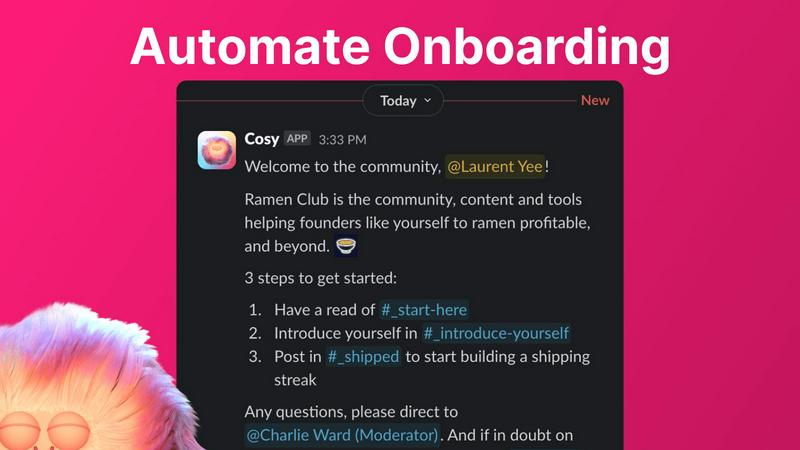
Automate Onboarding
Cosy allows you to create and automate up to 10 distinct onboarding welcome DM sequences. When a new member joins your Slack workspace, they receive tailored onboarding messages either immediately or after a specified delay. This feature is customizable, enabling you to include member names, links, and emojis, making each welcome feel personal. You can rest assured that every new member is greeted, even during odd hours, freeing up your time and ensuring no one is left out.
Connect Your Members
Enhance community engagement by automatically introducing members to each other via DMs. You can customize the frequency and timing of these introductions, making it easy for members to connect and interact. Opted-in members are randomly selected for introductions, promoting serendipitous conversations while avoiding repeated matches. This feature ensures that your community remains vibrant and connected, even when you are not actively managing it.
Member Directory
Create a simple and searchable member directory directly within Slack. Members can easily fill out their profiles with customized fields that you set up, allowing others to search for keywords and filter profiles. This feature encourages members to learn more about each other and facilitates meaningful connections. Members can access their profiles through the Cosy app or by using a quick slash command, making it effortless to engage with one another.
Content Highlights
Cosy instantly surfaces the top 10 most engaging posts in your community, along with a list of public messages that have gone unanswered. By using simple slash commands, community managers can quickly view the most engaging content or identify posts that require attention. This feature keeps the community active and ensures that important discussions are not overlooked, fostering ongoing engagement.
Use Cases of Cosy
Enhance New Member Experience
With Cosy, newly joined members receive immediate, personalized onboarding messages. This ensures they feel welcomed and informed about community norms and resources. The automated nature of this feature means community managers can focus on other priorities while new members receive the attention they need to integrate smoothly.
Facilitate Networking Opportunities
Cosy’s automatic member introductions create networking opportunities within the community. By connecting members based on their interests or roles, you foster collaboration and encourage meaningful conversations. This leads to stronger relationships and a more cohesive community.
Simplify Member Management
Community managers can utilize Cosy’s member directory to simplify the process of managing member information. With customizable fields and easy search functionality, members can find others with shared interests or skills, enhancing the overall community experience without extensive manual effort.
Keep Content Engaging
By leveraging Cosy’s content highlights feature, community managers can ensure that the most engaging discussions are brought to the forefront. This encourages participation and helps keep conversations lively, allowing members to stay informed and involved without missing out on important interactions.
Frequently Asked Questions
How does Cosy automate onboarding?
Cosy automates onboarding by allowing you to create up to 10 distinct welcome DM sequences that are sent automatically when a new member joins your Slack workspace. You can customize the messages and set timing preferences for delivery.
Can I customize member introductions?
Yes, Cosy enables you to customize the frequency and timing of member introductions. You can set intervals for how often introductions occur, ensuring that members are connected regularly in a way that suits your community’s needs.
What features are included in the member directory?
The member directory allows members to create profiles with customizable fields, making it easy to find others based on keywords and specific criteria. Members can access their profiles and search the directory directly within Slack.
How does Cosy handle spam and abusive language?
Cosy is equipped with features that detect spam and abusive language, ensuring a safe and enjoyable environment for all community members. This proactive approach helps maintain a positive atmosphere and encourages healthy interactions.
Explore more in this category:
Similar to Cosy

Kody Tools
Free collection of online developer utilities, code formatters, and digital converters designed to streamline your daily workflow.


Forms Plugin
The #1 Native Form Builder Plugin for Framer - No Code, No Embeds, No External Platforms.


amaze.directory
A directory of AI tools where every listing was opened and used by a person first. Search by job, filter by price, get the link.

benchmark.directory
146 AI tools across 20 categories, indexed by the job they do. Every listing earned its place. None of them paid for it.

saasgrow.ai
Find SaaS growth tools worth your time. Every tool is reviewed before it's listed, so the shortlist is already made for you.
