
Blueberry vs DevUtilX
Side-by-side comparison to help you choose the right tool.

Blueberry
Blueberry is an all-in-one Mac app that streamlines web app development by integrating your editor, terminal, and.
Last updated: February 28, 2026

DevUtilX
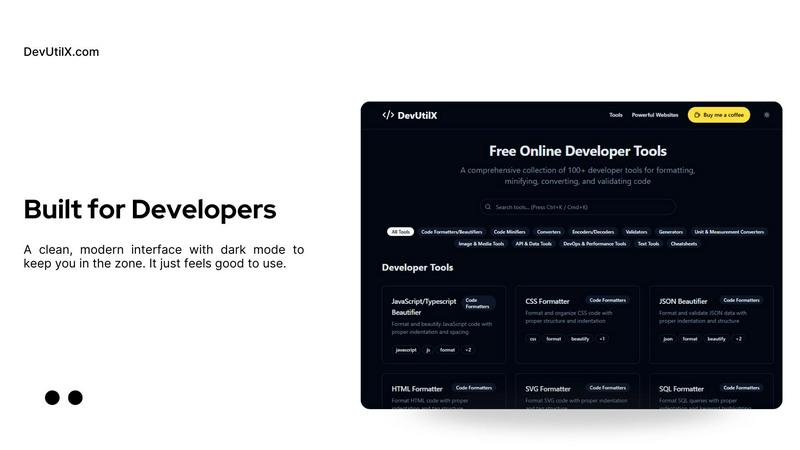
DevUtilX offers 100+ essential online tools for developers to format, validate, convert, and optimize code effortlessly.
Last updated: March 1, 2026
Visual Comparison
Blueberry

DevUtilX
Feature Comparison
Blueberry
Integrated Workspace
Blueberry offers an all-in-one workspace where your code editor, terminal, and browser exist in harmony. This integration allows for seamless transitions between coding, testing, and previewing your projects without the need to switch applications.
AI Context Awareness
With Blueberry's built-in MCP, your AI has full context of your project. It understands your code, current browser state, and terminal output, enabling it to provide relevant suggestions and assistance tailored to your specific needs, enhancing your development efficiency.
Advanced Code Editing
Experience a robust coding environment with full syntax highlighting, multi-cursor support, find and replace functionality, and Git integration. Blueberry's editor is designed for developers who need a powerful tool that also complements AI assistance.
Live Preview Across Devices
Blueberry includes a built-in live preview feature that allows users to view their applications on desktop, tablet, and mobile devices. This ensures that developers can see exactly how their applications will look to end-users, facilitating better design decisions.
DevUtilX
Comprehensive Tool Suite
DevUtilX boasts over 100 developer tools, covering everything from code formatting to data conversion. This extensive collection ensures that developers have all the utilities they need at their fingertips, simplifying their coding tasks and enhancing efficiency.
Multi-Language Support
The platform supports a broad range of programming languages, including JavaScript, Python, HTML, and CSS. This versatility makes DevUtilX an essential toolkit for developers working across various projects and tech stacks, ensuring that no matter the language, they have the tools required for success.
Local Data Processing
With a strong focus on privacy, all processing in DevUtilX occurs locally within the user's browser. This approach not only secures sensitive data but also enhances performance, as no data is sent to external servers during tool usage, allowing for faster processing times and a safer coding experience.
User-Friendly Interface
DevUtilX features an intuitive and user-friendly interface designed to cater to both novice and experienced developers. The seamless navigation and easy-to-use tools reduce the learning curve, enabling developers to quickly adopt the platform and enhance their productivity.
Use Cases
Blueberry
Streamlined Web Development
Developers can use Blueberry to build web applications from scratch, leveraging the integrated features to code, test, and preview their work all in one place. This reduces the time spent switching between different tools and enhances focus.
Collaborative Design
Design teams can utilize Blueberry to create and iterate on user interfaces, sharing live previews with stakeholders and receiving immediate feedback. The ability to see changes in real-time helps align design goals across teams.
AI-Assisted Coding
Leverage AI models like Claude and Codex to assist in writing code. Blueberry's context-sharing capabilities allow the AI to provide suggestions based on the entire project, making it easier to navigate complex coding tasks.
Efficient Project Management
By pinning essential apps like GitHub, Linear, and Figma within the Blueberry workspace, teams can manage projects more effectively. The ability to interact with these tools while developing ensures that all aspects of project management are seamlessly integrated.
DevUtilX
Quick Code Formatting
Developers can use DevUtilX to quickly format their code, ensuring it adheres to best practices and is easy to read. This is particularly useful in collaborative environments where coding standards must be maintained across different team members.
Efficient Code Minification
When preparing for production, developers can leverage the minification tools of DevUtilX to significantly reduce file sizes. This process not only optimizes load times but also enhances overall application performance, making it invaluable for web development.
Seamless Data Conversion
With the array of converters available, users can effortlessly convert files between different formats. This feature is essential for developers who frequently work with various data types, ensuring smooth transitions and compatibility across different systems.
Reliable Code Validation
DevUtilX provides robust validation tools that help developers catch errors early in the coding process. By validating code across multiple languages, developers can ensure their applications are error-free, improving the overall quality of their work.
Overview
About Blueberry
Blueberry is a powerful macOS application designed specifically for modern product builders, combining an editor, terminal, and browser into one cohesive workspace. This AI-native platform allows developers and designers to streamline their workflows, eliminating the hassle of juggling multiple windows and applications. By connecting with AI models like Claude, Gemini, and Codex through the Blueberry MCP (Multi-Context Platform), users gain instant access to their entire project context. This means that while you code, your AI can see your files, terminal outputs, and live previews simultaneously, making it easier than ever to obtain real-time assistance and insights. Whether you're crafting web applications or collaborating on design elements, Blueberry is built to enhance your productivity and creativity. With its free beta offering, it invites developers to experience a revolutionary approach to product building without any financial commitment.
About DevUtilX
DevUtilX is the ultimate web-based toolkit tailored for developers, featuring a powerful suite of over 100 essential tools that streamline various programming tasks. This platform is designed for everyone, from seasoned professionals to budding developers, eliminating the need for installations or downloads. With DevUtilX, users can effortlessly format, minify, convert, and validate code directly in their browsers, allowing them to focus on coding without distraction. The tool supports multiple programming languages including JavaScript, Python, HTML, and many more, making it an indispensable resource across diverse tech stacks. Its commitment to user privacy guarantees that all data processing happens locally, keeping your sensitive information secure. With features aimed at enhancing productivity and simplifying workflows, DevUtilX stands as the go-to solution for developers seeking to save time and elevate the quality of their code.
Frequently Asked Questions
Blueberry FAQ
What platforms does Blueberry support?
Blueberry is designed exclusively for macOS, providing a tailored experience for Mac users to optimize their product development workflow.
Is Blueberry really free during the beta phase?
Yes, Blueberry is completely free during its beta phase, allowing users to explore its features and provide feedback without any financial commitment.
Can I integrate my existing tools with Blueberry?
Absolutely! Blueberry allows you to pin essential tools like GitHub, Linear, and Figma within the workspace, creating a centralized hub for your project management activities.
How does Blueberry enhance my coding experience?
Blueberry enhances coding by providing an integrated environment with real-time AI assistance, advanced editing features, and live previews, allowing developers to focus on building rather than managing multiple tools.
DevUtilX FAQ
What types of programming languages does DevUtilX support?
DevUtilX supports a wide range of programming languages including JavaScript, Python, HTML, CSS, SQL, and more, catering to the diverse needs of developers.
Is DevUtilX free to use?
Yes, DevUtilX offers a comprehensive collection of tools for free, allowing developers to access high-quality utilities without any financial commitment.
Do I need to install any software to use DevUtilX?
No, DevUtilX is a web-based toolkit that does not require any installations or downloads. Simply access the platform through your browser to start using the tools.
How does DevUtilX ensure data privacy?
DevUtilX processes all data locally within the user's browser, which means no information is sent to external servers. This privacy-focused approach keeps your data secure while you work.
Alternatives
Blueberry Alternatives
Blueberry is a cutting-edge Mac application that integrates your editor, terminal, and browser into a single, streamlined workspace. This innovative solution is particularly popular among developers seeking to enhance their productivity by eliminating the hassle of managing multiple windows. As the demand for more efficient tools grows, users often look for alternatives to Blueberry to explore different features, pricing options, or compatibility with various platforms and workflows. When searching for alternatives, users should consider essential factors such as the specific features offered, ease of use, and the ability to integrate with other tools they already utilize. Additionally, the pricing model and the platform's compatibility with their current operating system can play a significant role in the decision-making process. Ultimately, finding the right alternative will depend on individual needs and preferences, ensuring a seamless and effective development experience.
DevUtilX Alternatives
DevUtilX is an all-in-one web-based toolkit tailored for developers, featuring over 100 essential tools for code formatting, validation, conversion, and optimization. As a versatile resource that supports various programming languages, it has become a go-to platform for developers seeking to enhance their coding efficiency without the need for installations or downloads. Users often explore alternatives to DevUtilX for various reasons, including pricing, specific feature sets, or compatibility with different platforms. When evaluating alternatives, it's crucial to consider factors such as the breadth of tools available, ease of use, security measures, and whether the tool meets your particular programming needs. Finding the right alternative can significantly improve your development workflow and overall productivity.