
Decode This Text vs DocuExtractor
Side-by-side comparison to help you choose the right tool.

Decode This Text
Decode confusing texts in seconds with AI-powered, human-like analysis for instant clarity.
Last updated: February 28, 2026

DocuExtractor
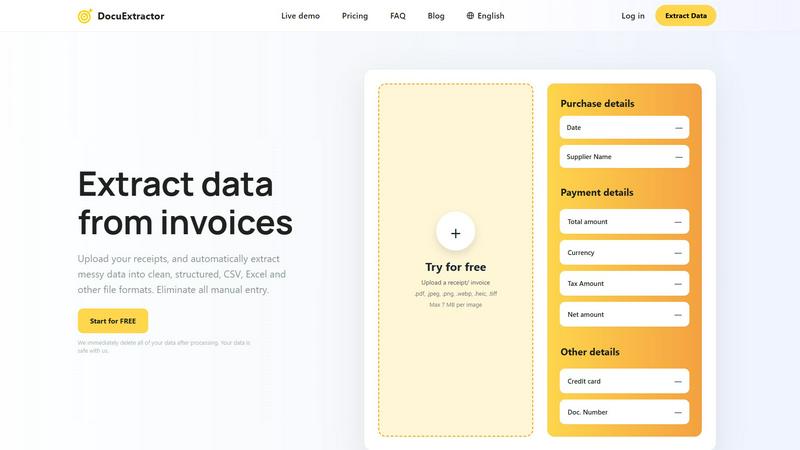
DocuExtractor swiftly transforms messy receipts and invoices into structured data for easy CSV and Excel downloads.
Last updated: February 28, 2026
Visual Comparison
Decode This Text

DocuExtractor
Feature Comparison
Decode This Text
Instant Screenshot Analysis
Why type it all out? Simply upload a photo of your text chat, and our AI does the heavy lifting. It reads the entire conversation—timestamps, emojis, and all—to provide a complete context-aware analysis. This feature leverages cutting-edge OCR and NLP technology to make decoding as effortless as taking a screenshot, ensuring you never miss a subtle detail buried in a long thread.
Emotional Tone Checker
Go beyond the words and measure the emotional temperature. Our advanced sentiment analysis engine detects whether a message is cold, sarcastic, friendly, or passive-aggressive. This feature quantifies the subtext, giving you a clear percentage-based read on the tone so you can avoid costly misinterpretations and understand the real vibe behind phrases like "We need to talk."
Behavioral Pattern Detection
The AI looks for what you might miss. It identifies critical behavioral patterns, like if someone only texts late at night, consistently avoids direct questions, or if their messages are getting progressively shorter. This trend-spotting feature connects the dots across interactions to reveal underlying habits and intentions, providing a strategic overview of the communication dynamic.
Smart Response Builder
Stuck on what to say next? Get unstuck instantly. Based on the analysis, the tool generates three tailored response options—calm, direct, or firm—so you can choose the approach that best fits the situation. This feature empowers you to reply with confidence, turning analysis into action and helping you navigate tricky replies without second-guessing yourself.
DocuExtractor
Advanced Optical Character Recognition (OCR)
DocuExtractor employs state-of-the-art OCR technology to accurately convert scanned documents and images into editable text. This feature ensures that key financial information is extracted with 99.6% accuracy, allowing users to trust the data they receive.
Multi-Format Uploads
Users can upload documents in several formats such as PDF, JPG, PNG, and more. This flexibility allows businesses to process various document types without worrying about compatibility issues, making it easier to manage diverse financial records.
Batch Processing
With DocuExtractor, users can upload multiple documents at once, significantly speeding up the data extraction process. This batch processing capability is perfect for businesses that handle large volumes of invoices and receipts, saving both time and effort.
Secure Data Handling
DocuExtractor prioritizes user privacy and data security. All documents uploaded for processing are automatically deleted immediately after extraction, ensuring that sensitive information remains confidential and protected from unauthorized access.
Use Cases
Decode This Text
Decoding Dating & Relationship Messages
They said they had fun but then ghosted for days. Are they genuinely busy or losing interest? Decode This Text analyzes the timing, tone, and content of messages to clarify romantic intentions. It helps you understand mixed signals, avoid sending regretful texts, and gain clarity on why someone's communication style has changed, saving you endless cycles of overanalysis.
Interpreting Professional & Workplace Communication
Did your boss's one-word email mean they're angry? What does "we'll keep your resume on file" really mean? This tool deciphers professional nuance, helping you understand critiques, passive-aggressive notes, and vague feedback. It provides the insight needed to craft appropriate, politically savvy responses and maintain your professional standing without misreading the situation.
Navigating Friends & Family Dynamics
Did the group chat go silent after your message? Is a family member being subtly dismissive? Use Decode This Text to parse the complex social cues within your inner circle. It offers an objective take on social tensions, helping you understand if you're being overly sensitive or if there's a genuine issue that needs addressing, improving your closest relationships.
Analyzing Client & Customer Interactions
Is a client's vague message a sign of dissatisfaction or just a busy schedule? Decode unclear client emails, project feedback, and negotiation texts to understand their true stance and priorities. This use case is essential for freelancers and businesses to maintain strong client relationships, manage expectations, and respond strategically to protect your interests.
DocuExtractor
Streamlining Invoice Management
Businesses can utilize DocuExtractor to quickly process invoices, extracting critical details such as supplier names, payment amounts, and dates. This efficiency reduces manual entry errors and accelerates accounting workflows.
Automating Receipt Tracking
For accountants and bookkeepers, DocuExtractor simplifies the task of tracking receipts. Users can easily upload receipts and receive organized data that is ready for expense reporting, saving time and enhancing accuracy.
Enhancing Financial Reporting
Organizations can streamline their financial reporting processes by using DocuExtractor to convert bank statements and other financial documents into structured formats. This automation enables faster data compilation and reporting.
Supporting Audit Preparations
During audits, financial professionals can rely on DocuExtractor to extract necessary documentation quickly. By providing accurate and organized data, it facilitates smoother audit processes and ensures compliance with regulations.
Overview
About Decode This Text
Stop the guesswork. In a world of cryptic texts, vague emails, and confusing DMs, Decode This Text is the AI-powered clarity engine you need to navigate modern communication. This isn't just another app—it's your personal communication analyst, designed to cut through the noise and reveal the true intentions, emotional tone, and hidden patterns behind any message. Simply paste the conversation, upload a screenshot, or describe the context. In 30 seconds, you'll get a comprehensive, human-feeling analysis that breaks down what's really being said (and not said). Built for anyone tired of overthinking, from decoding a partner's mixed signals to interpreting a boss's terse email, this tool provides the objective "reality check" needed to respond with confidence. It’s 100% anonymous, no human ever reads your texts, and it delivers the wisdom of a savvy older sibling on-demand. In the trending landscape of applied AI, this is the tool that turns communication anxiety into actionable insight.
About DocuExtractor
DocuExtractor is a cutting-edge document conversion software tailored to enhance the data extraction process for accountants, bookkeepers, and businesses managing financial documentation. This intuitive tool is designed to convert a variety of document types—such as invoices, bank statements, and receipts—into clean, structured formats like CSV and Excel. By harnessing advanced Optical Character Recognition (OCR) technology, DocuExtractor guarantees high accuracy in extracting essential information, substantially minimizing the time wasted on manual data entry. Users can effortlessly upload documents in multiple formats, including PDF and JPG, and receive their extracted data almost instantly. With a firm commitment to security, all uploaded data is deleted immediately after processing, ensuring user confidentiality. DocuExtractor stands as the ideal solution for organizations aiming to elevate their productivity while eliminating the burdensome task of data entry, providing a seamless experience that integrates effortlessly into any workflow.
Frequently Asked Questions
Decode This Text FAQ
How does Decode This Text protect my privacy?
Your privacy is our top priority. The process is 100% anonymous. No human ever reads the texts, messages, or screenshots you submit. All analysis is performed by our secure AI systems. We operate under strict data privacy policies, ensuring your personal conversations remain confidential and are not stored or used for any other purpose.
What kind of messages can I analyze?
You can analyze virtually any text-based communication. This includes pasted text messages, email excerpts, social media DMs (via screenshot or paste), and even descriptions of verbal conversations. The AI is trained on a wide array of communication styles, from casual dating chats and friend group texts to formal workplace emails and client correspondence.
How accurate is the analysis?
The AI provides a highly insightful analysis based on linguistic patterns, sentiment, and behavioral cues, offering clarity that often surpasses repeated consultations with friends. It is designed as a powerful "reality check" and decision-support tool. However, it should be used as a guide to inform your judgment, not as an absolute truth, as human communication can be complex.
Can it tell me exactly what to do?
Decode This Text provides clarity and suggests strategic responses, but it does not make decisions for you. It empowers you with information—explaining likely intentions, emotional tone, and patterns—and offers multiple response options. The final choice on how to proceed always remains in your hands, armed with better insight than you had before.
DocuExtractor FAQ
How does DocuExtractor ensure data accuracy?
DocuExtractor utilizes advanced OCR technology combined with specialized algorithms tailored for various document types, achieving an impressive extraction accuracy rate of 99.6%.
Is my data safe with DocuExtractor?
Absolutely. DocuExtractor is committed to user confidentiality and security. All uploaded data is deleted immediately after processing, ensuring your sensitive information is never stored or misused.
Can I upload multiple documents at once?
Yes, DocuExtractor supports batch processing, allowing users to upload multiple documents simultaneously. This feature dramatically speeds up the data extraction process for those handling large volumes of documents.
In what formats can I download my extracted data?
Users can download their extracted data in CSV or Excel formats, making it easy to integrate the results into accounting software or other applications for further analysis or reporting.
Alternatives
Decode This Text Alternatives
Decode This Text is a cutting-edge productivity tool designed to cut through the noise of modern digital communication. It falls squarely into the communication and personal management category, using AI to provide rapid, human-like analysis of confusing messages. This helps users decode subtext, emotional tone, and intent in seconds, turning ambiguous texts and emails into clear calls to action. Users often explore alternatives for a variety of reasons. Some need a solution that fits a specific budget, whether looking for a robust free tier or a different pricing model. Others might require integration with specific platforms like Slack or Gmail, or seek features beyond core analysis, such as sentiment tracking over time or team collaboration dashboards. The search is driven by the need to find the perfect fit for individual or professional workflows. When evaluating other options, focus on core competencies. Look for accuracy and nuance in interpretation, as not all tools grasp context equally. Consider speed and where you need the analysis—directly in your messaging apps or a standalone platform. Data privacy is non-negotiable; ensure any tool you choose has transparent policies about how your conversations are processed and stored.
DocuExtractor Alternatives
DocuExtractor is an advanced document conversion software that specializes in transforming messy receipts and invoices into structured data formats like CSV and Excel. It falls under the productivity and management category, making it an essential tool for accountants, bookkeepers, and businesses that frequently handle financial documents. Users often seek alternatives to DocuExtractor for various reasons, including pricing concerns, specific feature requirements, or compatibility with different platforms and workflows. When searching for an alternative, it’s crucial to consider factors such as the software’s accuracy in data extraction, the range of supported document formats, batch processing capabilities, and security measures in place to protect sensitive information. A well-rounded alternative will not only meet the user’s immediate needs but also enhance overall productivity through efficient data management solutions.