
dmaya vs Image3D AI
Side-by-side comparison to help you choose the right tool.

dmaya
dMaya is the AI design platform for agencies that generates client-ready UI and exports to code instantly.
Last updated: April 13, 2026

Image3D AI
Instantly transform any 2D image into a high-quality 3D model for printing or games with AI.
Last updated: March 1, 2026
Visual Comparison
dmaya
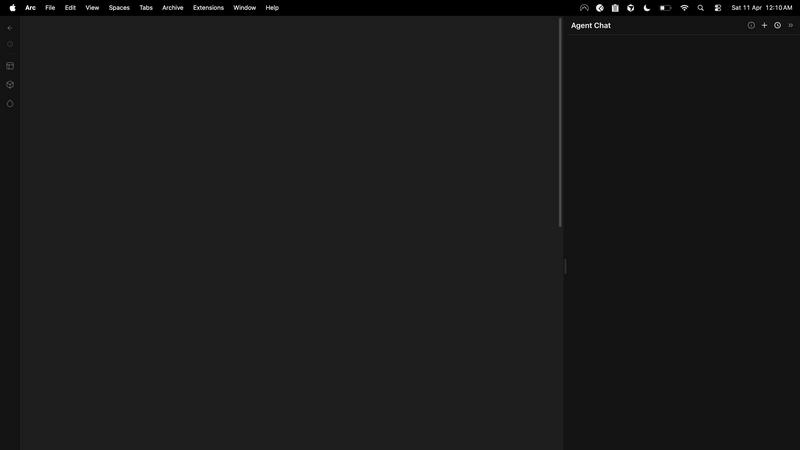
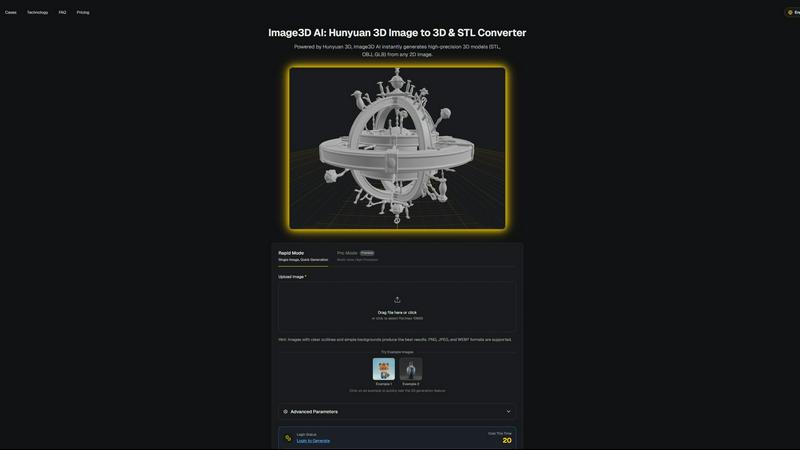
Image3D AI
Feature Comparison
dmaya
Conversational AI Design Generation
Describe any interface concept in natural language and watch dMaya generate complete, production-ready UI designs within seconds. This isn't just a static image; it's a fully structured layout with components, typography, and a logical design system. The AI understands complex requests for multi-screen flows, dashboards, and mobile apps, providing a professional starting point that eliminates blank canvas paralysis and accelerates the initial creative phase dramatically.
Real-Time Iterative Refinement
The design process is a dialogue. Using an integrated chat interface, you instruct the AI to make precise changes: "swap the primary color to a navy blue," "convert this to a dark mode variant," or "add a testimonial section here." Every command is executed instantly and accurately on the canvas. This allows for rapid exploration of visual directions and fine-tuning of details without manual dragging, resizing, or styling, streamlining the revision process to the speed of thought.
Client-Centric Presentation & Feedback Loops
Ditch cumbersome PDFs and static mockups. Generate a secure, shareable preview link for any project. Clients and stakeholders can view interactive designs directly in their browser—no account or login required. They can leave contextual feedback and comments, which funnel directly back into your dMaya workspace. This creates a seamless, professional review cycle that turns what used to be a multi-day email thread into a process that concludes in minutes.
Design-to-Code Export for AI Development
When designs are approved, dMaya doesn't leave you stranded. Export your screens as clean, well-structured HTML, CSS, and JavaScript code. This output is specifically engineered to be consumed by modern AI coding agents and assistants like Cursor, Claude Code, or GitHub Copilot. Hand off the exported code, and your developer or AI agent can efficiently translate the visual design into production-ready components in your framework of choice, bridging the infamous design-development gap.
Image3D AI
Powered by Hunyuan 3D Engine
At its core, Image3D AI leverages Tencent's advanced Hunyuan 3D technology, a powerhouse AI engine specifically trained for spatial understanding and reconstruction. This isn't a simple extrusion tool; it performs intelligent inference to generate geometrically accurate and textured 3D models from flat images, setting a new benchmark for quality and reliability in AI-driven 3D generation.
Dual Generation Modes
Cater to any project's needs with two distinct operational modes. Rapid Mode is perfect for quick iterations, generating a 3D model from a single image in under a minute. For ultimate precision, Pro Mode utilizes multi-view images (front, side, back) to perform a physically accurate reconstruction, delivering studio-quality models ideal for professional applications and 3D printing.
Multi-Format Export Flexibility
Image3D AI seamlessly integrates into any professional pipeline by exporting in the industry's most crucial formats. Get print-ready, watertight .STL files for 3D printing. Download textured .OBJ files for further editing in software like Maya or Blender. Or, generate efficient .GLB files that are perfect for real-time applications, web display, and augmented reality experiences.
Intelligent Optimization & Guidance
The platform is built for success, not guesswork. It provides clear best-practice guides, recommending high-contrast images with simple backgrounds for optimal results. The interface includes free example images to test the technology instantly without login, and advanced parameters allow users with specific needs to fine-tune their generation for polygon count or geometric focus.
Use Cases
dmaya
Agency Pitch & Concept Development
Agencies can revolutionize their client acquisition and discovery phases. During initial meetings, describe the client's vision and generate live design concepts on the fly. Quickly present multiple, polished visual directions to stakeholders within hours instead of weeks. This capability demonstrates immense value early, helps align on aesthetic direction before costly development begins, and significantly increases win rates by showcasing tangible, professional work instantly.
Product Team Ideation & Prototyping
Product managers and designers can use dMaya to explore UI concepts and user flows before committing engineering resources. Rapidly prototype different layouts for a new feature, generate A/B test variants visually, and collaborate with cross-functional teams in a shared workspace. This ensures that everyone—from design to engineering to leadership—is aligned on the visual and experiential goal, reducing rework and miscommunication down the line.
Freelancer Project Scalability
Freelancers and independent designers can dramatically increase their capacity and service offerings. Take on more client projects without extending timelines by leveraging AI for initial drafts and tedious revisions. Deliver high-fidelity concepts faster, impress clients with interactive presentations, and streamline the feedback process. This efficiency allows for higher-value project pricing and the ability to serve more clients while maintaining exceptional quality and a professional workflow.
Design System Exploration & Tokenization
Teams looking to establish or evolve a design system can use dMaya as a powerful exploration tool. Generate multiple component variations (buttons, cards, nav bars) using conversational AI to test different visual languages. The platform's automatic design tokenization maintains consistency across all generated screens, providing a practical sandbox to define color palettes, typography scales, and spacing rules that can later be formalized into a coded system.
Image3D AI
Rapid 3D Printing Prototyping
Revolutionize your maker workflow. Instantly convert a sketch, diagram, or logo into a precise, watertight STL file ready for your 3D printer. This slashes the time from concept to physical prototype from days to minutes, enabling rapid iteration for product designers, engineers, and hobbyists, accelerating innovation at an unprecedented pace.
Game Development Asset Creation
Indie and professional game developers, take note. Generate game-ready 3D models directly from character concept art, prop sketches, or environment paintings. With support for PBR-ready textures and low-poly optimization, these assets can be imported directly into engines like Unity or Unreal Engine, dramatically speeding up pre-production and asset pipeline bottlenecks.
E-commerce & AR Product Visualization
Transform static online shopping. Upload product photos and generate interactive 3D models and AR-ready GLB files in seconds. Embed these models on product pages to allow customers to view items from every angle, scale them in their own space via WebAR, and reduce return rates by setting accurate expectations, creating the future of digital retail today.
Architectural Concept Modeling
Architects and interior designers can quickly breathe life into their initial sketches. Generate basic 3D massing models or detailed scene elements from hand-drawn concepts or mood board images. This provides a powerful visual tool for early-stage client presentations and spatial studies, saving countless hours of manual modeling from scratch.
Overview
About dmaya
dMaya is the AI design platform that's finally built for professionals, not hobbyists. In a landscape flooded with tools that skip straight to code, dMaya reclaims the critical design-first workflow. It's a vibe design platform engineered for agencies, product teams, and freelancers who need to visualize, iterate, and get client approval before a single developer writes a line. You describe your vision—a SaaS dashboard, an e-commerce flow, a mobile app—in plain language, and dMaya's AI agent generates polished, professional UI screens in seconds. The magic happens in conversation: you chat with the AI to change colors, swap layouts, adjust typography, or add new sections, with every change rendered instantly. Design tokens ensure visual consistency automatically across every screen. Then, you share a simple preview link for client review and feedback, collapsing a days-long approval cycle into minutes. Once signed off, export clean HTML, CSS, and JS to hand directly to AI coding agents like Cursor or Claude Code for build-out in React, Next.js, Flutter, or any framework. dMaya is the missing link for teams that prioritize intentional design, early problem-solving, and stakeholder alignment to ship with confidence.
About Image3D AI
The 3D creation landscape is undergoing a seismic shift, and Image3D AI is at the epicenter. This isn't just another tool; it's a professional-grade platform powered by Tencent's cutting-edge Hunyuan 3D engine, designed to demolish the most significant barrier in digital creation: 3D modeling. Imagine transforming a simple 2D image—a logo, a sketch, a product photo—into a fully realized, production-ready 3D model in mere seconds. That's the reality Image3D AI delivers. It's democratizing high-fidelity 3D asset generation, making it accessible to everyone from indie game developers and 3D printing hobbyists to e-commerce giants and architectural visualizers. The core proposition is undeniable: massive time and cost savings. It eliminates the need for expensive, complex software like Blender and years of specialized modeling skill. Whether you need a watertight STL file for your 3D printer, a textured OBJ for further refinement in your favorite software, or a lightweight GLB for immersive WebAR experiences, Image3D AI provides a streamlined, AI-powered pipeline. It turns fleeting inspiration into a tangible, usable 3D asset in minutes, not days, propelling your projects forward at the speed of thought.
Frequently Asked Questions
dmaya FAQ
How is dMaya different from other AI design tools?
dMaya is purpose-built for professional, client-facing workflows where design approval precedes development. Unlike tools that generate only code or target solo builders, dMaya focuses on the visual design and presentation phase. It provides a collaborative canvas, client feedback tools, and a conversational AI tailored for iterative visual refinement, ensuring teams can align stakeholders and catch problems before they become expensive coding issues.
What kind of code does dMaya export?
dMaya exports clean, vanilla HTML, CSS, and JavaScript. This code is not tied to a specific framework, making it an ideal, agnostic handoff artifact. It is structured and commented to be easily interpreted and converted by AI coding assistants (like Cursor or Claude Code) or developers into any modern framework such as React, Next.js, Vue, Svelte, or Flutter, providing maximum flexibility for your development team.
Do clients need an account to review designs?
No. Client and stakeholder review requires zero accounts. You simply generate a shareable link from any project in dMaya and send it to your reviewers. They can view the interactive design presentation in their standard web browser, leave comments, and provide feedback without any sign-up process, friction, or software installation, making the approval process incredibly smooth and accessible.
Can I work on multiple screen sizes at once?
Yes. dMaya features a multi-screen canvas that allows you to work on desktop, tablet, and mobile frames simultaneously on an infinite canvas. You can organize screens for different device breakpoints or user flow steps side-by-side, drag them around, and zoom for detail. The AI can generate and modify designs for specific device contexts, and design tokens ensure consistency across all screen sizes automatically.
Image3D AI FAQ
What image formats and quality work best?
For optimal image to 3D conversion, use clear, high-contrast images in PNG, JPEG, or WEBP format (max 10MB). Images with a well-defined subject, sharp outlines, and a simple, uncluttered background yield the best results. Avoid blurry, poorly lit, or overly complex images where the subject isn't distinct.
What's the difference between Rapid Mode and Pro Mode?
Rapid Mode uses AI inference to generate a 3D model from a single image quickly, ideal for logos, sketches, or fast concepts. Pro Mode is for high-precision needs; it requires multiple images (e.g., front, side, top views) of an object to perform a detailed, physically accurate 3D reconstruction, perfect for real-world objects and 3D printing.
Which 3D file format should I download?
The format depends on your use case. Choose .STL for 3D printing (it contains only the mesh geometry). Select .OBJ if you plan to edit the model further in software like Blender (it includes mesh and texture data). Use .GLB for web, real-time applications, or AR/VR, as it's a compact, single-file format with everything included.
Do I need any 3D modeling experience to use this?
Absolutely not. This is the core promise of Image3D AI. It is designed specifically to democratize 3D creation. You only need a 2D image to get started. The AI handles the complex task of spatial reasoning and model generation, making professional-grade 3D asset creation accessible to anyone, regardless of their technical background in 3D software.
Alternatives
dmaya Alternatives
dmaya is an AI-powered vibe design platform that sits at the intersection of visual design and rapid prototyping. It's built for agencies and teams who need to create, iterate, and get client approval on UI designs before a single line of code is written. By chatting with an AI, users generate polished screens from text, making it a standout in the emerging category of conversational design tools. Users often explore alternatives for several key reasons. Budget constraints or specific pricing models can drive the search, as can the need for different feature sets, like more advanced prototyping or integration with existing developer workflows. Platform compatibility is another major factor, with teams needing tools that fit seamlessly into their current tech stack, whether that's Figma, Webflow, or a specific code framework. When evaluating other options, focus on your core workflow needs. Consider the fidelity of the AI-generated output, the smoothness of the client feedback and approval cycle, and the quality and flexibility of the exported code. The best alternative will balance AI-assisted speed with the intentional design control needed to align teams and catch issues early, ensuring you don't sacrifice vision for velocity.
Image3D AI Alternatives
Image3D AI is a trending AI-powered design tool that instantly converts 2D images into high-quality 3D models. It's part of a rapidly emerging category of generative 3D creation platforms, leveraging advanced AI to democratize a process that was once exclusive to skilled professionals. Users often explore alternatives for various reasons. Some may seek different pricing models, specific feature sets like animation rigging, or platforms that better integrate with their existing software ecosystem. The need for a particular output format or a different level of creative control can also drive the search. When evaluating other options, focus on core capabilities. Key factors include the quality and resolution of the generated 3D mesh, the availability of PBR materials, export format flexibility for your pipeline, and the overall speed and reliability of the AI engine. The goal is to find a tool that seamlessly fits your specific creation workflow.