
Dokie AI vs Image3D AI
Side-by-side comparison to help you choose the right tool.

Dokie AI
Dokie AI instantly creates professional presentations using the advanced Claude Opus 4.6 model.
Last updated: March 19, 2026

Image3D AI
Instantly transform any 2D image into a high-quality 3D model for printing or games with AI.
Last updated: March 1, 2026
Visual Comparison
Dokie AI

Image3D AI
Feature Comparison
Dokie AI
True AI-Powered Generation
Unlike tools that merely populate static templates, Dokie AI uses Claude Opus 4.6 for true generative creation. You describe your topic in plain text, and the AI intelligently structures the narrative, selects appropriate layouts, creates compelling content, and designs cohesive visuals from scratch. This results in unique, professional presentations tailored to your specific prompt, not generic, cookie-cutter slides.
AI Beautify & Redesign
Transform your existing, lackluster presentations into visually stunning decks instantly. Simply upload your PowerPoint file, and Dokie AI's engine analyzes and enhances the design. It fixes awkward layouts, applies professional color schemes and typography, and refines visual hierarchy—all while meticulously preserving your original core content and message.
Multi-Format Document Conversion
Dokie AI breaks down content silos by converting various source materials directly into presentation-ready slides. Effortlessly turn PDF documents, Word files, HTML web pages, and even YouTube videos into structured PowerPoint presentations. This feature is a game-changer for repurposing existing content for meetings, lectures, or pitches without starting from zero.
Intelligent Speaker Notes & Reverse Prompting
Go beyond slide creation with AI-assisted delivery. Dokie AI can automatically generate detailed speaker notes and talking points for each slide, helping you present with confidence. Uniquely, its "Reverse Prompt" feature can analyze an uploaded presentation and extract the core creative prompts, demystifying the design process and enabling learning and replication of successful styles.
Image3D AI
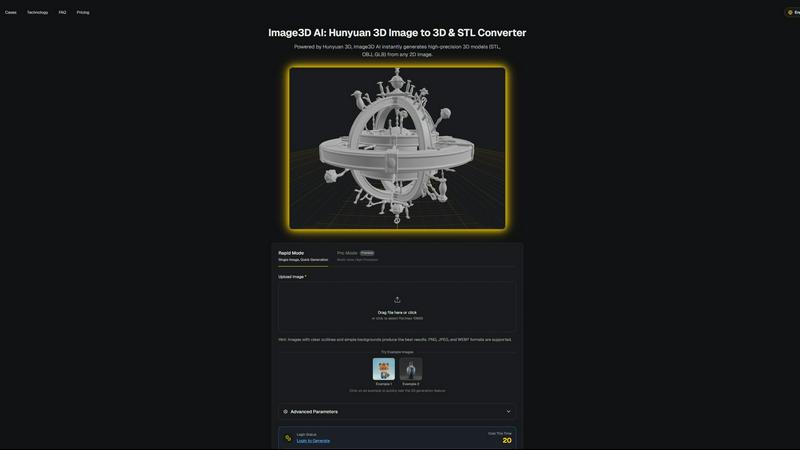
Powered by Hunyuan 3D Engine
At its core, Image3D AI leverages Tencent's advanced Hunyuan 3D technology, a powerhouse AI engine specifically trained for spatial understanding and reconstruction. This isn't a simple extrusion tool; it performs intelligent inference to generate geometrically accurate and textured 3D models from flat images, setting a new benchmark for quality and reliability in AI-driven 3D generation.
Dual Generation Modes
Cater to any project's needs with two distinct operational modes. Rapid Mode is perfect for quick iterations, generating a 3D model from a single image in under a minute. For ultimate precision, Pro Mode utilizes multi-view images (front, side, back) to perform a physically accurate reconstruction, delivering studio-quality models ideal for professional applications and 3D printing.
Multi-Format Export Flexibility
Image3D AI seamlessly integrates into any professional pipeline by exporting in the industry's most crucial formats. Get print-ready, watertight .STL files for 3D printing. Download textured .OBJ files for further editing in software like Maya or Blender. Or, generate efficient .GLB files that are perfect for real-time applications, web display, and augmented reality experiences.
Intelligent Optimization & Guidance
The platform is built for success, not guesswork. It provides clear best-practice guides, recommending high-contrast images with simple backgrounds for optimal results. The interface includes free example images to test the technology instantly without login, and advanced parameters allow users with specific needs to fine-tune their generation for polygon count or geometric focus.
Use Cases
Dokie AI
Startup Founder Fundraising Pitches
Startup founders can rapidly transform their business plan into a compelling investor deck. By inputting their vision, market analysis, and financial projections, Dokie AI generates a polished, professional presentation with persuasive visuals and clear data storytelling, crucial for making a powerful first impression and securing funding.
Educator & Trainer Course Material
Educators and corporate trainers can quickly create engaging lecture slides from lesson outlines or existing textbooks (via PDF/Word conversion). The AI structures complex information into digestible slides with appropriate visuals, saving countless hours on design and allowing more time for actual teaching and student interaction.
Marketing Team Campaign Reports
Marketing professionals can use Dokie AI to beautify monthly performance reports or create launch presentations from strategy documents. The tool ensures brand consistency, highlights key metrics with impactful charts, and delivers a client-ready aesthetic that reinforces professionalism and data-driven credibility.
Business Consultant Client Proposals
Consultants can convert detailed analysis documents into executive summary presentations for clients. Using the document conversion and beautify features, they can quickly synthesize lengthy reports into clear, visually appealing slides that highlight recommendations and drive decision-making in boardroom meetings.
Image3D AI
Rapid 3D Printing Prototyping
Revolutionize your maker workflow. Instantly convert a sketch, diagram, or logo into a precise, watertight STL file ready for your 3D printer. This slashes the time from concept to physical prototype from days to minutes, enabling rapid iteration for product designers, engineers, and hobbyists, accelerating innovation at an unprecedented pace.
Game Development Asset Creation
Indie and professional game developers, take note. Generate game-ready 3D models directly from character concept art, prop sketches, or environment paintings. With support for PBR-ready textures and low-poly optimization, these assets can be imported directly into engines like Unity or Unreal Engine, dramatically speeding up pre-production and asset pipeline bottlenecks.
E-commerce & AR Product Visualization
Transform static online shopping. Upload product photos and generate interactive 3D models and AR-ready GLB files in seconds. Embed these models on product pages to allow customers to view items from every angle, scale them in their own space via WebAR, and reduce return rates by setting accurate expectations, creating the future of digital retail today.
Architectural Concept Modeling
Architects and interior designers can quickly breathe life into their initial sketches. Generate basic 3D massing models or detailed scene elements from hand-drawn concepts or mood board images. This provides a powerful visual tool for early-stage client presentations and spatial studies, saving countless hours of manual modeling from scratch.
Overview
About Dokie AI
Dokie AI is not just another template-based slide builder; it's a revolutionary AI presentation maker that leverages the formidable power of Claude Opus 4.6 to automate the entire creation process. This tool is engineered for business professionals, educators, marketers, and startup founders who need to produce polished, professional presentations but lack the time, budget, or design skills to do so manually. Its core value proposition is the shift from manual, time-consuming assembly to true AI generation. You provide the idea, and Dokie AI handles the heavy lifting: structuring your content, selecting cohesive layouts, applying typography, and integrating visual design principles to create a complete, compelling slide deck in minutes. It transcends simple generation with a full suite of intelligent tools, including the ability to beautify existing slides, convert documents and videos into presentations, and generate speaker notes, establishing itself as the leading all-in-one AI-powered presentation solution for the modern professional.
About Image3D AI
The 3D creation landscape is undergoing a seismic shift, and Image3D AI is at the epicenter. This isn't just another tool; it's a professional-grade platform powered by Tencent's cutting-edge Hunyuan 3D engine, designed to demolish the most significant barrier in digital creation: 3D modeling. Imagine transforming a simple 2D image—a logo, a sketch, a product photo—into a fully realized, production-ready 3D model in mere seconds. That's the reality Image3D AI delivers. It's democratizing high-fidelity 3D asset generation, making it accessible to everyone from indie game developers and 3D printing hobbyists to e-commerce giants and architectural visualizers. The core proposition is undeniable: massive time and cost savings. It eliminates the need for expensive, complex software like Blender and years of specialized modeling skill. Whether you need a watertight STL file for your 3D printer, a textured OBJ for further refinement in your favorite software, or a lightweight GLB for immersive WebAR experiences, Image3D AI provides a streamlined, AI-powered pipeline. It turns fleeting inspiration into a tangible, usable 3D asset in minutes, not days, propelling your projects forward at the speed of thought.
Frequently Asked Questions
Dokie AI FAQ
What makes Dokie AI different from Canva or PowerPoint templates?
Dokie AI fundamentally differs by using generative AI (Claude Opus 4.6) to create unique presentations from your text description, not just filling pre-set templates. It makes intelligent decisions on content structure, layout, and design tailored to your topic. Template tools require you to do the design thinking and manual assembly; Dokie AI automates the entire creative and structural process.
Can I edit the presentations generated by Dokie AI?
Yes, absolutely. Dokie AI generates presentations in standard PowerPoint (.pptx) format. You can download the file and open it in Microsoft PowerPoint, Google Slides, or any other compatible software to make any further edits, additions, or customizations you desire, giving you full control over the final output.
What file formats can I use with the Beautify and Conversion tools?
Dokie AI supports a wide range of inputs. You can upload existing PowerPoint (.pptx) files for beautification. For conversions, it accepts PDF documents, Microsoft Word files (.docx), HTML pages, and even YouTube video links. This flexibility allows you to start from almost any type of content.
Is my data and uploaded content secure with Dokie AI?
Based on industry-standard practices for AI content creation platforms, Dokie AI is designed with data security in mind. It processes your uploads to generate the presentation but does not claim ownership of your content. For specific details on data retention, privacy policies, and security measures, you should refer to the official Dokie AI documentation and privacy policy.
Image3D AI FAQ
What image formats and quality work best?
For optimal image to 3D conversion, use clear, high-contrast images in PNG, JPEG, or WEBP format (max 10MB). Images with a well-defined subject, sharp outlines, and a simple, uncluttered background yield the best results. Avoid blurry, poorly lit, or overly complex images where the subject isn't distinct.
What's the difference between Rapid Mode and Pro Mode?
Rapid Mode uses AI inference to generate a 3D model from a single image quickly, ideal for logos, sketches, or fast concepts. Pro Mode is for high-precision needs; it requires multiple images (e.g., front, side, top views) of an object to perform a detailed, physically accurate 3D reconstruction, perfect for real-world objects and 3D printing.
Which 3D file format should I download?
The format depends on your use case. Choose .STL for 3D printing (it contains only the mesh geometry). Select .OBJ if you plan to edit the model further in software like Blender (it includes mesh and texture data). Use .GLB for web, real-time applications, or AR/VR, as it's a compact, single-file format with everything included.
Do I need any 3D modeling experience to use this?
Absolutely not. This is the core promise of Image3D AI. It is designed specifically to democratize 3D creation. You only need a 2D image to get started. The AI handles the complex task of spatial reasoning and model generation, making professional-grade 3D asset creation accessible to anyone, regardless of their technical background in 3D software.
Alternatives
Dokie AI Alternatives
Dokie AI has emerged as a prominent player in the AI presentation maker category, leveraging advanced models like Claude Opus 4.6 to generate and beautify entire slide decks from simple text prompts. It automates the heavy lifting of design, layout, and content structuring, positioning itself as a powerful tool for professionals who need polished presentations quickly. Despite its capabilities, users often explore alternatives for various reasons. Some may seek different pricing models or more budget-friendly options, while others might require specific integrations, platform compatibility, or a different balance between AI automation and manual creative control. The search for the right tool is highly personal and depends on individual workflow needs. When evaluating alternatives, it's crucial to look beyond just the AI label. Consider the depth of generation—does it create coherent content or just pretty templates? Assess the flexibility for customization and the quality of the output for your specific industry. The goal is to find a solution that not only saves time but also consistently delivers a professional result that aligns with your brand and communication style.
Image3D AI Alternatives
Image3D AI is a trending AI-powered design tool that instantly converts 2D images into high-quality 3D models. It's part of a rapidly emerging category of generative 3D creation platforms, leveraging advanced AI to democratize a process that was once exclusive to skilled professionals. Users often explore alternatives for various reasons. Some may seek different pricing models, specific feature sets like animation rigging, or platforms that better integrate with their existing software ecosystem. The need for a particular output format or a different level of creative control can also drive the search. When evaluating other options, focus on core capabilities. Key factors include the quality and resolution of the generated 3D mesh, the availability of PBR materials, export format flexibility for your pipeline, and the overall speed and reliability of the AI engine. The goal is to find a tool that seamlessly fits your specific creation workflow.