
Nano Banana Pro vs Sketch To
Side-by-side comparison to help you choose the right tool.

Nano Banana Pro
Nano Banana Pro generates stunning, 4K AI images with perfect character consistency and advanced editing tools.
Last updated: February 28, 2026
Sketch To
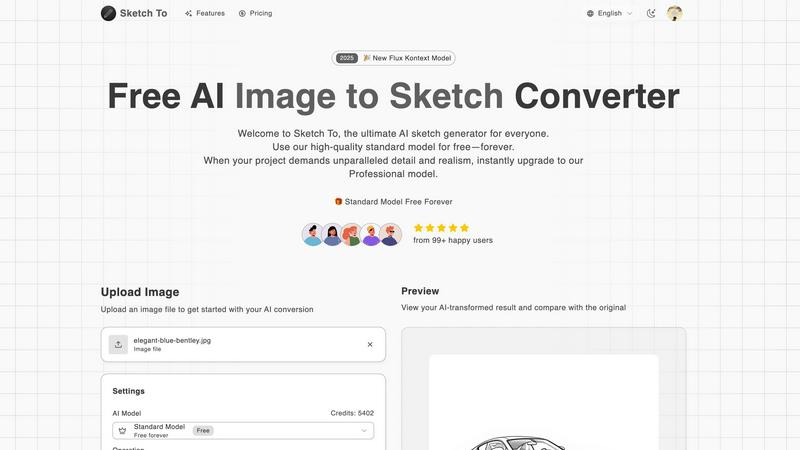
Sketch To instantly transforms your images into stunning AI sketches or sketches into images.
Last updated: February 28, 2026
Visual Comparison
Nano Banana Pro

Sketch To
Feature Comparison
Nano Banana Pro
Gemini 3 Pro Powered Engine
Experience the raw speed and precision of the next-generation Gemini 3 Pro image preview technology. This advanced architecture drives a 15% faster generation engine compared to standard models, delivering high-quality, 4K-resolution images with multi-step error correction built in. It's not just about speed; it's about reliable, professional-grade output on the first try, every time, making it the go-to for fast-paced creative workflows.
Unmatched Character Consistency
Nano Banana Pro solves the biggest headache in AI visual storytelling: maintaining a character's identity. Using advanced multi-image understanding technology, it ensures your character's facial features, style, and essence remain perfectly consistent across an entire series, storyboard, or comic. This is a game-changer for character design, serialized content, and brand marketing, providing a cohesive visual narrative that was previously nearly impossible with AI.
Advanced Image-to-Image Editing (Nano Banana Edit)
Transform and reimagine any existing visual with the powerful Nano Banana Edit suite. Go beyond simple filters; upload up to 10 reference images and use AI prompts to completely alter scenes, apply new artistic styles, add elements, or modify compositions while intelligently preserving key features. This turns your existing photo library into a limitless source of creative material.
Professional-Grade Format Flexibility
Craft visuals for any platform or purpose with support for 11 distinct aspect ratios, from a standard 1:1 square to a cinematic 21:9 ultrawide. Coupled with enhanced text rendering that produces crystal-clear logos, slogans, and typography within images, Nano Banana Pro is the complete toolkit for social media graphics, presentations, banners, posters, and more.
Sketch To
Bidirectional AI Conversion Engine
At the heart of Sketch To is its dual-direction AI technology. It doesn't just apply a simple overlay; it deeply understands image composition to transform photos into authentic, style-specific sketches. Conversely, its sketch-to-image feature analyzes line work and shading to generate rich, detailed, and realistic images from basic drawings. This two-way capability unlocks truly endless creative workflows, from conceptualizing ideas to finalizing professional artwork.
Tiered AI Model Access (Standard & Pro)
Sketch To democratizes AI art with its intelligent two-tier system. The Standard Model is a powerful, free-to-start tool perfect for learning, social media content, and personal projects, offering fantastic results across numerous sketch styles. For mission-critical work, the Professional Model is a game-changer, providing unparalleled detail, texture accuracy, and realism necessary for commercial design, professional portfolios, and high-resolution print applications.
Instant High-Resolution Processing
Leveraging a robust cloud-based infrastructure, Sketch To delivers rapid results without sacrificing quality. Users can upload an image and receive their transformed creation in seconds, ready for download in high resolution. This instant processing power is crucial for maintaining creative flow and meeting tight deadlines, ensuring that both hobbyists and professionals can work efficiently and effectively.
Extensive Artistic Style Library
Move beyond basic filters. Sketch To offers a curated and expanding library of artistic styles, including Pencil Sketch, Charcoal, Ink, Colored Pencil, Comic, Concept Art, Figure Sketch, and Watercolor effects. This allows creators to match the output to a specific aesthetic or project need, providing the versatility to create everything from classic portrait sketches to dynamic digital concept art with a single tool.
Use Cases
Nano Banana Pro
Serialized Content & Storyboarding
Creators developing webcomics, graphic novels, or animated series can leverage the unparalleled character consistency to maintain hero and supporting cast visuals across hundreds of panels. This ensures readers have a seamless, immersive experience and allows artists to focus on narrative without constantly battling AI to recognize their own characters.
Dynamic Marketing & Advertising Assets
Marketing teams can generate a cohesive suite of campaign visuals featuring the same brand mascot or spokesperson across different formats—Instagram posts, Facebook banners, website headers. The tool's text rendering and aspect ratio flexibility allow for the rapid creation of polished, on-brand posters, logos, and promotional materials tailored for every channel.
Conceptual Art & Character Design
Game developers, filmmakers, and concept artists can rapidly iterate on character designs, exploring different styles, outfits, and settings while keeping the core character model intact. This accelerates the pre-production phase, allowing for more exploration and refinement before finalizing a design for production.
Photo Transformation & Creative Editing
Photographers and digital artists can breathe new life into existing portfolios. Use Nano Banana Edit to transform a standard portrait into a cyberpunk masterpiece, change the season in a landscape shot, or merge elements from multiple photos into a single, cohesive piece of fantasy art, all guided by intuitive AI prompts.
Sketch To
Social Media Content Creation
Creators and influencers can instantly generate unique, eye-catching artwork from their photos to stand out on platforms like Instagram, TikTok, and Pinterest. Transforming a portrait into a pencil sketch or a travel photo into a watercolor painting creates highly engaging, personalized content that boosts audience interaction and feed aesthetics without requiring manual drawing skills.
Professional Design & Concept Art
Designers, architects, and concept artists can use the sketch-to-image function to rapidly visualize ideas. A quick hand-drawn sketch can be converted into a realistic product mock-up, architectural rendering, or character concept, accelerating the ideation and client presentation phases. The Pro model's detail is ideal for creating compelling, near-final visuals early in the creative process.
Educational & Hobbyist Projects
Students and hobbyists can use the Standard Model to enhance school presentations, personal art projects, or DIY crafts. It's a perfect tool for learning about artistic styles, creating custom illustrations for stories or journals, or simply adding a creative touch to personal photos and memorabilia in a fun and accessible way.
Professional Portrait & Artistic Services
Photographers and digital artists can offer new services by converting client photos into custom digital sketches or paintings. This opens revenue streams for creating personalized gifts, custom avatar illustrations, or stylized profile pictures, leveraging AI to produce high-volume, high-quality artwork that would be time-prohibitive to draw manually.
Overview
About Nano Banana Pro
Nano Banana Pro is not just another AI image generator; it's the professional-grade visual creation suite that's currently dominating creator conversations. Engineered for serious artists, marketers, designers, and developers, it shatters the limitations of basic generators by tackling the industry's toughest challenges head-on. At its core, Nano Banana Pro is powered by the cutting-edge Gemini 3 Pro image preview technology, delivering a staggering 15% faster generation speed alongside multi-step error correction for reliably stunning, 4K-ready outputs. Its killer feature? Mastering character consistency. This tool ensures your characters remain perfectly recognizable across an entire series, storyboard, or campaign, solving a notorious pain point in AI art. Beyond text-to-image, it unlocks powerful Image-to-Image editing with its advanced Nano Banana Edit tools, allowing you to transform existing photos with AI-driven prompts. With support for 11 flexible aspect ratios and enhanced text rendering for crisp logos and posters, Nano Banana Pro is the all-in-one visual engine trusted by over 10,000 creators who demand precision, speed, and professional results.
About Sketch To
Sketch To is the definitive AI-powered creative suite that is revolutionizing digital artistry by seamlessly bridging the gap between photography and illustration. This isn't just another filter app; it's a sophisticated platform built on advanced generative AI models that intelligently interpret and transform visual data. It empowers a massive user base of over 500,000 creators by offering two distinct pathways: converting real-world photos into stunning, nuanced artistic sketches (like pencil, charcoal, ink, and watercolor styles) and performing the reverse magic of turning simple line drawings into photorealistic images. The core value proposition is its unparalleled accessibility paired with professional-grade power. Anyone can dive in and start creating immediately with the high-quality Standard Model, supported by free trial credits for new users. For projects demanding commercial-ready, hyper-realistic detail, the Professional Model delivers world-class results. Designed for social media enthusiasts, hobbyists, students, designers, and professional artists, Sketch To's instant, cloud-based processing makes cutting-edge AI artistry available to everyone, breaking down the barriers between imagination and visual reality.
Frequently Asked Questions
Nano Banana Pro FAQ
What makes Nano Banana Pro different from other AI image generators?
Nano Banana Pro is built specifically for professional creators who need reliability and advanced control. Its defining difference is industry-leading character consistency, powered by Gemini 3 Pro, which maintains precise character details across multiple images. Combined with 15% faster generation, professional text rendering, and robust Image-to-Image editing tools, it's engineered for complex, real-world creative projects, not just one-off prompts.
How does the Image-to-Image editing (Nano Banana Edit) work?
You can upload up to 10 existing images as a reference base. Then, using a text prompt, you instruct the AI on how to transform them. The technology intelligently interprets your prompt to reimagine the scene, apply new styles, or alter compositions while preserving key elements you want to keep, such as a subject's pose or a specific object, offering a powerful blend of creative control and AI-powered transformation.
What image formats and resolutions does it support?
Nano Banana Pro generates high-quality images suitable for professional use, with outputs that are 4K-ready. You can download your creations in PNG format for optimal quality. The tool provides unparalleled flexibility with 11 different aspect ratios to choose from, ensuring your image is perfectly framed for any platform, from social media squares to cinematic widescreen formats.
Is there a free trial or free credits available?
Yes, new users are welcomed with 8 free credits to test and experience the power of Nano Banana Pro firsthand. This allows you to explore its core features, including text-to-image generation and character consistency, before committing to a subscription plan. The platform often runs promotional offers, such as limited-time discounts on annual plans.
Sketch To FAQ
How do I get started with Sketch To for free?
New users can sign up on the Sketch To platform to receive free trial credits for the Standard Model. This allows you to explore the core image-to-sketch and sketch-to-image conversion features without any initial cost. Simply upload your file, choose a style, and use your trial credits to generate your first AI creations.
What is the difference between the Standard and Professional models?
The Standard Model is designed for high-quality personal use, hobbies, and social media, delivering excellent artistic conversions. The Professional Model utilizes more advanced AI algorithms to produce superior detail, accuracy, texture, and photorealism, making it the required choice for commercial projects, professional artwork, and any application where the highest fidelity is critical.
What file formats and sizes does Sketch To support?
Sketch To supports common image file formats for upload. The interface indicates a maximum file size of 5MB for uploads to ensure swift processing. Output images are delivered in high resolution, suitable for both digital use and print, allowing you to download your creations for various applications.
Can I use Sketch To for commercial purposes?
Yes, but the appropriate model must be used. Outputs generated with the free Standard Model are typically for personal use. For commercial projects - such as client work, merchandise, advertising, or resale - you must use the Professional Model to ensure you have the rights to use the generated images commercially and to access the necessary quality and detail.
Alternatives
Nano Banana Pro Alternatives
Nano Banana Pro is a professional-grade AI image generator in the design and visual creation category, renowned for its mastery of character consistency and advanced editing tools. Users often explore alternatives for various reasons, including budget constraints, the need for different feature sets like specific AI models or integration capabilities, or simply to find a platform that better aligns with their unique creative workflow and platform preferences. When evaluating an alternative, it's crucial to assess your core needs. Prioritize tools that excel in your specific use case, whether that's flawless character generation for serialized content, robust image-to-image editing, high-resolution outputs, or superior text rendering for graphic design. The ideal platform should match your technical requirements and creative vision without unnecessary complexity or cost.
Sketch To Alternatives
Sketch To is a leading AI image-to-sketch converter, a standout tool in the creative AI and photo editing space. It empowers users to transform photos into artistic sketches and even reverse the process, bringing drawings to life with photorealistic detail. Users often explore alternatives for various reasons. Some may seek different pricing structures beyond a freemium model, require specific artistic styles not covered, or need tools that integrate with other professional design software. Platform availability, such as mobile apps or desktop clients, is another common driver for comparison. When evaluating other options, consider the core AI capabilities: the quality and variety of artistic filters, the speed of processing, and whether the tool offers unique two-way conversion like sketch-to-photo. Also, assess the value proposition—does a free tier exist, and what do premium features offer for professional use? Security and data privacy for uploaded images are equally crucial factors.