
Phishly vs Zovo
Side-by-side comparison to help you choose the right tool.

Phishly
Phishly uses AI to instantly detect phishing emails in your Gmail inbox.

Unlock 20 privacy-first Chrome extensions for developers and writers, all from a solo developer committed to your data.
Last updated: February 28, 2026
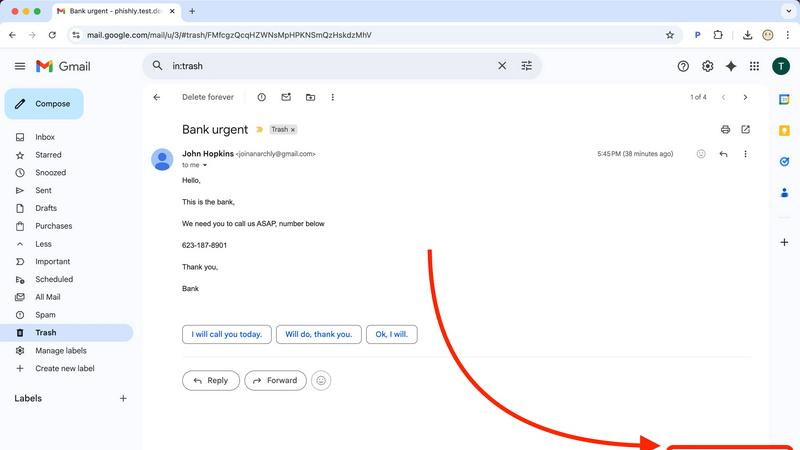
Visual Comparison
Phishly
Zovo

Feature Comparison
Phishly
One-Click Gmail Integration
Seamlessly integrate powerful AI security directly into your existing workflow. With the Phishly Chrome extension installed, analyzing any email is as simple as opening it in Gmail and clicking the "Scan with Phishly" button. There's no need to copy, paste, or navigate away from your inbox. This frictionless, instant access ensures you actually use the protection when you need it most, turning a moment of doubt into an actionable security insight in under a second, right where you work.
Advanced AI-Powered Threat Detection
Go beyond basic link checking with an AI engine trained on the latest phishing tactics. It doesn't just look for malware; it understands context. The system analyzes a holistic set of risk factors including suspicious domain registrations, subtle grammatical errors common in AI-generated text, spoofed header information, and the nuanced urgent or threatening language used in modern social engineering scams. This multi-layered analysis catches sophisticated threats that easily slip past standard email filters.
Clear, Actionable Risk Assessments
Phishly cuts through the technical jargon and delivers results you can actually use. Every scan concludes with a straightforward, color-coded verdict: Safe, Medium Risk, or High Risk. More importantly, it provides a detailed, plain-English explanation of the specific red flags it found, such as "The sender's domain was registered very recently" or "This email uses urgent language to pressure immediate action." This educates you while it protects you, building your digital literacy.
Privacy-First, On-Demand Scanning
Your privacy is non-negotiable. Phishly operates on a strict, user-initiated model. The AI only ever analyzes the content of emails you explicitly choose to scan. It does not continuously monitor your inbox, read your emails in the background, or store your personal correspondence. This approach gives you complete control over your data, ensuring you get powerful protection without sacrificing your confidentiality—a critical feature in today's data-conscious world.
Zovo
Privacy-First Design
Every Zovo extension is built with user privacy in mind. Running entirely on your device, these tools ensure that no data leaves your browser, eliminating risks associated with data breaches and tracking. Say goodbye to invasive ads and unwanted data collection.
Community-Driven Development
Zovo thrives on user feedback, allowing members to vote on new features and tools to be developed. This unique approach not only fosters community engagement but also ensures that the most requested features are prioritized, aligning the product with real user needs.
Comprehensive Tool Suite
With 20 extensions available, Zovo provides a one-stop solution for various browser needs. From managing tabs to formatting JSON and maintaining clipboard history, each tool is designed to enhance productivity and streamline workflows without compromising on privacy.
Seamless Installation and Use
Zovo extensions can be installed in seconds without creating an account. Core features are available for free, allowing users to experience the power of the extensions immediately. Upgrading to Pro unlocks additional features when users are ready for more.
Use Cases
Phishly
For Remote Workers & Digital Nomads
Working from coffee shops and co-working spaces on various networks increases exposure to phishing. Remote professionals can use Phishly to instantly verify every email request for sensitive data, invoice payments, or credential updates before responding. It acts as a virtual security colleague, providing a crucial second opinion on emails from "HR," "IT support," or "management" that could be sophisticated impersonation attacks targeting a dispersed workforce.
For Small Business Owners & Startups
Small teams often lack dedicated IT security staff, making them prime targets for phishing. A business owner can use Phishly to screen emails related to banking, wire transfers, or vendor communications. By pasting a suspicious invoice or payment request into the web tool, they can get an instant risk analysis, preventing devastating Business Email Compromise (BEC) scams that could cripple a young company's finances overnight.
For Individuals Managing Personal Finances
Consumers are bombarded with phishing emails mimicking banks, PayPal, Amazon, and tax services. Before clicking any link in an email about a "suspended account" or "unusual login attempt," an individual can scan it with Phishly. The clear risk rating and explanation help them confidently identify fraudulent messages, protecting their personal banking details, social media accounts, and sensitive identity information from theft.
For Educational Institutions & Non-Profits
Schools and non-profits handle sensitive data but often have limited cybersecurity budgets. Staff and volunteers can use the free Phishly tool to screen emails claiming to be from parents, donors, or software providers. This helps prevent credential theft that could lead to data breaches, ransomware attacks on school systems, or fraudulent diversion of donations, providing a vital layer of human-centric security.
Zovo
Enhanced Writing with BeLikeNative
Users looking to improve their writing skills can leverage BeLikeNative to receive instant suggestions for rewriting sentences. This tool is especially beneficial for non-native speakers or anyone seeking to enhance their communication in professional settings.
Improved Productivity with Tab Suspender Pro
For users who manage multiple tabs, Tab Suspender Pro helps conserve memory by automatically suspending inactive tabs. This feature is perfect for professionals juggling numerous projects or students conducting research online.
Efficient Data Management with Clipboard History Pro
Clipboard History Pro allows users to manage their clipboard effectively, storing up to 100 items for easy access. This is invaluable for anyone who frequently copies and pastes information, such as content creators or researchers.
Simplified API Testing with API Testing Lite
Developers can utilize API Testing Lite to streamline their testing processes. This tool simplifies the interaction with APIs, making it easier to debug and validate requests, which is crucial for maintaining the functionality of web applications.
Overview
About Phishly
In the digital trenches of your inbox, a new breed of cyber threat is evolving faster than traditional defenses can keep up. Phishing attacks are no longer clumsy emails from foreign princes; they are hyper-personalized, AI-generated masterpieces of deception designed to bypass human intuition and legacy spam filters. Enter Phishly: your on-demand AI sentinel against these next-generation threats. This isn't another complex enterprise security suite. Phishly is a sleek, powerful Chrome extension and web tool that puts cutting-edge phishing detection directly in your hands, the moment you need it. Simply open any suspicious email in Gmail and click "Scan with Phishly," or paste its contents directly on their website for an instant, deep-dive analysis. Its advanced AI engine meticulously scans for modern phishing indicators—from subtly spoofed sender addresses and lookalike domains to the urgent language and psychological pressure tactics of sophisticated social engineering. It then delivers a crystal-clear, actionable risk assessment: Safe, Medium Risk, or High Risk, complete with a detailed breakdown of why it flagged the content. Built for privacy-conscious individuals, remote workers, and small to medium businesses, Phishly offers enterprise-grade detection without the enterprise-level complexity, setup, or cost. It operates on a strict zero-trust privacy model, only analyzing emails you explicitly choose to scan. In a landscape where one click can cost everything, Phishly is the instant, intelligent second opinion you need to stay secure.
About Zovo
Zovo is a comprehensive suite of 20 Chrome extensions meticulously crafted by a solo developer with over a decade of experience and a stellar track record of $400K+ earned on Upwork. Designed for users who prioritize privacy and functionality, Zovo's flagship extension, BeLikeNative, empowers over 3,300 users to write like native speakers, offering one-keystroke rewrites in an impressive 80 languages. The suite also includes powerful tools like Tab Suspender Pro, JSON Formatter Pro, Clipboard History Pro, and many others, catering to a wide range of browser needs. What sets Zovo apart is its commitment to user privacy; all extensions operate locally on your device with no data harvesting or tracking. Users play an integral role in shaping the future of Zovo by voting on features and requesting new tools, ensuring that each release aligns with their needs. With new extensions launching monthly and many tools available for free online, Zovo is the go-to solution for anyone looking to enhance their browsing experience while keeping their data secure.
Frequently Asked Questions
Phishly FAQ
How does Phishly protect my privacy?
Phishly is built on a core principle of user-controlled privacy. Our tool is passive and on-demand. We do not, and cannot, access your email inbox unless you explicitly initiate a scan. When you click "Scan" in Gmail or paste text on our site, only that specific email content is sent for analysis. We do not store your personal emails, track your browsing history, or sell your data. Your security check remains confidential.
Is Phishly really free to use?
Yes, the core functionality of Phishly is completely free to use. You can install the Chrome extension for Gmail and use the web tool to scan suspicious emails at no cost. This allows individuals and small businesses to access powerful AI-driven phishing detection without any financial barrier. We are committed to making basic digital security accessible to everyone.
What makes Phishly different from my email's spam filter?
Traditional spam filters work passively in the background and primarily block bulk, low-effort spam. Phishly is an active tool for analyzing sophisticated, targeted phishing emails that are designed to look legitimate and often bypass standard filters. It provides a deep, contextual analysis and explains its reasoning, helping you understand the why behind a threat, which a typical spam filter notification does not do.
Do I need technical knowledge to use Phishly?
Absolutely not. Phishly is designed for everyone. The one-click scan in Gmail and the simple paste-and-analyze function on the website require zero technical setup or knowledge. The results are presented in clear, simple language with a straightforward risk rating (Safe/Medium/High), making it easy for anyone to understand and take appropriate action immediately.
Zovo FAQ
What makes Zovo different from other Chrome extensions?
Zovo stands out due to its privacy-first approach, where all data is processed locally on your device with no data harvesting or tracking. Additionally, the community-driven development model allows users to influence the roadmap of new features.
How do I install Zovo extensions?
Installing Zovo extensions is quick and easy. Simply visit the Chrome Web Store, choose any extension, and click install. No account creation or sign-up is required, making it a hassle-free experience.
Are there any costs associated with using Zovo?
Most of Zovo's core features are free to use. However, users can choose to upgrade to the Pro version for access to advanced features like Focus Mode and cross-device sync, which enhances the overall functionality of the extensions.
How can I request new features or provide feedback?
Zovo encourages user interaction, allowing you to submit feature requests directly. The developer reads every submission, and the most popular requests are prioritized for development, ensuring that the tools evolve based on user needs.