
SparkPix vs TextSharp | Text Image Enhance
Side-by-side comparison to help you choose the right tool.

SparkPix
Transform your photos effortlessly with SparkPix, the AI-powered online editor that enhances, restores, and stylizes images by simply typing.
Last updated: March 11, 2026

TextSharp | Text Image Enhance
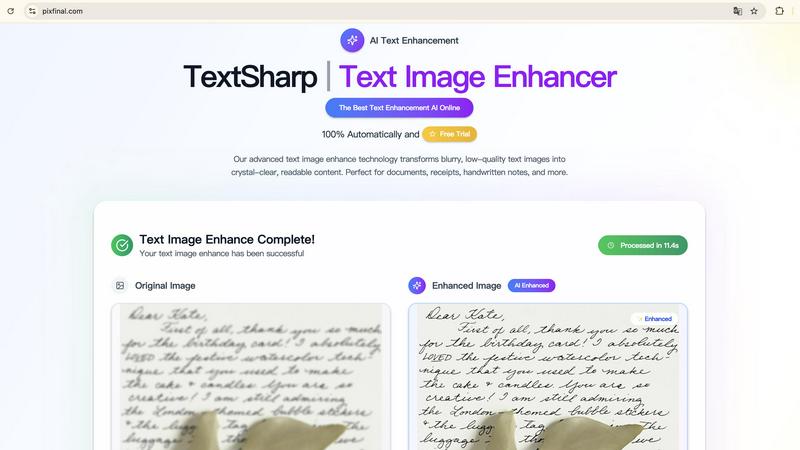
Transform blurry text images into clear, readable content instantly with TextSharp's advanced AI enhancement tool.
Visual Comparison
SparkPix

TextSharp | Text Image Enhance
Feature Comparison
SparkPix
AI Photo Editor
The AI Photo Editor feature allows users to type specific instructions such as "remove background" or "enhance colors," and within seconds, the AI applies the desired edits. This feature is perfect for users who want quick results without the need for extensive editing knowledge.
Background Remover
With just one click, the Background Remover can eliminate backgrounds from portraits, product images, or even complex scenes. This functionality is ideal for creating transparent backgrounds for use in marketing materials, social media posts, or e-commerce listings.
Unblur Image
The Unblur Image feature uses advanced AI algorithms to fix motion blur, out-of-focus shots, and compression artifacts. This tool is invaluable for those who want to salvage blurry images and transform them into clear, sharp photos suitable for sharing or printing.
Style Transfer
SparkPix offers a unique Style Transfer feature that allows users to convert their photos into various artistic styles, including anime, oil painting, watercolor, and pencil sketch. With over 15 styles available, users can unleash their creativity and produce stunning, original artwork from their images.
TextSharp | Text Image Enhance
Advanced AI Algorithms
TextSharp employs proprietary AI algorithms that enhance text clarity by intelligently sharpening letters and reducing background noise. This technology ensures that the restored text is not only readable but also accurate to the original content.
Instant Processing
Users can enjoy real-time text enhancement with TextSharp’s instant processing capabilities. Simply upload your image, and witness the transformation in seconds, allowing for efficient workflows without unnecessary delays.
Privacy-Focused
With TextSharp, users can rest easy knowing their data is secure. The tool processes images without storing them, ensuring that all personal and sensitive information remains private and confidential.
High-Quality Output
TextSharp is dedicated to providing professional-grade results every time. The tool enhances various types of text images—from receipts to handwritten notes—ensuring that clarity and quality are prioritized in every enhancement.
Use Cases
SparkPix
Personal Photo Enhancement
Individuals can use SparkPix to enhance their personal photos, like vacation snapshots or family portraits, by applying filters, improving colors, and removing unwanted elements, making every memory look its best.
Professional Product Photography
E-commerce businesses can leverage SparkPix to create high-quality product images without the need for expensive photography sessions. The Background Remover and AI Image Generator features can produce professional-looking product shots that attract customers.
Historical Photo Restoration
Families looking to preserve their heritage can utilize SparkPix's Photo Restoration capabilities to repair and enhance old, damaged photos. This is a perfect solution for maintaining family archives and reviving cherished memories.
Creative Artistic Projects
Artists and designers can transform their images into unique artworks using the Style Transfer feature. Whether for personal projects or professional portfolios, this capability allows for endless creative possibilities.
TextSharp | Text Image Enhance
Enhanced Document Clarity
Professionals can utilize TextSharp to restore clarity in important documents, ensuring that contracts and multi-page scans maintain their formatting and readability for accurate referencing.
Receipt Restoration
Businesses and individuals can fix faded or unclear receipts using TextSharp, enhancing the text for accurate OCR export and record-keeping, which is essential for expense tracking and financial documentation.
Screenshot Improvement
TextSharp can be used to polish screenshots from chat logs or tutorials, making them visually clear and easy to read. This is ideal for creating instructional content or sharing important information online.
Handwritten Note Clarity
Students and professionals alike can benefit from enhancing handwritten notes, whiteboards, and other text-heavy images. TextSharp clarifies these images, making archiving and studying easier and more effective.
Overview
About SparkPix
SparkPix is an innovative AI-powered photo editing tool that revolutionizes how users edit images by simply typing what they want. Designed for everyone from casual users to professional photographers, SparkPix eliminates the need for complex software skills like those required in Photoshop, making photo editing accessible to all. Users can enhance their photos, restore old images, remove backgrounds, and apply artistic styles with just a few clicks or typed commands. The platform is web-based, ensuring that anyone with an internet connection can access powerful editing tools from their desktop or mobile devices without the hassle of downloads. SparkPix offers a free entry-level option with credits to get started, making it an attractive choice for those looking to improve their photo editing capabilities quickly and efficiently.
About TextSharp | Text Image Enhance
TextSharp | Text Image Enhance is a cutting-edge AI tool designed to transform blurry and low-quality text images into crystal-clear, readable content. Whether you're dealing with screenshots, scanned documents, receipts, or handwritten notes, this innovative solution delivers exceptional clarity and accuracy. The main value proposition of TextSharp lies in its proprietary AI algorithms that intelligently detect and sharpen text, preserving the original formatting and context. This is crucial for professionals, students, or anyone needing reliable text clarity in their work. Unlike generic tools that often produce inconsistent results, TextSharp guarantees a high level of precision, ensuring that users can seamlessly convert unclear text into usable content within seconds. With a focus on speed, security, and quality, TextSharp offers an instant online experience that is both user-friendly and effective, making it the top choice for anyone looking to enhance text images.
Frequently Asked Questions
SparkPix FAQ
What types of photos can I edit with SparkPix?
You can edit a wide variety of photos, including portraits, landscapes, product images, and historical photos. The AI tools are designed to accommodate different editing needs and styles.
Do I need any special software to use SparkPix?
No, SparkPix is a web-based platform, which means you can access it directly from your browser on any device, including desktops and mobile phones, without the need for any downloads.
Is there a free trial available?
Yes, SparkPix offers a free plan that gives you 5 credits to start editing without requiring a credit card. This allows you to explore the features and functionality of the platform risk-free.
How does the credit system work?
SparkPix operates on a credit system where each edit or generated image costs a certain number of credits. You can purchase additional credits through various plans starting at $9.99 for 350 credits, giving you flexibility based on your editing needs.
TextSharp | Text Image Enhance FAQ
What is an image text enhancer and how does it work?
An image text enhancer is an advanced tool designed to transform blurry or low-quality text images into clear, readable content. TextSharp uses edge-aware algorithms to enhance clarity, reduce noise, and improve OCR accuracy across various image types.
Which image formats work best with the text image enhancer?
TextSharp supports multiple formats including JPG, PNG, JPEG, and WEBP, allowing for text-heavy images to be enhanced easily. These formats are optimal for screenshots, document scans, and any photos with text that require clarity improvements.
Is my image data stored or kept private with the text image enhancer?
User privacy is a top priority with TextSharp. All images processed are temporary, and they are automatically deleted after enhancement, ensuring that no personal data is stored or shared.
How fast can I expect results from the text image enhancer?
TextSharp delivers rapid results, with an average processing time of under five seconds per image. This speed allows users to quickly enhance their text images without disrupting their workflow.