
Perkoon vs TinyFast
Side-by-side comparison to help you choose the right tool.

Perkoon offers free unlimited P2P file transfers with no signup and no data scanning.
Last updated: March 4, 2026

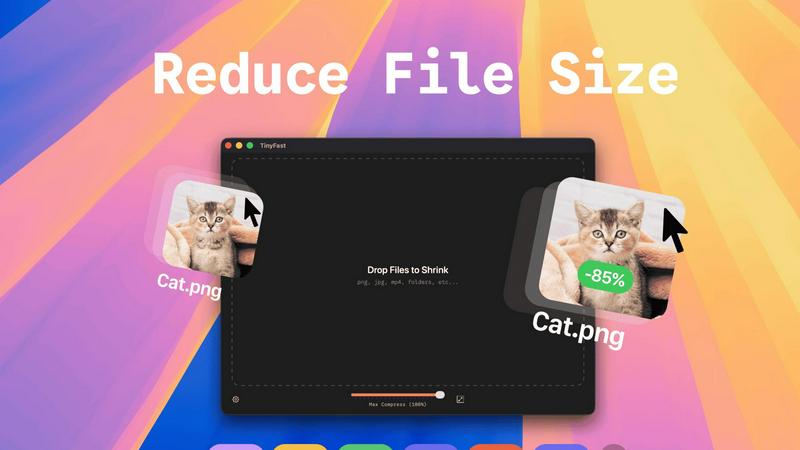
Effortlessly compress images, videos, and PDFs on your Mac with TinyFast's fast and private drag-and-drop solution.
Last updated: February 28, 2026
Visual Comparison
Perkoon

TinyFast
Feature Comparison
Perkoon
Unlimited Free P2P Transfers
This is the game-changer. Perkoon's core technology uses WebRTC to establish a direct, encrypted peer-to-peer connection between two browsers. Files stream from sender to recipient without ever passing through Perkoon's servers. This means there are absolutely no file size limits, no mandatory accounts, and complete privacy. The service is free because the infrastructure cost is virtually zero. It's file transfer in its purest, most efficient form, available to anyone with a modern browser.
Honest Encrypted Cloud Storage
For when your recipient is offline, Perkoon provides a straightforward cloud holding service. Files are encrypted on their servers before storage. This is the paid part of the service, and Perkoon is transparent about it: you pay for the real cost of server space and bandwidth. No hidden fees, no freemium tricks. It's an honest solution for asynchronous transfers, clearly separated from the free, real-time P2P system.
Native AI & Automation API
Perkoon is built for the future. Instead of forcing AI agents to clumsily scrape a website, Perkoon exposes a direct JavaScript API (window.__perkoon). This allows automation scripts, bots, and AI assistants to programmatically initiate and manage file transfers directly within the browser environment. It's a foundational feature that treats automation as a first-class citizen, not an afterthought.
Privacy-First Architecture
Your data is not the product. P2P transfers are inherently private as data is never intercepted. For cloud storage, files are encrypted. Perkoon does not scan, analyze, or sell your data. The entire service is built on the principle of minimal data handling, with clear explanations of what happens to your files in each transfer mode, putting user privacy and control front and center.
TinyFast
Batch & Drag-Drop Shrink
With TinyFast, you can easily drag entire folders into the application for bulk compression. This feature allows you to optimize multiple files at once, saving you precious time while ensuring that your assets are quickly and efficiently reduced in size.
Blazing-Fast Compression
TinyFast utilizes optimized native engines to shrink large files in seconds. This enables users to bypass the frustrating waits associated with online compression tools, allowing for rapid processing without the hassle of uploads and downloads.
Resize Resolution
This feature allows users to automatically resize their images and videos to fit specific needs. Whether you require smaller resolutions for web uploads or different formats for social media, TinyFast streamlines the process, ensuring high-quality outputs every time.
100% Local & Private
TinyFast operates entirely on your device, meaning your files never leave your Mac. This design ensures total privacy, making it ideal for users concerned about data security. No uploads or cloud servers mean your sensitive information remains confidential.
Use Cases
Perkoon
Sending Massive Creative Files
Video editors, 3D artists, and photographers can finally breathe easy. Need to send a raw 80GB project file to a client or collaborator? With Perkoon's P2P transfer, you can do it instantly and for free. No more splitting archives, battling upload limits, or paying for expensive "pro" tiers just to do your job. It's unlimited transfer for unlimited creativity.
Secure Document Exchange for Professionals
Lawyers, journalists, and consultants handling sensitive documents require confidentiality. Perkoon's direct P2P channel ensures documents move from point A to point B without being stored on or scanned by an intermediary server. For offline delivery, the encrypted cloud storage provides a secure holding pen, all without the data-harvesting practices of mainstream cloud services.
Automated Workflow & AI Agent Integration
Developers and power users can integrate Perkoon directly into their automated pipelines. An AI agent that generates weekly reports can use the native API to send them directly to a team. Backup scripts can offload large logs via the CLI tool. Perkoon acts as a programmable transfer layer, seamlessly connecting automated processes with human recipients.
Referral-Powered Storage Growth
Users who need more cloud storage can earn it organically through Perkoon's transparent affiliate program. By sharing a unique referral link, you and your contacts both receive bonus storage, with potential for chain rewards. It's a community-driven model that rewards active users instead of just charging them more, aligning platform growth with user benefit.
TinyFast
Streamlined Workflow for Designers
Designers can use TinyFast to efficiently compress large images and graphics without sacrificing quality. This expedites their workflow, allowing them to focus on creativity instead of waiting for files to upload or download.
Content Creation Simplified
For content creators, TinyFast provides a quick solution for compressing videos and images intended for social media or websites. By optimizing file sizes, creators can ensure faster loading times and better user experiences for their audiences.
Secure File Management for Developers
Developers often handle sensitive files and assets. TinyFast offers a secure way to compress and manage these files locally, reducing the risk of data breaches associated with online compression services.
Efficient Document Handling for Businesses
Businesses can benefit from using TinyFast to compress PDF and document files efficiently. This allows teams to share large files quickly while maintaining the integrity and quality of the documents, enhancing collaboration and productivity.
Overview
About Perkoon
Forget everything you know about file transfer. In an era of surveillance capitalism, artificial limits, and mandatory sign-ups, Perkoon is the radical return to sanity. This isn't just another WeTransfer clone; it's a foundational protocol built for the next generation of users and machines. Perkoon cuts through the corporate nonsense with a brutally honest, two-pronged approach. Its flagship service is unlimited, free, peer-to-peer (P2P) transfer that beams files directly between browsers. No accounts, no size caps, and because the data never touches a central server, it's private and costs Perkoon nothing—so it's free for you, forever. For sending to offline recipients, Perkoon offers transparently priced, encrypted cloud storage. But the real alert? Perkoon is natively designed for the age of AI, with built-in APIs so your agents can interact directly, no screen-scraping required. It's the privacy-focused, automation-ready file transfer solution for real people, developers, and the intelligent agents that work for them.
About TinyFast
TinyFast is a cutting-edge macOS application that transforms the way users compress their files, making it an indispensable tool for developers, designers, and content creators. Whether you're working with images, videos, documents, or audio files, TinyFast supports a wide range of formats, including PNG, JPEG, MP4, MOV, PDF, SVG, WebP, MP3, and GIF. Its intuitive drag-and-drop interface allows users to compress files directly on their Mac, ensuring that sensitive data remains secure and private. By eliminating the need for uploading files to unknown servers, TinyFast prioritizes speed and confidentiality, providing a seamless user experience. With TinyFast, you can maintain high-quality assets while significantly reducing file sizes, enabling efficient workflows without compromising security. Say goodbye to tedious online compression tools and embrace the simplicity and effectiveness of TinyFast, designed for anyone who values both efficiency and data protection.
Frequently Asked Questions
Perkoon FAQ
Is the free P2P transfer really unlimited and free forever?
Yes. The P2P technology streams data directly between browsers (like a video call for files). Since Perkoon's servers are not involved in the data transfer, they incur no bandwidth or storage costs. Therefore, they can offer this specific service as unlimited and free indefinitely. It's free as in beer, because it costs them nothing to provide.
What happens if the person I'm sending to is offline?
If the recipient is not online to accept the direct P2P connection, Perkoon offers encrypted cloud storage as a fallback. This is a paid feature because it involves Perkoon's servers storing your file until the recipient is ready to download it. You can initiate a cloud transfer instead, or the recipient can be notified to come online for a free P2P transfer.
How does Perkoon work with AI agents and automation?
Perkoon is built with automation in mind. It provides a native JavaScript API (window.__perkoon) accessible in the browser. This allows AI agents and scripts to control the transfer process programmatically without needing to simulate human clicks or scrape the website's HTML, making it a reliable and official integration point for machines.
Which web browsers are supported?
For the full, unlimited P2P experience, Chromium-based browsers like Chrome, Edge, and Brave are recommended. Firefox and Safari have inherent browser restrictions that can limit certain aspects of P2P functionality or file sizes. It's always best to use a modern, updated browser for optimal performance.
TinyFast FAQ
How does TinyFast ensure my files remain private?
TinyFast operates entirely on your local device, meaning files never get uploaded to any servers. This guarantees that your data remains confidential and secure.
What file types can I compress using TinyFast?
TinyFast supports a wide range of file types, including images (PNG, JPEG, GIF), videos (MP4, MOV), documents (PDF, DOCX), and audio files (MP3), making it a versatile tool for various needs.
Is TinyFast easy to use for non-technical users?
Absolutely! TinyFast features a user-friendly drag-and-drop interface, making it accessible for everyone, regardless of technical expertise. Simply drag your files into the app and watch them get compressed instantly.
What kind of compression speeds can I expect from TinyFast?
TinyFast is designed to offer blazing-fast compression speeds, allowing you to shrink large files in seconds. This efficiency eliminates the long wait times typically associated with online compression tools.
Alternatives
Perkoon Alternatives
Perkoon is a trending file transfer service in the productivity space, known for its no-signup, peer-to-peer approach that prioritizes user privacy and simplicity. Users often explore alternatives for various reasons, including needing different pricing models, specific platform integrations, or advanced collaboration features that go beyond core file transfer. When evaluating other options, key considerations include the transfer method—whether it's cloud-based or direct P2P—the true cost structure, and the depth of privacy guarantees. It's also crucial to assess if the service can handle your typical file sizes and workflows, especially in automated or AI-driven environments.
TinyFast Alternatives
TinyFast is a cutting-edge application designed for macOS users, providing a seamless solution for compressing various file types such as images, videos, and PDFs. As a tool that emphasizes speed and privacy, TinyFast allows users to manage their compression tasks locally, avoiding the risks associated with online services. Many users seek alternatives to TinyFast for reasons such as pricing concerns, specific feature requirements, or compatibility with different operating systems and devices. When searching for an alternative, it's essential to consider factors like ease of use, file format support, compression quality, and the level of privacy offered by the solution. When evaluating options, look for applications that prioritize local processing, ensuring your sensitive files remain secure while also providing the necessary features to streamline your workflow. The ideal alternative should not only meet your technical needs but also enhance your productivity, allowing you to focus on your creative or professional endeavors without compromising on quality or security.