
QuoteCraft AI vs TinyFast
Side-by-side comparison to help you choose the right tool.

QuoteCraft AI
QuoteCraft AI instantly creates winning proposals for freelancers, ensuring clarity and competitive pricing to close.
Last updated: March 4, 2026

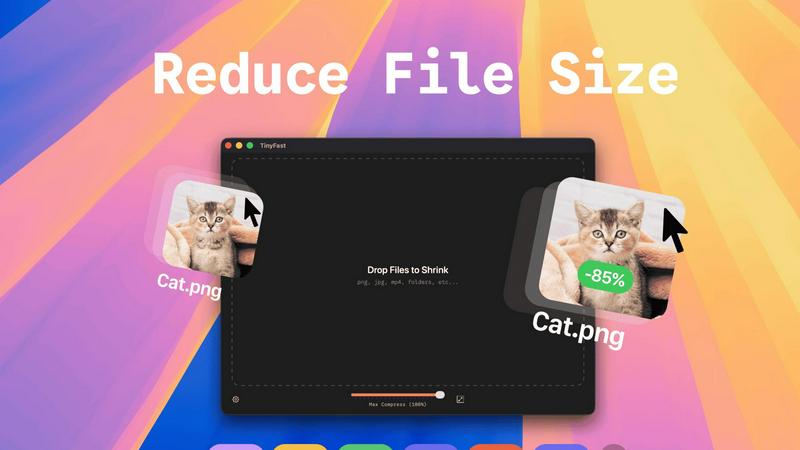
Effortlessly compress images, videos, and PDFs on your Mac with TinyFast's fast and private drag-and-drop solution.
Last updated: February 28, 2026
Visual Comparison
QuoteCraft AI

TinyFast
Feature Comparison
QuoteCraft AI
AI-Powered Proposal Generation
This feature automates the proposal creation process. Users can simply input project details or choose from templates, and the AI generates a complete proposal in seconds, including necessary details like scope, pricing, and timelines.
Voice-to-Proposal Capabilities
With this innovative feature, users can describe their project out loud, and the tool instantly transcribes their voice into a professional proposal. This functionality is perfect for capturing ideas right after client meetings.
Interactive Proposals
Clients can customize their proposals by toggling line items on or off. This flexibility allows for real-time updates to pricing, making it easier for clients to adjust the proposal according to their needs, resulting in fewer rejections.
Context Engine
The Context Engine learns from user interactions and past proposals. It adapts the writing style and pricing strategies to match the user's unique voice, ensuring that every generated proposal feels personalized and authentic.
TinyFast
Batch & Drag-Drop Shrink
With TinyFast, you can easily drag entire folders into the application for bulk compression. This feature allows you to optimize multiple files at once, saving you precious time while ensuring that your assets are quickly and efficiently reduced in size.
Blazing-Fast Compression
TinyFast utilizes optimized native engines to shrink large files in seconds. This enables users to bypass the frustrating waits associated with online compression tools, allowing for rapid processing without the hassle of uploads and downloads.
Resize Resolution
This feature allows users to automatically resize their images and videos to fit specific needs. Whether you require smaller resolutions for web uploads or different formats for social media, TinyFast streamlines the process, ensuring high-quality outputs every time.
100% Local & Private
TinyFast operates entirely on your device, meaning your files never leave your Mac. This design ensures total privacy, making it ideal for users concerned about data security. No uploads or cloud servers mean your sensitive information remains confidential.
Use Cases
QuoteCraft AI
Freelance Web Designers
Web designers can utilize QuoteCraft AI to create tailored proposals quickly, allowing them to focus more on design work and less on administrative tasks. This efficiency can lead to securing more clients and increasing revenue.
Marketing Agencies
Marketing agencies can employ QuoteCraft AI to generate detailed proposals that outline campaign scopes and pricing structures, enabling them to pitch effectively to potential clients and stand out in a competitive market.
Creative Studios
Creative studios can benefit from the tool by producing professional proposals that highlight their creative offerings, timelines, and pricing, helping them to better communicate their value to clients and close deals faster.
Consulting Firms
Consultants can streamline their proposal process with QuoteCraft AI, allowing them to present clear project scopes and pricing strategies to clients, which helps in building trust and enhancing client relationships.
TinyFast
Streamlined Workflow for Designers
Designers can use TinyFast to efficiently compress large images and graphics without sacrificing quality. This expedites their workflow, allowing them to focus on creativity instead of waiting for files to upload or download.
Content Creation Simplified
For content creators, TinyFast provides a quick solution for compressing videos and images intended for social media or websites. By optimizing file sizes, creators can ensure faster loading times and better user experiences for their audiences.
Secure File Management for Developers
Developers often handle sensitive files and assets. TinyFast offers a secure way to compress and manage these files locally, reducing the risk of data breaches associated with online compression services.
Efficient Document Handling for Businesses
Businesses can benefit from using TinyFast to compress PDF and document files efficiently. This allows teams to share large files quickly while maintaining the integrity and quality of the documents, enhancing collaboration and productivity.
Overview
About QuoteCraft AI
QuoteCraft AI is a groundbreaking tool specifically engineered to empower freelancers in crafting professional proposals swiftly and efficiently. This innovative platform leverages advanced artificial intelligence to streamline the proposal process, allowing users to either describe their project verbally or select from seven expertly designed starter templates. Within seconds, QuoteCraft AI generates a comprehensive proposal that encompasses all crucial elements, such as project scope, pricing, line items, and timelines. Targeting freelancers in various fields like web design, marketing agencies, creative studios, and consulting firms, QuoteCraft AI addresses two prevalent challenges: ambiguous project scopes and ineffective pricing strategies. Its standout features, including voice-to-proposal capabilities and a Context Engine that adapts based on user feedback, make it an essential asset for anyone aiming to enhance their proposal quality and secure more deals. Currently in its beta phase, QuoteCraft AI is free to use, enabling early adopters to seize the opportunity to lock in their access at no cost.
About TinyFast
TinyFast is a cutting-edge macOS application that transforms the way users compress their files, making it an indispensable tool for developers, designers, and content creators. Whether you're working with images, videos, documents, or audio files, TinyFast supports a wide range of formats, including PNG, JPEG, MP4, MOV, PDF, SVG, WebP, MP3, and GIF. Its intuitive drag-and-drop interface allows users to compress files directly on their Mac, ensuring that sensitive data remains secure and private. By eliminating the need for uploading files to unknown servers, TinyFast prioritizes speed and confidentiality, providing a seamless user experience. With TinyFast, you can maintain high-quality assets while significantly reducing file sizes, enabling efficient workflows without compromising security. Say goodbye to tedious online compression tools and embrace the simplicity and effectiveness of TinyFast, designed for anyone who values both efficiency and data protection.
Frequently Asked Questions
QuoteCraft AI FAQ
How does the AI generate proposals?
The AI generates proposals by analyzing the project details provided by the user, including scope, pricing, and timelines. It utilizes machine learning algorithms to produce a comprehensive and professional proposal within seconds.
Will my proposals look generic?
No, QuoteCraft AI ensures that your proposals maintain a personalized touch. The Context Engine learns your writing style and preferences, enabling the generated proposals to reflect your unique voice and approach.
Can I edit proposals after generation?
Absolutely! Users can easily edit and customize the generated proposals before sending them to clients. This feature allows for adjustments to ensure that every proposal meets specific client needs.
Is my data secure?
Yes, QuoteCraft AI prioritizes data security. All information shared is encrypted and stored securely, ensuring that your proposals and client details remain confidential and protected from unauthorized access.
TinyFast FAQ
How does TinyFast ensure my files remain private?
TinyFast operates entirely on your local device, meaning files never get uploaded to any servers. This guarantees that your data remains confidential and secure.
What file types can I compress using TinyFast?
TinyFast supports a wide range of file types, including images (PNG, JPEG, GIF), videos (MP4, MOV), documents (PDF, DOCX), and audio files (MP3), making it a versatile tool for various needs.
Is TinyFast easy to use for non-technical users?
Absolutely! TinyFast features a user-friendly drag-and-drop interface, making it accessible for everyone, regardless of technical expertise. Simply drag your files into the app and watch them get compressed instantly.
What kind of compression speeds can I expect from TinyFast?
TinyFast is designed to offer blazing-fast compression speeds, allowing you to shrink large files in seconds. This efficiency eliminates the long wait times typically associated with online compression tools.
Alternatives
QuoteCraft AI Alternatives
QuoteCraft AI is a cutting-edge tool that belongs to the Business & Finance and Productivity & Management categories. It specializes in helping freelancers create professional proposals quickly and efficiently. Users often seek alternatives to QuoteCraft AI for various reasons, including different pricing models, specific features that may better suit their needs, or compatibility with preferred platforms. As the landscape of freelance work evolves, it's essential to find tools that not only simplify the proposal process but also align with individual business strategies and workflows. When searching for an alternative, consider factors such as the ease of use, customization options, and unique features that can enhance your proposal creation experience. Look for platforms that prioritize user feedback and continuously adapt to meet the dynamic needs of freelancers, ensuring that you can secure more deals and grow your business effectively.
TinyFast Alternatives
TinyFast is a cutting-edge application designed for macOS users, providing a seamless solution for compressing various file types such as images, videos, and PDFs. As a tool that emphasizes speed and privacy, TinyFast allows users to manage their compression tasks locally, avoiding the risks associated with online services. Many users seek alternatives to TinyFast for reasons such as pricing concerns, specific feature requirements, or compatibility with different operating systems and devices. When searching for an alternative, it's essential to consider factors like ease of use, file format support, compression quality, and the level of privacy offered by the solution. When evaluating options, look for applications that prioritize local processing, ensuring your sensitive files remain secure while also providing the necessary features to streamline your workflow. The ideal alternative should not only meet your technical needs but also enhance your productivity, allowing you to focus on your creative or professional endeavors without compromising on quality or security.