
SimpleDraw vs vaethat
Side-by-side comparison to help you choose the right tool.

SimpleDraw
Create precise floor plans instantly with this free, powerful browser tool.
Last updated: March 1, 2026

vaethat
Vaethat is an AI tool that enhances 3D architectural renders, boosting clarity and detail effortlessly while preserving.
Last updated: February 28, 2026
Visual Comparison
SimpleDraw
vaethat

Feature Comparison
SimpleDraw
Dedicated Floor Plan Mode
This isn't a generic tool forced to handle walls; it's a purpose-built environment for architectural sketching. With a single click, you can draw walls to scale and instantly add pre-made symbols for doors and windows. The mode includes a comprehensive library of interior fixtures for kitchens, bathrooms, living rooms, and bedrooms, allowing you to furnish your plan realistically. Measurements update in real-time as you adjust walls or move furniture, ensuring every decision is informed by accurate dimensions from the very first step.
Intelligent Smart Alignment System
Experience the magic of precision without the pain. SimpleDraw's smart alignment system acts as your digital drafting assistant, intuitively snapping points and lines into perfect alignment as you draw. It provides clear visual cues, guessing your intent to create perpendicular walls or continuous lines. If you need finer control, simply zoom in for pixel-perfect placement or use keyboard shortcuts to lock movements to strictly horizontal or vertical axes, blending automated help with ultimate user control.
Non-Destructive Editing & Complete Control
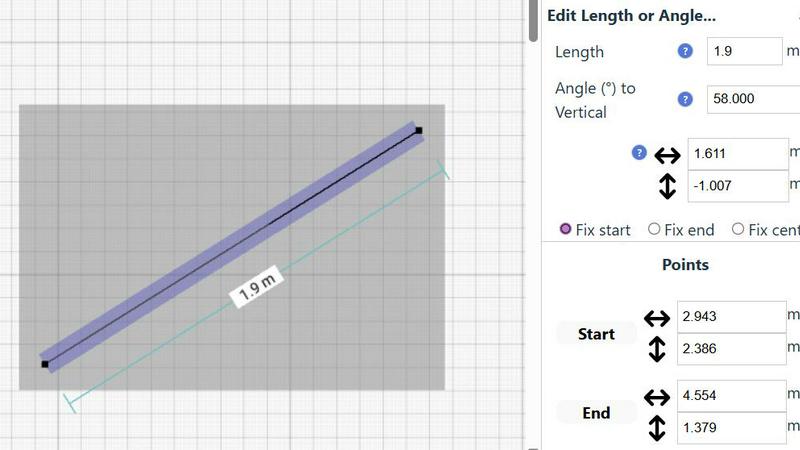
Every action is reversible, and every element is flexible. This is the cornerstone of a stress-free design process. Move, resize, or adjust any part of your drawing at any time without starting over. Powerful grouping functions let you copy, paste, and manipulate entire sections of your plan. For ultimate precision, bypass the mouse entirely and input exact coordinates, lengths, and angles directly via keyboard—a game-changer for iterating on detailed renovation plans and ensuring everything fits perfectly.
Dynamic Measurement & Unit Flexibility
Your drawing isn't just a picture; it's a data-rich blueprint. SimpleDraw features a comprehensive, dynamic measurement system that displays contextual dimensions as you work. You have full control over which measurements are shown, decluttering your view or providing all the details you need. The tool supports both metric and standard US units (feet and inches), making it a versatile solution for a global audience of DIYers and planners working on any project, anywhere.
vaethat
AI Render Upscaling
Vaethat's AI render upscaling feature allows users to boost the resolution and sharpness of their 3D architectural renders while preserving clean geometry. This ensures that enhancements do not distort the original design, resulting in images that maintain their structural integrity and visual appeal.
Detail Refinement
The detail refinement capability enhances fine textures, edges, and small architectural elements, giving a crisper and more polished look. This feature addresses the nuances of architectural visualization, ensuring that every detail is represented accurately and vividly.
Material and Lighting Enhancement
This feature focuses on improving the perceived realism of renders by enhancing material definition, contrast, and lighting balance. It ensures that the materials used in the design appear more lifelike, with true-to-life textures and effects that resonate with viewers.
Noise and Artifact Cleanup
Vaethat excels in reducing noise and common rendering artifacts, producing cleaner, presentation-ready images. By eliminating distractions, this feature allows the architectural designs to shine through, ensuring that the intended message and aesthetic are effectively communicated.
Use Cases
SimpleDraw
Home Renovation & Remodel Planning
Tackling a kitchen or bathroom remodel? Stop guessing and start planning with precision. SimpleDraw allows homeowners to create accurate, to-scale floor plans of their existing space and experiment with new layouts. Visualize where new cabinets, appliances, and fixtures will go, ensuring everything fits before a single dollar is spent or a wall is torn down. This mitigates risk, saves money on costly errors, and provides a clear vision to discuss with contractors.
Furniture Arrangement & Space Planning
Tired of moving heavy furniture only to find it doesn't fit or feel right? Use SimpleDraw to digitally arrange your room. Create a scale drawing of your bedroom, living room, or home office, then drag and drop scaled furniture representations from the library. Test multiple layouts in minutes to optimize flow, function, and aesthetics, giving you the confidence to make purchases and rearrange your space perfectly on the first try.
Real Estate & Rental Listing Visualization
For landlords, real estate agents, or anyone selling a property, a clear floor plan is a powerful tool. Quickly create professional, easy-to-understand apartment or house plans for listings. These plans help potential tenants or buyers instantly grasp the layout, room sizes, and flow of the property, setting accurate expectations and generating higher-quality inquiries, all without needing expensive professional drafting services.
DIY Project & Hobbyist Design
From designing a custom shed or garden layout to planning a complex woodworking project, SimpleDraw brings ideas to life. Hobbyists can sketch detailed plans, work out precise measurements for cuts and materials, and visualize the final product in scale. This transforms abstract ideas into actionable, error-free plans, elevating the quality and success rate of any DIY endeavor, big or small.
vaethat
Architectural Presentations
Vaethat is perfect for generating high-quality images for architectural presentations. Architects can utilize the tool to enhance their renders, making them more visually appealing and ready for client meetings or public exhibitions.
Portfolio Development
For professionals looking to build a compelling portfolio, Vaethat provides the means to elevate the quality of their work. Enhanced images can significantly improve the overall presentation of a designer’s body of work, making a lasting impression on potential clients.
Marketing and Advertising
Real estate marketers and advertising agencies can leverage Vaethat to produce stunning visuals for marketing campaigns. Enhanced architectural renders can attract potential buyers or clients by showcasing properties in their best light.
Design Review and Approval
Vaethat streamlines the design review process by providing clearer, more detailed images for stakeholder evaluations. This ensures that all parties involved in a project can make informed decisions based on high-quality visual representations.
Overview
About SimpleDraw
Forget everything you thought you knew about technical drawing software. The era of clunky, expensive CAD programs with steep learning curves is over. SimpleDraw is the disruptive, browser-based scale drawing tool that's democratizing precision design for everyone. This isn't just another sketching app; it's a professional-grade floor plan creator and technical drawing suite that lives entirely in your browser, requiring zero downloads, installations, or mandatory sign-ups. It's engineered for the modern creator: the homeowner planning a kitchen renovation, the hobbyist designing a custom piece of furniture, the small business owner sketching a new shop layout, or the landlord creating a listing. SimpleDraw's core, trending value proposition is powerful yet simple: achieve CAD-level accuracy with the intuitive ease of pen and paper. By leveraging an intelligent alignment system and non-destructive editing within a smart, focused toolset, it removes all friction from the visualization process. This is a community-driven platform evolving in real-time based on user feedback, making it the go-to, hot solution for anyone who needs to plan, design, and visualize space with absolute confidence and clarity.
About vaethat
Vaethat AI is a cutting-edge tool specifically designed to upscale and enhance 3D renders for architectural visualization. Tailored for archviz professionals, Vaethat utilizes advanced artificial intelligence technologies to elevate the quality of architectural images significantly. This platform empowers users to improve the clarity, sharpness, and overall realism of their renders without the complexities often associated with traditional enhancement methods. By providing a streamlined process that allows users to upload their projects, select enhancement presets, and receive refined images, Vaethat saves valuable time and resources. Ideal for architects, designers, and visualization artists, this tool represents a substantial leap forward in the efficiency and quality of architectural render presentations.
Frequently Asked Questions
SimpleDraw FAQ
Is SimpleDraw really free to use with no sign-up?
Yes, absolutely. SimpleDraw is committed to removing all barriers to entry. You can start creating detailed, professional-scale drawings immediately by visiting the website and clicking "Start Drawing Now." There is no requirement to create an account, input payment details, or download any software. It runs entirely in your modern web browser, making it accessible from any device, anywhere.
How does SimpleDraw compare to complex CAD software?
SimpleDraw operates on a philosophy of "power through simplicity." While professional CAD software offers vast, complex toolsets for engineers and architects, it comes with a high cost and a steep learning curve. SimpleDraw distills the essential power of CAD—precision scale drawing, accurate measurements, and technical planning—into an intuitive, focused interface. It's designed for the 95% of projects that don't require advanced 3D modeling or industrial detailing, making professional-grade planning accessible to all.
Can I save and share my drawings?
While the core drawing experience is browser-based and immediate, saving functionality is a key part of the user-driven roadmap. The development of robust save, export, and share features is actively guided by community feedback on platforms like Discord. Users are encouraged to join the community to stay updated on the rollout of these highly-requested capabilities as the platform evolves.
What kind of support and learning resources are available?
SimpleDraw is built to be intuitive, but comprehensive support is available. The website features a "How To Use" section and a blog for tips and tutorials. Most importantly, it is a community-driven project. Users can join the official Discord server to connect with other creators, get help, provide direct feedback to the developers, and request new features, actively shaping the future of the tool.
vaethat FAQ
How does the AI render enhancer calculate credits?
The AI render enhancer calculates credits based on the number of images processed and the complexity of the enhancements applied. Users can monitor their credit usage through their account dashboard.
Can I use the archviz AI upscaler with V-Ray, Lumion, Enscape, 3ds Max, and SketchUp?
Yes, Vaethat is compatible with popular 3D rendering software such as V-Ray, Lumion, Enscape, 3ds Max, and SketchUp, allowing for seamless integration into existing workflows.
What makes this AI post-production tool different from manual editing?
Unlike manual editing, which can be time-consuming and requires extensive expertise, Vaethat automates the enhancement process with AI, providing quick and consistent results without the need for complex adjustments.
Can I upgrade or downgrade my AI enhancement plan anytime?
Yes, Vaethat allows users the flexibility to upgrade or downgrade their enhancement plans at any time, ensuring that they can choose a plan that best fits their evolving needs without restrictions.
Alternatives
SimpleDraw Alternatives
SimpleDraw is a trending, browser-based scale drawing tool that has quickly become a go-to in the DIY and home design space. It belongs to the category of intuitive, no-friction design software, allowing users to create precise floor plans and technical drawings directly in their web browser without any downloads or mandatory sign-ups. Users often explore alternatives for various reasons. While SimpleDraw excels in accessibility and core precision, some may seek more advanced 3D modeling, specialized architectural features, or offline desktop applications. Others might require integrated project management tools or platforms that cater to large-scale commercial design workflows beyond simple floor plans. When evaluating other tools, consider your primary use case. Key factors include the required feature depth, collaboration needs, budget constraints, and preferred platform—whether you need a mobile app, a desktop suite, or a purely web-based solution. The goal is to find a tool that matches your project's complexity without introducing unnecessary bloat or a prohibitive learning curve.
vaethat Alternatives
Vaethat is an advanced AI tool tailored for architectural visualization (archviz) professionals, designed to upscale 3D renders, enhance clarity, and refine details while maintaining the design intent. As the demand for high-quality visual presentations grows, users often seek alternatives to Vaethat due to reasons such as pricing, specific feature sets, platform compatibility, or personal workflow preferences. When exploring alternatives, it is crucial to consider factors such as the quality of render upscaling, ease of use, the extent of detail refinement capabilities, and the overall enhancement of materials and lighting. Additionally, ensure that any alternative maintains design integrity and offers a user-friendly upload-and-export process for seamless workflow integration.